
Nano Banana vs ShinePhoto
Side-by-side comparison to help you choose the right AI tool.

Nano Banana
Nano Banana lets you create and edit stunning images simply by chatting with its powerful, easy-to-use AI.
Last updated: March 11, 2026

ShinePhoto
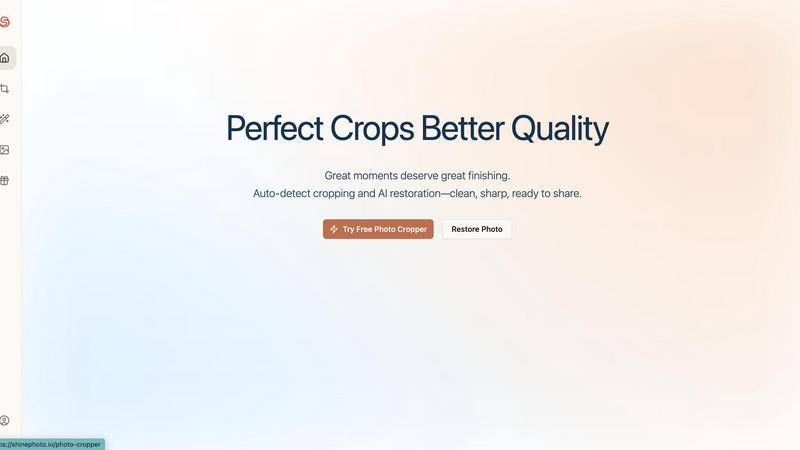
Effortlessly enhance and crop your photos with AI for stunning, share-ready images in just a few clicks.
Last updated: February 28, 2026
Visual Comparison
Nano Banana

ShinePhoto
Feature Comparison
Nano Banana
Natural Language Image Editing
Instead of manually using brushes, layers, and filters, you can edit images by simply typing what you want. Describe changes like "replace the cloudy sky with a sunset," "change the model's jacket to leather," or "add a cat sitting on the sofa," and the AI understands your intent and applies the edits automatically. This feature dramatically lowers the skill barrier for high-quality image manipulation, turning hours of work into seconds of typing.
Nano Banana Pro with 4K Resolution
This advanced model is the powerhouse of the platform. It delivers exceptional detail, perfect text rendering within images, and outputs at up to 4K ultra-high resolution, making results suitable for professional printing and large-format displays. It excels at preserving character consistency across edits and maintaining scene integrity, surpassing other models in delivering precise, detailed outcomes based on your prompts.
AI-Powered Specialized Tools
Beyond core editing, Nano Banana offers dedicated, one-click tools for specific tasks. The AI Image Upscaler enhances the resolution of existing images without losing quality, while the AI Background Remover instantly isolates subjects from their backgrounds. These tools provide quick, reliable solutions for common editing needs, streamlining your workflow even further.
Real-World Knowledge & Style Transfer
Leveraging models like Gemini, Nano Banana can incorporate real-world knowledge to create accurate and detailed scenes, such as annotated diagrams or data infographics. Its perfect style transfer feature allows you to flawlessly apply specific artistic styles—like oil painting, watercolor, or photography—to your generated images, giving you immense creative control over the final aesthetic.
ShinePhoto
Perfect Cropping
ShinePhoto's auto-detect cropping feature identifies the main subject of your photo and applies a clean, balanced crop. This ensures that distractions are trimmed away, allowing viewers to focus on the essence of the image.
Photo Restoration
The restoration tools in ShinePhoto work tirelessly to repair photo damage, reduce blur, and eliminate compression artifacts. Users can restore clarity and enhance detail with just one click, making old or damaged photos look vibrant again.
Batch Processing
ShinePhoto allows users to upload multiple images at once and process them together. This feature saves time and effort, especially for those with large collections of photos needing similar edits, enhancing productivity significantly.
Smart Manual Control
While ShinePhoto excels at automatic cropping, it also provides users with the option to manually adjust the crop area. This flexibility allows for precise framing, ensuring that every photo meets the user’s specific vision.
Use Cases
Nano Banana
Social Media Content Creation
Easily generate eye-catching graphics, promotional posters, and engaging visual stories for platforms like Instagram and Facebook. Use prompts to create cohesive branded imagery, design posts with legible text, or quickly edit product photos with new backgrounds to keep your feed fresh and professional without a design team.
Marketing & Advertising Material
Produce high-quality mockups, ad banners, and concept visuals for campaigns. Marketers can describe a scene for a new product launch, and Nano Banana will generate it, complete with text and styling. The 4K resolution ensures materials are print-ready for brochures or large-format ads, accelerating the concept-to-visual pipeline.
Personal Photo Enhancement & Fun
Transform personal photos effortlessly. Remove unwanted objects from a vacation picture, change the weather in a portrait, or even place yourself in a fantastical setting just for fun. It’s perfect for creating unique gifts, enhancing profile pictures, or simply exploring creativity without any technical know-how.
Concept Art & Design Ideation
Designers and artists can use Nano Banana as a brainstorming tool to rapidly visualize concepts. Generate multiple iterations of a character, landscape, or product design based on text descriptions to explore different styles and directions before committing to a final piece, saving valuable time in the early creative stages.
ShinePhoto
Family Photo Restoration
For families looking to restore old photographs, ShinePhoto provides an easy solution to bring faded or damaged images back to life. Users can enhance clarity and colors, preserving precious memories for future generations.
Professional Photography Workflow
Photographers can streamline their editing process using ShinePhoto's batch processing and auto-cropping features. This allows them to focus on their creative vision while letting the AI handle repetitive tasks.
Event Photo Management
After capturing an event, users can quickly upload and edit large batches of photos. ShinePhoto's tools make it simple to crop and enhance images, preparing them for sharing on social media or with clients.
Social Media Sharing
Users looking to enhance their social media presence can use ShinePhoto to polish their photos. With just a few clicks, they can crop, restore, and upscale images, making them share-ready and visually appealing.
Overview
About Nano Banana
Nano Banana is a powerful, AI-driven platform that makes professional-grade image creation and editing accessible to everyone. It transforms the complex world of visual design by letting you use simple text prompts to generate and edit images. Whether you're a marketer needing a quick ad mockup, a content creator looking for unique blog graphics, a designer seeking inspiration, or just someone who wants to enhance their photos, Nano Banana provides an intuitive solution. Its core value is speed and simplicity: instead of learning intricate software tools, you describe your vision in natural language. The AI then handles the technical execution, from replacing backgrounds and altering lighting to generating entirely new scenes from scratch. With advanced models like Nano Banana Pro, it offers superior capabilities like consistent character editing, 4K ultra-resolution output, and sharp text generation, making it a versatile tool for both casual projects and professional commercial work. The platform also includes specialized tools like an AI Image Upscaler and Background Remover, forming a complete creative suite powered by artificial intelligence.
About ShinePhoto
ShinePhoto is a freemium AI photo toolkit designed to revolutionize the way users edit and manage their photos. It is particularly beneficial for individuals looking to digitize, organize, and restore their photo collections, whether they are cherished family memories or professional photography work. With advanced features such as batch subject auto-cropping and photo quality restoration, ShinePhoto makes it easy for users to enhance their images in just a few clicks. The platform is built for everyone, from casual users wanting to touch up old album photos to professional photographers seeking to streamline their workflow. ShinePhoto’s powerful AI capabilities ensure that photos are not only preserved but also enhanced for sharing, making it an invaluable tool for anyone who appreciates the art of photography. With a user-friendly interface, ShinePhoto allows for quick uploads, effortless cropping, and seamless restoration, ensuring that every moment captured shines brightly.
Frequently Asked Questions
Nano Banana FAQ
How do I start using Nano Banana?
You can start for free by signing up on the Nano Banana website, which grants you free credits to try the platform. No credit card is required initially. Simply navigate to the creation workbench, type your idea into the prompt box, select your preferred model (like Nano Banana Pro), and hit "Start Creation" to generate your first image.
What is the difference between Nano Banana and Nano Banana Pro?
Nano Banana Pro (formerly Nano Banana 2) is the advanced tier model within the platform. It offers superior capabilities such as perfect text rendering within images, consistent character editing, higher quality outputs, and support for 4K ultra-resolution. The standard tools may use different, more baseline AI models suitable for simpler tasks.
Can I use the images I create for commercial purposes?
Yes, images generated by Nano Banana, particularly with the Pro model which produces 4K commercial-grade quality, can be used for commercial purposes like advertising, product packaging, and merchandise. It's always good practice to review the specific Terms of Service for the latest details on usage rights.
What are credits and how do I get more?
Credits are the currency used to generate images and use advanced features on Nano Banana. Each creation costs a certain number of credits (e.g., a Pro model image may cost 12 credits). You receive free credits upon sign-up. To get more, you can participate in the referral program to earn them or explore the pricing page to purchase credit packs or subscriptions.
ShinePhoto FAQ
What is ShinePhoto?
ShinePhoto is an AI-powered toolkit that combines a free photo cropper with restoration features, enabling users to crop, enhance, and upscale their images for better quality and presentation.
Is ShinePhoto free to use?
Yes, ShinePhoto is free to use. The photo cropper runs directly in your browser, allowing you to get started without any downloads or subscriptions.
How does photo restoration work?
Photo restoration in ShinePhoto involves uploading an image and utilizing the restoration tools to reduce blur, noise, and damage, resulting in sharper and clearer images based on the original quality.
Can I choose the subject to crop?
Yes, ShinePhoto allows users to specify the subject for cropping. This feature ensures that the photo cropper focuses accurately on the desired target for precise framing.
Alternatives
Nano Banana Alternatives
Nano Banana is a fantastic AI image generation and editing tool that lets you create and modify visuals using simple chat commands. It falls into the growing category of conversational AI image editors, designed to make professional-level edits accessible to everyone without needing complex software knowledge. People often explore other options for various reasons. You might be looking for a different pricing model, need specific features like a particular AI model or export format, or require an app that works on a different platform like your mobile device. It's a personal choice based on your unique workflow and budget. When evaluating other tools, consider what matters most to you. Think about the core editing capabilities, the quality and style of the AI-generated images, how intuitive the interface is, and of course, the cost. The best alternative is the one that feels like a natural fit for your creative projects.
ShinePhoto Alternatives
ShinePhoto is an innovative AI-driven photo editing tool that falls within the image and photo category. It is designed to enhance and restore photos effortlessly, making it particularly appealing to users who want to transform their image collections into share-ready masterpieces with minimal effort. However, many users often seek alternatives due to various reasons such as pricing structures, specific feature needs, or compatibility with different platforms. When searching for an alternative, it’s crucial to assess what features are most important to you, such as ease of use, batch processing capabilities, or advanced editing tools. Additionally, consider the pricing model—whether it's freemium, subscription-based, or a one-time purchase—and if it aligns with your budget and editing requirements.