
Nano Photo vs Sora 3 Video Generator
Side-by-side comparison to help you choose the right AI tool.

NanoPhoto.AI makes stunning AI photo and video editing simple and affordable for everyone.
Last updated: March 1, 2026

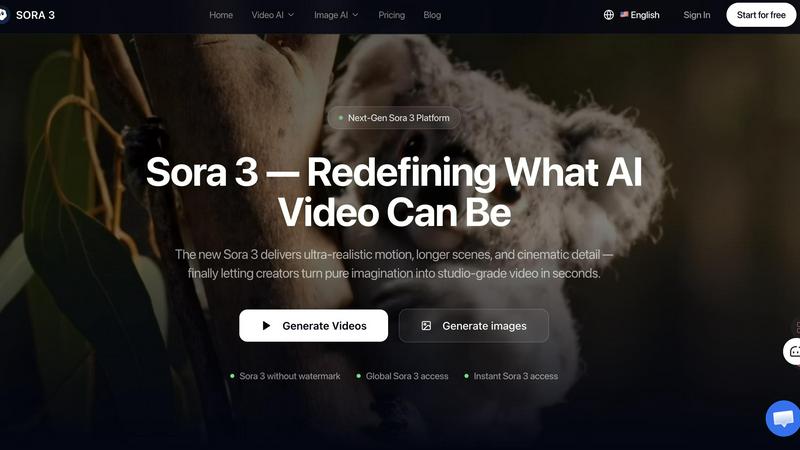
Sora 3 instantly transforms your ideas into stunning, studio-quality videos with realistic motion and cinematic detail.
Last updated: March 11, 2026
Visual Comparison
Nano Photo
Sora 3 Video Generator
Feature Comparison
Nano Photo
Sora 2 Pro HD Video Generation
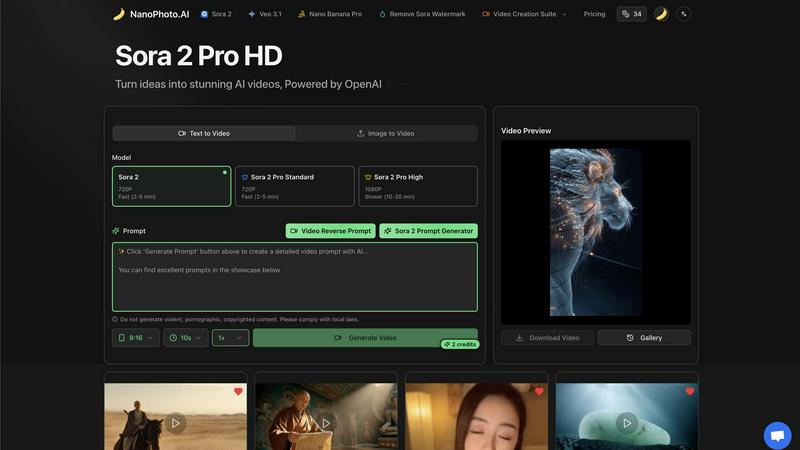
This flagship feature allows you to turn your written ideas into high-definition AI videos powered by OpenAI's advanced Sora 2 model. You can choose from different tiers like Standard for fast 720P generation or High for stunning, detailed 1080P videos. Simply type a description of the scene you imagine, and the AI brings it to life with coherent motion and realistic details, perfect for creating unique video content from scratch in minutes instead of days.
Intelligent Prompt Generation & Tools
Struggling to find the right words to describe your vision? Nano Photo includes a suite of prompt tools to help. The Sora 2 Prompt Generator suggests effective phrases to get the best results from the AI. For reverse engineering, the Video Reverse Prompt feature can analyze existing video concepts to help you create similar styles, making it easier to iterate and refine your creative ideas without starting from zero every time.
Comprehensive Video Creation Suite
Beyond text-to-video, the platform offers a full suite of video tools to support your workflow. This includes capabilities like converting an existing image into a moving video scene (Image to Video), generating videos in specific durations like 9:16 format for social media, and even offering options to remove watermarks for a clean, professional final product ready for public sharing or commercial use.
Nano Banana Pro & Model Access
Nano Photo provides access to specialized tools and the latest AI models in one place. Features like "Nano Banana Pro" offer enhanced creative controls, while direct integration with top-tier models like Google's Veo 3.1 alongside Sora 2 ensures you are always using some of the most powerful and up-to-date AI engines available for visual generation, giving you versatility and quality in your outputs.
Sora 3 Video Generator
Film-Grade Quality
Sora 3 is engineered to produce studio-level visuals that can elevate any brand's messaging. It generates videos with exceptional detail, realistic textures, and cinematic lighting, ensuring your content looks professionally produced. The AI is trained to minimize common artifacts, delivering consistent, high-fidelity output every time, whether you're creating a product showcase or an atmospheric brand story.
Smart Camera Control
Go beyond basic generation with dynamic, intelligent camera work. Sora 3 understands cinematic language, allowing it to simulate professional camera movements like smooth pans, dramatic zooms, and tracking shots. This feature adds a layer of polish and narrative depth to your videos, making them feel less like AI clips and more like scenes from a film, all directed by your text prompts.
Character Consistency
One of the biggest challenges in AI video is maintaining a character's appearance across different scenes and shots. Sora 3 tackles this head-on with advanced algorithms that ensure your subjects, whether people, mascots, or products, look recognizably the same throughout the video. This is crucial for creating coherent narratives, serialized ad content, or any project where continuity matters.
Extended Duration & Scene Understanding
Break free from short clips. Sora 3 supports the creation of longer, more complex video scenes, allowing for richer storytelling. Coupled with its deep scene understanding, the AI can generate videos where elements interact believably with their environment, respecting real-world physics and spatial relationships. This makes for more immersive and convincing final videos.
Use Cases
Nano Photo
Social Media Content Creation
For influencers, content creators, and social media managers, Nano Photo is a game-changer. You can rapidly produce eye-catching, original video clips for Instagram Reels, TikTok, or YouTube Shorts. Generate trending visual concepts, create engaging story-based clips, or produce consistent branding content daily, all without needing a camera crew or complex editing software, keeping your feed fresh and engaging.
Small Business Marketing & Advertising
Small businesses and startups can produce professional-quality promotional videos and ad creatives on a budget. Create product demonstration videos, craft compelling story-driven ads for Facebook or Google, or design attractive visual assets for email campaigns. This empowers businesses to tell their brand story effectively and compete visually with larger companies without the high cost of traditional video production.
Creative Exploration for Artists & Designers
Artists, illustrators, and digital designers can use Nano Photo as a boundless source of inspiration and a new medium. Visualize concepts for projects, generate unique textures and backgrounds, or create animated sequences from static artwork. It serves as a digital sketchbook that can instantly visualize abstract ideas, helping overcome creative blocks and explore styles that would be time-consuming to create manually.
Rapid Prototyping for Storytellers
Writers, filmmakers, and game developers can use the platform for pre-visualization and prototyping. Quickly generate video scenes from a script description to scout visual styles, create mood boards, or produce simple animatics to pitch a story concept. This accelerates the early creative process, allowing teams to align on a visual direction before committing to expensive production phases.
Sora 3 Video Generator
Advertising & Marketing Campaigns
Create eye-catching video ads for social media, websites, or TV commercials in minutes. Produce variations for A/B testing, showcase products in dynamic environments, or craft mini-brand films that tell your company's story without the need for actors, sets, or expensive filming crews.
Social Media Content Creation
Keep your feeds fresh and engaging with a constant stream of high-quality video content. From Instagram Reels and TikTok clips to YouTube shorts, Sora 3 helps influencers, educators, and businesses visualize concepts, create tutorials, or share captivating stories that stand out in a crowded digital landscape.
Brand Storytelling & Explainer Videos
Develop compelling narratives to explain your service, share your mission, or connect with your audience on an emotional level. Use the Storyboard feature to plan extended scenes and maintain character consistency, making it perfect for creating serialized content or detailed explainer videos.
Concept Visualization & Storyboarding
Bring ideas to life before committing to full production. Filmmakers, game developers, and designers can use Sora 3 to rapidly prototype scenes, visualize characters in action, or create dynamic mood boards and animatics. It's an invaluable tool for pitching ideas and refining creative vision quickly.
Overview
About Nano Photo
Nano Photo is your all-in-one creative companion, designed to make professional-grade AI visual creation accessible to everyone. At its core, it's an innovative platform that simplifies the process of generating stunning videos and images using the latest artificial intelligence technology. Whether you're a social media manager needing daily content, a marketer crafting compelling ads, a small business owner building a brand, or an artist exploring new digital frontiers, Nano Photo provides the tools to bring your ideas to life quickly and without complexity. The platform's main superpower is its seamless integration of cutting-edge AI models like OpenAI's Sora 2 and Google's Veo 3.1, which handle the heavy lifting of rendering realistic visuals from simple text prompts. This means you can save significant time and resources, reduce reliance on expensive production teams, and unlock a new level of creative potential, all from one convenient dashboard. Nano Photo is built on the belief that powerful creative tools should be simple, efficient, and empowering for creators at any skill level.
About Sora 3 Video Generator
Welcome to the future of video creation! Sora 3 Video Generator is a next-generation AI tool designed to transform your imagination into stunning, studio-grade video content in seconds. It's built specifically for creators, marketing teams, brands, and advertisers who need high-quality video without the complexity and cost of traditional production. At its core, Sora 3 takes your simple text descriptions or uploaded images and brings them to life with ultra-realistic motion, cinematic detail, and advanced scene understanding. The main value proposition is clear: democratize professional video production. Whether you're crafting a compelling ad campaign, telling a brand story, or visualizing a creative concept, Sora 3 empowers you to produce longer, sharper, and more believable videos than ever before. It handles complex physics, maintains character consistency, and offers smart camera controls, all while ensuring your final output is free of watermarks and ready for commercial use. It's more than just a generator; it's your partner in visual storytelling.
Frequently Asked Questions
Nano Photo FAQ
What AI models does Nano Photo use?
Nano Photo primarily integrates two of the most advanced AI video generation models available: OpenAI's Sora 2 and Google's Veo 3.1. These models are responsible for creating high-quality, realistic videos from your text descriptions. The platform provides easy access to these powerful technologies through a simple interface, handling all the complex processing on the backend for you.
How long does it take to generate a video?
Generation time depends on the quality and length you select. For standard 720P videos, the process is typically fast, often completing within 2 to 5 minutes. For higher-quality 1080P outputs with more detail, the rendering time is longer, usually between 10 to 20 minutes. The platform clearly indicates estimated times so you can plan your workflow accordingly.
Can I use the videos for commercial purposes?
Yes, you can use the videos you create with Nano Photo for commercial purposes, such as in advertisements, social media marketing, or client projects. For complete peace of mind, especially in professional settings, the platform offers features like "Remove Sora Watermark" to ensure your final product is clean and branded as your own, ready for public or commercial distribution.
Is there a free trial or any special offers?
Nano Photo frequently runs special promotions to make its tools more accessible. Currently, there is a highlighted "Annual Payment Special Offer" which provides a significant discount, effectively a half-price deal, for users who commit to a yearly plan. This is a great way to unlock full creative potential at a reduced cost. Always check the official pricing page for the latest offers and plan details.
Sora 3 Video Generator FAQ
What sets Sora 3 apart from other video generation platforms?
Sora 3 distinguishes itself with its focus on professional, campaign-ready quality. It combines longer video durations, superior scene and physics understanding, and features like smart camera control and character consistency that are essential for branded content. The output is designed to be watermark-free and commercially viable right out of the box.
Can Sora 3 generate videos longer than 10 seconds?
Yes, absolutely! Sora 3 supports extended durations, allowing for the creation of longer scenes essential for storytelling. The platform also offers a Storyboard feature, which lets you chain scenes together to build cohesive narratives that can extend well beyond basic clip length, perfect for ads or short films.
Are Sora 3 videos suitable for commercial advertising?
Yes, they are. Videos generated through the Sora 3 platform come with commercial usage rights, meaning you can legally use them in advertising campaigns, on social media, websites, and other marketing materials. This makes it a powerful and cost-effective tool for businesses of all sizes.
Do Sora 3 videos include watermarks?
No, they do not. One of the key benefits of using this platform is that your downloaded Sora 3 videos are completely free of watermarks. This ensures your brand remains the sole focus, and the content is immediately ready for professional deployment in any campaign.
Alternatives
Nano Photo Alternatives
Nano Photo is an AI-powered creative platform focused on video and image generation. It helps users, from marketers to artists, quickly turn ideas into professional visuals using advanced AI models. This places it firmly in the category of AI video and image creation tools. People often look for alternatives to a tool like this for various reasons. It might be due to budget constraints, a need for different specific features, or a preference for a platform that integrates with other software they use. Exploring options is a natural part of finding the perfect fit for your creative workflow. When evaluating alternatives, consider what matters most for your projects. Key factors include the quality and style of AI output, ease of use, pricing structure, and the specific types of media you need to create, whether it's short social clips or longer promotional videos.
Sora 3 Video Generator Alternatives
Sora 3 Video Generator is a cutting-edge AI tool in the video creation category, designed to produce ultra-realistic, cinematic-quality videos. It's known for its advanced motion, longer scene generation, and impressive detail, making it a powerful option for professional creators and marketers. Users often explore alternatives for various practical reasons. These can include budget constraints, as premium tools may have pricing tiers that don't fit every need. Others might seek different feature sets, simpler interfaces, or platforms that integrate better with their existing workflow. It's a common and smart step to compare options. When looking for a different tool, consider what matters most for your projects. Key factors often include the quality and style of the video output, the ease of use, the available control over the creative process, and of course, the overall cost and value. Finding the right balance for your specific goals is the ultimate aim.