
Nano Photo vs Vibe Video
Side-by-side comparison to help you choose the right AI tool.

NanoPhoto.AI makes stunning AI photo and video editing simple and affordable for everyone.
Last updated: March 1, 2026

Vibe Video
Vibe Video is an AI-powered tool that quickly transforms your images and ideas into stunning cinematic videos effortlessly.
Last updated: March 11, 2026
Visual Comparison
Nano Photo
Vibe Video
Feature Comparison
Nano Photo
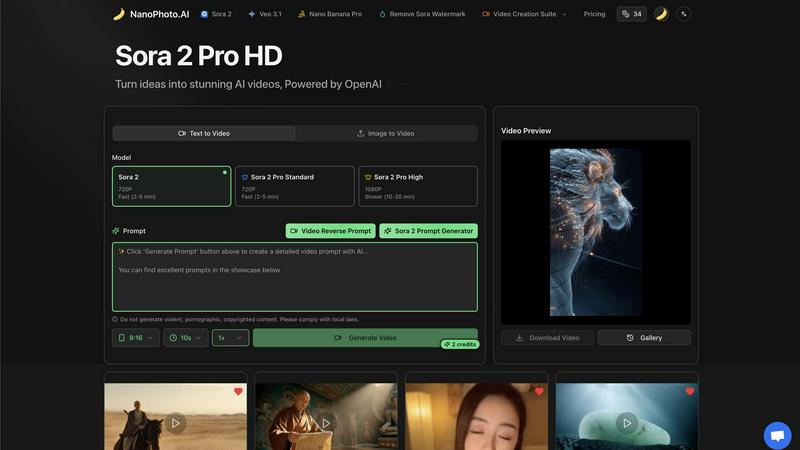
Sora 2 Pro HD Video Generation
This flagship feature allows you to turn your written ideas into high-definition AI videos powered by OpenAI's advanced Sora 2 model. You can choose from different tiers like Standard for fast 720P generation or High for stunning, detailed 1080P videos. Simply type a description of the scene you imagine, and the AI brings it to life with coherent motion and realistic details, perfect for creating unique video content from scratch in minutes instead of days.
Intelligent Prompt Generation & Tools
Struggling to find the right words to describe your vision? Nano Photo includes a suite of prompt tools to help. The Sora 2 Prompt Generator suggests effective phrases to get the best results from the AI. For reverse engineering, the Video Reverse Prompt feature can analyze existing video concepts to help you create similar styles, making it easier to iterate and refine your creative ideas without starting from zero every time.
Comprehensive Video Creation Suite
Beyond text-to-video, the platform offers a full suite of video tools to support your workflow. This includes capabilities like converting an existing image into a moving video scene (Image to Video), generating videos in specific durations like 9:16 format for social media, and even offering options to remove watermarks for a clean, professional final product ready for public sharing or commercial use.
Nano Banana Pro & Model Access
Nano Photo provides access to specialized tools and the latest AI models in one place. Features like "Nano Banana Pro" offer enhanced creative controls, while direct integration with top-tier models like Google's Veo 3.1 alongside Sora 2 ensures you are always using some of the most powerful and up-to-date AI engines available for visual generation, giving you versatility and quality in your outputs.
Vibe Video
Image to Video AI
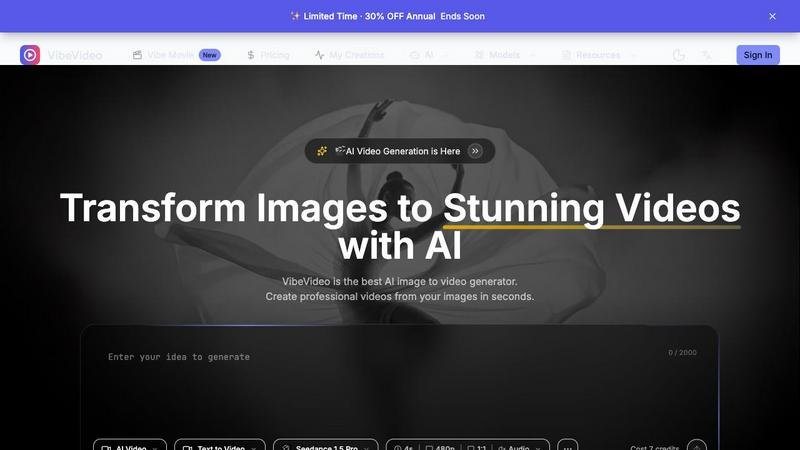
This feature allows users to upload any image and watch as Vibe Video transforms it into a dynamic video filled with natural motion and cinematic effects. It's perfect for turning ordinary photos into captivating visual stories.
Text to Video
With the text-to-video functionality, users can describe their vision in text form, and the AI will interpret these prompts to create a fitting video. This feature is ideal for those who want to convey specific ideas or themes without needing technical video editing expertise.
Multiple AI Models
Vibe Video offers a selection of various AI models, such as Kling and Runway, tailored for different video styles and quality levels. This versatility ensures that users can choose the model that best fits their creative needs.
Fast Generation
Vibe Video's optimized AI pipeline enables the rapid generation of videos in seconds. This speed is a game-changer for content creators who need to produce high volumes of video content quickly without sacrificing quality.
Use Cases
Nano Photo
Social Media Content Creation
For influencers, content creators, and social media managers, Nano Photo is a game-changer. You can rapidly produce eye-catching, original video clips for Instagram Reels, TikTok, or YouTube Shorts. Generate trending visual concepts, create engaging story-based clips, or produce consistent branding content daily, all without needing a camera crew or complex editing software, keeping your feed fresh and engaging.
Small Business Marketing & Advertising
Small businesses and startups can produce professional-quality promotional videos and ad creatives on a budget. Create product demonstration videos, craft compelling story-driven ads for Facebook or Google, or design attractive visual assets for email campaigns. This empowers businesses to tell their brand story effectively and compete visually with larger companies without the high cost of traditional video production.
Creative Exploration for Artists & Designers
Artists, illustrators, and digital designers can use Nano Photo as a boundless source of inspiration and a new medium. Visualize concepts for projects, generate unique textures and backgrounds, or create animated sequences from static artwork. It serves as a digital sketchbook that can instantly visualize abstract ideas, helping overcome creative blocks and explore styles that would be time-consuming to create manually.
Rapid Prototyping for Storytellers
Writers, filmmakers, and game developers can use the platform for pre-visualization and prototyping. Quickly generate video scenes from a script description to scout visual styles, create mood boards, or produce simple animatics to pitch a story concept. This accelerates the early creative process, allowing teams to align on a visual direction before committing to expensive production phases.
Vibe Video
Influencer Content Creation
Influencers can leverage Vibe Video to quickly produce visually striking videos from their photos. This allows them to maintain a consistent posting schedule and engage their audiences with fresh content.
Product Marketing
Marketers can utilize Vibe Video to create professional product videos that highlight features and benefits. These videos can be shared on social media or embedded in marketing campaigns to boost engagement and conversions.
Artistic Projects
Artists and animators can experiment with Vibe Video to bring their artwork to life. By transforming static images into animated videos, they can create unique visual experiences that showcase their creativity.
Social Media Engagement
Content creators can use Vibe Video to generate compelling video posts for various social media platforms. The ability to turn images into videos quickly helps keep their feeds dynamic and engaging, attracting more followers and interactions.
Overview
About Nano Photo
Nano Photo is your all-in-one creative companion, designed to make professional-grade AI visual creation accessible to everyone. At its core, it's an innovative platform that simplifies the process of generating stunning videos and images using the latest artificial intelligence technology. Whether you're a social media manager needing daily content, a marketer crafting compelling ads, a small business owner building a brand, or an artist exploring new digital frontiers, Nano Photo provides the tools to bring your ideas to life quickly and without complexity. The platform's main superpower is its seamless integration of cutting-edge AI models like OpenAI's Sora 2 and Google's Veo 3.1, which handle the heavy lifting of rendering realistic visuals from simple text prompts. This means you can save significant time and resources, reduce reliance on expensive production teams, and unlock a new level of creative potential, all from one convenient dashboard. Nano Photo is built on the belief that powerful creative tools should be simple, efficient, and empowering for creators at any skill level.
About Vibe Video
Vibe Video is an innovative AI video generator that enables creators, marketers, and indie makers to effortlessly transform static images, prompts, and ideas into high-quality videos within minutes. Designed for those seeking a faster video production process without the need for complex editing skills, Vibe Video simplifies the creation of cinematic clips, engaging product videos, and dynamic social media content. By utilizing advanced AI technology, users can easily generate videos that are visually captivating and professionally polished. Whether you're an influencer looking to enhance your content, a product marketer aiming to showcase your offerings, or an artist wanting to bring your visions to life, Vibe Video provides the tools you need to create stunning videos quickly and efficiently.
Frequently Asked Questions
Nano Photo FAQ
What AI models does Nano Photo use?
Nano Photo primarily integrates two of the most advanced AI video generation models available: OpenAI's Sora 2 and Google's Veo 3.1. These models are responsible for creating high-quality, realistic videos from your text descriptions. The platform provides easy access to these powerful technologies through a simple interface, handling all the complex processing on the backend for you.
How long does it take to generate a video?
Generation time depends on the quality and length you select. For standard 720P videos, the process is typically fast, often completing within 2 to 5 minutes. For higher-quality 1080P outputs with more detail, the rendering time is longer, usually between 10 to 20 minutes. The platform clearly indicates estimated times so you can plan your workflow accordingly.
Can I use the videos for commercial purposes?
Yes, you can use the videos you create with Nano Photo for commercial purposes, such as in advertisements, social media marketing, or client projects. For complete peace of mind, especially in professional settings, the platform offers features like "Remove Sora Watermark" to ensure your final product is clean and branded as your own, ready for public or commercial distribution.
Is there a free trial or any special offers?
Nano Photo frequently runs special promotions to make its tools more accessible. Currently, there is a highlighted "Annual Payment Special Offer" which provides a significant discount, effectively a half-price deal, for users who commit to a yearly plan. This is a great way to unlock full creative potential at a reduced cost. Always check the official pricing page for the latest offers and plan details.
Vibe Video FAQ
What is Vibe Video and how does it work?
Vibe Video is an AI-powered tool that transforms images and text prompts into stunning videos. Users upload their images or provide descriptive prompts, and the AI generates a video that captures their vision, making video creation accessible and efficient.
What types of images work best with Vibe Video?
Vibe Video supports a range of image formats, including JPG, PNG, and WebP. Any image can be used to create videos, but those with clear subjects and vibrant colors often yield the most visually appealing results.
How long does it take to generate a video?
Thanks to Vibe Video's optimized AI technology, videos can be generated in a matter of seconds. This rapid processing allows users to create and share content without long wait times.
What AI models are available?
Vibe Video features multiple AI models, including Kling and Runway, each designed for different video styles and quality outputs. Users can choose the model that best aligns with their creative vision and project requirements.
Alternatives
Nano Photo Alternatives
Nano Photo is an AI-powered creative platform focused on video and image generation. It helps users, from marketers to artists, quickly turn ideas into professional visuals using advanced AI models. This places it firmly in the category of AI video and image creation tools. People often look for alternatives to a tool like this for various reasons. It might be due to budget constraints, a need for different specific features, or a preference for a platform that integrates with other software they use. Exploring options is a natural part of finding the perfect fit for your creative workflow. When evaluating alternatives, consider what matters most for your projects. Key factors include the quality and style of AI output, ease of use, pricing structure, and the specific types of media you need to create, whether it's short social clips or longer promotional videos.
Vibe Video Alternatives
Vibe Video is a powerful AI Video Generator that transforms images, prompts, and ideas into cinematic videos in just minutes. It falls under the categories of Image & Photo, Video, and Image Generation, making it a versatile tool for various creative projects. Users often seek alternatives to Vibe Video due to factors such as pricing, specific feature requirements, or compatibility with different platforms. When looking for an alternative, consider the ease of use, quality of output, and whether the tool meets your specific needs—such as the type of videos you want to create and the level of customization available. It's essential to find a solution that offers the right balance between user-friendly functionality and the features you require for your video production goals.