
OpenAI Tools Hub vs Veo 4 AI Video Generator
Side-by-side comparison to help you choose the right AI tool.

OpenAI Tools Hub
Discover expert AI tool reviews, comparisons, and 33+ free developer tools without signup, all designed to enhance your workflow.
Last updated: March 11, 2026

Veo 4 AI Video Generator
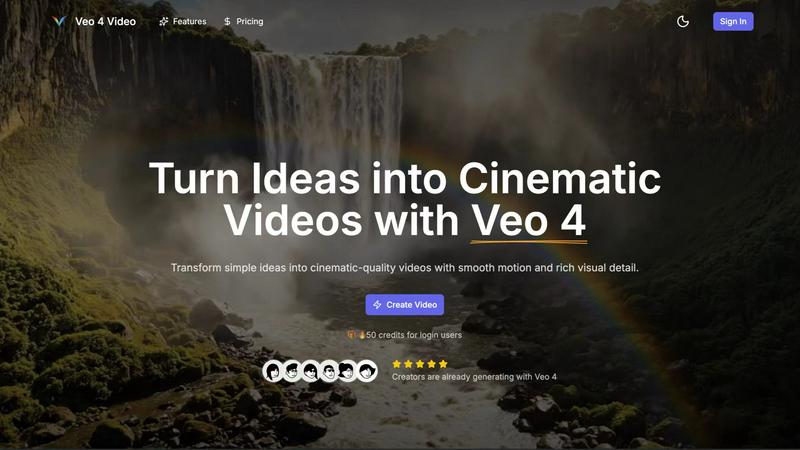
Create stunning cinematic videos from text or images in minutes with Veo 4's advanced AI video generator.
Last updated: February 28, 2026
Visual Comparison
OpenAI Tools Hub

Veo 4 AI Video Generator
Feature Comparison
OpenAI Tools Hub
Expert Reviews
OpenAI Tools Hub features in-depth expert reviews of various AI tools, providing reliable ratings based on comprehensive testing. Each review includes detailed insights into performance, usability, and pricing. This transparency allows users to select tools that best fit their needs without falling for biased marketing claims.
Head-to-Head Comparisons
The platform offers side-by-side comparisons of competing tools, allowing users to evaluate features, pricing, and overall value at a glance. This makes it easier to identify which AI solution is the best fit for specific applications, whether it be for writing, coding, or other creative tasks.
AI Skills Map
The AI Skills Map is a unique feature that provides a directory of over 349 community-built skills specifically for Claude Code. Users can browse, install, and share skills, enhancing their development experience and expanding their capabilities in AI tool usage.
Free Developer Tools
OpenAI Tools Hub provides more than 33 free developer tools, including utilities like an AI ROI calculator, JSON to YAML converter, and a regex tester. These tools are available without any sign-up or account requirements, making them easy to access and use for various development tasks.
Veo 4 AI Video Generator
Text-to-Video Engine
Veo 4 allows users to create videos from descriptive text prompts. Simply write a scene description, and the AI engine generates a coherent cinematic clip that reflects your ideas. You can add details like the time of day and camera movements for more control over the final output.
Image-to-Video Motion
If you want to animate still images, Veo 4's Image-to-Video feature lets you upload one or two images to create motion. The tool generates smooth transitions between the images, providing a dynamic way to bring your visuals to life.
Fast & Quality Modes
Veo 4 offers two distinct modes for video generation: Fast and Quality. The Fast mode is perfect for quick drafts or testing ideas, while the Quality mode focuses on delivering clearer details and smoother movements, ensuring that you get the result that fits your needs.
Multiple Aspect Ratios and Clean Exports
With Veo 4, you can export your videos in various aspect ratios, including Auto, 16:9, and 9:16, making your content versatile for different platforms. Additionally, the tool produces clean 1080p videos without watermarks, allowing for immediate sharing on social media and other channels.
Use Cases
OpenAI Tools Hub
For Developers
Developers can leverage OpenAI Tools Hub to find the best AI coding assistants, compare different tools, and access free utilities that enhance their workflow. With hands-on reviews and comparisons, they can make informed choices that improve their coding efficiency and productivity.
For Marketers
Marketers can benefit from the honest reviews and comparisons of AI tools focused on content generation, SEO, and customer engagement. By understanding the strengths and weaknesses of various platforms, they can select the right tools that align with their marketing strategies.
For Creatives
Creatives looking for AI tools for writing, image generation, or video production can explore the expert-reviewed resources on OpenAI Tools Hub. The platform's comprehensive insights help them choose tools that enhance their creative processes and output quality.
For Educators
Educators and trainers can utilize OpenAI Tools Hub to discover AI tools that can aid in teaching and learning processes. By comparing different educational tools and accessing free resources, they can select the best options to support their students’ learning experiences.
Veo 4 AI Video Generator
Product Ads
Veo 4 is an excellent tool for marketers looking to create engaging product ads. By turning concise pitches into punchy promo clips, users can enhance their landing pages and boost the effectiveness of paid campaigns.
Social Shorts
Content creators can generate loopable B-roll or short clips for social media platforms like TikTok and Instagram Reels. By using hooks, captions, or story beats, Veo 4 helps you capture audience attention quickly with captivating visuals.
Educational Content
Educators can leverage Veo 4 to create instructional videos that illustrate complex concepts in an engaging manner. By transforming lesson plans into cinematic clips, teachers can enhance learning experiences for their students.
Event Highlights
After hosting an event, users can utilize Veo 4 to compile highlights into a concise video. By summarizing key moments into an 8-second clip, event organizers can share memorable experiences on social media, fostering engagement and interest for future events.
Overview
About OpenAI Tools Hub
OpenAI Tools Hub is a comprehensive and free resource tailored specifically for developers, marketers, and creatives seeking unbiased reviews and comparisons of AI tools. With a focus on popular platforms like ChatGPT, Claude, Gemini, GitHub Copilot, and Cursor, OpenAI Tools Hub offers hands-on testing and honest analysis, ensuring that users make informed decisions. The platform boasts over 50 AI tools, providing real-world insights and ratings that are not influenced by paid rankings. Users can also access a variety of free resources, including an AI Skills Map featuring over 349 skills, a Backlinks Directory, and essential developer utilities. Notably, OpenAI Tools Hub doesn't require any sign-up or account creation, making it an accessible destination for anyone looking to explore and utilize AI technology effectively.
About Veo 4 AI Video Generator
Veo 4 AI Video Generator is an innovative tool designed to revolutionize the way creators produce video content. Powered by advanced artificial intelligence, Veo 4 transforms simple text prompts and images into stunning, cinematic-quality videos in just minutes. This platform is ideal for marketers, educators, and content creators who want to generate high-quality video content without the need for extensive technical skills. The main value proposition of Veo 4 lies in its ability to streamline the video production process, allowing users to effortlessly turn their ideas into visually dynamic content. With features like synchronized audio and advanced algorithms for realistic clips, Veo 4 enhances the viewing experience while making video creation accessible to everyone.
Frequently Asked Questions
OpenAI Tools Hub FAQ
What types of AI tools are reviewed on OpenAI Tools Hub?
OpenAI Tools Hub reviews a wide range of AI tools, including chatbots, writing assistants, image generation software, coding tools, video AI, audio AI, productivity enhancers, and marketing solutions.
Is there a cost to access the reviews and tools on OpenAI Tools Hub?
No, OpenAI Tools Hub is completely free to use. Users can access expert reviews, comparisons, and over 33 free developer tools without the need for sign-up or account creation.
How does OpenAI Tools Hub ensure the integrity of its reviews?
OpenAI Tools Hub tests every AI tool hands-on and publishes real ratings based on thorough analysis. The platform does not accept paid rankings, ensuring unbiased and honest reviews for its users.
Can I contribute to the AI Skills Map?
Yes, users can browse, install, and share community-built skills within the AI Skills Map. This collaborative feature allows developers to contribute their skills, enhancing the overall resource for the community.
Veo 4 AI Video Generator FAQ
How does Veo 4 generate videos?
Veo 4 uses advanced AI algorithms to convert text prompts and images into cinematic videos. Users input descriptions or upload images, and the tool automatically generates coherent video clips with synchronized audio.
Can I use my native language to create videos?
Yes, Veo 4 includes a built-in prompt translation feature that allows you to write your ideas in your own language. The tool can then translate your text to English for better understanding and accuracy in video generation.
What formats can I export my videos in?
Veo 4 allows users to export videos in several aspect ratios, including Auto, 16:9, and 9:16. The videos are exported in clean 1080p quality without any watermarks.
Is technical knowledge required to use Veo 4?
No, Veo 4 is designed to be user-friendly and accessible for everyone, regardless of technical expertise. Its intuitive interface enables users to create professional-looking videos quickly and easily.
Alternatives
OpenAI Tools Hub Alternatives
OpenAI Tools Hub is a comprehensive resource designed for developers, marketers, and creatives seeking unbiased reviews and comparisons of various AI tools. By providing insights into platforms like ChatGPT, Claude, and GitHub Copilot, it falls into the category of AI tool comparison and review hubs. Users often seek alternatives to OpenAI Tools Hub for various reasons, including pricing concerns, specific feature requirements, or compatibility with different platforms. When looking for an alternative, it's essential to consider factors such as the breadth of tools covered, the depth of analysis, ease of access, and additional resources available without the need for signup. --- [{"question": "What is OpenAI Tools Hub?", "answer": "OpenAI Tools Hub is a free resource offering expert AI tool reviews and comparisons, covering over 50 AI platforms."}, {"question": "Who is OpenAI Tools Hub for?", "answer": "OpenAI Tools Hub is designed for developers, marketers, and creatives looking for unbiased insights into AI tools."}, {"question": "Is OpenAI Tools Hub free?", "answer": "Yes, OpenAI Tools Hub is completely free to use, with no signup required."}, {"question": "What are the main features of OpenAI Tools Hub?", "answer": "Main features include AI tool reviews, comparisons, and free developer utilities like an AI Skills Map and a Backlinks Directory."}]
Veo 4 AI Video Generator Alternatives
Veo 4 AI Video Generator is an innovative tool that falls under the category of video content creation software, utilizing artificial intelligence to transform text and images into cinematic videos with ease. Its advanced features cater to various users, including marketers, content creators, and educators, who seek to produce high-quality visual content without requiring extensive editing skills. Users often look for alternatives due to various factors such as pricing, specific feature sets, or compatibility with different platforms. When exploring alternatives, it’s essential to consider aspects like user-friendliness, customization options, the quality of output, and any unique functionalities that may align better with your creative goals or project requirements.