
OpenAI Tools Hub vs Wan 2.6 AI Video Generator
Side-by-side comparison to help you choose the right AI tool.

OpenAI Tools Hub
Discover expert AI tool reviews, comparisons, and 33+ free developer tools without signup, all designed to enhance your workflow.
Last updated: March 11, 2026

Wan 2.6 AI Video Generator
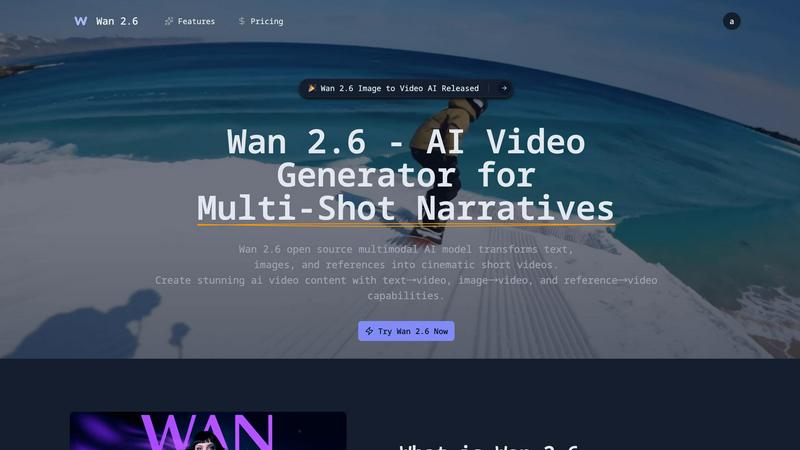
Wan 2.6 transforms your text and images into cinematic short videos with multi-shot storytelling.
Last updated: March 1, 2026
Visual Comparison
OpenAI Tools Hub

Wan 2.6 AI Video Generator
Feature Comparison
OpenAI Tools Hub
Expert Reviews
OpenAI Tools Hub features in-depth expert reviews of various AI tools, providing reliable ratings based on comprehensive testing. Each review includes detailed insights into performance, usability, and pricing. This transparency allows users to select tools that best fit their needs without falling for biased marketing claims.
Head-to-Head Comparisons
The platform offers side-by-side comparisons of competing tools, allowing users to evaluate features, pricing, and overall value at a glance. This makes it easier to identify which AI solution is the best fit for specific applications, whether it be for writing, coding, or other creative tasks.
AI Skills Map
The AI Skills Map is a unique feature that provides a directory of over 349 community-built skills specifically for Claude Code. Users can browse, install, and share skills, enhancing their development experience and expanding their capabilities in AI tool usage.
Free Developer Tools
OpenAI Tools Hub provides more than 33 free developer tools, including utilities like an AI ROI calculator, JSON to YAML converter, and a regex tester. These tools are available without any sign-up or account requirements, making them easy to access and use for various development tasks.
Wan 2.6 AI Video Generator
Multimodal Input Flexibility
Wan 2.6 doesn't box you into one way of creating. Start your video from whatever inspires you most. Use the text-to-video function to describe a scene and watch it generate, or use the image-to-video feature to animate your own photos and artwork. For even more control, the reference-to-video mode lets you upload a sample to guide the visual style, character design, or motion, making it incredibly versatile for different creative workflows.
Coherent Multi-Shot Narratives
This is where Wan 2.6 truly shines for storytellers. Instead of creating one-off scenes, you can generate longer videos composed of multiple, connected shots. The AI intelligently maintains consistency in characters, settings, and style across these different scenes, allowing for natural storytelling with transitions. It’s perfect for creating short narratives, explainer sequences, or ads that need to show progression and development.
Advanced Character Consistency
Nothing breaks the illusion of a story faster than a character who looks different in every shot. Wan 2.6 is specifically engineered to maintain a character's identity, clothing, and appearance throughout your entire generated video. This feature is crucial for creating believable narratives and professional-quality content, ensuring your main subject remains recognizable and consistent from the beginning to the end of your multi-scene project.
Frame-Level Control & Perfect Lip-Sync
You have detailed control over your video's parameters, like duration and resolution. More impressively, Wan 2.6 incorporates sophisticated technology to ensure any spoken elements in your video are matched with accurate lip movements. This perfect lip-sync adds a significant layer of polish and realism, making your AI-generated characters appear to speak naturally, which is essential for dialogue-driven content and professional presentations.
Use Cases
OpenAI Tools Hub
For Developers
Developers can leverage OpenAI Tools Hub to find the best AI coding assistants, compare different tools, and access free utilities that enhance their workflow. With hands-on reviews and comparisons, they can make informed choices that improve their coding efficiency and productivity.
For Marketers
Marketers can benefit from the honest reviews and comparisons of AI tools focused on content generation, SEO, and customer engagement. By understanding the strengths and weaknesses of various platforms, they can select the right tools that align with their marketing strategies.
For Creatives
Creatives looking for AI tools for writing, image generation, or video production can explore the expert-reviewed resources on OpenAI Tools Hub. The platform's comprehensive insights help them choose tools that enhance their creative processes and output quality.
For Educators
Educators and trainers can utilize OpenAI Tools Hub to discover AI tools that can aid in teaching and learning processes. By comparing different educational tools and accessing free resources, they can select the best options to support their students’ learning experiences.
Wan 2.6 AI Video Generator
Social Media Content Creation
Creators on platforms like TikTok, Instagram Reels, and YouTube Shorts can rapidly produce eye-catching, narrative-driven content. Quickly turn a blog post idea into a visual story, animate a series of images for a carousel post, or create engaging short skits with consistent characters, all tailored to capture audience attention in a crowded social feed.
Marketing & Advertising Prototyping
Marketing teams can use Wan 2.6 to quickly visualize ad concepts and campaign stories before investing in full-scale production. Generate multiple versions of a commercial storyboard, animate product photos to show them in use, or create compelling video ads for social media with coherent multi-shot narratives that build brand stories effectively and efficiently.
Educational & Explainer Videos
Educators and trainers can transform static lesson materials into dynamic video content. Animate diagrams, bring historical figures to life from portraits, or create simple animated sequences to explain complex processes. The multi-shot feature is perfect for building step-by-step tutorial videos that are more engaging than slides or text documents.
Creative Storytelling & Animation
Aspiring filmmakers, writers, and animators can use Wan 2.6 to prototype scenes, visualize characters from descriptions, or produce entire short animated narratives. It serves as a powerful tool for rapid visualization, allowing for creative experimentation with different visual styles and story flows without the need for extensive manual animation or filming resources.
Overview
About OpenAI Tools Hub
OpenAI Tools Hub is a comprehensive and free resource tailored specifically for developers, marketers, and creatives seeking unbiased reviews and comparisons of AI tools. With a focus on popular platforms like ChatGPT, Claude, Gemini, GitHub Copilot, and Cursor, OpenAI Tools Hub offers hands-on testing and honest analysis, ensuring that users make informed decisions. The platform boasts over 50 AI tools, providing real-world insights and ratings that are not influenced by paid rankings. Users can also access a variety of free resources, including an AI Skills Map featuring over 349 skills, a Backlinks Directory, and essential developer utilities. Notably, OpenAI Tools Hub doesn't require any sign-up or account creation, making it an accessible destination for anyone looking to explore and utilize AI technology effectively.
About Wan 2.6 AI Video Generator
Wan 2.6 is your creative partner for bringing stories to life. It's an advanced, open-source AI video generator designed to transform your ideas into stunning cinematic short videos with ease. Whether you're a content creator dreaming up the next viral social media clip, a marketer needing a compelling ad, or a storyteller prototyping a visual concept, Wan 2.6 puts a director's toolkit at your fingertips. Its core magic lies in being a multimodal model, meaning it can work from different starting points: you can feed it text descriptions, upload static images, or provide reference videos to guide the style. The real standout is its ability to craft multi-shot narratives, weaving together different scenes with character consistency and smooth transitions, much like a short film. This move beyond single, disjointed clips empowers you to build richer, more engaging stories. By combining this powerful narrative control with an intuitive interface, Wan 2.6 democratizes high-quality video production, allowing anyone to create professional-looking videos that truly resonate with their audience without needing a film degree or a big budget.
Frequently Asked Questions
OpenAI Tools Hub FAQ
What types of AI tools are reviewed on OpenAI Tools Hub?
OpenAI Tools Hub reviews a wide range of AI tools, including chatbots, writing assistants, image generation software, coding tools, video AI, audio AI, productivity enhancers, and marketing solutions.
Is there a cost to access the reviews and tools on OpenAI Tools Hub?
No, OpenAI Tools Hub is completely free to use. Users can access expert reviews, comparisons, and over 33 free developer tools without the need for sign-up or account creation.
How does OpenAI Tools Hub ensure the integrity of its reviews?
OpenAI Tools Hub tests every AI tool hands-on and publishes real ratings based on thorough analysis. The platform does not accept paid rankings, ensuring unbiased and honest reviews for its users.
Can I contribute to the AI Skills Map?
Yes, users can browse, install, and share community-built skills within the AI Skills Map. This collaborative feature allows developers to contribute their skills, enhancing the overall resource for the community.
Wan 2.6 AI Video Generator FAQ
What types of input can I use to generate a video?
You can generate videos using three main types of input with Wan 2.6. You can start from a text prompt, describing the scene you want. You can upload a static image to be animated into a video. Or, you can use a reference video or image to guide the style and composition of your new generation, which is great for maintaining a specific look or character design.
How does Wan 2.6 handle longer, multi-scene videos?
Wan 2.6 has a dedicated "Multi-Shot" mode designed for creating longer narratives. In this mode, you can guide the AI to generate a sequence of connected shots. The model is built to understand context across these shots, working to maintain consistency in characters, settings, and the overall story flow, allowing for coherent short films or detailed explainer videos.
Is the lip-sync feature accurate?
Yes, Wan 2.6 incorporates technology focused on achieving perfect lip-sync. It analyzes any provided audio or text-to-speech elements and synchronizes the generated character's mouth movements to match the speech closely. This results in more natural-looking and professional videos, especially for content where characters are speaking or narrating.
What does it mean that Wan 2.6 is "open source"?
Being open source means the core technology behind Wan 2.6 is publicly available for developers to view, use, and modify. For users on the Wan 2.6 platform, this translates to greater transparency, flexibility, and potential for customization. It often fosters rapid innovation and community-driven improvements, ensuring you have access to a cutting-edge and adaptable tool.
Alternatives
OpenAI Tools Hub Alternatives
OpenAI Tools Hub is a comprehensive resource designed for developers, marketers, and creatives seeking unbiased reviews and comparisons of various AI tools. By providing insights into platforms like ChatGPT, Claude, and GitHub Copilot, it falls into the category of AI tool comparison and review hubs. Users often seek alternatives to OpenAI Tools Hub for various reasons, including pricing concerns, specific feature requirements, or compatibility with different platforms. When looking for an alternative, it's essential to consider factors such as the breadth of tools covered, the depth of analysis, ease of access, and additional resources available without the need for signup. --- [{"question": "What is OpenAI Tools Hub?", "answer": "OpenAI Tools Hub is a free resource offering expert AI tool reviews and comparisons, covering over 50 AI platforms."}, {"question": "Who is OpenAI Tools Hub for?", "answer": "OpenAI Tools Hub is designed for developers, marketers, and creatives looking for unbiased insights into AI tools."}, {"question": "Is OpenAI Tools Hub free?", "answer": "Yes, OpenAI Tools Hub is completely free to use, with no signup required."}, {"question": "What are the main features of OpenAI Tools Hub?", "answer": "Main features include AI tool reviews, comparisons, and free developer utilities like an AI Skills Map and a Backlinks Directory."}]
Wan 2.6 AI Video Generator Alternatives
Wan 2.6 AI Video Generator is a powerful tool in the AI video creation space, designed to transform text, images, and references into cinematic short videos. It stands out for its focus on narrative-driven content, character consistency, and professional-grade results, making it a compelling choice for storytellers and marketers. Users often explore alternatives for various reasons. Some might be looking for a different pricing model or subscription plan that better fits their budget. Others may need specific features Wan 2.6 doesn't emphasize, require a tool with a different user interface, or prefer a platform that runs on a different operating system or device. When evaluating other options, consider what matters most for your projects. Key factors include the quality and style of the AI-generated video, the level of creative control you have over the output, the ease of use, and of course, the cost. It's also wise to check if an alternative supports the specific workflows you need, like animating images or maintaining character consistency across scenes.