
BarBrain vs Phishly
Side-by-side comparison to help you choose the right AI tool.

BarBrain
BarBrain simplifies inventory management for the hospitality industry, cutting your counting time in half while ensuring accurate results.
Last updated: April 4, 2026

Phishly
Phishly uses AI to quickly detect phishing emails, ensuring your Gmail is safe with just one click.
Visual Comparison
BarBrain

Phishly
Feature Comparison
BarBrain
Parallel Counting on Multiple Devices
BarBrain allows users to count inventory simultaneously across multiple iOS and Android devices. This feature enhances efficiency by enabling staff to work together, significantly reducing the time spent on inventory tasks and streamlining the counting process.
Comprehensive Product Catalog
With over 30,000 products in its catalog, BarBrain enables users to manage a wide variety of items including beverages, food items, and housekeeping supplies. This extensive catalog helps businesses track all their inventory needs in one place, ensuring that nothing is overlooked.
Automated Inventory Reporting
After each inventory count, BarBrain generates an automatic and comprehensive inventory report. This eliminates the need for manual data entry and post-processing, providing business owners with reliable and accurate results without the usual hassle.
Intuitive Food and Beverage Tracking
BarBrain incorporates a user-friendly fill-level slider for tracking open food and beverage products. This feature allows for quick and easy entry of both opened and whole units, ensuring that inventory counts are precise and up-to-date.
Phishly
Instant Email Scanning
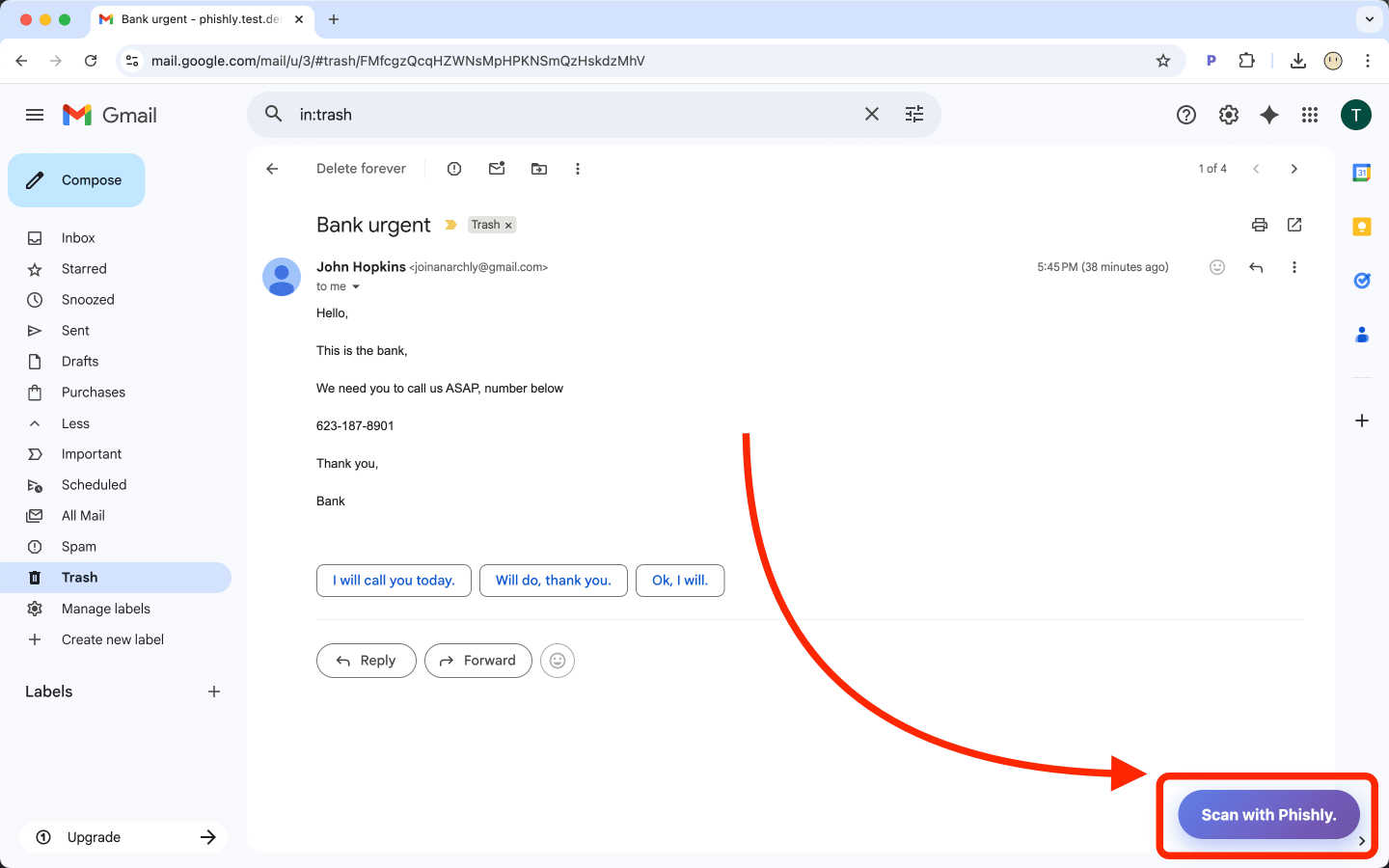
With Phishly, users can scan any email in Gmail instantly. Simply click the "Scan with Phishly" button, and the AI analyzes the email for potential phishing threats in real-time.
Detailed Risk Assessments
Phishly provides comprehensive risk assessments that categorize emails as Safe, Medium Risk, or High Risk. Each evaluation comes with a clear explanation, helping users understand the potential dangers.
Privacy Focused
Phishly respects your privacy by only analyzing emails you explicitly choose to scan. This ensures that your sensitive information remains confidential and protected from unauthorized access.
User-Friendly Interface
The Phishly platform is designed with simplicity in mind. No technical expertise is required to use the tool, making it accessible for everyone, from individual users to small business owners.
Use Cases
BarBrain
Single Bar Management
For independent bar owners, BarBrain simplifies inventory management, allowing them to reduce counting time and focus on enhancing customer experiences. Users can monitor stock levels accurately and make informed purchasing decisions.
Multi-Location Restaurant Oversight
Restaurant groups can leverage BarBrain to maintain consistent inventory practices across multiple locations. The software provides a unified overview of inventory usage across all sites, enabling better resource allocation and cost management.
Hotel Food and Beverage Inventory
Hotels with restaurants or bars can use BarBrain to conduct comprehensive inventory counts of all food and beverage products across various outlets. This ensures that all locations maintain optimal stock levels and minimize waste.
Event Management for Catering
Caterers can utilize BarBrain to efficiently track inventory for events. With the ability to quickly assess stock levels and manage supplies, they can ensure that events are well-stocked and that waste is minimized.
Phishly
Personal Email Security
Individual users can benefit from Phishly by scanning emails from unknown senders or unexpected attachments. This helps in identifying potential scams and protects personal information.
Small Business Protection
Small businesses often face phishing attacks that can jeopardize their operations. Phishly enables teams to validate emails before interacting, ensuring that sensitive business data remains secure.
Remote Work Safety
As remote work becomes common, employees can use Phishly to verify emails that may contain phishing attempts, reducing the risk of falling victim to cyber threats while working from home.
Educational Institutions
Teachers and administrators can utilize Phishly to protect themselves and students from phishing scams that often target educational institutions, ensuring a secure communication environment.
Overview
About BarBrain
BarBrain is a revolutionary inventory management tool specifically designed for the hospitality industry. It addresses the unique challenges faced by bar and restaurant owners who often struggle with outdated inventory practices that are time-consuming and error-prone. With BarBrain, owners can quickly count stock in minutes rather than hours, enabling them to focus more on customer service and less on tedious inventory tasks. The software provides precise calculations for the cost per drink and dish, identifies waste and shrinkage in real time, and consolidates supplier orders for easy management. BarBrain is tailored for operators of all sizes, whether you manage a single cocktail bar or a large multi-location restaurant group. The platform is user-friendly with no complex training required, making it an essential tool for improving operational efficiency and protecting your margins.
About Phishly
Phishly is an innovative AI-powered phishing detection platform designed to safeguard your email communications effortlessly. Available as a Chrome extension for Gmail and a user-friendly web tool, Phishly empowers users to quickly verify the legitimacy of emails. With just a click of the "Scan with Phishly" button or by pasting suspicious emails directly on our website, users can receive instant analyses of potential phishing threats. Phishly employs advanced AI algorithms to identify phishing indicators such as suspicious domains, urgent language, spoofed senders, and social engineering tactics. The platform delivers clear risk assessments categorized as Safe, Medium Risk, or High Risk, along with detailed explanations for each assessment. Phishly is perfect for individuals and small businesses seeking reliable phishing protection without the complexity often associated with enterprise solutions. Our commitment to user privacy ensures that we only analyze emails that users explicitly choose to scan, making Phishly a trustworthy tool for anyone concerned about email security. No technical knowledge is required, and best of all, it is free to use, providing instant answers whenever you need to determine if an email is legitimate.
Frequently Asked Questions
BarBrain FAQ
How does BarBrain reduce inventory time?
BarBrain significantly streamlines the inventory process, allowing users to complete counts in minutes rather than hours. Its intuitive design and multi-device functionality enhance efficiency, leading to time savings of over 75%.
Is training required to use BarBrain?
No, BarBrain is designed with user-friendliness in mind. There are no complex training manuals or bloated feature sets, allowing users to jump right in and start managing their inventory effectively.
What types of products can I manage with BarBrain?
BarBrain supports a broad range of products, including spirits, soft drinks, food items, and housekeeping supplies. This versatility makes it suitable for various hospitality businesses.
Can I access BarBrain from different locations?
Yes, BarBrain can be accessed on multiple devices simultaneously, making it easy for teams to collaborate and count inventory from different locations, whether in a single establishment or across multiple sites.
Phishly FAQ
How does Phishly detect phishing emails?
Phishly uses advanced AI algorithms to analyze various indicators of phishing, such as suspicious sender domains, urgent language, and common social engineering tactics.
Is Phishly free to use?
Yes, Phishly is completely free to use. There are no hidden costs or subscriptions, making it accessible to everyone who wants to enhance their email security.
Do I need technical knowledge to use Phishly?
No, Phishly is designed to be user-friendly and does not require any technical expertise. Anyone can easily navigate the platform and utilize its features.
What happens to my email data?
Phishly prioritizes user privacy by only analyzing emails that you specifically choose to scan. We do not store or analyze any other emails, ensuring your information remains confidential.