
AI Clothes Changer vs PhotoWeather
Side-by-side comparison to help you choose the right AI tool.

AI Clothes Changer
Instantly transform your look with AI Clothes Changer, your virtual fitting room for endless outfit previews.
Last updated: February 28, 2026

PhotoWeather
Get real-time alerts for perfect photography conditions tailored to your favorite locations and preferences.
Last updated: February 26, 2026
Visual Comparison
AI Clothes Changer
PhotoWeather

Feature Comparison
AI Clothes Changer
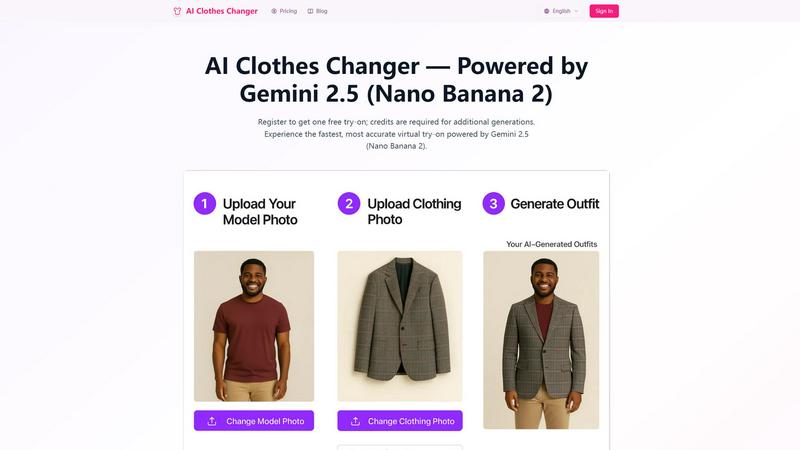
Upload Your Model Photo
Users can easily upload a clear full-body photo of themselves or a model to get started. The platform supports various image formats such as JPG, PNG, and WEBP, making it accessible for everyone. For best results, high-resolution images are recommended, ensuring that the AI can deliver stunningly realistic outfit previews.
Upload Clothing Photo
With AI Clothes Changer, you can upload photos of clothing items you wish to try on. Whether it’s upper body attire, lower body wear, or dresses, the tool provides options for various clothing types. This flexibility allows users to experiment with different styles and outfits, enhancing their shopping experience.
Generate Outfit Instantly
Once you have uploaded both your photo and the clothing item, simply click to change clothes and watch the magic happen. The AI processes your inputs rapidly, delivering photorealistic clothing swaps in seconds. This feature eliminates the need for tedious fitting room visits, allowing you to see how outfits look in the comfort of your home.
One Free Try-On
AI Clothes Changer offers a user-friendly approach by providing one free try-on upon registration. This allows new users to experience the technology without any initial investment. For additional outfit generations, credits are required, ensuring that users get premium quality from the advanced computing technology used.
PhotoWeather
Ready-Made Templates
PhotoWeather provides a variety of pre-made templates tailored for photographers. These include conditions like fog and mist, golden and blue hour, storm intensity, and aurora visibility. This feature simplifies the setup process, allowing you to quickly select the conditions that matter most to your photography style.
Powerful Rule Builder
With a robust rule builder, PhotoWeather offers over 80 parameters to customize your alerts. You can track factors such as cloud cover, visibility, wind speed, and humidity. The ability to combine conditions using AND/OR/NOT logic allows for highly specific alerts, ensuring you are notified only when the perfect conditions arise.
Smart Notifications
Receive daily digests and real-time alerts that keep you informed about upcoming opportunities. You can customize reminders and sync alerts with your calendar, making it easy to plan your photography sessions. This ensures you never miss a chance to capture those fleeting moments.
Trusted Forecast Sources
PhotoWeather pulls data from leading weather services such as ECMWF, NOAA, and Météo-France. This guarantees that you receive accurate and reliable forecasts, helping you make informed decisions about where and when to shoot.
Use Cases
AI Clothes Changer
Personal Styling
Whether you are planning a night out or a casual day at the park, AI Clothes Changer helps you visualize different outfit combinations at your convenience. By experimenting with various styles, you can find the perfect look that suits your personal taste.
E-Commerce Support
Retailers and fashion brands can leverage AI Clothes Changer to enhance their online shopping experience. By allowing potential customers to see how clothes fit on a model or themselves, it helps reduce return rates and increases customer satisfaction.
Event Preparation
Preparing for an important event can be stressful, but AI Clothes Changer simplifies this process. Users can try on outfits for weddings, parties, or interviews, ensuring they feel confident and stylish without the hassle of visiting multiple stores.
Fashion Exploration
Fashion enthusiasts looking to expand their wardrobe can use AI Clothes Changer to explore endless outfit possibilities. By trying on different styles and colors, users can discover new looks and trends that they might not have considered before.
PhotoWeather
Landscape Photography
Landscape photographers can benefit immensely from PhotoWeather by setting alerts for specific conditions like golden hour light or dramatic cloud formations. This allows them to plan their shoots around the best possible conditions, enhancing the quality of their landscape images.
Astro Photography
For astrophotographers, knowing when the moon is below the horizon or when conditions are optimal for capturing the Milky Way is crucial. PhotoWeather provides timely alerts based on astronomical data, ensuring that photographers can maximize their shooting opportunities on clear nights.
Wildlife Photography
Wildlife photographers can set specific weather conditions that align with animal behavior. For instance, alerts for overcast skies or light rain can signal ideal times for capturing animal movements, as many species are more active under certain weather conditions.
Event Photography
Event photographers can use PhotoWeather to track changing weather conditions for outdoor events. Whether it's a wedding, festival, or sports event, getting timely alerts about sudden weather changes allows photographers to adapt quickly and capture the best moments.
Overview
About AI Clothes Changer
AI Clothes Changer is a groundbreaking virtual try-on tool that transforms the way you shop for clothing. Powered by the cutting-edge Gemini 2.5 (Nano Banana 2) technology, this platform allows users to easily upload a clear photo and instantly see how various outfits would look on them. Whether you are preparing for a casual outing, a business meeting, or a special event, AI Clothes Changer caters to all fashion preferences, making it suitable for everyday users, fashionistas, and e-commerce teams alike. The primary value proposition of AI Clothes Changer is its ability to provide a realistic preview of outfits without the hassle of complex editing or endless fitting room visits. By offering features like batch generation, multilingual support, and a commitment to privacy, it creates a seamless and enjoyable user experience, empowering you to make informed fashion choices that reflect your unique style.
About PhotoWeather
PhotoWeather is a specialized weather alert service designed specifically for outdoor photographers who want to capture the perfect shot without constantly checking weather apps. This innovative tool monitors weather conditions 24/7 and sends notifications only when the atmospheric conditions align with your photography goals. Whether you are looking to catch the mystical beauty of sunrise fog, the dramatic intensity of storms, or the soft glow of golden-hour light, PhotoWeather ensures you are always prepared. It offers an intuitive interface that allows you to add your favorite shooting locations and set custom alerts tailored to your specific needs. With ready-made templates and a powerful rule builder, photographers can focus on their art while leaving the weather monitoring to PhotoWeather, giving them peace of mind and the best chance at capturing stunning images.
Frequently Asked Questions
AI Clothes Changer FAQ
How does the AI clothes changer work?
AI Clothes Changer utilizes Gemini 2.5 (Nano Banana 2) to analyze your uploaded photo and seamlessly swap out clothing items based on your selections. The AI understands body pose, lighting, and texture, resulting in photorealistic clothing previews.
Is the AI clothes changer really free?
Yes, the service offers one free try-on after registration. However, because the technology involves premium computing resources, additional outfit generations require credits or a paid plan.
Is my photo safe and private?
Absolutely! Privacy is a top priority for AI Clothes Changer. Your photos are processed securely and not stored permanently. We do not share your images with third parties, and you have the option to delete your photos at any time.
What photo formats are supported?
AI Clothes Changer supports all common image formats, including JPG, PNG, and WEBP. For optimal results, it is recommended to use high-resolution images (at least 512x512 pixels) to ensure the AI delivers the best clothing previews.
PhotoWeather FAQ
How do I get started?
To start using PhotoWeather, simply sign up for a free account. You can then add your favorite shooting locations, choose your desired weather conditions, and begin receiving alerts tailored to your photography needs.
How accurate are the forecasts?
PhotoWeather sources its data from trusted weather services like ECMWF and NOAA, ensuring that the forecasts are highly accurate. You can rely on these forecasts to make informed decisions about your photography sessions.
Can I create my own rules?
Yes, PhotoWeather allows you to create custom rules based on over 80 different weather parameters. This flexibility means you can tailor alerts specifically to your photography style and location.
How do notifications work?
Notifications can be customized to your preferences. You can choose to receive daily digests, real-time alerts, or reminders before specific conditions occur, ensuring you are always prepared for the perfect shooting opportunity.
Alternatives
AI Clothes Changer Alternatives
AI Clothes Changer is a cutting-edge virtual fitting room tool that enables users to transform their appearance instantly by trying on various outfits through advanced AI technology. This innovative platform falls under the categories of design tools, e-commerce, and photography, making it a versatile choice for everyday users, fashion enthusiasts, and retail professionals alike. Users often seek alternatives to AI Clothes Changer for a variety of reasons, including pricing considerations, specific feature sets, or the need for compatibility with different platforms. When looking for an alternative, it’s important to consider factors such as user interface ease, the quality of outfit generation, privacy features, and support for bulk image processing to ensure a seamless experience tailored to individual needs.
PhotoWeather Alternatives
PhotoWeather is a specialized tool designed for photography enthusiasts, helping them capture stunning images by providing real-time alerts for optimal weather conditions. It monitors forecasts around the clock to notify users of perfect moments for photography, such as golden hour light, fog, and dramatic clouds. As it falls within the photography category, it caters specifically to those who want to enhance their shooting experience with timely weather updates. Users often seek alternatives to PhotoWeather due to various factors like pricing, feature sets, or specific platform compatibility. Some may find the need for broader customization options or additional integrations with other photography tools. When looking for an alternative, consider aspects such as user-friendliness, the flexibility of weather parameters, the accuracy of alerts, and compatibility with mobile devices or operating systems to ensure it meets your photography needs.