
Pinpoint Solver vs Pullsy
Side-by-side comparison to help you choose the right AI tool.

Pinpoint Solver
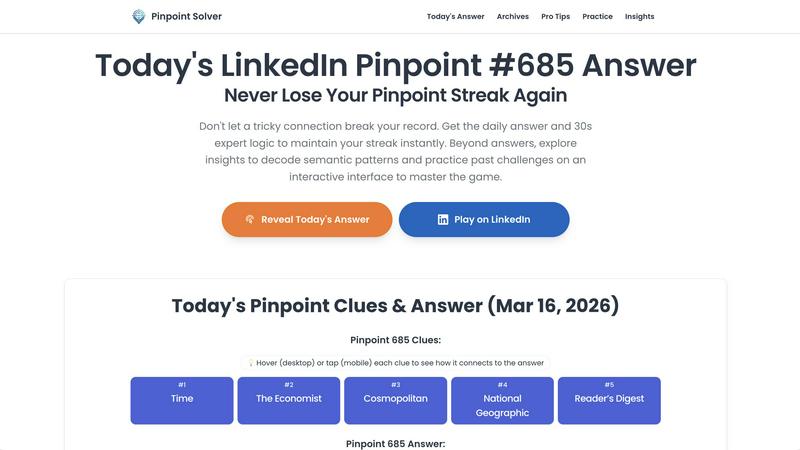
Pinpoint Solver instantly reveals the daily LinkedIn Pinpoint answer and expert logic to protect your winning streak.
Last updated: March 26, 2026

Pullsy organizes your inbox, drafts replies in your voice, and keeps your day on track with smart AI assistance.
Last updated: February 26, 2026
Visual Comparison
Pinpoint Solver
Pullsy

Feature Comparison
Pinpoint Solver
Daily Answer & Instant Clues
Get the precise solution to the day's LinkedIn Pinpoint puzzle as soon as it's live. If you're stuck, you can use interactive hints for each clue. Simply hover or tap on words like "Marble" or "Obsidian" to see how they connect, guiding you step-by-step toward the answer without outright spoiling the fun. This feature helps you solve with fewer guesses and understand the connections as you go.
Expert Logic & Video Walkthroughs
This feature provides a concise, 30-second expert analysis that deconstructs the relationships between all five clues. It explains the "why" behind the answer, such as revealing how "Marble, Obsidian, Slate, Granite, Sandstone" are all "Types of rock!" For visual learners, video walkthroughs break down the puzzle's hidden logic, helping you master the professional reasoning skills used to spot these categories.
Interactive Practice Archive
Master the game by revisiting past challenges. Pinpoint Solver offers a full archive of previous puzzles on a simulated interface, allowing you to practice in a zero-pressure environment. You can replay puzzles like #693 (Mahalo, Danke, Arigato...) to deconstruct semantic traps, sharpen your intuition, and prepare for future patterns without risking your daily streak.
Streak Protection & Timely Alerts
Never miss a puzzle or break your record. The tool updates in real-time with LinkedIn's official schedule, so you always have access to the latest answer. You can also sign up for free notifications to get an alert when a new Pinpoint unlocks, ensuring you stay on top of the game every single day and maintain your leaderboard position effortlessly.
Pullsy
Intelligent Email Labeling
Pullsy offers intelligent email labeling that automatically categorizes incoming messages based on their content and importance. This feature helps users prioritize their emails, ensuring that they focus on what truly matters while filtering out unnecessary noise.
Context-Aware Reply Drafting
With its context-aware reply drafting capability, Pullsy not only generates responses but also identifies specific actions needed from the user. Whether it's answering questions, confirming tasks, or scheduling appointments, Pullsy drafts personalized replies tailored to the context of each email.
Smart Inbox Insights
Pullsy provides smart insights by highlighting the most important messages in the user’s inbox. This feature ensures that critical emails are never overlooked, allowing users to stay informed and organized without getting bogged down by less important communications.
Adaptive Writing Style Learning
Pullsy learns the user's writing style over time, adapting its responses to match the user’s preferred tone—be it professional, friendly, or casual. This feature ensures that all drafted replies feel authentic and true to the user’s voice.
Use Cases
Pinpoint Solver
The Streak Protector
You've built a 50-day Pinpoint streak and encounter a puzzle with seemingly random clues like "Vines, Orangutans, Hammocks..." Panicking, you use Pinpoint Solver. You access an interactive clue, get a nudge in the right direction, and use the expert logic to confirm the answer ("Things you swing on") just in time, saving your impressive record from breaking.
The Pattern Learner
You enjoy Pinpoint but want to get better at spotting connections faster. You use the Practice section to work through last week's puzzles. By reviewing the expert logic for each one, you start to recognize common thematic categories and semantic patterns, training your brain to make connections more quickly and independently.
The Time-Saver
Your morning routine is busy, but you don't want to skip your daily Pinpoint. You quickly visit Pinpoint Solver, reveal the day's answer in seconds, and input it on LinkedIn. This allows you to maintain your daily habit and streak without spending precious minutes stuck in trial-and-error guessing, making your gameplay efficient and stress-free.
The Casual Player Enhancer
You play Pinpoint for fun but often get stuck after the third clue. Instead of giving up, you use the instant clues feature. Tapping on each clue gives you a hint about its connection, making the puzzle an engaging, solvable challenge rather than a point of frustration, which significantly increases your daily enjoyment of the game.
Pullsy
Streamlining Daily Email Management
For busy professionals inundated with emails, Pullsy simplifies daily email management by categorizing messages, suggesting replies, and summarizing threads. This allows users to clear their inboxes efficiently and focus on their core responsibilities.
Enhancing Team Collaboration
Small teams can leverage Pullsy to enhance collaboration by ensuring that everyone stays updated on important communications. With Pullsy's smart insights and task management features, team members can easily track project-related emails and follow up on outstanding tasks.
Improving Response Times
Entrepreneurs often struggle to keep up with client communications. Pullsy helps them respond quickly and effectively by drafting context-aware replies, which enables faster decision-making and fosters better client relationships.
Simplifying Document Management
Pullsy's ability to review and summarize PDFs and other documents directly from the inbox streamlines document management. Users can extract key insights without needing to open multiple files, saving valuable time during busy workdays.
Overview
About Pinpoint Solver
Pinpoint Solver is your dedicated companion for LinkedIn's daily word association game, Pinpoint. Designed for players who love the challenge but want to protect their winning streak and deepen their understanding, this tool provides much more than just answers. At its core, Pinpoint Solver offers the verified daily solution the moment the new puzzle drops, ensuring you never lose your hard-earned streak to a tricky connection. But it goes beyond that, offering interactive clues, expert logic breakdowns, and a full archive of past puzzles for practice. Whether you're a casual player looking for a quick hint or a dedicated enthusiast aiming to master semantic patterns, Pinpoint Solver transforms your gameplay from frustrating guesswork into a rewarding learning experience. It's built for anyone who wants to solve faster, learn smarter, and enjoy the satisfaction of cracking LinkedIn's Pinpoint every single day.
About Pullsy
Pullsy is an innovative AI-powered inbox assistant designed specifically for busy professionals, entrepreneurs, and small teams who want to regain control over their email communications. By seamlessly integrating with popular platforms like Gmail and Outlook, Pullsy transforms the way users manage their inboxes. This powerful tool intelligently labels incoming emails, drafts context-aware replies that reflect the user's unique tone, and offers instant summarization of email threads. Additionally, Pullsy's “Ask Pullsy” feature allows users to quickly extract key insights and review documents like PDFs. With Pullsy, users can navigate their inboxes up to three times faster, dramatically reducing the time spent on organizing, responding, and searching for crucial information. Its user-friendly interface and straightforward setup process ensure that anyone can easily benefit from Pullsy's features. Plus, with a free 14-day trial, users can experience how Pullsy transforms email management from a daily burden into a streamlined, AI-driven workflow.
Frequently Asked Questions
Pinpoint Solver FAQ
What is LinkedIn Pinpoint and where can I find today's answer?
LinkedIn Pinpoint is a daily word association game by LinkedIn News where players must identify a common category connecting five given clues. To find today's verified answer, along with a category breakdown and logic analysis, you can visit the Pinpoint Solver homepage. It provides the solution and tools to help you solve it with the fewest clues possible.
When is the daily LinkedIn Pinpoint answer updated?
Our Pinpoint answer guide is updated immediately after the daily puzzle refreshes on LinkedIn. New puzzles typically go live at 12:00 AM Pacific Time. Pinpoint Solver syncs with this official schedule in real-time, so you can always find the most current solution and analysis as soon as it's available.
Does using Pinpoint Solver give me an unfair advantage?
Pinpoint Solver is designed as a learning and assistance tool. While it provides answers, its greater value lies in features like expert logic, interactive hints, and practice archives that help you understand the game's patterns. How you use it--whether to get a quick answer or to learn and improve--is up to your personal playstyle and goals.
Can I practice past Pinpoint puzzles?
Absolutely! Pinpoint Solver features a comprehensive archive of past challenges. You can access this "Practice" section to replay previous puzzles on an interactive interface. This is a fantastic way to hone your skills, learn from past semantic traps, and prepare for similar categories that might appear in future games, all without any pressure.
Pullsy FAQ
What is Pullsy and how does it work?
Pullsy is an AI-powered inbox management tool that connects to Gmail and Outlook. It automatically organizes messages, highlights important content, and suggests personalized replies, helping users manage their inboxes more efficiently.
Is Pullsy safe to use?
Yes, Pullsy prioritizes data security by implementing Google OAuth verification, and it adheres to GDPR compliance. Your information remains protected while using the platform.
Do I need a credit card to start the free trial?
No, you do not need a credit card to start your free 14-day trial of Pullsy. You can explore its features without any commitment.
Can Pullsy draft replies for me?
Absolutely! Pullsy can draft replies based on the content of your emails, allowing you to review and send them with just one click. You can even select the tone that best fits your message.
Alternatives
Pinpoint Solver Alternatives
Pinpoint Solver is a productivity tool designed to enhance your daily LinkedIn Pinpoint experience. It falls into the category of productivity and management software, helping users get instant answers, smart clues, and interactive explanations to solve the puzzle faster and maintain their streaks. People often look for alternatives for a variety of reasons. Some might be seeking a different pricing model, while others may want a tool with a specific feature set or one that integrates with a different platform. It's a natural part of finding the perfect fit for your personal workflow and preferences. When evaluating other options, consider what matters most to you. Look at the core functionality, the user experience, and how the tool aligns with your specific goals for playing LinkedIn Pinpoint. A good alternative should feel like a natural extension of your routine, making the game more enjoyable and less stressful.
Pullsy Alternatives
Pullsy is an AI-powered inbox assistant designed to help busy professionals, entrepreneurs, and small teams take control of their email communication. By integrating seamlessly with both Gmail and Outlook, Pullsy enhances productivity by intelligently organizing emails, drafting replies that reflect your personal tone, and providing quick summaries and insights. It transforms the often overwhelming task of managing an inbox into a more efficient and tailored experience. Users often seek alternatives to Pullsy for various reasons, such as pricing considerations, specific feature requirements, or compatibility with different platforms. When searching for an alternative, it's essential to consider factors like ease of integration with your existing email system, the quality of AI features, user interface design, and whether there's a trial period to test the product before committing. Finding the right tool can significantly enhance your email management experience.