
AssiPilot vs Read PDF Aloud
Side-by-side comparison to help you choose the right AI tool.

AssiPilot
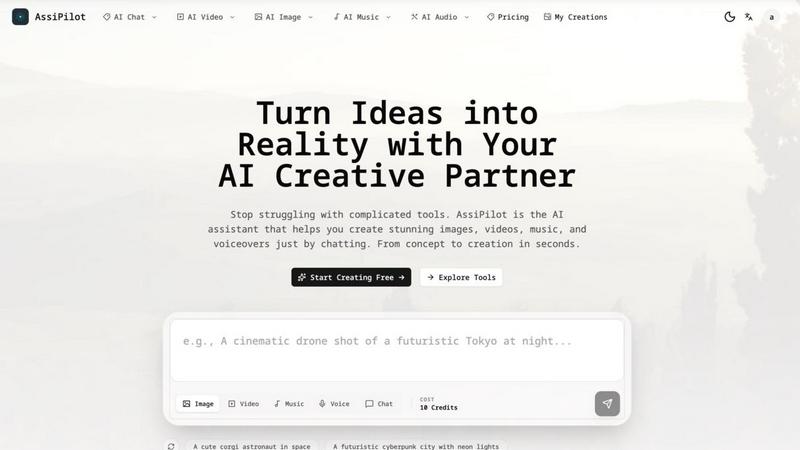
AssiPilot is your all-in-one AI creative partner for effortlessly generating stunning images, videos, music, and voiceovers through simple chat.
Last updated: March 11, 2026

Read PDF Aloud
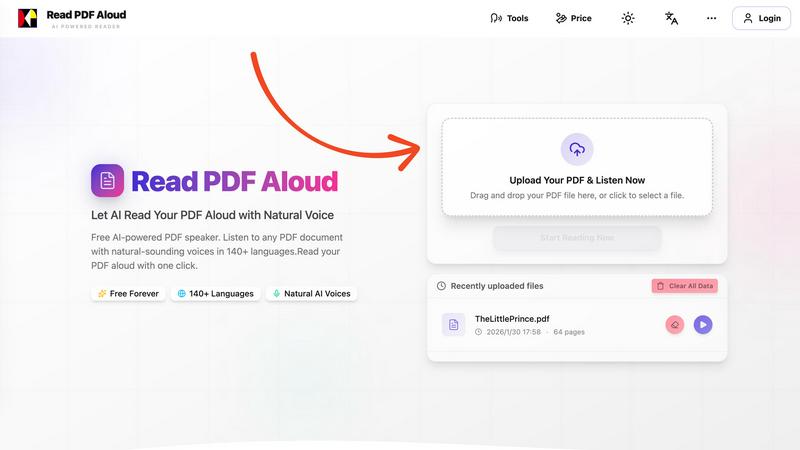
Easily listen to any PDF document aloud in natural voices, including scanned files, with 142 language options.
Last updated: February 26, 2026
Visual Comparison
AssiPilot
Read PDF Aloud
Feature Comparison
AssiPilot
AI Image Generator
The AI Image Generator allows users to create photorealistic images, stunning art, and graphics using advanced models like Flux. It is perfect for generating content tailored for social media, websites, and marketing campaigns, ensuring that your visuals stand out.
AI Video Generator
With the AI Video Generator, users can transform simple text and images into engaging videos. This feature is ideal for creating marketing clips, dynamic social motion graphics, and cinematic scenes instantly, making video production fast and hassle-free.
AI Voice Generator
The AI Voice Generator produces human-like voiceovers in various languages and emotional tones. This feature is essential for video narration, podcasts, and presentations, enabling creators to add a professional touch to their audio content effortlessly.
AI Music Generator
The AI Music Generator composes royalty-free music and sound effects that match the mood and timing of your content perfectly. This feature helps creators enhance their projects with tailored audio, ensuring that every element aligns beautifully.
Read PDF Aloud
Free to Use
Read PDF Aloud offers free daily credits to all registered users, making it easy for anyone to enjoy its features without any cost. Just log in, and you can start converting your PDFs into audio instantly.
PDF OCR
With advanced Optical Character Recognition (OCR) technology, Read PDF Aloud can read not just standard PDFs but also scanned documents. This means you can upload any PDF file, and the application will identify and extract the text for you to listen to.
Natural AI Voices
Enjoy a diverse selection of realistic AI voices with different accents and tones. Choose from hundreds of natural-sounding voice options to enhance your listening experience, ensuring that the narration suits your content perfectly.
Cross-Platform Compatibility
Read PDF Aloud works seamlessly across various devices and operating systems. Whether you are using Windows, Mac, iPhone, iPad, Android, or Linux, you can access the application from any modern browser without any installation required.
Use Cases
AssiPilot
Indie Hackers
Indie hackers can utilize AssiPilot to generate promotional visuals, demo videos, and engaging background music, streamlining the process of building and marketing their products without the need for multiple subscriptions.
SaaS Founders
SaaS founders can create effective demo content quickly using AssiPilot. The platform enables them to produce high-quality educational videos and marketing materials that showcase their software's features and benefits in an engaging way.
Content Creators
Content creators can leverage AssiPilot to produce short-form media effortlessly. Whether it is for social media or YouTube, they can generate high-quality visuals, sound, and voiceovers that elevate their content and captivate their audience.
Marketers
Marketers can test ad creatives rapidly with AssiPilot. The platform allows them to generate various marketing visuals and video content quickly, enabling them to optimize their campaigns and react to market changes with agility.
Read PDF Aloud
Studying for Exams
Students can use Read PDF Aloud to listen to their study materials, making it easier to absorb information. This auditory approach helps reinforce learning and can improve retention rates for complex subjects.
Proofreading Documents
Writers and editors can benefit from hearing their documents read aloud, allowing them to catch mistakes or awkward phrasing that they might miss during traditional reading. It's a perfect tool for enhancing the editing process.
Enjoying eBooks on the Go
For avid readers, Read PDF Aloud provides a convenient way to enjoy eBooks while commuting or during other activities. Simply upload your eBook PDF and listen to it as you go about your day.
Accessibility for Visual Impairments
Individuals with visual impairments can use Read PDF Aloud to access written content easily. The application empowers users by providing them with a way to engage with text that they might otherwise find challenging to read.
Overview
About AssiPilot
AssiPilot is an innovative all-in-one AI creative platform that empowers users to effortlessly generate images, videos, music, and voice assets through simple natural language prompts. Designed for indie hackers, SaaS founders, content creators, and marketers, AssiPilot streamlines the creative process, allowing users to produce high-quality marketing visuals, engaging demo videos, captivating background music, and professional voiceovers all within a single workflow. With AssiPilot, creators no longer need to juggle multiple AI tools; they can turn their ideas into reality quickly and efficiently. The platform's goal is to simplify creative production, significantly reducing the time and costs associated with launching and promoting digital products. Trusted by over 10,000 creators worldwide, AssiPilot is built on cutting-edge technology that transforms concepts into masterpieces with just a few clicks.
About Read PDF Aloud
Read PDF Aloud is an innovative browser-based application that revolutionizes how you interact with PDF documents by converting them into natural-sounding speech. With its cutting-edge AI technology, it supports over 142 languages and numerous voice options, making it an ideal tool for a diverse audience, including students, professionals, and casual readers. Whether you have a simple text PDF or a complex scanned document, Read PDF Aloud ensures you can listen to your content effortlessly. Its local-first processing philosophy means your data remains secure within your browser, providing a smooth experience across devices such as Windows, Mac, iPhone, iPad, and Android. The application is designed for seamless use, allowing you to pick up where you left off without any hassle. This accessibility is especially beneficial for those who prefer auditory learning or need assistance with reading due to visual impairments or language barriers. With Read PDF Aloud, you can easily proofread documents, study for exams, or simply enjoy your favorite eBooks while on the move.
Frequently Asked Questions
AssiPilot FAQ
What types of assets can I create with AssiPilot?
With AssiPilot, you can create a wide range of assets, including images, videos, music, and voiceovers, all tailored to your specific needs through natural language prompts.
Do I own the rights to the content I create?
Yes, you own 100% of the commercial rights to everything you create on AssiPilot. This means you can use your assets for client work, monetized platforms, and marketing campaigns without any restrictions.
How does the prompt system work?
AssiPilot features a smart prompting system that helps refine your basic ideas into professional, detailed prompts. This ensures that the generated content meets your expectations and creative vision.
Is it easy to switch between different tools within AssiPilot?
Absolutely! AssiPilot offers an integrated workflow that allows you to seamlessly move assets between different tools, making it easy to use generated images as video inputs or add voiceovers to your projects.
Read PDF Aloud FAQ
How do I upload a PDF to Read PDF Aloud?
To upload a PDF, simply drag and drop your file into the designated area on the website or click to select a file from your device. The application supports all modern browsers.
Can I choose different voices and languages?
Yes, Read PDF Aloud supports over 142 languages and provides various natural-sounding voice options for each language. You can select your preferred voice before starting the reading.
Is my data secure while using Read PDF Aloud?
Absolutely! Read PDF Aloud processes most data locally within your browser. This means that your documents and personal information remain secure and are not stored on external servers.
Can I export the audio to listen offline?
Yes, Read PDF Aloud allows you to export the audio as MP3 files. This feature enables you to download your documents and listen to them on any device or audio player, even when you are offline.
Alternatives
AssiPilot Alternatives
AssiPilot is an all-in-one AI creative platform that allows users to generate images, videos, music, and voice assets through natural language prompts. This tool falls under the category of AI assistants, aimed at streamlining the creative process for various users such as indie hackers, SaaS founders, content creators, and marketers. Users often seek alternatives to AssiPilot due to factors like pricing, specific feature sets, or compatibility with other platforms they use. When considering an alternative, it’s important to evaluate aspects such as ease of use, range of creative assets offered, integration possibilities, and overall cost-effectiveness to ensure the chosen solution meets your unique creative needs.
Read PDF Aloud Alternatives
Read PDF Aloud is an innovative browser-based application that allows users to listen to their PDF documents with natural-sounding speech, making it a part of the AI Assistants and Audio & Music categories. Users often seek alternatives to Read PDF Aloud for various reasons, including pricing concerns, specific feature sets, or compatibility with different platforms. When choosing an alternative, it's essential to consider factors such as voice quality, language support, ease of use, and whether the service maintains user privacy and security. --- [{"question": "What is Read PDF Aloud?", "answer": "Read PDF Aloud is a browser-based application that converts PDF documents into natural-sounding speech using AI technology."}, {"question": "Who is Read PDF Aloud for?", "answer": "Read PDF Aloud is designed for anyone who prefers listening to text, including students, professionals, and individuals with visual impairments."}, {"question": "Is Read PDF Aloud free?", "answer": "Yes, Read PDF Aloud offers a free AI-powered service to listen to PDF documents."}]