
Lobster Sauce vs Read PDF Aloud
Side-by-side comparison to help you choose the right AI tool.

Lobster Sauce
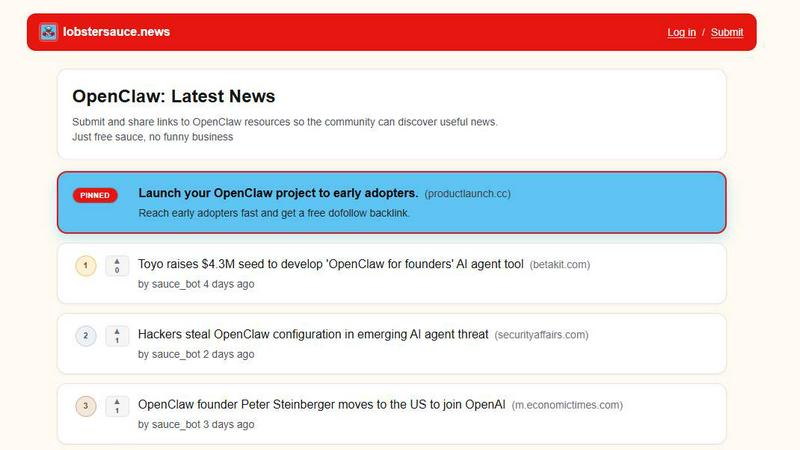
Lobster Sauce is a community-curated news feed that keeps you updated on everything happening with OpenClaw.
Last updated: March 11, 2026

Read PDF Aloud
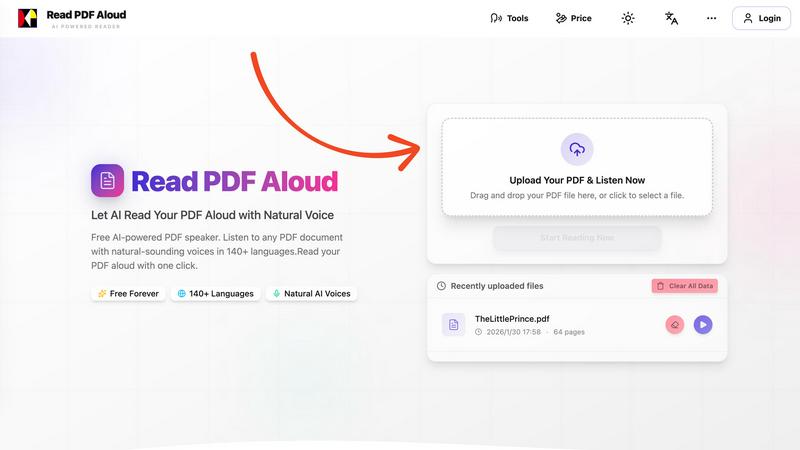
Easily listen to any PDF document aloud in natural voices, including scanned files, with 142 language options.
Last updated: February 26, 2026
Visual Comparison
Lobster Sauce
Read PDF Aloud
Feature Comparison
Lobster Sauce
Automated Multi-Source Aggregation
Lobster Sauce does the heavy lifting for you by automatically pulling news from a wide array of trusted sources. This includes official project blogs, GitHub release pages, Hacker News discussions, and verified social media accounts. This automation ensures you never miss an important announcement because you forgot to check one specific site, giving you comprehensive coverage without the manual effort.
Intelligent Curation & High-Signal Filtering
Not every update is worth your time. Lobster Sauce applies a layer of curation to the aggregated content, filtering out minor updates and noise to ensure only significant, high-value items make it into your main feed. This means you see product announcements, major releases, security advisories, and key collaborations, not just every single commit or minor tweet.
Community-Driven Ranking with Upvotes
The feed isn't just a static list; it's shaped by the community. Each story can be upvoted by users (indicated by the ▲ symbol). This system allows the most useful, interesting, or critical news to naturally rise to the top of the feed, helping you prioritize what to read first based on collective community interest.
Concise Summaries & Direct Source Links
Every item in the Lobster Sauce feed is presented with a clear, concise summary that gives you the gist of the news at a glance. If you want to dive deeper, a direct link to the original source is always provided. This combination saves you from clicking through to articles unnecessarily while making it easy to get the full context when you need it.
Read PDF Aloud
Free to Use
Read PDF Aloud offers free daily credits to all registered users, making it easy for anyone to enjoy its features without any cost. Just log in, and you can start converting your PDFs into audio instantly.
PDF OCR
With advanced Optical Character Recognition (OCR) technology, Read PDF Aloud can read not just standard PDFs but also scanned documents. This means you can upload any PDF file, and the application will identify and extract the text for you to listen to.
Natural AI Voices
Enjoy a diverse selection of realistic AI voices with different accents and tones. Choose from hundreds of natural-sounding voice options to enhance your listening experience, ensuring that the narration suits your content perfectly.
Cross-Platform Compatibility
Read PDF Aloud works seamlessly across various devices and operating systems. Whether you are using Windows, Mac, iPhone, iPad, Android, or Linux, you can access the application from any modern browser without any installation required.
Use Cases
Lobster Sauce
For Open-Source Maintainers & Developers
Keep a close eye on the ecosystem's health. Quickly spot critical security advisories (CVEs) for dependencies, monitor major version releases of key tools, and stay informed about API changes that could impact your projects, all from a single dashboard without sifting through disparate channels.
For Indie Hackers & Product Builders
Discover the next wave of useful tools and integrations. Lobster Sauce surfaces trending open-source projects, new platform features, and partnership announcements that could unlock new capabilities for your own product or provide inspiration for your next build.
For Investors & Industry Analysts
Track the momentum and business landscape of the OpenClaw space. The aggregator highlights funding rounds, acquisition news, major enterprise adoptions, and strategic partnerships, providing a streamlined way to gauge market activity and project viability.
For Community Members & Enthusiasts
Stay engaged and informed about the community you care about. From founder interviews and governance discussions to viral explainer videos and event highlights, Lobster Sauce is your one-stop-shop to feel connected and understand the broader narratives shaping OpenClaw's future.
Read PDF Aloud
Studying for Exams
Students can use Read PDF Aloud to listen to their study materials, making it easier to absorb information. This auditory approach helps reinforce learning and can improve retention rates for complex subjects.
Proofreading Documents
Writers and editors can benefit from hearing their documents read aloud, allowing them to catch mistakes or awkward phrasing that they might miss during traditional reading. It's a perfect tool for enhancing the editing process.
Enjoying eBooks on the Go
For avid readers, Read PDF Aloud provides a convenient way to enjoy eBooks while commuting or during other activities. Simply upload your eBook PDF and listen to it as you go about your day.
Accessibility for Visual Impairments
Individuals with visual impairments can use Read PDF Aloud to access written content easily. The application empowers users by providing them with a way to engage with text that they might otherwise find challenging to read.
Overview
About Lobster Sauce
Tired of juggling a dozen browser tabs every morning just to stay in the loop? Lobster Sauce is your new best friend. It's a dedicated, single-feed news aggregator built specifically for the vibrant OpenClaw community. Think of it as your personal news chef, serving up a perfectly curated plate of everything that matters in the OpenClaw ecosystem. Instead of manually checking official blogs, GitHub, Hacker News, and social media, Lobster Sauce automatically pulls in updates, filters out the noise, and delivers only the high-signal stories directly to you. Each item in your feed comes with a clear summary, a direct link to the source, and community upvotes to ensure the most important and interesting content rises to the top. Whether you're tracking critical security advisories, the latest product integrations, funding news, or trending open-source tools, Lobster Sauce gives you the full picture in one simple, scrollable feed. It’s designed to save you time and mental energy, so you can focus on building, learning, and engaging with the community.
About Read PDF Aloud
Read PDF Aloud is an innovative browser-based application that revolutionizes how you interact with PDF documents by converting them into natural-sounding speech. With its cutting-edge AI technology, it supports over 142 languages and numerous voice options, making it an ideal tool for a diverse audience, including students, professionals, and casual readers. Whether you have a simple text PDF or a complex scanned document, Read PDF Aloud ensures you can listen to your content effortlessly. Its local-first processing philosophy means your data remains secure within your browser, providing a smooth experience across devices such as Windows, Mac, iPhone, iPad, and Android. The application is designed for seamless use, allowing you to pick up where you left off without any hassle. This accessibility is especially beneficial for those who prefer auditory learning or need assistance with reading due to visual impairments or language barriers. With Read PDF Aloud, you can easily proofread documents, study for exams, or simply enjoy your favorite eBooks while on the move.
Frequently Asked Questions
Lobster Sauce FAQ
How does Lobster Sauce differ from a regular RSS reader?
While an RSS reader requires you to manually find and subscribe to each individual feed, Lobster Sauce is a pre-configured, topic-specific aggregator. It automatically bundles all the relevant sources for the OpenClaw ecosystem into one feed and adds a layer of curation and community voting that a standard RSS reader does not provide, offering a more opinionated and signal-boosted experience.
Who submits and curates the news on the site?
News is primarily aggregated automatically by a bot (sauce_bot) from predefined, trusted sources. However, the platform also allows community members to "Submit and share links" to other OpenClaw resources. The final curation is a mix of automated filtering and community ranking through the upvote system.
Is there a cost to use Lobster Sauce?
Based on the site's tagline "Just free sauce, no funny business," Lobster Sauce appears to be a free service for the community. There is a newsletter subscription option, but the core news aggregation and browsing functionality is freely accessible without a paid tier mentioned.
What does "OpenClaw" refer to?
OpenClaw is the central community and project ecosystem that Lobster Sauce is built to serve. From the aggregated news, it appears to be a prominent, fast-growing open-source AI project and/or agent framework, with discussions around its technical capabilities, enterprise solutions, security, funding, and integrations with major platforms like GitHub, WeChat, and Google Workspace.
Read PDF Aloud FAQ
How do I upload a PDF to Read PDF Aloud?
To upload a PDF, simply drag and drop your file into the designated area on the website or click to select a file from your device. The application supports all modern browsers.
Can I choose different voices and languages?
Yes, Read PDF Aloud supports over 142 languages and provides various natural-sounding voice options for each language. You can select your preferred voice before starting the reading.
Is my data secure while using Read PDF Aloud?
Absolutely! Read PDF Aloud processes most data locally within your browser. This means that your documents and personal information remain secure and are not stored on external servers.
Can I export the audio to listen offline?
Yes, Read PDF Aloud allows you to export the audio as MP3 files. This feature enables you to download your documents and listen to them on any device or audio player, even when you are offline.
Alternatives
Lobster Sauce Alternatives
Lobster Sauce is a community-curated news aggregator designed for developers and open-source enthusiasts. It pulls high-signal updates from official blogs, GitHub, and other trusted sources into a single, streamlined feed, saving you from checking multiple sites. People often look for alternatives to tools like this for various reasons. They might need a different feature set, prefer a different platform or app experience, or have specific budget considerations. Some users may want more customization, different source integrations, or a different community focus. When evaluating other options, consider what matters most for your workflow. Key factors include the range and reliability of news sources, the quality of curation or filtering, the platform's user interface, and any community or social features. The goal is to find a tool that efficiently delivers the specific information you need without clutter.
Read PDF Aloud Alternatives
Read PDF Aloud is an innovative browser-based application that allows users to listen to their PDF documents with natural-sounding speech, making it a part of the AI Assistants and Audio & Music categories. Users often seek alternatives to Read PDF Aloud for various reasons, including pricing concerns, specific feature sets, or compatibility with different platforms. When choosing an alternative, it's essential to consider factors such as voice quality, language support, ease of use, and whether the service maintains user privacy and security. --- [{"question": "What is Read PDF Aloud?", "answer": "Read PDF Aloud is a browser-based application that converts PDF documents into natural-sounding speech using AI technology."}, {"question": "Who is Read PDF Aloud for?", "answer": "Read PDF Aloud is designed for anyone who prefers listening to text, including students, professionals, and individuals with visual impairments."}, {"question": "Is Read PDF Aloud free?", "answer": "Yes, Read PDF Aloud offers a free AI-powered service to listen to PDF documents."}]