
Project20x vs Read PDF Aloud
Side-by-side comparison to help you choose the right AI tool.

Project20x
Project20x provides AI governance solutions that ensure your policies are compliant and effective for modern needs.
Last updated: March 4, 2026

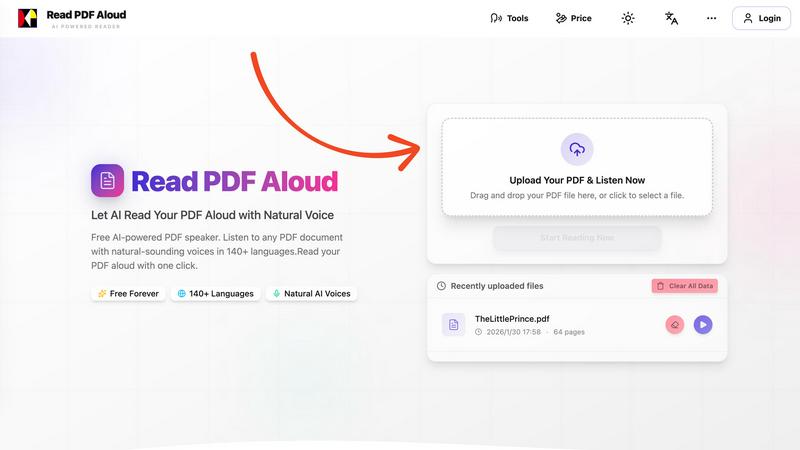
Read PDF Aloud
Easily listen to any PDF document aloud in natural voices, including scanned files, with 142 language options.
Last updated: February 26, 2026
Visual Comparison
Project20x

Read PDF Aloud
Feature Comparison
Project20x
Governance Layer
The Governance Layer of Project20x guides policy development through an AI-powered ten-step methodology. This feature dissects legislative texts, identifies inconsistencies, and simulates potential outcomes to empower lawmakers with valuable insights. By validating proposals before voting, it enhances the legislative process's effectiveness.
Management Layer
The Management Layer converts approved legislation into "Rules as Code," automating agency workflows for maximum efficiency. This feature eliminates bureaucratic inefficiencies, enabling real-time performance monitoring and ensuring that governmental initiatives are executed seamlessly and accurately.
Interface Layer
The Interface Layer provides citizens with round-the-clock access to AI agents, trained on comprehensive policy data. This feature simplifies the process of accessing public services, verifying eligibility, and tracking commitments made by elected officials, thus promoting civic engagement and transparency.
Security and Accountability
Project20x incorporates a zero-trust security architecture, ensuring that all governmental processes are secure and transparent. This feature includes human oversight in critical decision-making and ongoing bias evaluations, guaranteeing that all policies and financial allocations are accountable and traceable.
Read PDF Aloud
Free to Use
Read PDF Aloud offers free daily credits to all registered users, making it easy for anyone to enjoy its features without any cost. Just log in, and you can start converting your PDFs into audio instantly.
PDF OCR
With advanced Optical Character Recognition (OCR) technology, Read PDF Aloud can read not just standard PDFs but also scanned documents. This means you can upload any PDF file, and the application will identify and extract the text for you to listen to.
Natural AI Voices
Enjoy a diverse selection of realistic AI voices with different accents and tones. Choose from hundreds of natural-sounding voice options to enhance your listening experience, ensuring that the narration suits your content perfectly.
Cross-Platform Compatibility
Read PDF Aloud works seamlessly across various devices and operating systems. Whether you are using Windows, Mac, iPhone, iPad, Android, or Linux, you can access the application from any modern browser without any installation required.
Use Cases
Project20x
Legislative Process Improvement
Project20x can be utilized by lawmakers to enhance the legislative process. By using its Governance Layer, legislators can analyze proposed bills for clarity and potential conflicts, allowing them to make informed decisions before voting.
Streamlined Agency Workflows
Government agencies can implement the Management Layer to automate workflows related to new policies and regulations. This use case ensures that initiatives are executed efficiently, reducing delays and improving service delivery to the public.
Citizen Engagement
Citizens can interact with the Interface Layer to access information about public services and verify eligibility for programs. This use case empowers individuals to take an active role in their governance, fostering a more engaged and informed citizenry.
Accountability in Governance
Project20x can be employed by watchdog organizations and the public to track government commitments and financial allocations. By leveraging its security and accountability features, stakeholders can hold officials accountable for their actions and ensure transparency in government operations.
Read PDF Aloud
Studying for Exams
Students can use Read PDF Aloud to listen to their study materials, making it easier to absorb information. This auditory approach helps reinforce learning and can improve retention rates for complex subjects.
Proofreading Documents
Writers and editors can benefit from hearing their documents read aloud, allowing them to catch mistakes or awkward phrasing that they might miss during traditional reading. It's a perfect tool for enhancing the editing process.
Enjoying eBooks on the Go
For avid readers, Read PDF Aloud provides a convenient way to enjoy eBooks while commuting or during other activities. Simply upload your eBook PDF and listen to it as you go about your day.
Accessibility for Visual Impairments
Individuals with visual impairments can use Read PDF Aloud to access written content easily. The application empowers users by providing them with a way to engage with text that they might otherwise find challenging to read.
Overview
About Project20x
Project20x is an innovative AI-driven platform designed to revolutionize governmental operations by translating complex regulatory frameworks into user-friendly, actionable digital processes. Targeted at government agencies, lawmakers, and citizens, Project20x aims to bridge the gap between policy creation and public engagement. The platform operates through three distinct layers: Governance, Management, and Interface. The Governance Layer employs a ten-step AI methodology to aid lawmakers in developing sound policies by analyzing legislative texts for clarity and potential conflicts. The Management Layer turns these approved policies into functional code, implementing "Rules as Code" to create efficient automated workflows. Finally, the Interface Layer provides citizens with 24/7 access to AI agents trained on the codified policies, streamlining public service interactions. With a commitment to transparency, accountability, and security, Project20x ensures that all governmental activities are traceable, quantifiable, and subject to rigorous human oversight.
About Read PDF Aloud
Read PDF Aloud is an innovative browser-based application that revolutionizes how you interact with PDF documents by converting them into natural-sounding speech. With its cutting-edge AI technology, it supports over 142 languages and numerous voice options, making it an ideal tool for a diverse audience, including students, professionals, and casual readers. Whether you have a simple text PDF or a complex scanned document, Read PDF Aloud ensures you can listen to your content effortlessly. Its local-first processing philosophy means your data remains secure within your browser, providing a smooth experience across devices such as Windows, Mac, iPhone, iPad, and Android. The application is designed for seamless use, allowing you to pick up where you left off without any hassle. This accessibility is especially beneficial for those who prefer auditory learning or need assistance with reading due to visual impairments or language barriers. With Read PDF Aloud, you can easily proofread documents, study for exams, or simply enjoy your favorite eBooks while on the move.
Frequently Asked Questions
Project20x FAQ
What is Project20x designed to do?
Project20x is designed to improve governmental operations by leveraging AI to transform complex regulatory frameworks into clear, actionable digital processes for lawmakers and citizens.
How does the Governance Layer work?
The Governance Layer employs a ten-step AI-powered methodology to guide lawmakers in policy development, analyzing legislative texts and simulating outcomes to ensure clarity and effectiveness.
What benefits does the Management Layer provide?
The Management Layer automates agency workflows by converting approved policies into "Rules as Code," which streamlines processes, enhances efficiency, and allows for real-time performance monitoring.
How does Project20x ensure security and accountability?
Project20x features a zero-trust security architecture and includes human oversight in critical decisions. It also undergoes continuous bias evaluations, ensuring that all governmental actions are transparent and accountable.
Read PDF Aloud FAQ
How do I upload a PDF to Read PDF Aloud?
To upload a PDF, simply drag and drop your file into the designated area on the website or click to select a file from your device. The application supports all modern browsers.
Can I choose different voices and languages?
Yes, Read PDF Aloud supports over 142 languages and provides various natural-sounding voice options for each language. You can select your preferred voice before starting the reading.
Is my data secure while using Read PDF Aloud?
Absolutely! Read PDF Aloud processes most data locally within your browser. This means that your documents and personal information remain secure and are not stored on external servers.
Can I export the audio to listen offline?
Yes, Read PDF Aloud allows you to export the audio as MP3 files. This feature enables you to download your documents and listen to them on any device or audio player, even when you are offline.
Alternatives
Project20x Alternatives
Project20x is an innovative AI governance platform designed to enhance governmental operations by transforming complex regulatory frameworks into clear, actionable digital processes. It falls under the category of AI Assistants, utilizing advanced technology to streamline policy development and implementation while ensuring accountability and transparency. Users often seek alternatives to Project20x for various reasons, including pricing, specific feature sets, or compatibility with existing platforms. When exploring alternatives, it's important to consider factors such as ease of use, support services, security measures, and the extent to which the platform can be customized to meet unique organizational needs. A thorough evaluation of these aspects will help users find a solution that aligns with their goals.
Read PDF Aloud Alternatives
Read PDF Aloud is an innovative browser-based application that allows users to listen to their PDF documents with natural-sounding speech, making it a part of the AI Assistants and Audio & Music categories. Users often seek alternatives to Read PDF Aloud for various reasons, including pricing concerns, specific feature sets, or compatibility with different platforms. When choosing an alternative, it's essential to consider factors such as voice quality, language support, ease of use, and whether the service maintains user privacy and security. --- [{"question": "What is Read PDF Aloud?", "answer": "Read PDF Aloud is a browser-based application that converts PDF documents into natural-sounding speech using AI technology."}, {"question": "Who is Read PDF Aloud for?", "answer": "Read PDF Aloud is designed for anyone who prefers listening to text, including students, professionals, and individuals with visual impairments."}, {"question": "Is Read PDF Aloud free?", "answer": "Yes, Read PDF Aloud offers a free AI-powered service to listen to PDF documents."}]