
BudgetSheet vs RedBison
Side-by-side comparison to help you choose the right AI tool.

BudgetSheet
BudgetSheet automates bank transaction imports into Google Sheets for effortless budgeting and expense tracking.
Last updated: February 26, 2026

RedBison
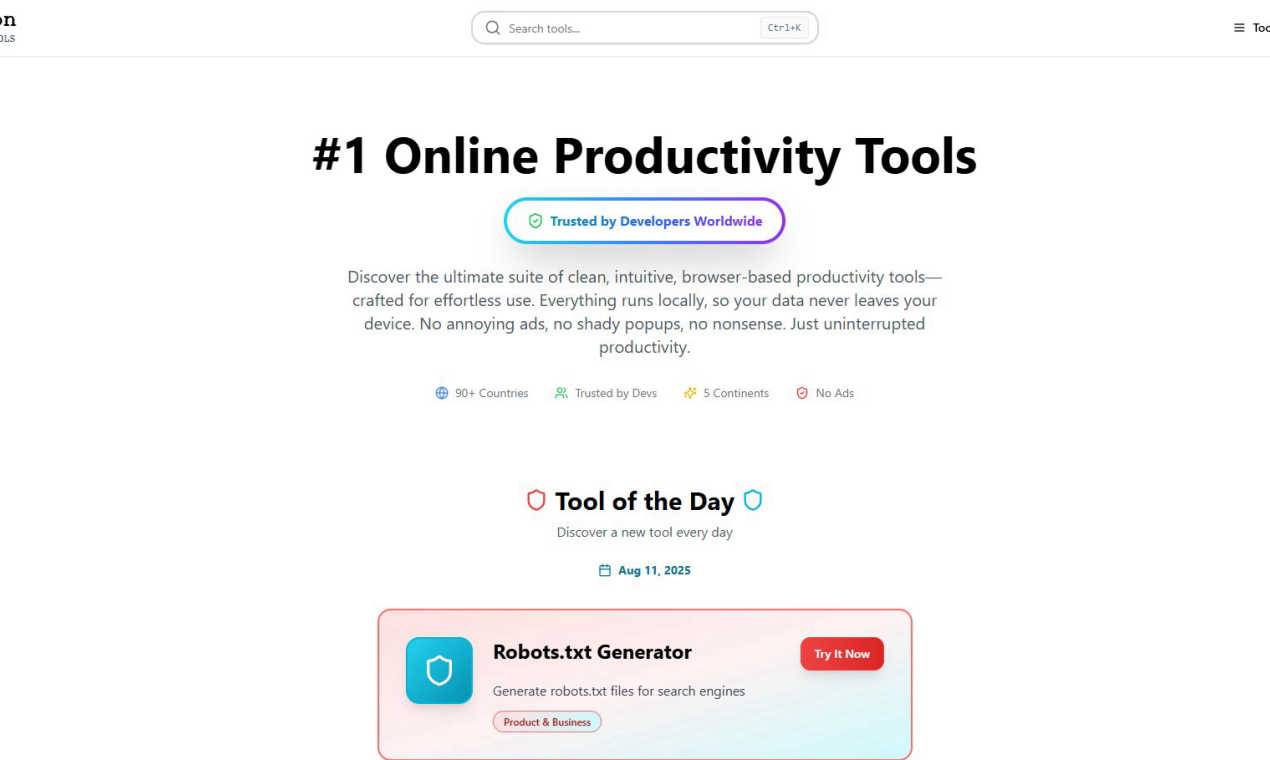
RedBison provides free, private online tools designed for developers and professionals to enhance productivity.
Last updated: March 1, 2026
Visual Comparison
BudgetSheet

RedBison
Feature Comparison
BudgetSheet
Live Bank Transactions
BudgetSheet allows you to import live bank transactions directly into your Google Sheets. This eliminates the need for manual data entry and ensures that your financial data is always up to date, allowing you to monitor your spending in real time.
Secure Bank Connections
Using Plaid to connect securely to your financial institutions, BudgetSheet ensures that your sensitive information is protected. The add-on does not store your bank logins; it only keeps a secure, read-only access token necessary for transaction retrieval.
Automation with Autofetch
With the Autofetch feature, you can fully automate the process of fetching new bank transactions every night. This means you can wake up to an updated budget without lifting a finger, making financial management easier than ever.
Customization and Control
BudgetSheet gives you the freedom to customize your spreadsheets according to your unique budgeting needs. You can design your charts and tables without being restricted by pre-defined templates, allowing for a more personalized experience.
RedBison
Comprehensive Tool Suite
RedBison boasts an extensive suite of over 200 tools that cater to various needs, from tech and productivity to health and finance. This ensures that no matter the task at hand, users can find a tool that fits their requirements seamlessly.
Privacy-First Approach
Every tool in RedBison runs locally in your web browser, meaning your data never leaves your device. This design choice prioritizes user privacy and security, making it a safe workspace for handling sensitive information.
Daily Tool Discovery
The "Tool of the Day" feature allows users to discover new and innovative tools daily. This encourages continuous learning and experimentation, helping users stay ahead in their respective fields while enhancing their productivity.
Intuitive User Interface
All tools are designed with a clean, intuitive interface that eliminates distractions. This user-friendly approach means that professionals can focus on their work without being sidetracked by ads or pop-ups, fostering an environment of uninterrupted productivity.
Use Cases
BudgetSheet
Personal Budgeting
Individuals can use BudgetSheet to create personalized budgeting sheets that automatically pull in their bank transactions. This enables users to track expenses and manage their finances without the complexity of traditional budgeting tools.
Small Business Expense Tracking
Small business owners can leverage BudgetSheet to keep tabs on their business expenses by importing transactions from multiple accounts. This helps in understanding cash flows and making informed financial decisions.
Investment Tracking
Investors can benefit from BudgetSheet by linking their investment accounts to track performance and expenses related to their investments. This allows for comprehensive financial oversight in one place.
Financial Reporting
Financial analysts can utilize BudgetSheet to generate detailed financial reports by importing necessary transaction data into customizable Google Sheets. This means reports can be tailored to specific needs without the clutter of unnecessary information.
RedBison
Efficient Coding and Debugging
Developers can leverage RedBison's powerful coding tools such as the JSON Formatter, Regex Tester, and Hash Generator to streamline their debugging processes. This helps them resolve issues faster and enhances overall code quality.
Project Management and Organization
Product managers can utilize tools like the Project Dashboard Generator and Kanban Board to visualize tasks and manage projects effectively. These tools facilitate better team collaboration and project tracking, ensuring that deadlines are met.
Startup Idea Validation
Entrepreneurs can employ RedBison's Idea Validation Framework and User Survey Designer to conduct thorough market research and gather user feedback. This helps them refine their business ideas and make informed decisions before launching new products.
Personal Finance Management
Individuals can benefit from tools like the Budget Planner and Investment Calculator to manage their finances effectively. These tools assist users in tracking expenses and planning for their financial future, promoting better financial health.
Overview
About BudgetSheet
BudgetSheet is an innovative Google Sheets add-on designed to streamline the process of importing bank transactions directly into your spreadsheets. It eliminates the hassle of manual exports or tedious copying and pasting from CSV files. This tool is perfect for individuals and businesses looking to gain better control over their financial data, create custom budgets, and track expenses efficiently. By leveraging the power of Plaid, BudgetSheet ensures secure connections with over 10,000 financial institutions, including checking accounts, savings accounts, credit cards, investment accounts, loans, and mortgages. With BudgetSheet, users can effortlessly automate their financial tracking, budget planning, and reporting, all while maintaining the flexibility to customize their spreadsheets to meet their unique needs. Whether you are a budget-conscious individual, a small business owner, or a financial analyst, BudgetSheet empowers you to manage your finances your way, providing a seamless integration with Google Sheets.
About RedBison
RedBison is your ultimate digital workshop, offering a vast collection of over 200 premium-quality tools specifically designed for tech professionals, entrepreneurs, and builders. Unlike traditional online resources cluttered with ads and distractions, RedBison provides a clean, secure, and ad-free environment where productivity thrives. Whether you are a developer debugging code, a product manager organizing a sprint, or a startup founder seeking to validate your next big idea, RedBison equips you with purpose-built tools to enhance your workflow. Each tool runs directly in your web browser, ensuring that your data, code snippets, and sensitive information remain on your device, preserving your privacy. Trusted by developers across more than 90 countries, RedBison is more than just a toolkit; it is a curated productivity platform that emphasizes power, privacy, and peace of mind, allowing you to focus on what truly matters: getting things done.
Frequently Asked Questions
BudgetSheet FAQ
How does BudgetSheet connect to my bank accounts?
BudgetSheet uses Plaid to securely connect to your bank accounts. This ensures that your sensitive information remains protected while providing you with live access to your financial data.
Is my financial data safe with BudgetSheet?
Yes, BudgetSheet prioritizes your security. It does not store your bank logins and only keeps a read-only access token that is encrypted. All transactions are passed directly to your Google Sheets.
Can I try BudgetSheet for free?
Absolutely! You can try BudgetSheet for free for 15 days without any credit card required. This allows you to explore all its features before committing to a paid plan.
What happens after the free trial ends?
After the 15-day free trial, BudgetSheet starts at $59 per year. You can easily upgrade to a paid plan through the BudgetSheet Addon menu whenever you're ready.
RedBison FAQ
What types of tools does RedBison offer?
RedBison offers a wide range of tools across various categories, including tech, productivity, creative design, health and wellness, and personal finance. This diverse selection ensures that every user can find relevant tools tailored to their needs.
Is RedBison free to use?
Yes, RedBison provides its suite of tools completely free of charge. Users can access all tools without any hidden fees or subscriptions, making it an accessible option for everyone.
How does RedBison ensure user privacy?
User privacy is paramount at RedBison. All tools operate directly in the user's web browser, meaning that no data is transmitted to external servers. This guarantees that sensitive information remains secure and private.
Can I suggest new tools for RedBison?
Absolutely! RedBison encourages user feedback and suggestions for new tools. Users can reach out through the platform to recommend features or tools they would like to see added, fostering a community-driven approach to tool development.
Alternatives
BudgetSheet Alternatives
BudgetSheet is an innovative tool that falls under the personal finance category, designed to streamline the process of managing your financial transactions. By seamlessly importing live bank data directly into Google Sheets, it eliminates the tedious tasks of manual exports and data entry. Users often seek alternatives to BudgetSheet for various reasons, including pricing concerns, specific feature requirements, or compatibility with different platforms. When searching for alternatives, it's essential to consider what features are most important for your financial tracking needs, such as automation capabilities, ease of use, and integration with other tools. Evaluating user reviews and trial options can also help ensure you find a solution that best fits your personal finance management style.
RedBison Alternatives
RedBison is a comprehensive digital toolkit designed for developers and tech professionals. It provides over 200 premium-quality tools that enable users to streamline their workflows in a secure, ad-free environment. Given the diversity of tools available, many users seek alternatives for various reasons such as pricing structures, specific features that better meet their needs, or preferences for different platforms. When choosing an alternative to RedBison, it's important to consider the range and quality of tools offered, ease of use, and the level of privacy and security provided. Look for platforms that prioritize a seamless user experience without the distractions of ads or unnecessary features. Additionally, check for tools that ensure your data remains private and secure, similar to what RedBison promises.