
Preuve AI vs Refbox
Side-by-side comparison to help you choose the right AI tool.

Preuve AI validates your startup ideas with real-time data, uncovering competitors and blind spots to boost your success.
Last updated: April 4, 2026

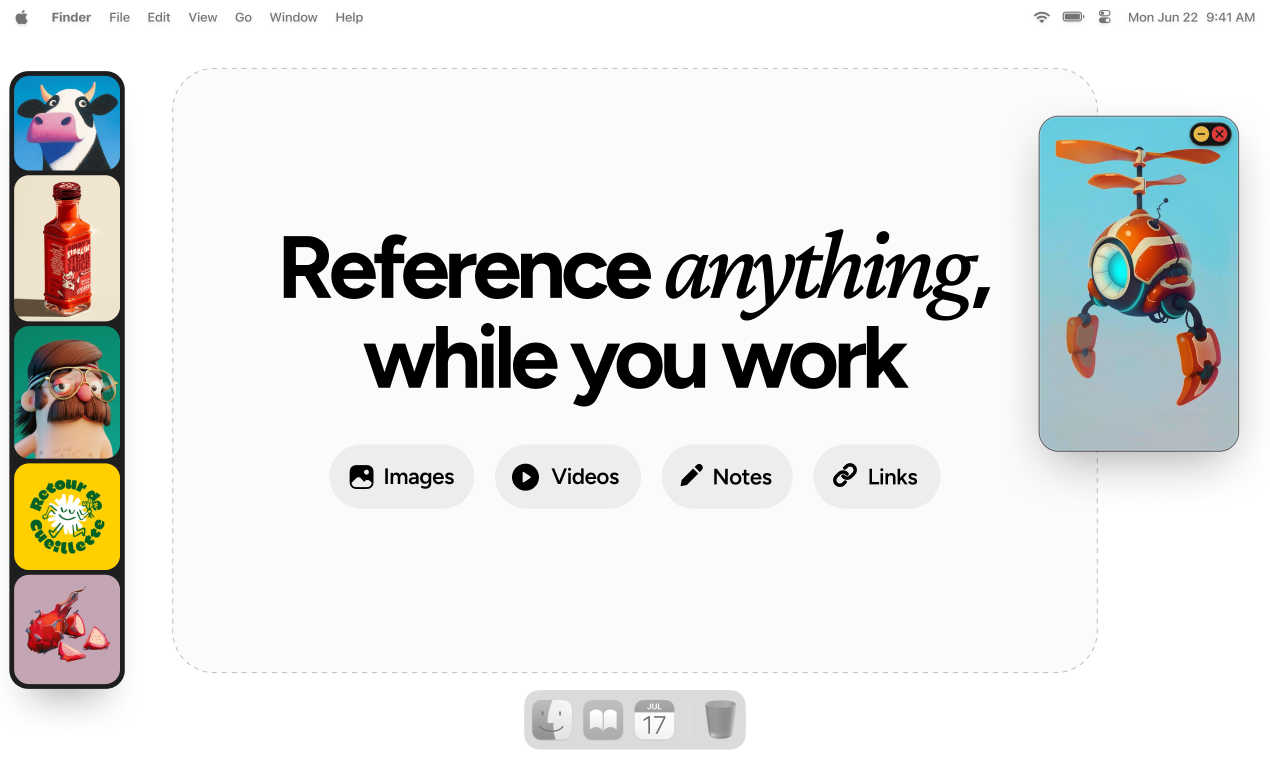
Refbox keeps your reference images and notes visible above your workspace for instant access.
Last updated: March 1, 2026
Visual Comparison
Preuve AI

Refbox
Feature Comparison
Preuve AI
Comprehensive Viability Reports
Preuve AI generates detailed viability reports for submitted ideas, encompassing competitor analysis, market size, and demand signals. Each report is backed by data from over 40 live sources, ensuring that entrepreneurs receive accurate and actionable insights tailored to their specific ideas.
Competitive Mapping
With the ability to map up to 15 competitors, Preuve AI provides users with critical insights into the competitive landscape. This feature includes funding data and pricing benchmarks, enabling founders to understand their competition thoroughly and make informed decisions about their market entry strategy.
Quick Free Scans
In just 60 seconds, users can access a free scan that offers a high-level overview of their startup idea. This quick assessment includes a viability score, a brief competitor preview, and highlights potential blockers and leverage points, allowing entrepreneurs to understand if further investigation is warranted.
Pivot Recommendations
Preuve AI doesn’t just stop at validation; it also offers actionable pivot recommendations. By analyzing the submitted idea and its market context, the tool provides insights on how founders can adjust their approach to improve viability and better meet market demands.
Refbox
Always-on-Top Floating Frames
The core feature of Refbox is its floating frames. You can pin any image, video, GIF, or note in a resizable window that stays on top of all other applications, like Photoshop, Blender, or your code editor. This eliminates the need for alt-tabbing or rearranging windows, keeping your reference material instantly accessible and your primary workspace uncluttered. You can have multiple frames open at once, each independently adjustable.
Masonry Mode & Gallery View
Refbox offers flexible viewing options to suit any task. Masonry Mode automatically arranges your references on an infinite canvas in a clean, Pinterest-style grid, perfect for mood boarding and seeing the big picture. For focused review, the full-screen Gallery View lets you flip through items like a slideshow, making detailed comparison quick and effortless.
Smart Media Handling & Tools
Beyond simple display, Refbox includes powerful tools for working with your references. You can step through GIFs frame-by-frame for detailed study, take screenshots of websites by pasting a URL, and use a built-in color picker on any media to copy hex codes. It also supports cropping images, viewing SVG files, and creating styled notes with checklists, making it a versatile hub for all your reference needs.
Streamlined Workflow Shortcuts
Designed for efficiency, Refbox is packed with intuitive controls. Quickly swap references in a frame using your arrow keys, minimize frames to access apps behind them, or instantly switch between different collections of references. You can auto-hide your entire "Box" and summon it only when needed, keeping your screen clean until inspiration strikes. These thoughtful shortcuts save countless clicks and hours over time.
Use Cases
Preuve AI
Startup Founders Validating Ideas
Entrepreneurs looking to enter the market can use Preuve AI to validate their business ideas quickly. By receiving a viability score and comprehensive report, founders can determine whether to proceed with development or pivot their concepts based on solid data.
Investors Evaluating Opportunities
Investors can leverage Preuve AI to analyze potential startups before committing funds. The detailed reports provide insights into market demand and competitive landscapes, helping investors make informed decisions about where to allocate their resources.
Teams Qualifying Leads
Sales and marketing teams can utilize Preuve AI to assess startup leads before initial meetings. By understanding the viability and competitive positioning of potential clients, teams can tailor their pitches and strategies for maximum impact.
Market Researchers Seeking Insights
Market researchers can use Preuve AI to gather comprehensive data on emerging trends and competitor activity within various industries. This tool helps researchers track market dynamics and identify opportunities for innovation and growth.
Refbox
Digital Illustration & Concept Art
Illustrators and concept artists can keep character sheets, environment photos, and color palettes floating right next to their canvas in Clip Studio Paint or Procreate. The ability to lock frames means they can even sketch directly over a reference without it moving, and the pixel-perfect rendering mode ensures pixel art references are displayed with crisp clarity.
UI/UX & Web Design
Designers building interfaces in Figma or Sketch can float style guides, competitor screenshots, and component libraries in Refbox. The website screenshot feature lets them quickly capture live pages for reference, and the color picker tool allows instant sampling and copying of colors directly from any inspiration image into their design tool.
3D Modeling & Animation
3D artists and animators working in Blender or Maya can pin orthographic reference images, texture photos, or motion study videos in floating windows around their viewport. The GIF playback control is invaluable for animators to scrub through frame-by-frame to study movement, all without leaving their 3D workspace.
Motion Graphics & Video Editing
Motion designers in After Effects or video editors in Premiere Pro can use Refbox to keep storyboards, style frames, and video reference clips visible. They can organize sequences in the Gallery view to flip through quickly, ensuring their creative direction stays consistent throughout the editing and compositing process.
Overview
About Preuve AI
Preuve AI is an innovative startup validation tool designed to help founders assess their business ideas before investing significant time and resources into development. By allowing users to input their ideas in simple language, Preuve AI generates comprehensive, source-backed reports. These reports include a detailed competitor analysis, demand signals, market size estimates, pricing benchmarks, and key risks associated with the idea. Each claim in the report links to its source, ensuring transparency and credibility. With more than 3,500 startup ideas analyzed across 13 industries since its inception, Preuve AI aims to reduce the 42% failure rate of startups attributed to a lack of market need. Free scans provide quick insights, while paid reports unlock deeper analysis and actionable recommendations, making it a valuable resource for entrepreneurs looking to validate their ideas effectively.
About Refbox
Refbox is the ultimate floating reference manager designed to keep creative professionals in their flow. It solves the universal frustration of constantly switching between tabs, folders, and applications to view source material. Instead of digging through your desktop or browser, Refbox lets you pin images, videos, GIFs, and notes in resizable, always-on-top frames that float above any other app on your screen. This means your inspiration and references are always visible at a glance, right where you're working. Whether you're sketching a character, designing a UI, animating a sequence, or modeling in 3D, Refbox provides a seamless and distraction-free environment. You can add media from anywhere—drag and drop from the web, your computer, or even paste directly from your clipboard. With smart viewing modes like Masonry Layout and a full-screen Gallery, it adapts to your workflow. Built for speed and organization, Refbox is an essential tool for graphic designers, illustrators, animators, photographers, and digital artists who value focus and efficiency.
Frequently Asked Questions
Preuve AI FAQ
How long does it take to receive a report from Preuve AI?
After submitting your idea, you can access a free scan in just 60 seconds. For a full Founder Report, it takes a little longer, but you will receive comprehensive insights typically within a few minutes.
What kind of data sources does Preuve AI scan?
Preuve AI analyzes over 40 live data sources, including popular platforms like Crunchbase, Google Trends, Reddit, Product Hunt, and G2, ensuring a well-rounded view of the market landscape.
Can I use Preuve AI for multiple ideas?
Yes, while free scans are limited to two per user, you can purchase additional Founder Reports for individual ideas at a one-time cost of $29 each, allowing you to validate multiple concepts effectively.
What if I am not satisfied with my report?
Preuve AI offers a 14-day report guarantee, meaning if you're not satisfied with the insights provided, you can reach out for support to discuss your concerns or request a review of your report.
Refbox FAQ
What kinds of files can I use with Refbox?
Refbox supports a wide range of media types to cover most creative needs. You can directly add common image formats (JPG, PNG, WebP, SVG), video files (MP4, MOV), and GIFs. You can also create and format text notes right within the app. A standout feature is the ability to paste a website URL, and Refbox will automatically generate a screenshot of that page for you to use as a reference.
Does Refbox work on multiple monitors?
Yes, absolutely. Refbox is designed for modern workflows and works seamlessly across multiple monitors. You can drag your floating reference frames onto any screen, allowing you to dedicate one monitor entirely to your references in Masonry mode while keeping your main screen focused on your creative application.
Can I organize my references into different projects?
Yes, you can. Refbox allows you to create and save multiple Collections. This lets you separate references for different projects, clients, or tasks—like one collection for a logo design and another for a website redesign. You can switch between these collections instantly with a single click, keeping your workspace organized and context-specific.
Is there a free trial or version of Refbox?
Refbox operates on a simple, one-time purchase model. This means you pay once and own the current version of the app forever. While there isn't a traditional subscription, the website may offer a limited-time trial so you can test all the features and ensure it fits your workflow before making the one-time purchase.
Alternatives
Preuve AI Alternatives
Preuve AI is a powerful tool designed to help entrepreneurs validate their startup ideas using real data instead of subjective opinions. Falling under the category of AI Assistants and Productivity & Management, it provides founders with comprehensive insights such as competitor analysis, market size, and viability scores. This encourages informed decision-making before investing time and resources into a project. Users often seek alternatives to Preuve AI for various reasons, including pricing, specific features that may not meet their unique needs, or compatibility with different platforms. When looking for an alternative, it's essential to consider the depth of analysis provided, the types of data sources utilized, and the overall user experience to ensure that the new tool aligns with your specific validation requirements.
Refbox Alternatives
Refbox is a specialized design tool that acts as a floating reference manager. It helps creatives by keeping images, videos, and notes visible in always-on-top windows, eliminating the need to constantly switch between applications while working. People often explore alternatives for various reasons. This could be due to budget constraints, a need for specific features Refbox might not have, or because they require an app that works on a different operating system. Finding the right fit for your unique workflow is key. When looking for a similar tool, consider what's most important for your process. Key factors include how easily you can pin and organize references, support for different media types like GIFs and videos, and whether the tool offers layout options that suit your screen setup and personal preferences.