
Refbox vs SureThing.io
Side-by-side comparison to help you choose the right AI tool.

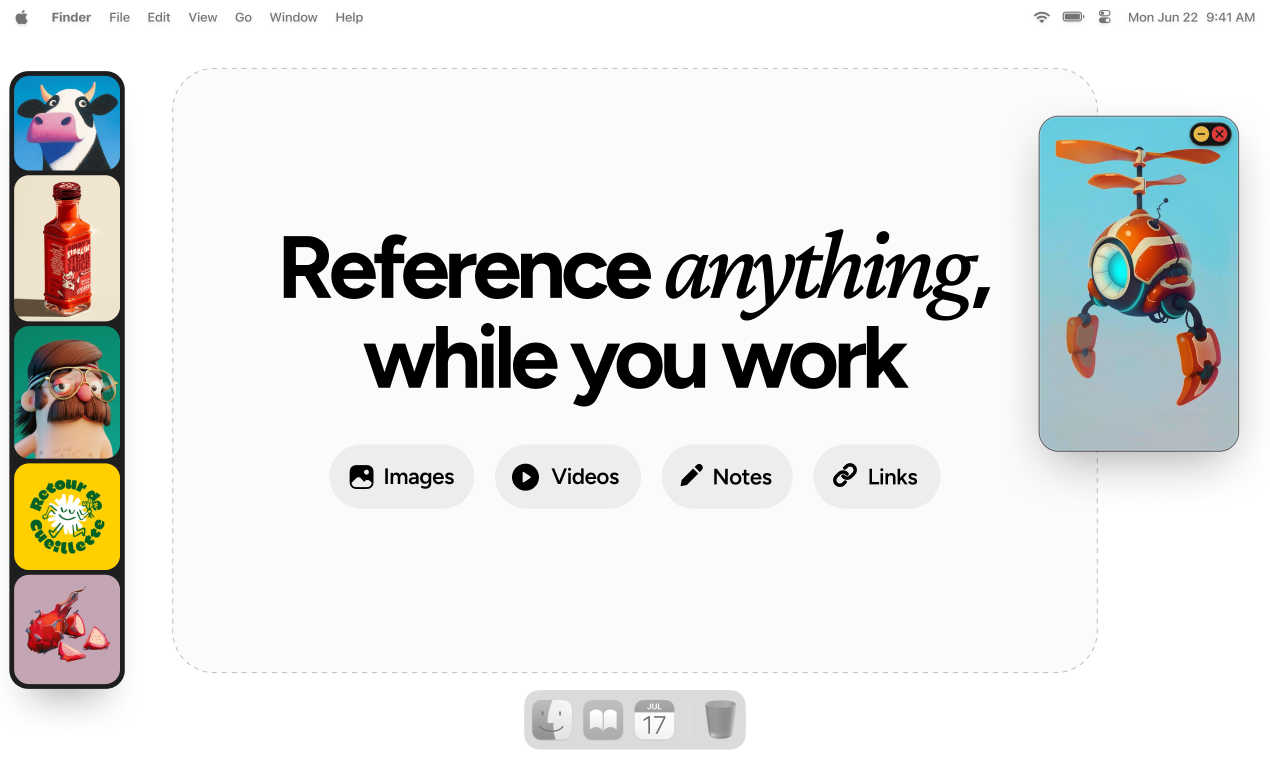
Refbox keeps your reference images and notes visible above your workspace for instant access.
Last updated: March 1, 2026

SureThing.io
SureThing.io is your autonomous business partner that learns your style and works securely around the clock.
Last updated: March 19, 2026
Visual Comparison
Refbox
SureThing.io

Feature Comparison
Refbox
Always-on-Top Floating Frames
The core feature of Refbox is its floating frames. You can pin any image, video, GIF, or note in a resizable window that stays on top of all other applications, like Photoshop, Blender, or your code editor. This eliminates the need for alt-tabbing or rearranging windows, keeping your reference material instantly accessible and your primary workspace uncluttered. You can have multiple frames open at once, each independently adjustable.
Masonry Mode & Gallery View
Refbox offers flexible viewing options to suit any task. Masonry Mode automatically arranges your references on an infinite canvas in a clean, Pinterest-style grid, perfect for mood boarding and seeing the big picture. For focused review, the full-screen Gallery View lets you flip through items like a slideshow, making detailed comparison quick and effortless.
Smart Media Handling & Tools
Beyond simple display, Refbox includes powerful tools for working with your references. You can step through GIFs frame-by-frame for detailed study, take screenshots of websites by pasting a URL, and use a built-in color picker on any media to copy hex codes. It also supports cropping images, viewing SVG files, and creating styled notes with checklists, making it a versatile hub for all your reference needs.
Streamlined Workflow Shortcuts
Designed for efficiency, Refbox is packed with intuitive controls. Quickly swap references in a frame using your arrow keys, minimize frames to access apps behind them, or instantly switch between different collections of references. You can auto-hide your entire "Box" and summon it only when needed, keeping your screen clean until inspiration strikes. These thoughtful shortcuts save countless clicks and hours over time.
SureThing.io
Proactive Autonomous Operation
Unlike passive tools that wait for commands, SureThing takes initiative. It constantly scans your connected work environments—like your email inbox—identifies what needs attention, and acts on your behalf. This means it can flag urgent messages, draft initial responses, and manage routine tasks without you having to prompt it every single time, freeing you to concentrate on strategic thinking.
Persistent, Adaptive Memory
This is SureThing's core superpower. It builds a comprehensive understanding of you over time, remembering your communication style, your priorities for different projects, and your preferences for scheduling. The longer you work together, the less context you need to provide. It won't forget a detail you mentioned last week, ensuring consistency and personalized service in every action it takes.
Enterprise-Grade Security & Reliability
SureThing is built for users who need to trust an AI with real, sensitive work. With SOC 2 certification and Google CASA Tier 2 compliance, it meets rigorous standards for data security, privacy, and system availability. This foundation of trust means you can confidently connect it to your critical work apps, knowing it's designed for dependable, day-in, day-out performance.
Cross-App Action & Integration
SureThing doesn't just observe—it acts. It can move information and execute tasks across the applications you use, such as updating your project management tool when an email confirms a deliverable or scheduling a follow-up meeting based on a conversation thread. This creates a seamless, automated workflow that bridges gaps between your favorite tools.
Use Cases
Refbox
Digital Illustration & Concept Art
Illustrators and concept artists can keep character sheets, environment photos, and color palettes floating right next to their canvas in Clip Studio Paint or Procreate. The ability to lock frames means they can even sketch directly over a reference without it moving, and the pixel-perfect rendering mode ensures pixel art references are displayed with crisp clarity.
UI/UX & Web Design
Designers building interfaces in Figma or Sketch can float style guides, competitor screenshots, and component libraries in Refbox. The website screenshot feature lets them quickly capture live pages for reference, and the color picker tool allows instant sampling and copying of colors directly from any inspiration image into their design tool.
3D Modeling & Animation
3D artists and animators working in Blender or Maya can pin orthographic reference images, texture photos, or motion study videos in floating windows around their viewport. The GIF playback control is invaluable for animators to scrub through frame-by-frame to study movement, all without leaving their 3D workspace.
Motion Graphics & Video Editing
Motion designers in After Effects or video editors in Premiere Pro can use Refbox to keep storyboards, style frames, and video reference clips visible. They can organize sequences in the Gallery view to flip through quickly, ensuring their creative direction stays consistent throughout the editing and compositing process.
SureThing.io
The Overwhelmed Solo Founder
For a founder running a business alone, SureThing acts as a force multiplier. It can manage inbound customer inquiries, draft responses, track outreach campaigns, and help coordinate a product launch—all while the founder focuses on product development and high-level strategy. It effectively provides the support of an extra team member.
The Executive with a Packed Schedule
Busy executives can offload the cognitive load of calendar management and communication triage. SureThing can prioritize emails, draft succinct summaries of long threads, schedule meetings based on preferences, and ensure nothing falls through the cracks, allowing the executive to stay focused on leadership and decision-making.
The Project Manager Juggling Multiple Threads
SureThing helps project managers stay on top of dependencies and communications. It can monitor project-specific email channels, update task statuses in tools like Asana or Jira based on updates, send gentle reminder follow-ups to contributors, and compile progress reports, keeping the entire project moving forward smoothly.
The Professional Protecting Deep Work Time
For anyone who needs uninterrupted blocks of time, SureThing serves as a protective shield. It can handle routine communications, filter out non-urgent notifications, and only escalate truly important items. This allows the user to enter a state of deep focus without the constant fear of missing something critical.
Overview
About Refbox
Refbox is the ultimate floating reference manager designed to keep creative professionals in their flow. It solves the universal frustration of constantly switching between tabs, folders, and applications to view source material. Instead of digging through your desktop or browser, Refbox lets you pin images, videos, GIFs, and notes in resizable, always-on-top frames that float above any other app on your screen. This means your inspiration and references are always visible at a glance, right where you're working. Whether you're sketching a character, designing a UI, animating a sequence, or modeling in 3D, Refbox provides a seamless and distraction-free environment. You can add media from anywhere—drag and drop from the web, your computer, or even paste directly from your clipboard. With smart viewing modes like Masonry Layout and a full-screen Gallery, it adapts to your workflow. Built for speed and organization, Refbox is an essential tool for graphic designers, illustrators, animators, photographers, and digital artists who value focus and efficiency.
About SureThing.io
SureThing.io is your proactive, 24/7 AI work partner. Think of it less as a chatbot you command and more as a trusted colleague who knows you, understands your goals, and gets things done in the background. While you're focused on deep work or even sleeping, SureThing is actively monitoring your inbox, drafting thoughtful replies in your unique voice, managing your calendar, tracking project progress, and taking action across the apps you use daily. What truly sets it apart is its state-of-the-art memory; SureThing remembers your preferences, patterns, contacts, and objectives across every interaction. It learns from your feedback, avoids repeating mistakes, and continuously adapts to become more helpful over time. Built with enterprise-grade security (SOC 2 certified and Google CASA Tier 2 compliant), it's designed for reliability in real-world scenarios, not just flashy demos. SureThing is perfect for busy professionals, executives, and especially solo founders and small teams who need an extra set of capable, intelligent hands to manage the operational load and help them execute complex projects, like full go-to-market launches, with greater efficiency and less personal burnout.
Frequently Asked Questions
Refbox FAQ
What kinds of files can I use with Refbox?
Refbox supports a wide range of media types to cover most creative needs. You can directly add common image formats (JPG, PNG, WebP, SVG), video files (MP4, MOV), and GIFs. You can also create and format text notes right within the app. A standout feature is the ability to paste a website URL, and Refbox will automatically generate a screenshot of that page for you to use as a reference.
Does Refbox work on multiple monitors?
Yes, absolutely. Refbox is designed for modern workflows and works seamlessly across multiple monitors. You can drag your floating reference frames onto any screen, allowing you to dedicate one monitor entirely to your references in Masonry mode while keeping your main screen focused on your creative application.
Can I organize my references into different projects?
Yes, you can. Refbox allows you to create and save multiple Collections. This lets you separate references for different projects, clients, or tasks—like one collection for a logo design and another for a website redesign. You can switch between these collections instantly with a single click, keeping your workspace organized and context-specific.
Is there a free trial or version of Refbox?
Refbox operates on a simple, one-time purchase model. This means you pay once and own the current version of the app forever. While there isn't a traditional subscription, the website may offer a limited-time trial so you can test all the features and ensure it fits your workflow before making the one-time purchase.
SureThing.io FAQ
How is SureThing different from a standard AI chatbot?
Standard chatbots are reactive—they only respond when you ask a question. SureThing is proactive and autonomous. It takes initiative based on its understanding of your work and goals. Furthermore, its persistent memory means it learns and remembers your context permanently, unlike chatbots that start fresh with each conversation.
What does "Google CASA Tier 2 Compliant" mean?
Google's Cloud Application Security Assessment (CASA) framework evaluates the security of applications that integrate with Google Workspace. Tier 2 compliance is a rigorous level that indicates SureThing has undergone a thorough independent security review, giving you confidence that it handles your Google-connected data with a high standard of protection.
Can I control what SureThing does on my behalf?
Absolutely. You maintain full oversight. SureThing is designed to suggest actions and draft communications for your review before sending. You can approve, edit, or reject anything. Over time, as it learns your preferences, it may automate more routine tasks, but you always have the final say and can adjust its permissions.
How does SureThing learn my "voice" for communication?
SureThing analyzes your past written communications—emails, messages, etc.—to understand your tone, formality, common phrases, and style. When it drafts a reply or message, it mimics these patterns. You can also provide direct feedback ("make this more casual" or "sound more enthusiastic"), which it remembers and applies to future drafts.
Alternatives
Refbox Alternatives
Refbox is a specialized design tool that acts as a floating reference manager. It helps creatives by keeping images, videos, and notes visible in always-on-top windows, eliminating the need to constantly switch between applications while working. People often explore alternatives for various reasons. This could be due to budget constraints, a need for specific features Refbox might not have, or because they require an app that works on a different operating system. Finding the right fit for your unique workflow is key. When looking for a similar tool, consider what's most important for your process. Key factors include how easily you can pin and organize references, support for different media types like GIFs and videos, and whether the tool offers layout options that suit your screen setup and personal preferences.
SureThing.io Alternatives
SureThing.io is an autonomous AI agent for business management, designed to proactively handle tasks like email, scheduling, and project tracking. It belongs to the productivity and management software category, aiming to function as a reliable, always-on assistant. Users often explore alternatives for various reasons. These can include budget constraints, a need for different specific features, or a preference for a platform that integrates with a particular set of tools. The search for the right fit is a normal part of finding software that aligns perfectly with individual workflows and business requirements. When evaluating options, consider a few key factors. Look for an agent's core capability: is it reactive or truly proactive? Assess the quality of its memory and learning over time, as context persistence is crucial. Finally, prioritize proven reliability and security standards, especially if you plan to trust the tool with sensitive data and critical business functions.