
Renderly vs tools.video
Side-by-side comparison to help you choose the right AI tool.

Renderly
Renderly automates video production, enabling you to generate thousands of personalized videos quickly and efficiently.
Last updated: February 26, 2026

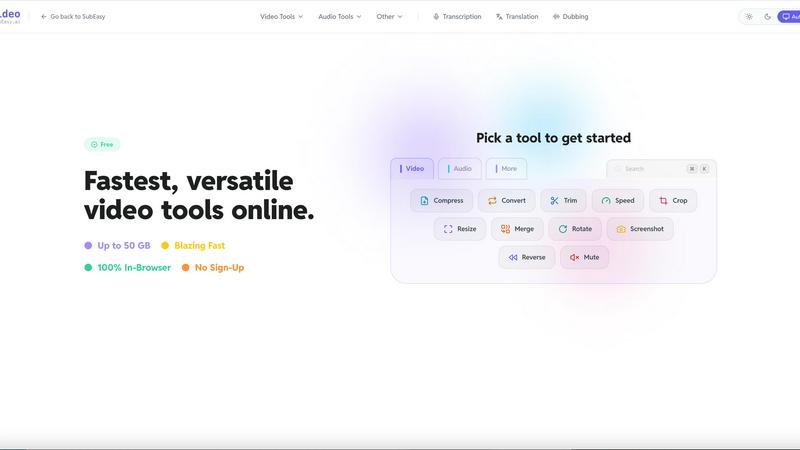
tools.video is a fast, free online video toolkit for compressing, converting, cropping, and trimming videos without watermarks or sign-ups.
Last updated: April 13, 2026
Visual Comparison
Renderly

tools.video
Feature Comparison
Renderly
API-First Architecture
Renderly's RESTful API is built for high-volume video generation, allowing developers to programmatically create videos at scale. Comprehensive documentation and SDKs make it easy to integrate into any workflow.
Template Management
The platform offers a centralized library for managing video templates. Users can create JSON-configurable templates that support dynamic content, making it easy to personalize videos for different audiences.
Scalable Infrastructure
Renderly's cloud-native platform is designed to auto-scale, handling thousands of concurrent rendering requests. This means businesses can produce anywhere from a single video to 100,000+ without performance drops.
Credit-Based Billing
Renderly employs a transparent credit-based pricing model. Users only pay for what they render, with volume discounts available, ensuring cost-efficiency and predictability in budgeting.
tools.video
Video Compression
The video compression tool allows users to reduce the size of their video files without sacrificing quality. This feature is essential for those looking to save space or upload videos quickly to social media platforms. With tools.video, you can compress large files effortlessly, making it easier to share your content without lengthy upload times.
Format Conversion
tools.video supports an extensive range of formats, including MP4, MOV, WebM, and many others. This feature enables users to convert their videos to the format that best suits their needs, whether for web use, playback on different devices, or editing purposes. The process is straightforward and requires no additional software, making it accessible for everyone.
Editing Tools
The editing tools available on tools.video make it easy to trim, crop, mute, or merge video clips. These features are designed to be intuitive, allowing users to make quick edits without the need for complex software. Whether you are creating social media content or preparing educational materials, these tools help streamline the editing process.
Media Extraction
With the media extraction feature, users can convert videos to GIFs or extract high-quality MP3 audio tracks from their videos. This functionality is particularly useful for content creators who want to repurpose video content into other formats, such as creating engaging GIFs for social media or extracting audio for podcasts.
Use Cases
Renderly
Personalized Marketing Videos
Businesses can leverage Renderly to generate tailored marketing videos for individual customers. By using customer data, companies can create unique messaging that resonates with their audience, increasing engagement and conversion rates.
Social Media Content Creation
Renderly excels at producing bulk social media content. Whether creating promotional videos or engaging posts, users can automate the generation of multiple videos, saving time and enhancing their online presence.
Data-Driven Motion Graphics
With Renderly, organizations can transform complex data into visually appealing motion graphics. This is particularly useful for presentations, reports, and educational content, making information more digestible and engaging.
E-Learning and Training Videos
Educational institutions and businesses can create personalized training videos for their employees or students. By using the template-driven approach, content can be tailored to various learning objectives, improving knowledge retention.
tools.video
Content Creation for Social Media
Tools.video is perfect for social media managers and content creators who need to quickly edit and format videos for platforms like Instagram, Facebook, and TikTok. With its fast processing and user-friendly tools, you can create engaging content with minimal effort.
Educational Use
Educators can utilize tools.video to prepare instructional videos or presentations that require video editing. By easily trimming clips or converting formats, teachers can create professional-looking materials that enhance the learning experience for students.
Podcast Production
For podcasters, the media extraction feature is invaluable. You can quickly extract audio from video files, allowing for seamless integration of video content into audio formats. This can help diversify your content offerings and reach a broader audience.
Personal Projects
Individuals working on personal video projects, such as family videos or travel montages, will find tools.video incredibly helpful. The ability to compress large files and perform basic edits means that anyone can create polished videos without needing extensive technical knowledge.
Overview
About Renderly
Renderly is an innovative video infrastructure platform designed to revolutionize video production for developers and content creators. By automating the video creation process, Renderly allows users to generate personalized videos, bulk social media content, and data-driven motion graphics effortlessly. Its API-first design means that integrating Renderly into existing workflows is seamless and efficient. With the capacity to produce thousands of videos daily, Renderly is perfect for enterprises and businesses looking to scale their video output without sacrificing quality or incurring high costs. The platform ensures a robust infrastructure with features like auto-scaling capabilities, template-driven designs, and a commitment to security. By leveraging Renderly, users can save up to 90% on video production costs while enjoying a user-friendly experience that empowers creativity and efficiency.
About tools.video
tools.video is a powerful web-based video processing suite that simplifies how you handle video and audio editing tasks. This tool is designed for speed and efficiency, making it ideal for creators, educators, and professionals who need reliable video solutions without the hassle of expensive software. With tools.video, users can perform various tasks, including video compression, format conversions, and basic editing—all directly in their browser. There's no need for account registration, and files are processed locally, ensuring that privacy is maintained. The platform supports large files up to 50 GB and offers a user-friendly interface that allows for quick and seamless workflows. Whether you are looking to compress a video for faster uploading or convert a file format for compatibility, tools.video provides a straightforward, no-frills approach to video processing that respects your time and resources.
Frequently Asked Questions
Renderly FAQ
What types of videos can I create using Renderly?
Renderly allows you to create a wide range of videos, including personalized marketing content, bulk social media posts, data-driven animations, and educational videos, all tailored to your specific needs.
How does the credit-based billing work?
Renderly uses a transparent credit-based billing system where users pay only for the videos they render. This allows for flexibility and cost control, making it easier to manage budgets for video production.
Is Renderly suitable for small businesses?
Absolutely! Renderly is designed to scale with your needs, making it suitable for businesses of all sizes. Whether you are producing one video or thousands, Renderly accommodates your production capacity.
What security measures does Renderly have in place?
Renderly is SOC 2 compliant and implements robust security measures, including data encryption, access controls, and audit logging, ensuring your data is safe and secure while using the platform.
tools.video FAQ
Is tools.video free to use?
Yes, tools.video is completely free to use. There are no hidden fees, subscriptions, or account registrations required to access its features.
What file types does tools.video support?
tools.video supports a wide array of file formats including MP4, MOV, MKV, WebM, AVI, and many more. It also provides multi-channel audio support, ensuring compatibility with various media types.
How long does processing take?
Processing times can vary based on the size of the file and the complexity of the task. However, tools.video is designed for speed, utilizing advanced technology to ensure that tasks are completed quickly and efficiently.
Does tools.video keep my files?
No, tools.video processes everything locally on your device. This means your files never leave your computer, ensuring maximum privacy and security while working on your projects.
Alternatives
Renderly Alternatives
Renderly is a video infrastructure platform designed to automate video production, allowing developers and creators to generate thousands of videos quickly using a powerful API or an intuitive online editor. This innovative tool is ideal for producing personalized videos, bulk social media content, and data-driven motion graphics at scale, making it a valuable asset in the dynamic world of video creation. Users often seek alternatives to Renderly for various reasons, including pricing concerns, specific feature requirements, or compatibility with their existing platforms. When searching for an alternative, consider factors such as ease of use, customization options, scalability, and the ability to integrate with your current workflow. Finding a solution that meets your unique video production needs is essential for enhancing your content strategy.
tools.video Alternatives
tools.video is a free, online video toolkit that belongs to the video processing category. It provides users with a variety of essential tools such as compression, conversion, and editing, all within a browser-based platform. This accessibility makes it appealing to creators, students, and professionals seeking quick and effective video solutions without the hassle of installations or expensive software. Users often search for alternatives to tools.video for various reasons, such as specific feature requirements, compatibility with different platforms, or preferences for unique editing capabilities. When evaluating alternatives, it’s important to consider factors like ease of use, range of features, pricing models, and whether the tool supports the video formats you need. A good alternative should provide the same level of convenience and functionality while meeting your specific needs.