
GifSpeed vs Rocket Source
Side-by-side comparison to help you choose the right AI tool.

GifSpeed
GifSpeed instantly changes your GIF's speed right in your browser, with no uploads and total privacy.
Last updated: February 27, 2026

Rocket Source
Rocket Source instantly analyzes millions of products to uncover profitable Amazon wholesale opportunities.
Last updated: February 28, 2026
Visual Comparison
GifSpeed

Rocket Source
Feature Comparison
GifSpeed
Instant Browser Processing
GifSpeed leverages powerful WebAssembly technology to process your GIFs entirely within your browser. This means there's no need to upload your file to a remote server and wait for it to process. You get instant results the moment you adjust the speed slider, making edits incredibly fast and efficient without any dependency on your internet connection speed after the initial page load.
100% Private & Secure
Your privacy is paramount. When you use GifSpeed, your files never leave your computer or phone. The tool runs locally in your browser tab, so we never see, store, or have access to your GIFs. This is perfect for editing sensitive content, proprietary software demos, or any material you don't want to hand over to a third-party service.
Free Forever with No Watermarks
GifSpeed is completely free to use with no hidden costs, trials, or subscriptions. You can change the speed of as many GIFs as you want, as often as you want, without ever needing to create an account. Best of all, every GIF you download is clean and free of any annoying watermarks or branding, so your content stays purely yours.
Mobile-Friendly & Precise Control
Designed to work flawlessly on iPhones, Android devices, and all modern desktop browsers, GifSpeed offers a seamless experience anywhere. The interface provides precise control over speed adjustments with a smooth slider ranging from 0.25x (slow motion) to 4x (fast forward), complemented by handy preset buttons for common adjustments.
Rocket Source
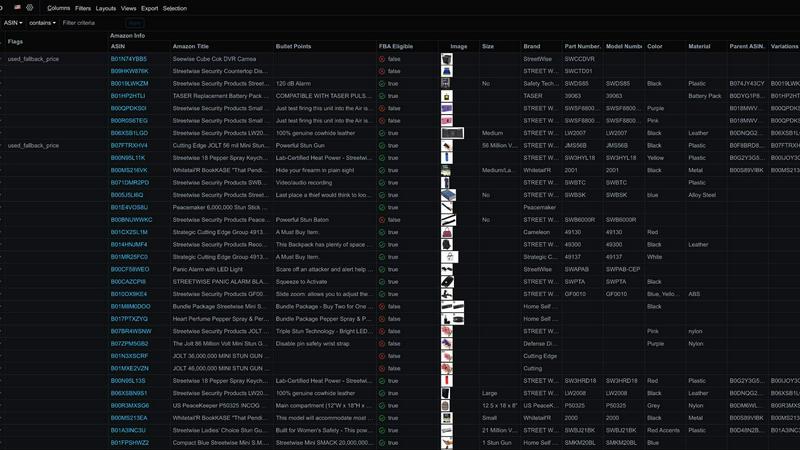
Comprehensive Product Intelligence (90+ Data Points)
Rocket Source doesn't just give you a profit estimate; it delivers a complete product dossier. For every single SKU you scan, you get access to over 90 critical data points. This includes fundamental metrics like Buy Box price and sales rank, but also delves into competitive analysis (number of offers), fulfillment details (dimensions, weight, Small & Light eligibility), and crucial restriction flags like Hazmat or brand gating. This holistic view ensures you understand not just if a product could be profitable, but if it's practical and safe to sell.
Automated Supplier File Analysis
Gone are the days of manually copying and pasting ASINs or UPCs. Rocket Source's smart column mapping automatically recognizes the data in your supplier's spreadsheet file—whether it's ASINs, UPCs, EANs, or product titles. You simply upload the file, and the system does the rest, scanning millions of products in the background to populate your report with live Amazon data. This seamless integration turns a chaotic, error-prone process into a smooth, automated workflow.
Advanced Variation & Multipack Detection
One of the biggest pitfalls for sellers is accidentally purchasing a single item for a multi-pack listing or the wrong variation (like color or size). Rocket Source protects you by clearly identifying Parent ASINs, listing all related variations, and showing the Amazon Pack Quantity. You can easily filter to see only single-pack items or listings with no variations, ensuring you order the correct inventory from your supplier and forecast sales accurately for the specific product you'll receive.
Smart Profitability & Demand Forecasting
The tool moves beyond static data to provide derived insights that predict success. It calculates the BSR Percentage (how a product's rank compares to others in its category) to gauge true demand. It also flags potential warning signs, like products that are not in a top-level category (which tend to sell poorly). By combining real-time fees, prices, and these predictive metrics, Rocket Source shows you the actual net profit, helping you prioritize the most promising, high-demand opportunities in any catalog.
Use Cases
GifSpeed
Speeding Up Tutorials and Demos
Turn lengthy, slow-paced tutorial GIFs into concise, quick guides. Speed up step-by-step instructions to 2x or 3x speed to help your audience get to the point faster, perfect for embedding in documentation, product demos, or educational content where time is of the essence.
Slowing Down Fast Animations
Analyze rapid motions frame-by-frame by slowing down fast animations. This is ideal for designers studying animation techniques, athletes breaking down form, or anyone who wants to appreciate and catch every detail of a quick action sequence in a GIF.
Reducing GIF File Size for Sharing
Shrink oversized GIFs to meet platform limits without complex software. Compress your GIFs to fit under Discord's 256KB emoji limit, send them via email attachments, or optimize them for faster website loading times, all while maintaining good visual quality.
Fixing Browser Playback Issues
Solve the common problem of GIFs playing too slowly in browsers like Chrome or Safari. Browsers often throttle frame delays. GifSpeed allows you to easily adjust the timing to 40ms or more, ensuring your animations play back smoothly and as intended for every viewer.
Rocket Source
Rapid Wholesale Catalog Vetting
A supplier sends you a massive CSV file with 5,000 products. Instead of spending weeks manually researching each one, you upload the file to Rocket Source. Within minutes, you have a filtered report showing only the items with high profitability, low competition, and no Amazon restrictions. This allows you to quickly identify the top 20-50 products worthy of deeper due diligence and negotiation with the supplier.
Avoiding Costly Inventory Mistakes
Before placing a large purchase order, you run your shortlisted SKUs through Rocket Source. The system flags several items as "Hazmat" and others as having a high number of variations. This early warning prevents you from investing thousands of dollars in inventory that would be expensive to store or difficult to sell correctly, saving you from significant potential losses and headaches.
Expanding into New Product Categories
When looking to diversify your Amazon store, you need to understand new markets quickly. Rocket Source's category data, top-level category flags, and BSR percentage give you an instant overview of a category's competitiveness and typical demand. You can confidently assess whether a new product line in, say, "Home Improvement" has viable, profitable opportunities before you invest.
Optimizing Sourcing for FBM Sellers
For Fulfilled-by-Merchant sellers, shipping costs and handling are critical. Rocket Source provides precise product dimensions and weight. You can use this data to filter out items that are too large or heavy for your logistics setup to handle profitably, ensuring you only source products that align with your operational capabilities and maintain healthy margins.
Overview
About GifSpeed
GifSpeed is your go-to, completely free online tool for changing the speed of any GIF animation instantly and privately, right within your web browser. Ever needed to speed up a slow tutorial GIF or slow down a rapid animation to catch the details? GifSpeed makes it effortless. The core magic lies in its use of WebAssembly technology, which means all the processing happens directly on your own device. Your GIF files are never uploaded to a server, ensuring 100% privacy and eliminating any waiting time for server queues. Built with creators, marketers, and developers in mind, it solves common frustrations like oversized files for Discord, slow browser playback, or the need for a quick edit for a social media post. It replaces clunky alternatives like ezgif (which requires uploads), complex software like GIMP (which is overkill for simple speed changes), or command-line tools like FFmpeg. With support for files up to 80MB, a simple drag-and-drop interface, and a promise of zero watermarks, GifSpeed offers a streamlined "Drop. Adjust. Download. Done." workflow that works perfectly on both desktop and mobile, no sign-up required.
About Rocket Source
Rocket Source is your AI-powered co-pilot for navigating the complex world of Amazon wholesale. Designed specifically for Amazon FBA and FBM sellers, it transforms the tedious, hours-long process of analyzing supplier catalogs into a task that takes just minutes. The core challenge for sellers is evaluating hundreds or thousands of potential products from a supplier's spreadsheet. Manually checking each one for profitability, competition, and restrictions is a massive bottleneck. Rocket Source solves this by connecting directly to Amazon's API, pulling in over 90 real-time data points for each product in your file. This goes far beyond simple estimates, giving you a crystal-clear view of actual Buy Box prices, precise FBA fees, sales rank, offer counts, and historical pricing. It automatically maps your supplier's spreadsheet columns, so you can upload and analyze instantly. Whether you're a new seller looking for your first profitable product or a seasoned brand managing a vast inventory, Rocket Source provides the deep, actionable insights needed to make confident purchasing decisions, maximize profit margins, and significantly reduce the risks of holding slow-moving or restricted inventory.
Frequently Asked Questions
GifSpeed FAQ
How do I change GIF speed online with GifSpeed?
It's a simple three-step process. First, drag and drop your GIF file onto the upload area or click to browse your device (supports files up to 80MB). Second, use the intuitive slider to adjust the speed from 0.25x (slow motion) to 4x (fast forward). Third, click "Change Speed" to process it instantly in your browser and then download your newly speed-adjusted GIF.
Is the GIF speed changer really free?
Yes, absolutely! GifSpeed is free forever. There are no subscriptions, no hidden fees, and no requirement to sign up for an account. You can use all its features to change GIF speed, compress GIFs, or convert between GIF and MP4 as many times as you want without any cost or watermarks on your downloads.
Does changing GIF speed affect its quality?
Changing the speed of a GIF by adjusting its frame delay does not affect the visual quality or resolution of the individual frames. The tool simply alters the timing between frames. However, if you significantly speed up a GIF, the playback may appear more choppy simply because frames are displayed for a shorter duration.
What is the maximum GIF file size I can use?
GifSpeed supports GIF files up to 80MB in size. This generous limit accommodates most high-quality, lengthy animations you might need to edit. If your file is larger, you may want to consider compressing it first using the built-in compress GIF tool before adjusting its speed.
Rocket Source FAQ
What's the difference between Rocket Source and other Amazon product research tools?
Most generic product research tools are designed for finding ideas from scratch using keywords. Rocket Source is built for a specific workflow: analyzing existing supplier catalogs. It automates the tedious data entry, connects directly to Amazon's API for the most accurate, real-time fees and prices, and provides unique data points critical for wholesale, like pack quantities, variation details, and restriction flags that other tools often miss.
How accurate is the profit calculation?
Rocket Source's profit calculations are based on real-time data pulled from Amazon's API, including the current Buy Box price and the exact FBA fee for the product's size and weight tier. This makes it far more accurate than tools that use estimates or averages. However, you should always input your exact landed cost from the supplier for the most precise net profit figure.
Can I use Rocket Source for online arbitrage or retail arbitrage?
While its primary strength is wholesale catalog analysis, Rocket Source can certainly be used for OA/RA. Its ability to quickly return 90+ data points on a list of ASINs or UPCs makes it excellent for vetting a haul of potential products from retail stores. The restriction flags and variation data are especially valuable in these models to avoid gated or problematic items.
Is there a limit to how many products I can analyze?
Rocket Source offers a free tier to get started. Paid plans then provide increased scanning limits suitable for professional sellers, allowing you to process full supplier catalogs containing thousands of products. You can check their pricing page for the specific limits and features associated with each plan tier.
Alternatives
GifSpeed Alternatives
GifSpeed is a free, browser-based tool that lets you change the speed of any GIF instantly. It falls into the category of online design and image editing tools, specifically built for quick, no-fuss GIF manipulation. The entire process happens locally in your browser, so your files stay private and you avoid upload delays. People often search for alternatives to find a tool that better fits their specific workflow. This could be because they need advanced editing features beyond speed control, prefer downloadable desktop software, or require integration with other platforms. Budget is also a key factor, as some tools charge for premium features or add watermarks to exports. When evaluating other options, consider your core needs. Look at the pricing model, the range of editing features offered, and whether the tool works on your preferred device or operating system. Security is another important aspect—check if the service requires uploading your files to a server or if it processes them locally like GifSpeed does.
Rocket Source Alternatives
Rocket Source is a powerful AI-driven tool in the e-commerce software category, specifically designed to help Amazon sellers analyze supplier catalogs and uncover profitable wholesale opportunities. It pulls real-time data to give sellers a clear picture of potential profit margins and competition. Sellers often explore alternatives for a variety of reasons. Budget is a common factor, as pricing plans need to align with business size and sales volume. Some may need different feature sets, like integration with other platforms beyond Amazon, or perhaps a simpler interface if they're just starting out. It's all about finding the right tool for your specific workflow and goals. When evaluating other options, focus on what matters most for your business. Key considerations include the accuracy and source of the data, the depth of analysis provided, and how easily the tool integrates into your existing process. A good fit should save you time, reduce risk, and ultimately help you make smarter, more confident buying decisions.