
RocketShare vs TempEmail.cc
Side-by-side comparison to help you choose the right AI tool.

RocketShare
RocketShare lets you share files privately with encryption that even we can't access.
Last updated: March 3, 2026

TempEmail.cc
TempEmail.cc instantly creates free, disposable email addresses to protect your real inbox from spam and keep you anonymous online.
Last updated: March 18, 2026
Visual Comparison
RocketShare

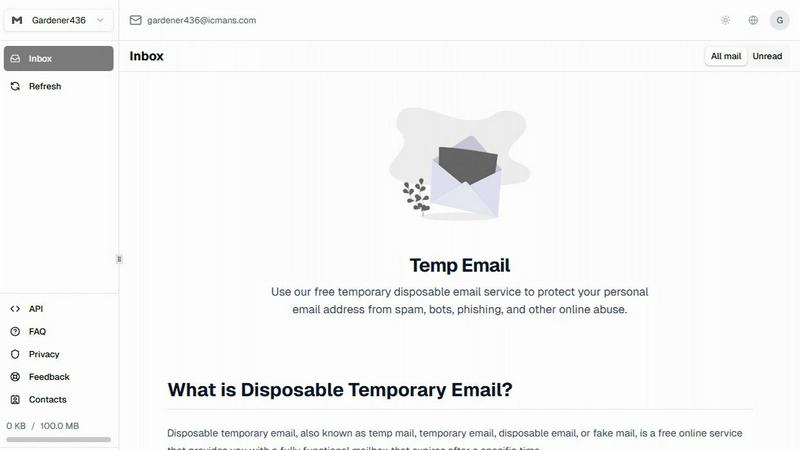
TempEmail.cc
Feature Comparison
RocketShare
Zero-Knowledge Encryption
This is the cornerstone of RocketShare's security. Your files are encrypted on your own computer or device using a unique key before upload. This encryption key never leaves your control and is never sent to RocketShare's servers. Because the company has "zero knowledge" of your key, it is physically impossible for them to decrypt or view your files. This ensures true privacy, protecting your data from external breaches and internal access alike.
Client-Side Encryption
Building on the zero-knowledge model, encryption happens entirely on your device—this is known as client-side encryption. When you drag and drop a file into RocketShare, the app on your computer immediately scrambles the data into a secure, encrypted format. Only this scrambled, unreadable "blob" is ever transmitted and stored on the remote servers. This means your sensitive information is protected from the very moment you decide to share it.
Secure Share Links with URL Fragments
When you create a shareable link, the decryption key is cleverly embedded within the URL fragment (the part after the #). This fragment is not sent to the server during transmission; it stays locally in the browser of the person you're sharing with. The server only handles the encrypted file data and basic metadata (like file name and expiry), while the crucial key travels directly and securely to the recipient, enabling them to decrypt the file.
Flexible Sharing Modes (Cloud & Local)
RocketShare offers two powerful ways to share. The Cloud Share mode uploads your encrypted file to secure EU-based servers for easy, asynchronous sharing with anyone, anywhere. The Local Share (coming soon) mode creates a direct, peer-to-peer connection between devices for transferring files without them ever touching an external server, ideal for the most sensitive transfers on a local network.
TempEmail.cc
Instant, No-Registration Address Generation
The core of TempEmail.cc is its incredible simplicity and speed. You don't need to create an account, remember a password, or go through any sign-up process. Simply visit the website, and a fresh, random temporary email address is generated for you instantly. This immediate access means you can bypass registration walls on other sites in seconds, making your online experience smoother and more private without any upfront commitment or hassle.
Customizable Email Aliases
While a random address is great, sometimes you need to stay organized. TempEmail.cc allows you to customize the username part of your temporary email (the text before the "@" symbol). This means you can create addresses like "[email protected]" or "[email protected]". This simple feature makes it much easier to track which service or website a particular temporary inbox is linked to, helping you manage multiple sign-ups without confusion.
Organized and Simple Inbox Interface
Your temporary inbox is designed for clarity and efficiency. It automatically separates unread messages from your full email history, so important items like verification codes or download links are easy to spot at a glance. The clean, ad-free interface lets you focus on finding the message you need quickly, without sifting through a cluttered layout. It’s a straightforward, user-friendly space to manage your temporary communications.
Privacy-First and Secure Operation
TempEmail.cc is built with a strong commitment to user privacy. The service does not log your IP address, track your activity, or sell any of your data. For added security on individual inboxes, you have the option to protect them with a custom password. When you're finished with an address, you can permanently delete the entire inbox and its contents with a single click, ensuring your temporary interactions leave no lasting digital footprint.
Use Cases
RocketShare
Legal Document Exchange
Law firms and legal professionals regularly handle highly confidential case files, contracts, and evidence. RocketShare allows them to send these documents to clients, co-counsel, or experts with an auditable trail and the absolute assurance that the content is protected by zero-knowledge encryption, maintaining attorney-client privilege and compliance with data protection regulations.
Healthcare Data Sharing
Medical practices, therapists, and healthcare administrators can use RocketShare to safely transmit patient records, lab results, and insurance information. The platform's robust encryption ensures Protected Health Information (PHI) remains confidential, helping organizations meet strict HIPAA and GDPR requirements for data security and patient privacy during digital communication.
Creative Asset Delivery
Photographers, videographers, and marketing agencies can deliver high-resolution portfolios, campaign assets, and draft edits to clients without fear of unauthorized access or piracy. The sender controls the link expiry, and the encryption guarantees that only the intended recipient can view the final creative work, protecting intellectual property.
Secure Financial Collaboration
Accountants, financial advisors, and business owners need to share sensitive spreadsheets, tax returns, and audit reports. RocketShare provides a secure channel for this collaboration, ensuring that financial data is never exposed. Teams can confidently collaborate on sensitive projects, knowing the files are encrypted end-to-end.
TempEmail.cc
Signing Up for Websites and Services
Whenever a website, forum, or app demands an email address just to access basic features, read an article, or leave a comment, TempEmail.cc is the perfect solution. Use a disposable address to complete the registration, receive the necessary confirmation link, and gain access without exposing your real email to potential spam lists or data collection practices. It’s ideal for platforms like Discord, Reddit, or TikTok where you might want to test the waters first.
Downloading Free Resources and Trials
Many sites offer free e-books, software trials, whitepapers, or coupon codes in exchange for your email. Instead of using your primary account and risking an influx of promotional follow-ups, generate a temporary email. Use it to download the resource or activate the trial, and then discard the address once you have what you need. This keeps your main inbox clean and your personal information private.
Protecting Against Spam and Phishing
Using your real email on unfamiliar or less-trustworthy websites can open the door to spam, phishing attempts, and malware. A temporary email address acts as a protective buffer. Any malicious or unwanted communication sent to that address is contained within the disposable inbox and cannot reach you. If the address starts receiving spam, you can simply delete it and create a new one, maintaining your primary inbox's security.
Testing and Development Work
For web developers, software testers, or marketers, TempEmail.cc is an invaluable tool. It allows you to test user registration flows, email notification systems, or form submissions without creating countless dummy accounts on your personal or work email. You can generate a unique address for each test case, ensuring your testing is clean, organized, and doesn’t clutter any important email accounts.
Overview
About RocketShare
RocketShare is a secure file-sharing platform designed with one core principle: your privacy is non-negotiable. It allows individuals and businesses to send files of any size with the confidence that no one, not even RocketShare itself, can ever access the content. This is made possible through a zero-knowledge encryption model, where your files are encrypted on your own device before they ever touch the internet. The encryption key stays with you, often embedded in the share link itself, meaning the servers only ever handle unreadable, encrypted data. This approach provides enterprise-grade security in a beautifully simple, self-serve package. Whether you're a lawyer sending sensitive case files, a photographer delivering client galleries, or a team collaborating on confidential projects, RocketShare ensures your intellectual property and private data remain exactly that—private. With options for both cloud-based and local "peer-to-peer" sharing, and data stored securely in the EU, it’s the perfect tool for anyone who values simplicity without compromising on top-tier security.
About TempEmail.cc
In a digital world where signing up for a new app or downloading a free resource often means handing over your personal email address, TempEmail.cc is your friendly shield against spam and privacy invasion. It's a completely free, web-based service that generates disposable, temporary email addresses on the fly. Think of it as a digital "burner phone" for your inbox. You get a fully functional email address instantly, without any registration or login required, which you can use to receive verification codes, confirm sign-ups, or access gated content. Once you're done, you simply discard the address, leaving your primary inbox safe, clean, and free from a relentless flood of marketing emails and potential security risks. It's the ultimate tool for anyone who values their online privacy and wants to maintain a clutter-free personal email, from casual web surfers and savvy shoppers to developers and privacy-conscious professionals.
Frequently Asked Questions
RocketShare FAQ
How does zero-knowledge encryption protect my files?
With zero-knowledge encryption, your files are encrypted on your device with a key only you possess. RocketShare's servers never receive this key, so they only store encrypted, unreadable data. Even if someone accessed the servers, they couldn't decrypt your files. Only someone with the unique link containing the key fragment can decrypt and view them, giving you ultimate control.
Where are my files stored?
All files uploaded via RocketShare's Cloud Share are stored on secure servers located within the European Union. This ensures that your data is protected under the EU's strong data protection laws (GDPR). The files are stored exclusively in their encrypted state, so the storage provider only ever handles scrambled data.
What is the difference between Cloud Share and Local Share?
Cloud Share uploads your encrypted file to RocketShare's secure servers, generating a link you can share with anyone. It's great for asynchronous sharing. Local Share (coming soon) establishes a direct connection between your device and the recipient's device to transfer the file without it going to any server, ideal for maximum privacy on the same network.
Do I need a credit card to start using RocketShare?
No, you do not need a credit card to start using RocketShare. You can sign up and begin using the service for free to experience its secure file-sharing capabilities. This allows you to test the privacy features and workflow before committing to a paid plan, if needed.
TempEmail.cc FAQ
Is TempEmail.cc really free to use?
Yes, absolutely! TempEmail.cc is a completely free service. There are no hidden fees, premium tiers, or subscription plans. You can generate unlimited temporary email addresses, use the inboxes, and access all features without ever providing payment information or creating a paid account. The service is supported to remain free for all users.
How long does a temporary email address last?
The lifespan of your temporary inbox can vary, but the service is designed for short-term use, often referred to as "10-minute mail." The address and its inbox will remain active for a limited period, typically long enough to receive a verification code or a sign-up confirmation. Once the time expires or if you manually delete the inbox, the address becomes inactive and all messages are permanently erased.
Can I send emails from a TempEmail.cc address?
No, TempEmail.cc is designed as a receive-only service. Its primary function is to provide you with an instant inbox to catch emails sent to you by other websites and services, such as confirmation links and verification codes. You cannot compose and send outgoing emails from a TempEmail.cc address.
Is using a temporary email address safe and legal?
Yes, using a temporary email service like TempEmail.cc is both safe and legal. It is a legitimate privacy tool used by millions to protect their personal information from spam and data harvesting. The service itself operates with a strong privacy policy, not logging your activity. It is perfectly acceptable to use for bypassing mandatory sign-ups on websites where you do not wish to share your primary email.
Alternatives
RocketShare Alternatives
RocketShare is a secure file-sharing tool in the productivity and management category. It focuses on user privacy by encrypting your files on your own device before they are uploaded. The unique security key stays within the shareable link you create, meaning the service itself cannot access your data. People often explore other options for various reasons. You might need a different pricing plan, specific integrations with other software, or more storage space. Some users look for platforms with different collaboration features or those that are better suited for very large teams or personal use. When evaluating alternatives, consider your top priorities. Key factors include the level of security and privacy offered, the ease of use for both you and your recipients, and the overall cost for the features you need. It's also wise to check platform compatibility to ensure it works seamlessly with your devices.
TempEmail.cc Alternatives
TempEmail.cc is a popular free service in the disposable email category, designed to create temporary inboxes on the fly. It's a fantastic tool for anyone wanting to shield their primary email from spam, especially during website sign-ups or downloads. People often search for alternatives for various reasons. Some might need a service that works on a specific platform like a mobile app, while others might look for different features, longer email lifespan, or simply want to explore other user interfaces. The needs can vary widely from one user to the next. When choosing an alternative, consider what matters most to you. Key factors include the ease of generating addresses, inbox organization, privacy policies, and whether the service is truly free without hidden limitations. Finding the right fit depends on your specific use case and priorities.