
BarBrain vs Session Stacker
Side-by-side comparison to help you choose the right AI tool.

BarBrain
BarBrain simplifies inventory management for the hospitality industry, cutting your counting time in half while ensuring accurate results.
Last updated: April 4, 2026

Session Stacker
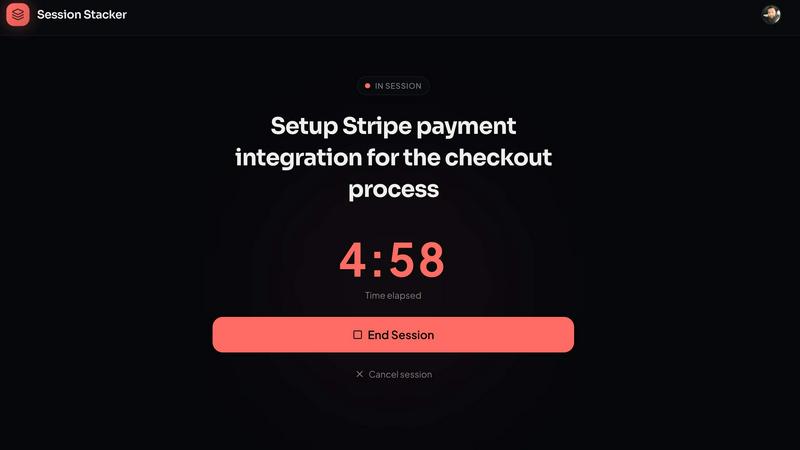
Session Stacker helps you define your next task so you can start building right where you left off, effortlessly.
Last updated: February 26, 2026
Visual Comparison
BarBrain

Session Stacker
Feature Comparison
BarBrain
Parallel Counting on Multiple Devices
BarBrain allows users to count inventory simultaneously across multiple iOS and Android devices. This feature enhances efficiency by enabling staff to work together, significantly reducing the time spent on inventory tasks and streamlining the counting process.
Comprehensive Product Catalog
With over 30,000 products in its catalog, BarBrain enables users to manage a wide variety of items including beverages, food items, and housekeeping supplies. This extensive catalog helps businesses track all their inventory needs in one place, ensuring that nothing is overlooked.
Automated Inventory Reporting
After each inventory count, BarBrain generates an automatic and comprehensive inventory report. This eliminates the need for manual data entry and post-processing, providing business owners with reliable and accurate results without the usual hassle.
Intuitive Food and Beverage Tracking
BarBrain incorporates a user-friendly fill-level slider for tracking open food and beverage products. This feature allows for quick and easy entry of both opened and whole units, ensuring that inventory counts are precise and up-to-date.
Session Stacker
AI-Powered Task Review
The AI-powered task review feature analyzes your previous sessions and helps you identify the most effective next steps. This ensures that you are always working on tasks that align with your goals and progress, promoting efficiency and effectiveness in your workflow.
Streak Tracking
Streak tracking is an essential feature that motivates you to maintain consistency. By visualizing your progress over time, you can see how many sessions you've completed in a row, encouraging you to keep building and reinforcing positive habits.
Session History
With session history, you can review your past work sessions to understand your productivity trends better. This feature allows you to identify patterns in your work habits, making it easier to optimize your time and focus on what truly matters.
Detailed Stats
Session Stacker provides detailed statistics about your work habits, including the number of sessions completed, time spent per session, and weekly targets. These insights give you tangible proof of your progress, helping to boost your confidence and commitment to your projects.
Use Cases
BarBrain
Single Bar Management
For independent bar owners, BarBrain simplifies inventory management, allowing them to reduce counting time and focus on enhancing customer experiences. Users can monitor stock levels accurately and make informed purchasing decisions.
Multi-Location Restaurant Oversight
Restaurant groups can leverage BarBrain to maintain consistent inventory practices across multiple locations. The software provides a unified overview of inventory usage across all sites, enabling better resource allocation and cost management.
Hotel Food and Beverage Inventory
Hotels with restaurants or bars can use BarBrain to conduct comprehensive inventory counts of all food and beverage products across various outlets. This ensures that all locations maintain optimal stock levels and minimize waste.
Event Management for Catering
Caterers can utilize BarBrain to efficiently track inventory for events. With the ability to quickly assess stock levels and manage supplies, they can ensure that events are well-stocked and that waste is minimized.
Session Stacker
For Freelancers
Freelancers can use Session Stacker to manage multiple projects efficiently. By defining the next task at the end of each session, they can jump straight back into work without wasting time on ramp-up, allowing for a more productive freelance experience.
For Aspiring Entrepreneurs
Aspiring entrepreneurs can leverage Session Stacker to build their business ideas alongside their full-time jobs. The tool helps them maintain momentum by providing clear next steps, making it easier to transition from planning to execution.
For Hobbyists
Hobbyists working on personal projects can benefit from the simplicity of Session Stacker. It enables them to engage with their passions without the burden of over-complicated task management systems that can stifle creativity.
For Students
Students juggling coursework and side projects can use Session Stacker to optimize their study sessions. By establishing a routine of defining next tasks, they can enhance their focus and productivity, leading to better academic performance alongside personal endeavors.
Overview
About BarBrain
BarBrain is a revolutionary inventory management tool specifically designed for the hospitality industry. It addresses the unique challenges faced by bar and restaurant owners who often struggle with outdated inventory practices that are time-consuming and error-prone. With BarBrain, owners can quickly count stock in minutes rather than hours, enabling them to focus more on customer service and less on tedious inventory tasks. The software provides precise calculations for the cost per drink and dish, identifies waste and shrinkage in real time, and consolidates supplier orders for easy management. BarBrain is tailored for operators of all sizes, whether you manage a single cocktail bar or a large multi-location restaurant group. The platform is user-friendly with no complex training required, making it an essential tool for improving operational efficiency and protecting your margins.
About Session Stacker
Session Stacker is a productivity tool specifically designed for side hustlers and builders with limited time. It addresses the common challenge of forgetting where you left off in your projects, which often leads to wasted time and lost momentum. By establishing a simple habit of defining your next task before ending a work session, Session Stacker ensures that when you return, you know exactly what to do. This means no more time spent re-planning or recalling previous efforts. It's an incredibly streamlined approach that focuses on clarity and actionable next steps, making it perfect for those juggling full-time jobs and personal projects. With features like AI-powered task review, streak tracking, session history, and detailed stats, Session Stacker provides the tools needed to maintain focus and build consistently. Whether you're working on a personal blog, an app, or any side project, this tool supports you in making the most of your limited time.
Frequently Asked Questions
BarBrain FAQ
How does BarBrain reduce inventory time?
BarBrain significantly streamlines the inventory process, allowing users to complete counts in minutes rather than hours. Its intuitive design and multi-device functionality enhance efficiency, leading to time savings of over 75%.
Is training required to use BarBrain?
No, BarBrain is designed with user-friendliness in mind. There are no complex training manuals or bloated feature sets, allowing users to jump right in and start managing their inventory effectively.
What types of products can I manage with BarBrain?
BarBrain supports a broad range of products, including spirits, soft drinks, food items, and housekeeping supplies. This versatility makes it suitable for various hospitality businesses.
Can I access BarBrain from different locations?
Yes, BarBrain can be accessed on multiple devices simultaneously, making it easy for teams to collaborate and count inventory from different locations, whether in a single establishment or across multiple sites.
Session Stacker FAQ
How does Session Stacker help with productivity?
Session Stacker helps by providing a clear next step at the end of each work session, eliminating time wasted trying to remember where you left off. This focus on actionable tasks promotes consistent progress.
Is Session Stacker suitable for team projects?
While Session Stacker is designed primarily for individuals with side projects, it can also be used for small team projects. However, it is not tailored for larger teams that require complex project management.
Can I use Session Stacker on multiple devices?
Yes, Session Stacker is built as a Progressive Web App (PWA), which means you can access it on any device with a web browser, providing flexibility and convenience for on-the-go productivity.
Is there a trial period available for new users?
Yes, Session Stacker offers a 7-day free trial with full access, allowing new users to explore the features without needing to provide credit card information upfront. You can cancel at any time during the trial.
Alternatives
BarBrain Alternatives
BarBrain is an innovative inventory management tool specifically designed for the hospitality industry, focusing on bars and restaurants. It streamlines the often tedious process of counting bottles and tracking inventory, enabling operators to manage their stock quickly and accurately. Users frequently seek alternatives to BarBrain for various reasons, including pricing concerns, specific feature requirements, or the need for compatibility with existing platforms. When choosing an alternative, it's essential to consider factors such as ease of use, the ability to tailor features to hospitality needs, and how well the solution integrates with your current operations.
Session Stacker Alternatives
Session Stacker is a productivity tool designed specifically for side hustlers, helping them stay focused by establishing clear next tasks before closing their laptops. By addressing the common issue of forgetting where you left off, it enables users to seamlessly pick up their work without wasting precious time on recollection. This tool falls under the productivity and management category, offering features like AI-powered task review and streak tracking to enhance efficiency. Users often seek alternatives to Session Stacker for various reasons, such as concerns about pricing, the range of features offered, or compatibility with different platforms. When evaluating alternatives, it’s essential to consider what specific functionalities you need, how user-friendly the interface is, and whether it integrates well with your existing workflows. Finding a tool that aligns closely with your side hustling needs can significantly enhance your productivity.