
Perkoon vs Session Stacker
Side-by-side comparison to help you choose the right AI tool.

Perkoon offers free, unlimited peer-to-peer file transfers with no signup required.
Last updated: March 3, 2026

Session Stacker
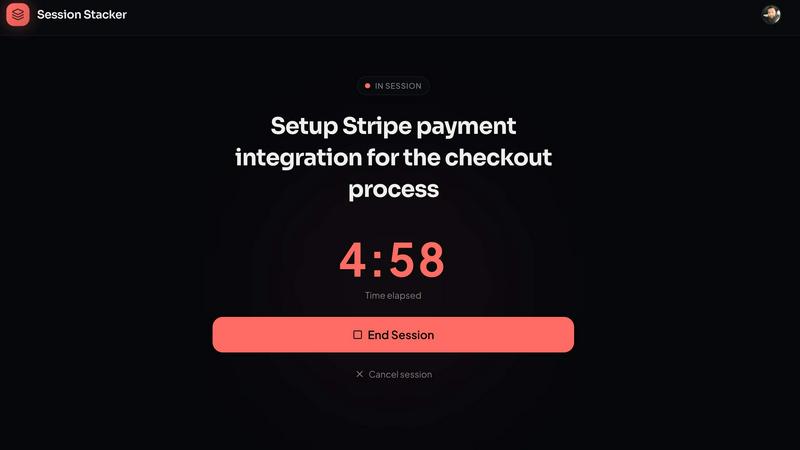
Session Stacker helps you define your next task so you can start building right where you left off, effortlessly.
Last updated: February 26, 2026
Visual Comparison
Perkoon

Session Stacker
Feature Comparison
Perkoon
Truly Free P2P Transfers
This is the heart of Perkoon. When both sender and receiver are online, files travel directly between their web browsers using WebRTC technology. There is no intermediary server, which means there are absolutely no file size caps, no forced account creation, and your data is never stored by Perkoon. It's fast, private, and free because the architecture makes it cost-effective to offer.
Encrypted Cloud Storage for Offline Recipients
Life doesn't always sync up. When you need to send a file to someone who isn't currently online, Perkoon's cloud storage steps in. Your file is encrypted and securely held on a server until your recipient is ready to download it. This is the part of the service that has real infrastructure costs, which is why it operates on a paid model, keeping the business transparent and sustainable.
Native AI & Automation Accessibility
Perkoon is built for the future. It features a machine-readable state, stable DOM selectors, and a dedicated automation API (window.__perkoon). This allows AI assistants, bots, and automated workflows to send and receive files programmatically without the inefficiency and fragility of simulating human clicks. It’s file transfer designed for both people and their digital agents.
Command Line Interface (CLI) Tool
For developers and terminal enthusiasts, Perkoon offers a full-featured CLI accessible via npx perkoon. You can send and receive files directly from your command line, enabling seamless browser-to-CLI and CLI-to-CLI transfers. It brings the same simplicity and power of the web service to your workflow, proving that terminals deserve nice things, too.
Session Stacker
AI-Powered Task Review
The AI-powered task review feature analyzes your previous sessions and helps you identify the most effective next steps. This ensures that you are always working on tasks that align with your goals and progress, promoting efficiency and effectiveness in your workflow.
Streak Tracking
Streak tracking is an essential feature that motivates you to maintain consistency. By visualizing your progress over time, you can see how many sessions you've completed in a row, encouraging you to keep building and reinforcing positive habits.
Session History
With session history, you can review your past work sessions to understand your productivity trends better. This feature allows you to identify patterns in your work habits, making it easier to optimize your time and focus on what truly matters.
Detailed Stats
Session Stacker provides detailed statistics about your work habits, including the number of sessions completed, time spent per session, and weekly targets. These insights give you tangible proof of your progress, helping to boost your confidence and commitment to your projects.
Use Cases
Perkoon
Sending Large Project Files to a Client
Freelancers and creatives often need to send massive video edits, design portfolios, or code repositories that exceed the limits of email or other free services. With Perkoon's P2P transfer, you can send hundreds of gigabytes directly to your client's browser in one go, for free, with no compression or wait times, ensuring they get the full-quality work.
Automated Backup Scripts and AI Workflows
A developer has a script that generates nightly reports or an AI agent that creates weekly content batches. Using Perkoon's API or CLI, these automated processes can instantly send the generated files to a designated recipient or cloud folder without any manual intervention, seamlessly integrating file transfer into automated pipelines.
Sharing Personal Media Collections
Imagine wanting to share all your vacation photos and videos from a recent trip with family—a collection easily reaching 50GB. Instead of splitting into dozens of links or paying for a one-time transfer, you can create a single Perkoon P2P link. As long as your family is online, they can download the entire collection directly from you, quickly and privately.
Ad-Hoc Collaboration Between Teams
Two remote team members need to exchange a large dataset or a prototype asset immediately during a call. Instead of uploading to a slow cloud drive, one can start a Perkoon P2P transfer and share the link in the chat. The other person clicks and the file downloads in real-time, facilitating instant, frictionless collaboration without leaving the browser.
Session Stacker
For Freelancers
Freelancers can use Session Stacker to manage multiple projects efficiently. By defining the next task at the end of each session, they can jump straight back into work without wasting time on ramp-up, allowing for a more productive freelance experience.
For Aspiring Entrepreneurs
Aspiring entrepreneurs can leverage Session Stacker to build their business ideas alongside their full-time jobs. The tool helps them maintain momentum by providing clear next steps, making it easier to transition from planning to execution.
For Hobbyists
Hobbyists working on personal projects can benefit from the simplicity of Session Stacker. It enables them to engage with their passions without the burden of over-complicated task management systems that can stifle creativity.
For Students
Students juggling coursework and side projects can use Session Stacker to optimize their study sessions. By establishing a routine of defining next tasks, they can enhance their focus and productivity, leading to better academic performance alongside personal endeavors.
Overview
About Perkoon
Perkoon is a refreshingly honest file transfer service that cuts through the noise and gets back to basics: moving your files from point A to point B without hassle. It's built for anyone tired of artificial limits, mandatory sign-ups, and services that treat your data as a product. At its core, Perkoon offers two smart ways to send files. First, its flagship free service uses peer-to-peer (P2P) technology to beam files directly between browsers when both people are online. This means no size limits, no accounts, and because the data never passes through a central server, it's private and costs Perkoon nothing to run—so it's free for you, forever. For when the recipient is offline, Perkoon provides encrypted cloud storage, a paid feature that honestly covers the cost of running servers. What truly sets Perkoon apart is its native design for the age of AI, offering built-in tools for automation and AI agents to interact with the service directly, no screen-scraping required. With a simple CLI tool also available, Perkoon is the straightforward, powerful, and privacy-focused file transfer solution for real people and the machines that help them.
About Session Stacker
Session Stacker is a productivity tool specifically designed for side hustlers and builders with limited time. It addresses the common challenge of forgetting where you left off in your projects, which often leads to wasted time and lost momentum. By establishing a simple habit of defining your next task before ending a work session, Session Stacker ensures that when you return, you know exactly what to do. This means no more time spent re-planning or recalling previous efforts. It's an incredibly streamlined approach that focuses on clarity and actionable next steps, making it perfect for those juggling full-time jobs and personal projects. With features like AI-powered task review, streak tracking, session history, and detailed stats, Session Stacker provides the tools needed to maintain focus and build consistently. Whether you're working on a personal blog, an app, or any side project, this tool supports you in making the most of your limited time.
Frequently Asked Questions
Perkoon FAQ
Is peer-to-peer (P2P) transfer really free forever?
Yes, absolutely. Perkoon's P2P transfer is free and unlimited because of how it works: files stream directly from one browser to another without ever touching Perkoon's servers. This means there are no storage or bandwidth costs for the company to cover for this specific service, so they can genuinely offer it for free indefinitely, no strings attached.
What happens if the person I'm sending to is offline?
If your recipient is not online to accept the direct P2P connection, Perkoon offers a seamless fallback to encrypted cloud storage. You can choose this option to upload your file to Perkoon's servers, where it is encrypted and held until your recipient comes online to download it. This cloud storage service is a paid feature, as it involves real infrastructure costs.
How does Perkoon protect my privacy?
Privacy is a core principle. In P2P mode, your files never pass through Perkoon's servers; they take a direct path between you and the recipient, so Perkoon cannot see your data. For cloud transfers, files are encrypted on their servers. Perkoon has a strict no-scanning, no-selling data policy, ensuring your files stay yours.
Can I use Perkoon from the command line?
Definitely! Perkoon provides an official Node.js CLI tool. You can install and run it directly with npx perkoon send [file] or npx perkoon receive. This allows you to initiate transfers from your terminal to a web browser, or even between two terminals, making it perfect for scripting and server environments.
Session Stacker FAQ
How does Session Stacker help with productivity?
Session Stacker helps by providing a clear next step at the end of each work session, eliminating time wasted trying to remember where you left off. This focus on actionable tasks promotes consistent progress.
Is Session Stacker suitable for team projects?
While Session Stacker is designed primarily for individuals with side projects, it can also be used for small team projects. However, it is not tailored for larger teams that require complex project management.
Can I use Session Stacker on multiple devices?
Yes, Session Stacker is built as a Progressive Web App (PWA), which means you can access it on any device with a web browser, providing flexibility and convenience for on-the-go productivity.
Is there a trial period available for new users?
Yes, Session Stacker offers a 7-day free trial with full access, allowing new users to explore the features without needing to provide credit card information upfront. You can cancel at any time during the trial.
Alternatives
Perkoon Alternatives
Perkoon is a modern file transfer service in the productivity and management category. It focuses on direct, peer-to-peer transfers with no file size limits and no mandatory signups, making it a streamlined choice for quick sharing. People often look for alternatives for various reasons. They might need a different pricing model, require specific features like advanced team collaboration, or need guaranteed compatibility with certain platforms or automated workflows. It's a common step in finding the perfect tool for individual or business needs. When evaluating other options, consider your core requirements. Key factors include transfer speed and reliability, privacy and security standards, ease of use for all parties involved, and whether the service supports the automation or integration capabilities your work demands.
Session Stacker Alternatives
Session Stacker is a productivity tool designed specifically for side hustlers, helping them stay focused by establishing clear next tasks before closing their laptops. By addressing the common issue of forgetting where you left off, it enables users to seamlessly pick up their work without wasting precious time on recollection. This tool falls under the productivity and management category, offering features like AI-powered task review and streak tracking to enhance efficiency. Users often seek alternatives to Session Stacker for various reasons, such as concerns about pricing, the range of features offered, or compatibility with different platforms. When evaluating alternatives, it’s essential to consider what specific functionalities you need, how user-friendly the interface is, and whether it integrates well with your existing workflows. Finding a tool that aligns closely with your side hustling needs can significantly enhance your productivity.