
MP3ToMIDI vs The Ultimate Piano
Side-by-side comparison to help you choose the right AI tool.

MP3ToMIDI
Effortlessly convert MP3, WAV, FLAC, and OGG audio files to MIDI with our free AI-powered converter in seconds.
Last updated: February 26, 2026

The Ultimate Piano
The Ultimate Piano lets you practice piano online with realistic sounds, MIDI support, and interactive learning tools.
Last updated: March 3, 2026
Visual Comparison
MP3ToMIDI
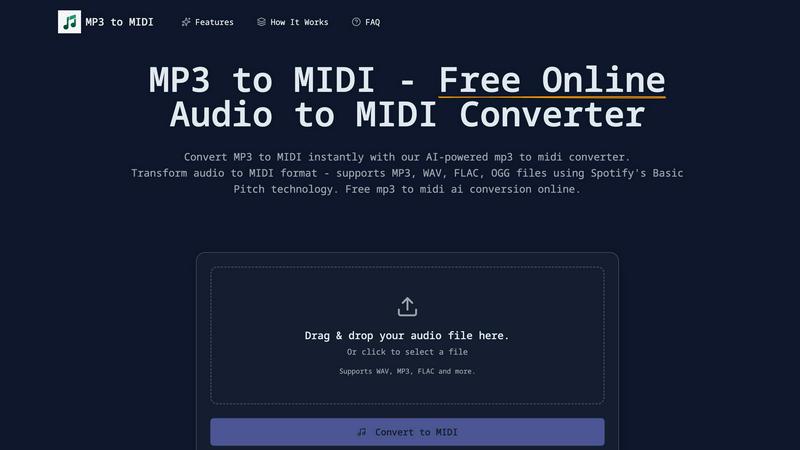
The Ultimate Piano

Feature Comparison
MP3ToMIDI
AI-Powered Technology
MP3ToMIDI utilizes advanced AI technology from Spotify's Basic Pitch, ensuring high accuracy in converting audio to MIDI. This feature allows for precise note detection, tempo recognition, and instrument separation, making it a powerful tool for music creation.
Multi-Format Audio Support
The converter supports various audio file formats, including MP3, WAV, FLAC, and OGG. This multi-format compatibility enables users to upload any audio file and convert it into MIDI instantly, offering flexibility for different audio projects.
Instant MIDI Download
Once the audio file is processed, users can download their MIDI files immediately. This quick turnaround allows musicians and producers to import MIDI into their favorite DAWs—such as Ableton, FL Studio, or Logic Pro—and start editing right away.
Accurate Note Detection
MP3ToMIDI boasts industry-leading accuracy in detecting musical notes, chords, and melodies. This feature ensures that every detail of the original recording is captured, providing users with high-quality MIDI files that reflect the nuances of their audio.
The Ultimate Piano
Play Piano Online
Experience the joy of playing piano directly in your web browser without any installations. You can use your mouse, computer keyboard, or connect a MIDI keyboard for a realistic playing experience. The Ultimate Piano provides beautiful, high-quality piano sounds that bring every note to life.
MIDI Player & Falling Notes
Load any MIDI file to see the notes light up on the keyboard as they play. This feature lets you slow down the tempo, step through each note individually, or loop challenging sections, making it easier to master difficult passages and enhance your playing skills.
Chord Detection & Learning
As you play, The Ultimate Piano automatically recognizes and displays the chord names in real time. This feature not only aids in understanding harmonic relationships but also allows you to play freely while learning about chords intuitively, enhancing your overall music comprehension.
Learning Modes
The Ultimate Piano offers various interactive learning modes that allow you to focus on specific chords and scales. Simply select the scale you want to practice, such as the "Blues Scale in Ab," and it will be visualized and played on the keyboard, helping you engage with music theory and improve your performance.
Use Cases
MP3ToMIDI
Music Production
Producers can use MP3ToMIDI to convert audio samples into MIDI, allowing for easy manipulation and integration into their projects. This feature streamlines the production process and enhances creativity by enabling remixing and sampling.
Music Education
Teachers can leverage the converter to create MIDI files from recordings, providing students with editable sheet music. This approach allows learners to practice and understand music better by working with familiar songs they enjoy.
Composing Original Music
Composers can quickly transform their audio ideas into MIDI format, facilitating arrangement and orchestration. By using MP3ToMIDI, they can focus on creativity without the tedious task of manual transcription.
Sound Design
Sound designers can extract MIDI data from audio files to create new sounds and textures. This capability enables them to innovate and experiment with sound, leading to unique musical compositions and soundscapes.
The Ultimate Piano
Enhancing Learning for Beginners
For beginners, The Ultimate Piano serves as an excellent introduction to piano playing. With its user-friendly interface and interactive features, novice musicians can easily learn chords and scales while enjoying the process, building a solid foundation for further musical education.
Practicing with MIDI Files
Intermediate and advanced players can benefit greatly from the MIDI player feature. By loading their favorite MIDI files, they can visualize their playing, practice with falling notes, and work on difficult sections at their own pace, making practice sessions more effective and engaging.
Ear Training Development
Musicians looking to sharpen their ear can utilize the ear training feature focused on intervals and chords. This practical application allows users to develop aural skills essential for music composition and improvisation, enhancing their overall musicianship.
Teaching and Demonstration Tool
The Ultimate Piano is an excellent resource for music teachers. With its ability to generate chord diagrams and its transparent overlay for OBS streaming, educators can easily create engaging lessons and demonstrations, making complex concepts accessible to their students.
Overview
About MP3ToMIDI
MP3ToMIDI is a free, online AI-powered converter that transforms audio files into MIDI tracks effortlessly. Designed for musicians, producers, composers, and students, this user-friendly tool supports a variety of audio formats, including MP3, WAV, FLAC, and OGG. By leveraging advanced AI technology from Spotify's Basic Pitch library, MP3ToMIDI accurately analyzes melodies, harmonies, and rhythms within your audio files, producing high-quality MIDI files in mere seconds. The platform requires no software installation, making music transcription accessible for everyone. Simply upload your audio file, let the AI process it, and download your ready-to-edit MIDI file, compatible with any Digital Audio Workstation (DAW). Fast, intuitive, and completely free, MP3ToMIDI opens up a world of creative possibilities for anyone looking to convert audio into editable music formats.
About The Ultimate Piano
The Ultimate Piano is an innovative browser-based tool designed specifically for pianists and music learners who want to enhance their skills without the hassle of downloading software. This platform allows users to connect their MIDI keyboards or use their computer keyboards to practice piano anytime, anywhere. Its rich features include real-time chord detection, a comprehensive scale trainer with 14 different scale types, and an ear training module that helps users develop their auditory skills for intervals and chords. The Ultimate Piano also offers a chord explorer for a deeper understanding of music theory. With the ability to load MIDI files, watch falling notes, and practice alongside audio or YouTube videos, this tool provides a unique, interactive learning experience. Whether you are a beginner or an experienced musician, The Ultimate Piano equips you with everything needed to practice effectively and visualize music theory—all in a user-friendly interface.
Frequently Asked Questions
MP3ToMIDI FAQ
How does MP3ToMIDI work?
MP3ToMIDI analyzes your audio file using AI technology from Spotify's Basic Pitch. It detects notes, rhythms, and instruments, converting them into a MIDI file that can be downloaded and edited.
What audio formats does MP3ToMIDI support?
MP3ToMIDI supports multiple audio formats, including MP3, WAV, FLAC, and OGG. This feature allows users to upload a wide range of audio files for conversion.
Is MP3ToMIDI free to use?
Yes, MP3ToMIDI is completely free to use. There are no hidden fees, watermarks, or limitations on the number of conversions you can perform.
Can I use the MIDI files in any DAW?
Absolutely! The MIDI files generated by MP3ToMIDI are compatible with all major Digital Audio Workstations, including Ableton Live, FL Studio, Logic Pro, and GarageBand, making it easy to incorporate into your music projects.
The Ultimate Piano FAQ
Do I need to install anything to use Ultimate Piano?
No, The Ultimate Piano is a browser-based application, meaning you can access it directly from your web browser without any downloads or installations required.
Can I connect my MIDI keyboard?
Yes, you can connect your MIDI keyboard to The Ultimate Piano and enjoy a realistic piano playing experience, enhancing your practice sessions with high-quality sounds.
Does Ultimate Piano have ear training?
Absolutely! The Ultimate Piano includes an ear training feature that helps users develop their listening skills for intervals and chords, essential for improving overall musicality.
Can I practice along with my own songs?
Yes, you can load your own audio files and practice along with them using the integrated audio player, making it easy to tailor your practice sessions to your personal music preferences.
Alternatives
MP3ToMIDI Alternatives
MP3ToMIDI is a free online converter that leverages AI technology to transform audio files like MP3, WAV, FLAC, and OGG into editable MIDI tracks. This tool is particularly popular among musicians, producers, and students who want to easily transcribe music without the need for complex software installations. Users often seek alternatives to MP3ToMIDI for various reasons, including the need for different features, specific platform compatibility, or potential pricing structures. When choosing an alternative, it's essential to consider aspects such as the accuracy of audio processing, the range of supported audio formats, the ease of use, and any additional functionalities that may enhance your music production workflow.
The Ultimate Piano Alternatives
The Ultimate Piano is an innovative browser-based practice tool designed for pianists and music learners. It allows users to connect their MIDI keyboards and engage in various musical activities such as practicing chords, learning scales, and exploring music theory without the need for downloads. As part of the audio and music category, it caters to those seeking comprehensive solutions for their piano practice. Users often look for alternatives to The Ultimate Piano for several reasons, including pricing, specific feature sets, or compatibility with different devices and platforms. When selecting an alternative, it's essential to consider factors such as user interface, available features, and whether the tool meets your specific practice needs. Additionally, evaluating the flexibility and accessibility of the alternative can greatly enhance your learning experience.