
Preuve AI vs TinyFast
Side-by-side comparison to help you choose the right AI tool.

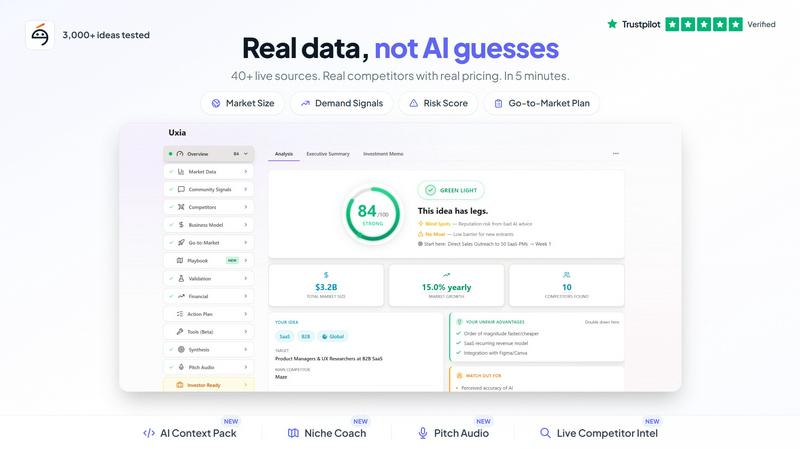
Preuve AI validates your startup ideas with real-time data, uncovering competitors and blind spots to boost your success.
Last updated: April 4, 2026

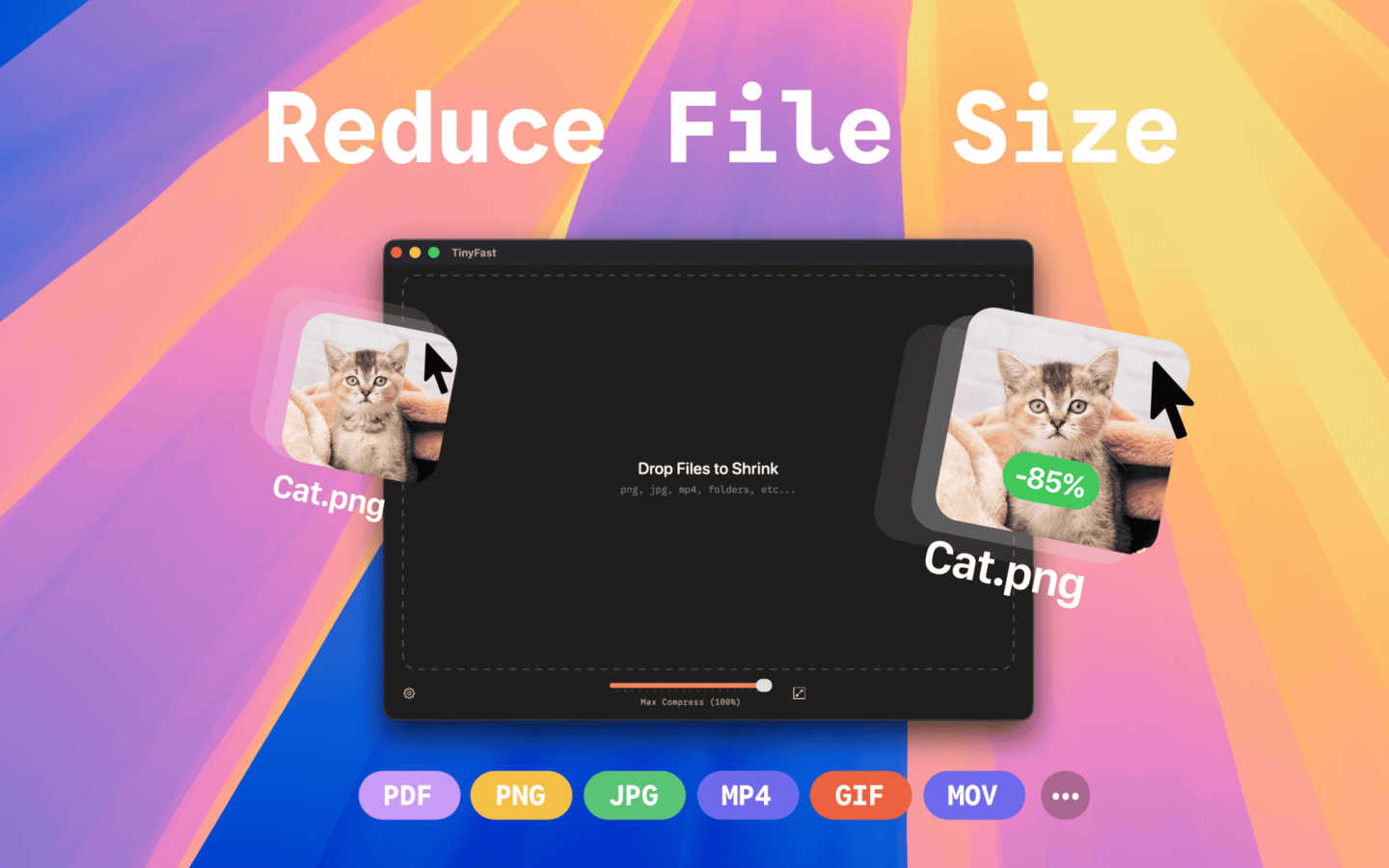
TinyFast shrinks your images, videos, and PDFs instantly and privately right on your Mac.
Last updated: March 1, 2026
Visual Comparison
Preuve AI
TinyFast
Feature Comparison
Preuve AI
Comprehensive Viability Reports
Preuve AI generates detailed viability reports for submitted ideas, encompassing competitor analysis, market size, and demand signals. Each report is backed by data from over 40 live sources, ensuring that entrepreneurs receive accurate and actionable insights tailored to their specific ideas.
Competitive Mapping
With the ability to map up to 15 competitors, Preuve AI provides users with critical insights into the competitive landscape. This feature includes funding data and pricing benchmarks, enabling founders to understand their competition thoroughly and make informed decisions about their market entry strategy.
Quick Free Scans
In just 60 seconds, users can access a free scan that offers a high-level overview of their startup idea. This quick assessment includes a viability score, a brief competitor preview, and highlights potential blockers and leverage points, allowing entrepreneurs to understand if further investigation is warranted.
Pivot Recommendations
Preuve AI doesn’t just stop at validation; it also offers actionable pivot recommendations. By analyzing the submitted idea and its market context, the tool provides insights on how founders can adjust their approach to improve viability and better meet market demands.
TinyFast
100% Local & Private Processing
Your files never leave your Mac. TinyFast performs all compression directly on your device, ensuring total privacy. This is crucial for anyone working with sensitive documents, client assets, or proprietary code under NDAs. You get peace of mind knowing there are no cloud uploads, no third-party servers, and no risk of your data being stored or accessed by anyone else.
Blazing-Fast Drag & Drop Compression
Speed is at the heart of TinyFast. Simply drag your files or entire folders into the app, and it gets to work instantly. There's no waiting for files to upload to a website and then download again. Using optimized native engines built for macOS, it shrinks even large files in seconds, turning a previously tedious task into a quick and effortless part of your routine.
Universal File Format Support
TinyFast is a versatile tool that supports a wide array of common file types. This includes images (PNG, JPG, WebP, GIF, SVG), videos (MP4, MOV), documents (PDF, DOCX), code files (JS, CSS, JSON), and audio (MP3). Instead of searching for a different online tool for each file type, you have one reliable app that handles almost everything you throw at it.
Batch Processing & Resolution Control
Efficiency is key. You can drop entire folders of files for compression all at once, saving you from processing items one by one. Furthermore, for images and videos, TinyFast offers the option to automatically resize the resolution during compression. This gives you extra control to reduce dimensions alongside file size, perfect for optimizing assets for web use or specific platform requirements.
Use Cases
Preuve AI
Startup Founders Validating Ideas
Entrepreneurs looking to enter the market can use Preuve AI to validate their business ideas quickly. By receiving a viability score and comprehensive report, founders can determine whether to proceed with development or pivot their concepts based on solid data.
Investors Evaluating Opportunities
Investors can leverage Preuve AI to analyze potential startups before committing funds. The detailed reports provide insights into market demand and competitive landscapes, helping investors make informed decisions about where to allocate their resources.
Teams Qualifying Leads
Sales and marketing teams can utilize Preuve AI to assess startup leads before initial meetings. By understanding the viability and competitive positioning of potential clients, teams can tailor their pitches and strategies for maximum impact.
Market Researchers Seeking Insights
Market researchers can use Preuve AI to gather comprehensive data on emerging trends and competitor activity within various industries. This tool helps researchers track market dynamics and identify opportunities for innovation and growth.
TinyFast
Preparing Assets for Web or App Development
Developers and designers can quickly optimize batches of images, icons (SVG), and videos for their projects. Compressing these assets locally ensures faster load times for websites and apps while keeping unreleased designs and code completely confidential during the development process.
Emailing Large Files or Client Deliverables
Professionals often need to email large presentations, PDF reports, or video proofs to clients and colleagues. TinyFast allows you to shrink these documents and media files down to a manageable size for email attachments quickly and securely, without using insecure online transfer services.
Managing Personal Photo & Video Libraries
For photographers, hobbyists, or anyone with a large personal media library, TinyFast helps free up valuable disk space. You can compress years of photos and home videos to save storage without noticeable quality loss, all while keeping your private memories safely on your own computer.
Compressing Screenshots and Recordings for Documentation
Creating tutorials, bug reports, or internal documentation often involves screenshots and screen recordings. These files can be surprisingly large. TinyFast lets you compress them instantly before uploading to project management tools, wikis, or help desks, making collaboration smoother and faster.
Overview
About Preuve AI
Preuve AI is an innovative startup validation tool designed to help founders assess their business ideas before investing significant time and resources into development. By allowing users to input their ideas in simple language, Preuve AI generates comprehensive, source-backed reports. These reports include a detailed competitor analysis, demand signals, market size estimates, pricing benchmarks, and key risks associated with the idea. Each claim in the report links to its source, ensuring transparency and credibility. With more than 3,500 startup ideas analyzed across 13 industries since its inception, Preuve AI aims to reduce the 42% failure rate of startups attributed to a lack of market need. Free scans provide quick insights, while paid reports unlock deeper analysis and actionable recommendations, making it a valuable resource for entrepreneurs looking to validate their ideas effectively.
About TinyFast
TinyFast is your Mac's personal file-shrinking powerhouse, designed to make digital life simpler, faster, and more secure. At its core, it's a macOS application that compresses images, videos, and documents directly on your computer. This means you can dramatically reduce file sizes for easier sharing, storage, and uploading without ever sending your sensitive data to the internet. It's built for developers, designers, marketers, and any creator who values their time and privacy. Imagine needing to send a batch of high-res project images to a client or reduce a video file to fit an email attachment—TinyFast handles it in seconds with a simple drag-and-drop. Its main value proposition is a powerful combination of blazing-fast local processing and ironclad privacy, ensuring your confidential files never leave your Mac. By eliminating uploads, server queues, and privacy worries, TinyFast seamlessly integrates into your workflow, offering a reliable and efficient way to optimize your files.
Frequently Asked Questions
Preuve AI FAQ
How long does it take to receive a report from Preuve AI?
After submitting your idea, you can access a free scan in just 60 seconds. For a full Founder Report, it takes a little longer, but you will receive comprehensive insights typically within a few minutes.
What kind of data sources does Preuve AI scan?
Preuve AI analyzes over 40 live data sources, including popular platforms like Crunchbase, Google Trends, Reddit, Product Hunt, and G2, ensuring a well-rounded view of the market landscape.
Can I use Preuve AI for multiple ideas?
Yes, while free scans are limited to two per user, you can purchase additional Founder Reports for individual ideas at a one-time cost of $29 each, allowing you to validate multiple concepts effectively.
What if I am not satisfied with my report?
Preuve AI offers a 14-day report guarantee, meaning if you're not satisfied with the insights provided, you can reach out for support to discuss your concerns or request a review of your report.
TinyFast FAQ
Is TinyFast really free to use?
Yes, TinyFast offers a fully-featured Free Forever plan. This allows you to compress up to 5 files per day at no cost, giving you a great way to test all its features. For unlimited use, there are one-time lifetime and monthly subscription plans available.
How does local compression protect my privacy?
Local compression means the entire process happens on your Mac's processor and memory. Your files are never sent over the internet to external servers. This design guarantees that sensitive, confidential, or proprietary files remain completely under your control and are never exposed to potential data breaches or third-party access.
What file types does TinyFast support?
TinyFast supports a broad range of common formats. This includes images like PNG, JPG, HEIC, WebP, GIF, BMP, and SVG; videos like MP4, MOV, and M4V; documents like PDF and DOCX; code files like JS, CSS, and JSON; and audio files like MP3.
Can I compress multiple files at once?
Absolutely! TinyFast supports batch processing. You can drag and drop an entire folder containing multiple files, and the app will compress them all in one go. This is a massive time-saver compared to uploading files individually to online websites.
Alternatives
Preuve AI Alternatives
Preuve AI is a powerful tool designed to help entrepreneurs validate their startup ideas using real data instead of subjective opinions. Falling under the category of AI Assistants and Productivity & Management, it provides founders with comprehensive insights such as competitor analysis, market size, and viability scores. This encourages informed decision-making before investing time and resources into a project. Users often seek alternatives to Preuve AI for various reasons, including pricing, specific features that may not meet their unique needs, or compatibility with different platforms. When looking for an alternative, it's essential to consider the depth of analysis provided, the types of data sources utilized, and the overall user experience to ensure that the new tool aligns with your specific validation requirements.
TinyFast Alternatives
TinyFast is a popular Mac app in the productivity and management category, designed to shrink images, videos, and PDFs quickly and directly on your computer. It's a favorite for its local processing, which keeps files private, and its simple drag-and-drop workflow. Users often explore other options for various reasons. Some might need a tool that works on Windows or online, while others may be looking for different pricing models or more specialized features like advanced editing or cloud storage integration. It's a natural part of finding the perfect tool for your specific needs. When evaluating alternatives, consider your core requirements. Key factors include the types of files you need to compress, whether you need cross-platform availability, your budget, and how important local, private processing is versus the convenience of a web-based service. Prioritizing these elements will help you find the best fit.