
ToolPortal vs Zovo
Side-by-side comparison to help you choose the right AI tool.

ToolPortal
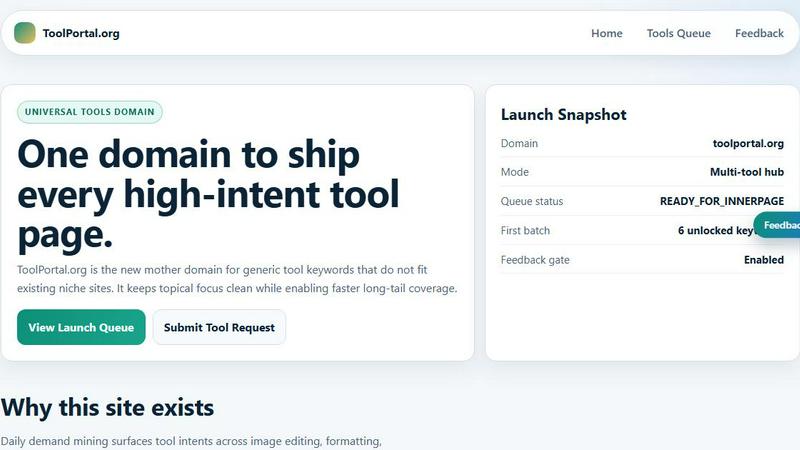
ToolPortal is your go-to online directory with over 300 free tools for developers, designers, and content creators to streamline their tasks.
Last updated: April 4, 2026

Zovo offers 20 privacy-focused Chrome extensions for developers and writers, all for one simple subscription.
Last updated: February 26, 2026
Visual Comparison
ToolPortal
Zovo

Feature Comparison
ToolPortal
Comprehensive Tool Index
ToolPortal features a dense index of 261 live tools organized into specific categories, including generators, checkers, converters, formatters, and image editing tools. This organization allows users to quickly navigate to the tools they need without unnecessary friction.
Dual Search Modes
Users can choose between two search methods: a direct keyword search for when they know the exact tool name or a task description mode that suggests tools based on the stated job. This flexibility caters to both experienced users and those who may be unsure of what they need.
Daily Refresh Cycle
ToolPortal is committed to continuous improvement, with new pages and UI updates being rolled out daily. This ensures that users always have access to the latest tools and features, enhancing the overall experience and keeping the content fresh and relevant.
Instant Access Without Login
One of the standout features of ToolPortal is that it requires no login or account creation. Users can open any tool page and run it immediately, eliminating barriers to access and allowing for a seamless workflow.
Zovo
BeLikeNative
BeLikeNative is a groundbreaking tool that helps users write like native speakers in just one keystroke. Supporting 80 languages, this extension works seamlessly across all platforms, making it an indispensable tool for anyone looking to enhance their writing skills and communicate effectively in a foreign language.
Tab Suspender Pro
Tab Suspender Pro is designed to optimize your browser's performance by automatically suspending inactive tabs. This feature uses smart detection to track memory usage, ensuring that your system runs smoothly without the clutter of open tabs, thus saving memory and improving your overall browsing experience.
JSON Formatter Pro
JSON Formatter Pro simplifies the process of handling JSON data by allowing users to format, validate, and explore JSON files locally. With features like beautification, minification, and a tree explorer, users can easily work with JSON data without the need for additional software, making it ideal for developers and data analysts alike.
Clipboard History Pro
Clipboard History Pro helps you manage your copied texts efficiently by storing up to 10,000 clips. This extension provides instant search functionality and smart paste options, ensuring that you never lose important information you copied earlier. It is particularly useful for writers, programmers, and anyone who frequently copies and pastes text.
Use Cases
ToolPortal
Social Media Content Creation
Content creators can utilize the text styling tools available in ToolPortal, such as glitch or gothic text generators, to produce eye-catching social media posts. This allows for enhanced engagement and unique branding.
Quick Image Editing
Marketers and designers can use the image tools to crop photos, remove backgrounds, and prepare assets for various platforms in a matter of minutes. This efficiency is crucial for meeting tight deadlines in the fast-paced digital landscape.
Validation and Quality Checks
Developers can rely on the validation tools for tasks such as checking DMARC records or running speed tests to ensure their projects meet quality standards before publishing. This helps maintain a high level of professionalism.
Format Conversion
Students and professionals alike can benefit from the conversion tools offered by ToolPortal, which allow for quick and easy transformation of units, time, and text formats. This is particularly useful for those working on reports or data analysis.
Zovo
Enhancing Multilingual Communication
BeLikeNative is perfect for professionals and students who need to communicate in multiple languages. With its instant rewriting capabilities, users can express their thoughts clearly and accurately, improving their confidence in writing.
Optimizing Browser Performance
For users who often have numerous tabs open, Tab Suspender Pro is invaluable. It automatically suspends inactive tabs, freeing up memory and ensuring that the browser remains responsive, making it an ideal solution for multitaskers.
Streamlining JSON Management
Developers working with APIs or data structures will find JSON Formatter Pro essential. It allows for quick formatting and validation of JSON data, which can save time and reduce errors during development, enhancing productivity.
Managing Copied Content Efficiently
Clipboard History Pro is a game-changer for anyone who regularly copies and pastes. Whether you are a writer needing to gather research notes or a developer working with code snippets, this tool ensures that your clipboard history is easily accessible and organized.
Overview
About ToolPortal
ToolPortal is a robust online directory offering over 300 free, browser-based tools designed to cater to a wide range of needs. Whether you're looking to convert text formats, validate JSON code, edit images, or perform SEO checks, ToolPortal has something for everyone. It serves as a one-stop-shop for developers, marketers, writers, and anyone who needs quick access to practical online utilities without the hassle of installation or sign-up. The intuitive interface allows users to search for tools by keyword or describe their task in plain language, making it easy to find the right tool in seconds. With a focus on user experience, ToolPortal ensures that all tools are live and ready to use immediately, streamlining workflows and enhancing productivity.
About Zovo
Zovo is an innovative suite of 20 Chrome extensions developed by a solo developer with over a decade of experience in software development, boasting a remarkable track record of $400K earned on Upwork with a 100% success rate. The flagship extension, BeLikeNative, empowers over 3,300 users to write like native speakers through one-keystroke rewrites in 80 languages, making communication effortless and effective. The collection includes essential tools like Tab Suspender Pro, JSON Formatter Pro, Clipboard History Pro, Form Filler Pro, Session Manager Pro, Regex Tester Pro, Web Scraper Lite, Cookie Manager, API Testing Lite, and many more. Each extension is designed with a privacy-first approach, ensuring that user data never leaves their device. With no data harvesting and no investors, Zovo stands out by allowing users to influence the development roadmap through feature requests and votes, ensuring that the tools evolve according to user needs. New extensions are released monthly, with early access granted to members, and many tools are also available for free online at zovo.one, making Zovo a user-centered solution for all your browser needs.
Frequently Asked Questions
ToolPortal FAQ
What types of tools does ToolPortal offer?
ToolPortal offers a wide variety of tools across categories such as generators, checkers, converters, formatters, and image editing utilities. This diversity ensures that users can find tools for nearly any online task.
Do I need to create an account to use ToolPortal?
No, ToolPortal does not require any account creation or login. Users can access and run tools directly in their browser without any barriers, making it quick and easy to get started.
How often are new tools added to ToolPortal?
ToolPortal features a daily refresh cycle, meaning new tools and updates are continually being integrated into the platform. This commitment to freshness ensures users have access to the latest tools available.
Can I search for tools without knowing their names?
Absolutely! ToolPortal allows users to describe their tasks in plain language, and it will suggest the best-fit tools based on that description. This user-friendly feature helps those who may not be familiar with specific tool names.
Zovo FAQ
How does Zovo ensure user privacy?
Zovo prioritizes user privacy by ensuring that all data is processed locally. No data is harvested or shared with third parties, allowing users to utilize the extensions without concerns about data security.
Can I request new features for Zovo extensions?
Absolutely! Zovo encourages users to submit feature requests directly. The developer actively reviews suggestions, and the most requested features are prioritized for future updates.
Are there any costs associated with using Zovo extensions?
While many tools are available for free online, Zovo offers premium features through membership, which provides early access to new extensions and additional functionalities.
How can I get support if I encounter issues?
If you have questions or problems, you can reach out directly via email or Discord. Unlike many services, Zovo ensures that you communicate with a human rather than automated systems, providing personalized support.
Alternatives
ToolPortal Alternatives
ToolPortal is a robust online tools directory designed specifically for developers, designers, SEO professionals, and content creators. With over 300 free browser-based tools, it offers a wealth of resources across various categories, including productivity, web development, and SEO. Users often seek alternatives to ToolPortal for several reasons, such as varying feature sets, user interface preferences, or specific platform needs that might not be met by ToolPortal. When looking for an alternative, consider factors like the types of tools offered, ease of navigation, user experience, and whether the platform requires any installation or sign-up. It's also essential to assess the reliability and support provided, as well as how frequently the tools are updated to meet current industry standards.
Zovo Alternatives
Zovo is a suite of 20 privacy-first Chrome extensions designed specifically for developers and writers. Each extension focuses on enhancing productivity and efficiency, addressing various tasks such as JSON formatting, clipboard history management, and tab suspension. With a strong emphasis on user privacy, Zovo ensures that data remains on the user's device, offering a trustworthy solution for those who prioritize security in their digital tools. Users often seek alternatives to Zovo for a variety of reasons, including pricing, feature sets, and platform compatibility. Some may find that certain tools better suit their specific workflows or offer unique functionalities that meet their needs. When choosing an alternative, it's important to consider factors like user privacy, ease of use, and the overall value provided by the product. Additionally, evaluating community support and the frequency of updates can significantly impact your experience with a new tool.