
FilexHost vs TrackMailBox
Side-by-side comparison to help you choose the right AI tool.

FilexHost
Easily host and share any file with instant URLs, secure access, and built-in viewers for a seamless experience.
Last updated: February 26, 2026

TrackMailBox
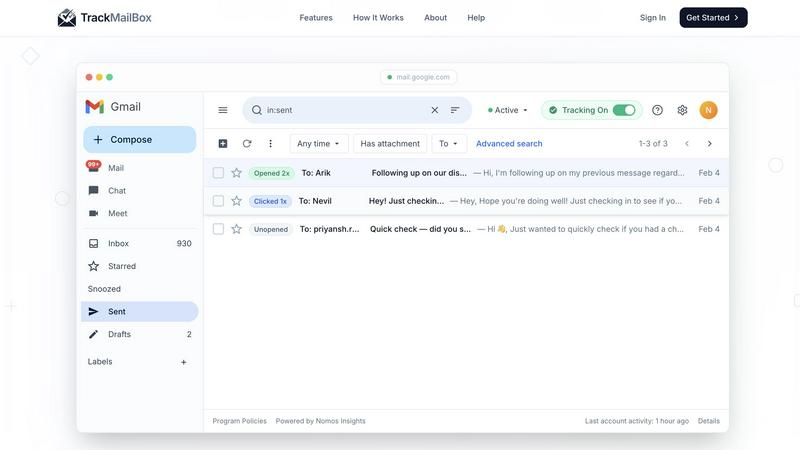
TrackMailBox is a free Chrome extension that provides real-time tracking of email opens and link clicks in Gmail.
Last updated: February 26, 2026
Visual Comparison
FilexHost

TrackMailBox
Feature Comparison
FilexHost
Instant Subdomains
With FilexHost, each file you upload is assigned a unique, instant subdomain (your-file.filex.host). This feature enables quick and easy sharing of your files without needing any setup or configuration, making it incredibly user-friendly.
Free SSL Encryption
Security is a top priority for FilexHost. Every link generated on the platform comes with free SSL encryption, ensuring that your files are transferred securely. This means you can share sensitive documents with confidence, knowing they are protected from unauthorized access.
Smart View Modes
FilexHost offers smart view modes that allow your recipients to experience your files in the best possible way. You can choose between direct rendering for in-browser viewing or a download page, depending on the nature of the file and how you want it presented.
Optional Password Protection & Expiry Settings
For users who need additional security, FilexHost provides options for password protection and file expiry settings. You can set links to expire after 24 hours or keep them live indefinitely, providing flexible sharing options tailored to your needs.
TrackMailBox
Unlimited Email Tracking
TrackMailBox offers unlimited email tracking, allowing you to monitor as many emails as you want without any costs. There are no hidden fees or premium tiers, making it an ideal solution for those who frequently send important emails.
Real-time Open Notifications
Receive instant notifications the moment your emails are opened. TrackMailBox ensures you know exactly when your recipients engage with your messages, helping you follow up effectively and strategically.
Link Click Tracking
With TrackMailBox, you can track which links in your emails are clicked and how often. This feature provides valuable insights into what content resonates with your recipients and can help you tailor your future communications for better engagement.
Detailed Engagement History
Access a comprehensive engagement history for each email directly within your Gmail interface. You'll see opens, clicks, and timestamps, allowing you to analyze the effectiveness of your email campaigns at a glance.
Use Cases
FilexHost
Sharing Client Reports
Professionals can easily share client reports and presentations without the hassle of email attachments. By using FilexHost, you can upload your files and provide clients with a secure link that they can access immediately, streamlining communication.
Hosting Developer Projects
Developers can host landing pages, mock APIs, or even entire websites in a matter of seconds. FilexHost allows for the quick upload of project files, enabling easy sharing with colleagues or clients for feedback and collaboration.
Distributing Digital Products
Creators and entrepreneurs can utilize FilexHost to distribute digital products like eBooks, software, or design templates. With the ability to generate secure links quickly, you can focus on your creativity rather than dealing with complicated file-sharing methods.
Friction-Free File Delivery
Anyone needing to send files without the hassle of "request access" emails or attachment limits will find FilexHost invaluable. The platform is designed for simplicity, making it easy to share files of any type with anyone, anywhere.
TrackMailBox
Freelancers Pitching Clients
Freelancers can use TrackMailBox to track their proposals and pitches, ensuring they know when potential clients have read their messages. This insight allows them to time their follow-ups effectively.
Sales Teams Closing Deals
Sales teams can benefit greatly from TrackMailBox by monitoring when leads open their emails and click on links to product demos or sales materials. This real-time data helps them prioritize their outreach efforts.
Recruiters Following Up with Candidates
Recruiters can streamline their communication with candidates by using TrackMailBox to see if their emails, such as interview invites or feedback, have been opened, ensuring a smoother hiring process.
Job Seekers Networking
Job seekers can utilize TrackMailBox to track their networking emails, ensuring they follow up with contacts who have engaged with their outreach. This feature can enhance their chances of securing job opportunities.
Overview
About FilexHost
FilexHost is an innovative file hosting and sharing platform designed to simplify the way users share files online. Whether you need to share documents, media files, spreadsheets, or even entire websites, FilexHost has you covered. Its intuitive "Drop & Share" workflow allows you to drag and drop your files, generating a secure URL in seconds—no complicated setups or logins required for recipients. This service caters to professionals, developers, creatives, and anyone who needs hassle-free file delivery. The platform supports a wide range of file types, ensuring that your content is displayed optimally. With its focus on viewer experience, FilexHost presents your files beautifully without requiring additional downloads or plugins, making it the ideal solution for fast, secure, and efficient file sharing.
About TrackMailBox
TrackMailBox is a free and unlimited email tracking extension designed specifically for Gmail users. It addresses a common question among email senders: "Did they read it?" Unlike Gmail's default settings, which lack built-in read receipts, TrackMailBox provides a seamless solution for those who send important emails like proposals, pitches, or follow-ups. The tool eliminates the frustrations associated with other email tracking solutions that often impose restrictions, include unwanted signatures, or charge monthly fees. With TrackMailBox, you can track an unlimited number of emails without any branding, ensuring that your communications remain professional and clean. This extension is perfect for freelancers, sales teams, recruiters, job seekers, and founders—essentially anyone who relies on email for communication and wants to gain insights into their email engagement.
Frequently Asked Questions
FilexHost FAQ
What is FilexHost?
FilexHost is a file hosting and sharing service that allows users to upload and share files of all types quickly and securely. It simplifies the sharing process with its drag-and-drop interface and generates instant, secure URLs for easy access.
Is it really free?
Yes, FilexHost offers a free plan that allows users to host up to 1,000 files, with a maximum file size of 25MB and a 7-day expiry. This plan is ad-supported, making it a great option for quick sharing and testing.
What file types are supported?
FilexHost supports a wide range of file types, including documents (PDF, TXT), media files (MP3, MP4), images (JPG, PNG), spreadsheets (XLSX), and more. This versatility ensures that you can host virtually any type of content.
How do I update my site?
To update your site hosted on FilexHost, simply upload the new version of your file or website ZIP. The platform automatically generates a new link, ensuring that your recipients always have access to the latest version without any additional effort on your part.
TrackMailBox FAQ
Is TrackMailBox really free?
Yes! TrackMailBox is completely free and unlimited. You can track as many emails as you want without any cost. There are no credit card requirements, hidden fees, or premium tiers involved.
How do I install TrackMailBox?
Installing TrackMailBox is easy. Simply add the extension from the Chrome Web Store. The installation process takes less than 30 seconds, and you can start tracking right away without any technical setup.
Will my recipients know I'm tracking my emails?
No, your recipients will not be aware that you are tracking your emails. TrackMailBox operates invisibly, meaning no signatures, logos, or labels are added to your outgoing messages.
Can I monitor engagement history for all my emails?
Absolutely! TrackMailBox provides a detailed engagement history for each email you send. You can view opens, clicks, and timestamps directly in your Gmail account, making it easy to analyze your email performance.
Alternatives
FilexHost Alternatives
FilexHost is a user-friendly file hosting and sharing service designed to simplify the way users manage and distribute files. By allowing users to drag and drop files for instant sharing, it falls into the productivity and management category. Many users seek alternatives to FilexHost for various reasons, such as pricing structures, specific feature sets, or unique platform requirements that may better suit their needs. When considering alternatives, it's important to evaluate factors like ease of use, security features, file type support, and any limitations on storage or sharing capabilities. Assessing these elements can help ensure that you find a solution that meets your specific needs for file hosting and sharing without unnecessary complications.
TrackMailBox Alternatives
TrackMailBox is a free email tracking extension designed specifically for Gmail users, enabling real-time open and click tracking without any limitations or branding. Users often seek alternatives to TrackMailBox for various reasons, including pricing, feature sets, and compatibility with other platforms. As you explore options, it's essential to consider factors such as ease of use, the comprehensiveness of tracking features, privacy policies, and whether the tool integrates seamlessly with your existing email workflows. When selecting an alternative, look for tools that offer unlimited tracking without hidden fees, ensure a clean email presentation, and provide detailed engagement insights. Prioritizing user privacy and data security is also crucial, as you want a solution that protects your information while delivering the insights you need.