
AdaptlyPost vs Veo 4 AI Video Generator
Side-by-side comparison to help you choose the right AI tool.

AdaptlyPost
Create, schedule, and publish tailored social media content effortlessly across all platforms from one intuitive dashboard.
Last updated: March 11, 2026

Veo 4 AI Video Generator
Create stunning cinematic videos from text or images in minutes with Veo 4's advanced AI video generator.
Last updated: February 28, 2026
Visual Comparison
AdaptlyPost

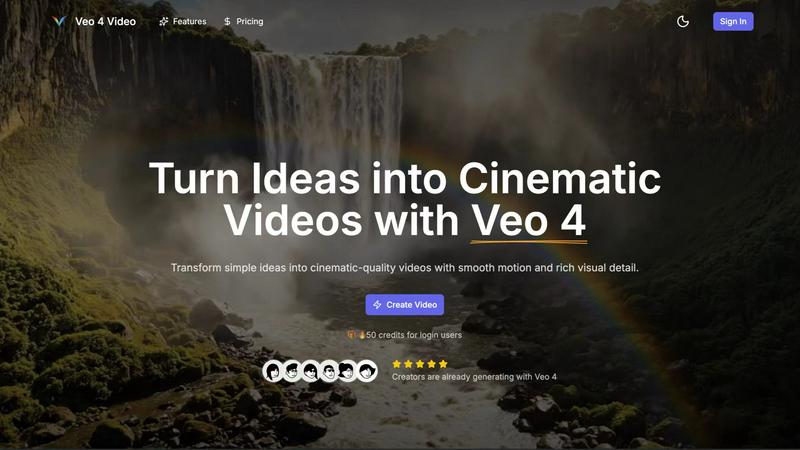
Veo 4 AI Video Generator
Feature Comparison
AdaptlyPost
Smart Scheduling
With Smart Scheduling, users can plan and schedule their posts in advance, ensuring that content goes live at optimal times. This feature helps manage posting frequency and timing, allowing for better audience engagement without the need for constant manual oversight.
Multi-Platform Posting
The Multi-Platform Posting feature allows users to create a single piece of content and distribute it across various social networks with just one click. Each post is automatically tailored to fit the specific requirements and tone of each platform, ensuring consistency and effectiveness.
AI Caption Co-pilot
The AI Caption Co-pilot assists users in generating engaging captions that resonate with their audience. This tool can adapt captions for different platforms, ensuring that the messaging aligns with the unique characteristics of each social media outlet.
AI Image Studio
The AI Image Studio empowers users to create stunning visuals in seconds. By simply describing their vision, users can generate eye-catching images that enhance their social media posts, ensuring that their content stands out in crowded feeds.
Veo 4 AI Video Generator
Text-to-Video Engine
Veo 4 allows users to create videos from descriptive text prompts. Simply write a scene description, and the AI engine generates a coherent cinematic clip that reflects your ideas. You can add details like the time of day and camera movements for more control over the final output.
Image-to-Video Motion
If you want to animate still images, Veo 4's Image-to-Video feature lets you upload one or two images to create motion. The tool generates smooth transitions between the images, providing a dynamic way to bring your visuals to life.
Fast & Quality Modes
Veo 4 offers two distinct modes for video generation: Fast and Quality. The Fast mode is perfect for quick drafts or testing ideas, while the Quality mode focuses on delivering clearer details and smoother movements, ensuring that you get the result that fits your needs.
Multiple Aspect Ratios and Clean Exports
With Veo 4, you can export your videos in various aspect ratios, including Auto, 16:9, and 9:16, making your content versatile for different platforms. Additionally, the tool produces clean 1080p videos without watermarks, allowing for immediate sharing on social media and other channels.
Use Cases
AdaptlyPost
Content Creation for Businesses
Businesses can leverage AdaptlyPost to create consistent and engaging content across all their social media channels. By utilizing the platform's smart scheduling and AI tools, they can maintain an active online presence that resonates with their target audience.
Influencer Marketing
Influencers can use AdaptlyPost to manage their posts across multiple platforms effortlessly. By generating tailored captions and visuals, they can maintain their unique brand voice while maximizing their reach and engagement with followers.
Event Promotion
Event organizers can utilize AdaptlyPost to create buzz around upcoming events. By scheduling promotional posts in advance and using engaging visuals, they can ensure optimal visibility and attendance, all managed from a single dashboard.
Team Collaboration
Teams can take advantage of AdaptlyPost's collaborative features, allowing multiple members to work together on content creation and scheduling. This fosters a streamlined workflow and keeps everyone on the same page, enhancing productivity and creativity.
Veo 4 AI Video Generator
Product Ads
Veo 4 is an excellent tool for marketers looking to create engaging product ads. By turning concise pitches into punchy promo clips, users can enhance their landing pages and boost the effectiveness of paid campaigns.
Social Shorts
Content creators can generate loopable B-roll or short clips for social media platforms like TikTok and Instagram Reels. By using hooks, captions, or story beats, Veo 4 helps you capture audience attention quickly with captivating visuals.
Educational Content
Educators can leverage Veo 4 to create instructional videos that illustrate complex concepts in an engaging manner. By transforming lesson plans into cinematic clips, teachers can enhance learning experiences for their students.
Event Highlights
After hosting an event, users can utilize Veo 4 to compile highlights into a concise video. By summarizing key moments into an 8-second clip, event organizers can share memorable experiences on social media, fostering engagement and interest for future events.
Overview
About AdaptlyPost
AdaptlyPost is an all-in-one social media management tool designed to simplify the content creation, scheduling, and publishing process across multiple platforms, including X, Instagram, TikTok, and YouTube. It caters to individuals, creators, and businesses looking for a streamlined approach to their social media strategy. With AdaptlyPost, users can easily create engaging content with the help of an AI Co-pilot that generates platform-specific captions and visuals. The platform allows users to manage all their social media accounts from a single dashboard, saving them valuable time and effort. Whether you are a solopreneur or part of a larger team, AdaptlyPost helps you maximize your online presence while keeping your workflow organized and efficient.
About Veo 4 AI Video Generator
Veo 4 AI Video Generator is an innovative tool designed to revolutionize the way creators produce video content. Powered by advanced artificial intelligence, Veo 4 transforms simple text prompts and images into stunning, cinematic-quality videos in just minutes. This platform is ideal for marketers, educators, and content creators who want to generate high-quality video content without the need for extensive technical skills. The main value proposition of Veo 4 lies in its ability to streamline the video production process, allowing users to effortlessly turn their ideas into visually dynamic content. With features like synchronized audio and advanced algorithms for realistic clips, Veo 4 enhances the viewing experience while making video creation accessible to everyone.
Frequently Asked Questions
AdaptlyPost FAQ
Which social media platforms do you support?
AdaptlyPost supports a variety of platforms, including X, Instagram, TikTok, YouTube, and more, enabling users to manage their presence across multiple channels seamlessly.
Will my posts get less reach than posting manually?
No, posts made through AdaptlyPost are designed to maintain or even enhance reach. Each post is auto-adapted to fit the platform's requirements, ensuring optimal engagement without sacrificing visibility.
Can I schedule posts in advance?
Yes, AdaptlyPost allows users to schedule posts in advance, enabling them to plan their content strategy effectively and post at the most advantageous times for their audience.
How does the AI caption writer work?
The AI caption writer generates engaging and relevant captions based on user prompts. It can adapt these captions for different platforms and suggest trending hashtags to enhance discoverability.
Veo 4 AI Video Generator FAQ
How does Veo 4 generate videos?
Veo 4 uses advanced AI algorithms to convert text prompts and images into cinematic videos. Users input descriptions or upload images, and the tool automatically generates coherent video clips with synchronized audio.
Can I use my native language to create videos?
Yes, Veo 4 includes a built-in prompt translation feature that allows you to write your ideas in your own language. The tool can then translate your text to English for better understanding and accuracy in video generation.
What formats can I export my videos in?
Veo 4 allows users to export videos in several aspect ratios, including Auto, 16:9, and 9:16. The videos are exported in clean 1080p quality without any watermarks.
Is technical knowledge required to use Veo 4?
No, Veo 4 is designed to be user-friendly and accessible for everyone, regardless of technical expertise. Its intuitive interface enables users to create professional-looking videos quickly and easily.
Alternatives
AdaptlyPost Alternatives
AdaptlyPost is an innovative content creation tool designed to streamline the process of publishing across multiple social media platforms like X, Instagram, TikTok, and YouTube. By offering an all-in-one dashboard, users can create, schedule, and publish their content efficiently while utilizing features such as an AI Co-pilot for caption generation and an AI Image Studio for eye-catching visuals. This makes AdaptlyPost a valuable resource for marketers and content creators looking to enhance their online presence. However, users often seek alternatives to AdaptlyPost for various reasons, including pricing, specific feature sets, or compatibility with different platforms. When exploring alternatives, it's essential to consider factors such as ease of use, the range of supported platforms, and the quality of customer support. Additionally, users should evaluate whether the alternative can meet their unique content creation needs without sacrificing efficiency.
Veo 4 AI Video Generator Alternatives
Veo 4 AI Video Generator is an innovative tool that falls under the category of video content creation software, utilizing artificial intelligence to transform text and images into cinematic videos with ease. Its advanced features cater to various users, including marketers, content creators, and educators, who seek to produce high-quality visual content without requiring extensive editing skills. Users often look for alternatives due to various factors such as pricing, specific feature sets, or compatibility with different platforms. When exploring alternatives, it’s essential to consider aspects like user-friendliness, customization options, the quality of output, and any unique functionalities that may align better with your creative goals or project requirements.