
ShotAI vs Veo 4 AI Video Generator
Side-by-side comparison to help you choose the right AI tool.

ShotAI
ShotAI is an all-in-one platform that uses advanced AI to effortlessly create stunning images and videos from text descriptions.
Last updated: March 11, 2026

Veo 4 AI Video Generator
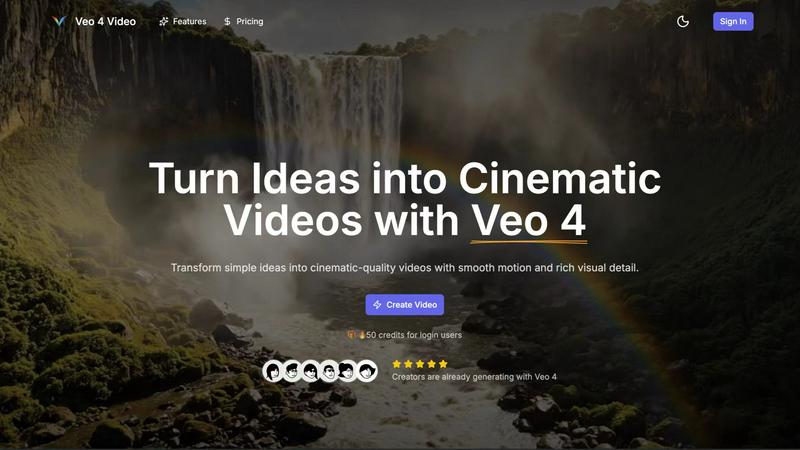
Create stunning cinematic videos from text or images in minutes with Veo 4's advanced AI video generator.
Last updated: February 28, 2026
Visual Comparison
ShotAI

Veo 4 AI Video Generator
Feature Comparison
ShotAI
Text to Image
Transform your text descriptions into stunning, high-quality images with ease. ShotAI uses advanced AI models like Gemini Nano Banana and Seedream 4.0 to comprehend your vision, producing photorealistic images that capture intricate details and nuances.
Image to Image
Edit and enhance existing images using AI precision. With this feature, users can modify styles, change specific elements, or create variations of an image while preserving the original composition, making it perfect for iterative design processes.
Text to Video
Bring your ideas to life with AI-generated videos in a matter of minutes. Users simply describe their scene, and ShotAI's powerful tools, such as Sora 2 and VEO3, create professional-quality videos that incorporate realistic motion, physics, and synchronized audio, making video creation accessible to everyone.
AI Effects
Streamline your creative process with a variety of image and video templates. Users can easily upload their photos to generate professional AI-enhanced images and videos, allowing for quick transformations without needing extensive editing skills.
Veo 4 AI Video Generator
Text-to-Video Engine
Veo 4 allows users to create videos from descriptive text prompts. Simply write a scene description, and the AI engine generates a coherent cinematic clip that reflects your ideas. You can add details like the time of day and camera movements for more control over the final output.
Image-to-Video Motion
If you want to animate still images, Veo 4's Image-to-Video feature lets you upload one or two images to create motion. The tool generates smooth transitions between the images, providing a dynamic way to bring your visuals to life.
Fast & Quality Modes
Veo 4 offers two distinct modes for video generation: Fast and Quality. The Fast mode is perfect for quick drafts or testing ideas, while the Quality mode focuses on delivering clearer details and smoother movements, ensuring that you get the result that fits your needs.
Multiple Aspect Ratios and Clean Exports
With Veo 4, you can export your videos in various aspect ratios, including Auto, 16:9, and 9:16, making your content versatile for different platforms. Additionally, the tool produces clean 1080p videos without watermarks, allowing for immediate sharing on social media and other channels.
Use Cases
ShotAI
Content Creation for Social Media
Social media managers can utilize ShotAI to quickly create eye-catching visuals and videos that resonate with their audience. By transforming text prompts into engaging content, they can maintain a consistent posting schedule without sacrificing quality.
Marketing Campaigns
Digital marketers can leverage ShotAI to produce promotional materials and videos tailored to their campaigns. With the ability to generate high-quality imagery and video content at scale, marketers can enhance brand engagement and drive conversions.
Creative Projects for Artists
Visual artists can use ShotAI to explore new creative avenues by generating unique images and videos based on their ideas. The platform allows artists to experiment with various styles and effects, fostering innovation in their work.
Educational Content Development
Educators and trainers can create visually appealing instructional materials using ShotAI. By converting complex concepts into easy-to-understand visuals and videos, they can enhance learning experiences and improve knowledge retention.
Veo 4 AI Video Generator
Product Ads
Veo 4 is an excellent tool for marketers looking to create engaging product ads. By turning concise pitches into punchy promo clips, users can enhance their landing pages and boost the effectiveness of paid campaigns.
Social Shorts
Content creators can generate loopable B-roll or short clips for social media platforms like TikTok and Instagram Reels. By using hooks, captions, or story beats, Veo 4 helps you capture audience attention quickly with captivating visuals.
Educational Content
Educators can leverage Veo 4 to create instructional videos that illustrate complex concepts in an engaging manner. By transforming lesson plans into cinematic clips, teachers can enhance learning experiences for their students.
Event Highlights
After hosting an event, users can utilize Veo 4 to compile highlights into a concise video. By summarizing key moments into an 8-second clip, event organizers can share memorable experiences on social media, fostering engagement and interest for future events.
Overview
About ShotAI
ShotAI is a professional, AI-powered platform designed for seamless photo and video creation. By harnessing the latest advancements in artificial intelligence, it empowers creators to generate high-quality visual content without the hassle of switching between multiple tools. Ideal for content creators, digital marketers, social media managers, and visual artists, ShotAI simplifies the creative process with its all-in-one solution. Users can effortlessly create stunning images and videos using various preset templates and advanced AI models, significantly accelerating their workflow. With competitive pricing and a user-friendly interface, ShotAI makes it easy for anyone to transform their ideas into breathtaking visuals, allowing for more time to focus on creativity rather than technicalities.
About Veo 4 AI Video Generator
Veo 4 AI Video Generator is an innovative tool designed to revolutionize the way creators produce video content. Powered by advanced artificial intelligence, Veo 4 transforms simple text prompts and images into stunning, cinematic-quality videos in just minutes. This platform is ideal for marketers, educators, and content creators who want to generate high-quality video content without the need for extensive technical skills. The main value proposition of Veo 4 lies in its ability to streamline the video production process, allowing users to effortlessly turn their ideas into visually dynamic content. With features like synchronized audio and advanced algorithms for realistic clips, Veo 4 enhances the viewing experience while making video creation accessible to everyone.
Frequently Asked Questions
ShotAI FAQ
How long does it take to generate content?
Content generation with ShotAI is remarkably fast, typically taking just a few minutes from the moment you input your description until you receive your final image or video.
What AI models does ShotAI use?
ShotAI employs a variety of advanced AI models, including Gemini Nano Banana, Seedream 4.0, Sora 2, and VEO3, among others, to ensure high-quality and diverse content generation.
Can I use the generated content commercially?
Yes, users can utilize the generated content for commercial purposes. This allows creators, marketers, and businesses to leverage AI-generated visuals in their marketing campaigns, social media, and other commercial endeavors.
What formats are supported for export?
ShotAI supports a variety of export formats for both images and videos, ensuring compatibility with most platforms and allowing easy integration into your existing workflows.
Veo 4 AI Video Generator FAQ
How does Veo 4 generate videos?
Veo 4 uses advanced AI algorithms to convert text prompts and images into cinematic videos. Users input descriptions or upload images, and the tool automatically generates coherent video clips with synchronized audio.
Can I use my native language to create videos?
Yes, Veo 4 includes a built-in prompt translation feature that allows you to write your ideas in your own language. The tool can then translate your text to English for better understanding and accuracy in video generation.
What formats can I export my videos in?
Veo 4 allows users to export videos in several aspect ratios, including Auto, 16:9, and 9:16. The videos are exported in clean 1080p quality without any watermarks.
Is technical knowledge required to use Veo 4?
No, Veo 4 is designed to be user-friendly and accessible for everyone, regardless of technical expertise. Its intuitive interface enables users to create professional-looking videos quickly and easily.
Alternatives
ShotAI Alternatives
ShotAI is an innovative AI photo and video creation platform that leverages cutting-edge AI technology to help creators produce stunning visuals. It consolidates various tools into one user-friendly interface, making it easier for individuals to explore their creative potential without the hassle of juggling multiple applications. However, users often search for alternatives to ShotAI due to factors like pricing, specific feature sets, or unique platform requirements that may better suit their individual needs. When looking for alternatives, consider important factors such as the range of features offered, ease of use, and any specific capabilities that may enhance your creative projects. Additionally, evaluate the pricing models to ensure they align with your budget. Ultimately, finding the right platform means balancing your creative aspirations with the tools that best support them.
Veo 4 AI Video Generator Alternatives
Veo 4 AI Video Generator is an innovative tool that falls under the category of video content creation software, utilizing artificial intelligence to transform text and images into cinematic videos with ease. Its advanced features cater to various users, including marketers, content creators, and educators, who seek to produce high-quality visual content without requiring extensive editing skills. Users often look for alternatives due to various factors such as pricing, specific feature sets, or compatibility with different platforms. When exploring alternatives, it’s essential to consider aspects like user-friendliness, customization options, the quality of output, and any unique functionalities that may align better with your creative goals or project requirements.