
OGimagen vs Volume Shader BM
Side-by-side comparison to help you choose the right AI tool.

OGimagen instantly creates beautiful, platform-perfect social images and meta tags from your content.
Last updated: March 11, 2026
Unlock your GPU's true potential with our accurate, professional-grade performance testing tool.
Last updated: March 1, 2026
Visual Comparison
OGimagen
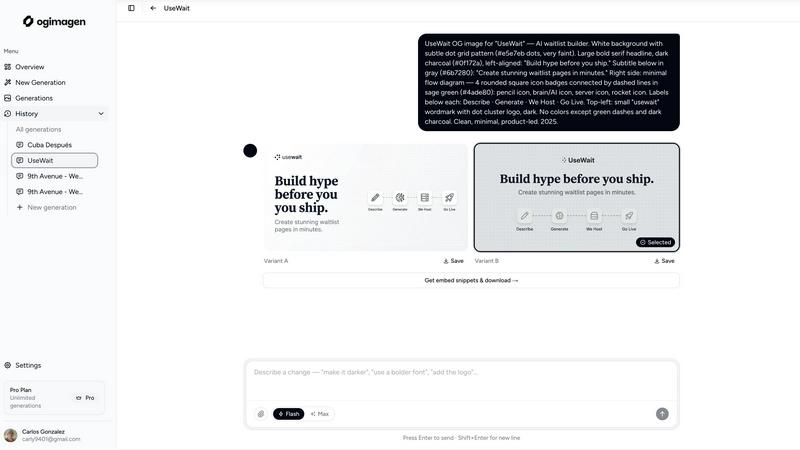
Volume Shader BM

Feature Comparison
OGimagen
AI-Powered Generation
Simply enter your title and description, and OGimagen's AI will instantly create two beautiful, unique image variants for you to choose from. The AI handles the design, typography, and layout, ensuring a polished and professional result every time. You can further customize the output with your brand color and select from different style presets to match your project's aesthetic, all without any design skills required.
Multi-Platform Optimization
OGimagen doesn't just create one image; it automatically generates and optimizes three different formats from a single generation to meet each platform's specific requirements. You get a 1200x630px image for Facebook and other OG platforms, a 1200x600px Twitter Card, and a 1200x627px LinkedIn Card. This ensures your preview looks pixel-perfect everywhere your link is shared, saving you from manually resizing and reformatting.
Framework-Specific Meta Tags
After generating your images, OGimagen provides ready-to-paste code snippets for your specific web framework. Free users get the standard HTML meta tags, while Pro users unlock snippets for modern frameworks like Next.js (App and Pages Router), Astro, SvelteKit, and Remix. This feature eliminates the guesswork and manual coding, letting you ship your new social cards in seconds.
MCP (Model Context Protocol) Integration
For Pro users, OGimagen integrates directly into your coding workflow through MCP. You can connect it to tools like Claude Code, Cursor, or Windsurf and generate images, list past generations, and grab embed snippets without ever leaving your code editor. This seamless integration is a game-changer for developers who want to maintain their flow and efficiency.
Volume Shader BM
Advanced Volume Shader Technology
At its core, Volume Shader BM uses cutting-edge volume rendering algorithms to thoroughly stress your GPU's shader units. It creates intricate 3D scenes with complex lighting, shadows, and particle effects, simulating the demanding graphical workloads of the latest software. This approach ensures the benchmark accurately measures your card's ability to handle real-world computational tasks, not just synthetic ones.
Comprehensive Performance Metrics
You get far more than a single score. Volume Shader BM provides a detailed report on your GPU's health and capability, tracking key metrics like frame rates, GPU utilization percentages, memory bandwidth usage, and thermal readings in real-time. This holistic view helps you identify not just how fast your card is, but also where any potential performance bottlenecks or stability issues might be hiding.
Real-Time Monitoring & Stress Testing
Watch your hardware perform under pressure. During the test, you can monitor live data on clock speeds, memory usage, and temperatures. This feature is especially valuable for overclockers and stability checks, as it allows you to safely push your GPU to its limits and see exactly how it responds to sustained, heavy loads.
Multi-GPU Configuration Support
Whether you have a single graphics card or a powerful multi-GPU setup using SLI or CrossFire technology, Volume Shader BM has you covered. It seamlessly benchmarks complex configurations, providing accurate performance data for high-end gaming rigs and professional workstations alike, giving a true picture of your system's combined graphical power.
Use Cases
OGimagen
Blog Post Promotion
Every time you publish a new blog post, you need an eye-catching social preview. With OGimagen, you can generate a unique, branded image for each article in seconds. Simply input the post's title and a short excerpt, and you have a professional card ready to boost shares and clicks when you or your readers share the link on social media.
SaaS Product Launches
When launching a new feature or product, first impressions on social platforms are critical. OGimagen allows SaaS teams to quickly create consistent, high-quality Open Graph images that reflect their brand. This ensures that every announcement link shared on LinkedIn, Twitter, or in community channels like Discord looks polished and trustworthy.
Developer Workflow Integration
Developers building websites can integrate OGimagen's MCP feature directly into their editor. While coding a new page or component, they can generate the required OG image on the fly and immediately insert the correct meta tags into their Next.js or Astro project. This streamlines the development process and ensures no page goes live without proper social previews.
Marketing Campaigns
For marketing teams running campaigns with multiple landing pages or content pieces, creating individual social images can be a bottleneck. OGimagen scales this process effortlessly. Team members can generate a batch of on-brand images for all campaign assets quickly, ensuring visual consistency and saving valuable design resources.
Volume Shader BM
Optimizing Gaming Performance
Gamers use Volume Shader BM to test their GPU's capability before buying a new game or to fine-tune in-game settings. By understanding your card's performance ceiling, you can find the perfect balance between stunning visual fidelity and smooth, high frame rates for a perfectly optimized gaming experience.
Validating System Stability for Work
IT professionals and content creators rely on Volume Shader BM to verify that a workstation or PC build is stable and performing as expected for critical tasks like video rendering, 3D animation, or live streaming. It's a trusted tool to ensure hardware can handle professional applications without crashing or throttling.
Comparing Hardware Before Purchase
Thinking of upgrading your graphics card? Volume Shader BM provides objective, comparable benchmark scores. You can test your current card and compare its results to online scores from newer models, giving you concrete data to make a smart, informed purchasing decision.
Stress Testing for Overclocking
Overclocking enthusiasts use Volume Shader BM as a crucial stability test. After adjusting GPU settings for higher performance, running this demanding benchmark helps confirm that the overclock is stable under extreme load, all while monitoring temperatures to ensure the hardware remains safe.
Overview
About OGimagen
OGimagen is your AI-powered assistant for creating stunning Open Graph images in seconds. It's designed for developers, content creators, and marketers who want their shared links to look professional and engaging without the hassle of manual design work. The tool takes your content—like a title and description—and uses artificial intelligence to generate beautiful, production-ready social card images that are perfectly optimized for platforms like Facebook, Twitter (X), and LinkedIn. Beyond just creating images, OGimagen provides the exact meta tag snippets you need to embed them into your website, whether you're using Next.js, Astro, SvelteKit, or plain HTML. This end-to-end solution ensures your links stand out in feeds, helping to dramatically improve click-through rates with minimal effort. You can even try it instantly without signing up, making it the fastest way to level up your link previews.
About Volume Shader BM
Ever wondered if your PC is truly ready for the latest games or demanding creative work? Volume Shader BM is your definitive answer. It's a specialized, industry-leading GPU benchmarking tool designed to give you a crystal-clear and accurate picture of your graphics card's real-world performance. Instead of simple tests, it pushes your GPU to its limits using intense, real-time volumetric shader computations. These simulate complex visual effects like smoke, fire, and clouds—the very things that strain your card in modern games and professional 3D applications. The goal isn't just to spit out a score; it's about providing deep understanding. Volume Shader BM delivers detailed insights into your frame rates, thermal performance, and potential system bottlenecks. This makes it the perfect tool for a wide audience, from gamers tweaking their settings for a buttery-smooth experience, to IT professionals verifying hardware stability for critical projects, or anyone comparing performance before a new GPU purchase. By delivering reliable, comprehensive data, Volume Shader BM empowers you to make informed decisions and squeeze the best possible performance from your hardware.
Frequently Asked Questions
OGimagen FAQ
How does AI generation work?
OGimagen's AI analyzes the text content you provide, such as your title and description, to understand the context and key elements. It then applies design principles, typography, and layout rules to create a visually appealing image that highlights your content. You can guide the style with presets and brand colors, but the AI handles the creative composition, ensuring a unique and professional result every time.
What's the difference between Starter, Growth, and Pro?
Starter and Growth are one-time purchase packs for 10 and 25 generations, respectively, with CDN hosting for 45 or 90 days. The Pro plan is a monthly subscription that includes 50 generations per month, permanent CDN hosting, and exclusive access to the MCP integration for editor workflow tools. Pro is designed for ongoing, high-volume use with priority processing.
What is MCP integration?
MCP (Model Context Protocol) integration allows OGimagen to connect directly with compatible code editors and AI assistants like Claude Code, Cursor, and Windsurf. Once connected, you can generate images, access your generation history, and copy embed code snippets through commands within your editor, without switching to a web browser. This is a Pro plan feature.
Which frameworks are supported for meta tag snippets?
OGimagen provides snippets for a wide range of frameworks. All users get plain HTML. Pro users additionally get framework-specific snippets for Next.js (both App Router and Pages Router), Astro, SvelteKit, and Remix. This ensures you have the correct, optimized code structure for your project's architecture.
Volume Shader BM FAQ
What makes Volume Shader BM different from other benchmark tools?
Volume Shader BM specializes in volumetric shader computations, which are exceptionally good at simulating the complex, real-time lighting and particle effects found in modern games and creative software. This provides a more accurate and demanding assessment of your GPU's real-world gaming and rendering performance compared to simpler synthetic tests.
Is Volume Shader BM suitable for beginners?
Absolutely! While it offers deep data for professionals, the results are presented in an easy-to-understand format. You'll get a clear overall score and can explore more detailed metrics as you become more familiar with hardware performance. It's designed to be valuable for users at all knowledge levels.
Can I use it to test laptops or pre-built systems?
Yes, you can. Volume Shader BM works on any Windows-based system with a dedicated graphics card, including gaming laptops and pre-built desktops. It's a great way to understand the performance of the GPU in your specific device, regardless of the brand.
How often should I run a GPU benchmark?
It's useful to run a benchmark in a few key situations: when you first get a new PC or GPU to establish a baseline, after updating your graphics drivers, before and after making significant hardware changes or overclocks, and if you suspect your system is underperforming in games or applications.
Alternatives
OGimagen Alternatives
OGimagen is an AI-powered tool in the developer tools category, designed to create beautiful Open Graph images quickly. It helps developers and content creators generate production-ready social cards that make shared links look professional and engaging, ultimately boosting click-through rates on social media. People often explore alternatives for various reasons. This could be due to budget constraints, needing a different set of features, or requiring integration with a specific platform or workflow. Some may seek more design control, while others prioritize simplicity or a different pricing model. When evaluating other options, consider your core needs. Look at the balance between ease of use and customization, the quality and speed of the AI image generation, compatibility with your tech stack, and of course, the overall value for the price. The right tool should fit seamlessly into your process and help you create stunning previews without extra hassle.
Volume Shader BM Alternatives
Volume Shader BM is a specialized GPU benchmarking tool in the development and performance testing category. It pushes your graphics card with intense volumetric shader computations to provide a clear, accurate picture of its real-world performance for tasks like gaming and 3D rendering. Users often look for alternatives for various reasons. Some might need a tool that fits a different budget, offers a specific feature not present here, or runs on an operating system that isn't supported. Others may simply want to compare results from multiple benchmarking sources to validate their findings. When evaluating other options, consider what matters most for your use case. Key factors include the type of tests performed, the depth of real-time monitoring and reporting, ease of use, and of course, compatibility with your hardware and software. The right tool should give you the reliable, actionable data you need.