
Inflowave vs WebP to PNG
Side-by-side comparison to help you choose the right AI tool.

Inflowave is your AI-powered Instagram assistant that automates lead generation, manages conversations, and provides growth analytics.
Last updated: March 18, 2026

WebP to PNG
Convert WebP images to PNG for free, privately, and instantly right in your browser.
Last updated: February 28, 2026
Visual Comparison
Inflowave
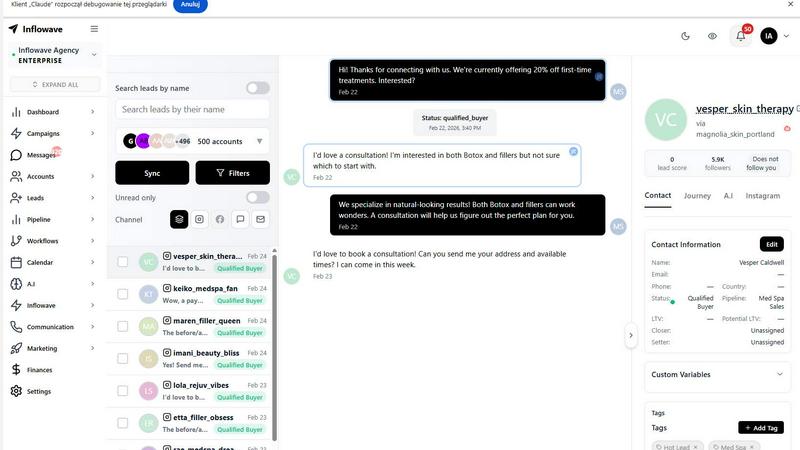
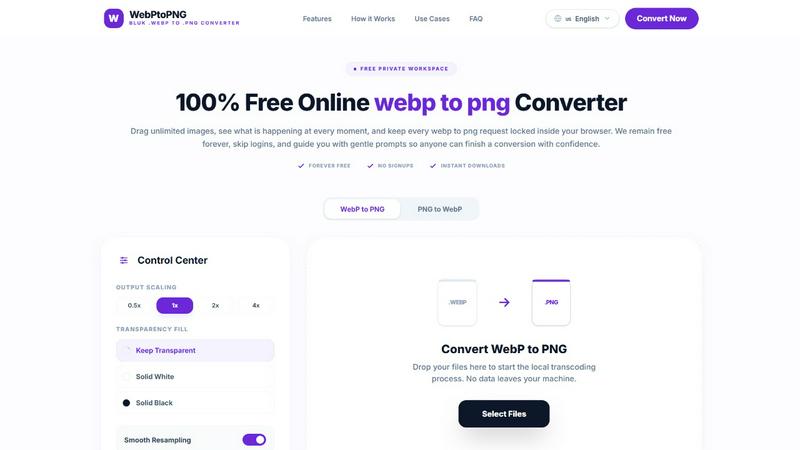
WebP to PNG
Feature Comparison
Inflowave
Unified Multi-Account Inbox
Say goodbye to logging in and out of countless Instagram profiles. Inflowave lets you connect and manage unlimited Instagram accounts from a single, clean dashboard. All your DMs, comments, and interactions flow into one organized inbox. This is a game-changer for agencies handling multiple clients or entrepreneurs running several brands, saving hundreds of hours on management and ensuring no lead ever slips through the cracks.
AI-Powered Chatbot & Automation
This isn't a generic bot. With one click, you can train your personal AI assistant on your past conversations, so it learns your tone, style, and common responses. It then works 24/7 to automatically reply to DMs, answer FAQs, qualify leads by asking key questions, and even book appointments directly into your calendar. It picks up conversations seamlessly, so your team can jump in exactly where the AI left off, providing a smooth, human-like experience for every prospect.
Competitor Analysis & Advanced Analytics
Stop guessing what works. Inflowave’s spy tools let you monitor competitor accounts to track their growth, analyze their content strategy, and uncover their engagement tactics. For your own accounts, go beyond vanity metrics. Track the exact messages, comments, or reels that generated the most sales, monitor your VAs' performance against KPIs, and get data-driven insights on engagement rates and ROI to make smarter scaling decisions.
Integrated Marketplace & Funnel Builder
Get discovered for free by getting listed on the Inflowave Marketplace. Showcase your real performance metrics to brands and agencies looking for collaborations, with no commission fees. Additionally, use the visual AI funnel builder to create automated customer journeys. Easily design lead capture flows, set up cross-channel nurturing sequences via SMS and email, and guide prospects from first DM to final purchase without any coding.
WebP to PNG
100% Local & Private Conversion
Your privacy is the top priority. Every single conversion process happens directly inside your web browser on your own device. This means your original WebP files and the resulting PNGs are never uploaded to any external server. It's perfect for converting personal documents, unreleased creative work, or any sensitive images with complete peace of mind, requiring no internet connection after the initial page load.
Unlimited Drag & Drop Batch Processing
Say goodbye to converting images one by one. You can drag and drop an entire folder of WebP files or select multiple images at once. The tool neatly queues them all up, showing you handy thumbnails so you can keep track of everything. There's no limit on the number of images you can convert in a single session, making it ideal for large projects or organizing big photo collections.
Customizable Output Controls
Get PNGs that are ready to use. Before converting, you have full control over the final output. You can choose to keep transparent backgrounds or fill them with a solid color like white or black. Need to resize? Use the simple scaling options (0.5x, 1x, 2x, 4x) to adjust image dimensions quickly. These settings ensure your converted images fit perfectly into your slides, documents, or designs without needing extra editing.
Guided, User-Friendly Workspace
The interface is built for clarity and confidence. Every step is explained with friendly prompts, clear buttons, and plain-language status updates. Live progress guidance shows you exactly what's happening, so you're never left guessing. This thoughtful design makes the tool accessible to everyone, regardless of their technical skill, ensuring a smooth and successful conversion every time.
Use Cases
Inflowave
Marketing & Social Media Agencies
Agencies managing dozens of client accounts can centralize all communication, provide transparent reporting with actionable analytics, and automate lead qualification. This eliminates reliance on untrackable VA work, ensures consistent and fast response times across all clients, and dramatically scales service delivery without proportionally increasing overhead or headcount.
Coaches & Consultants
For coaches generating leads via Instagram, Inflowave automates the initial conversation, filters serious prospects from tire-kickers, and books discovery calls directly into their calendar. It handles frequent questions about services and pricing 24/7, allowing the coach to focus their energy on delivering high-value sessions instead of administrative back-and-forth messaging.
E-commerce & Online Product Businesses
Businesses selling digital or physical products can use Inflowave to automate post-purchase support, answer common customer service queries, and recover abandoned carts via Instagram DM follow-ups. They can also build automated nurture funnels that combine Instagram engagement with targeted email and SMS sequences to boost customer lifetime value and repeat purchases.
Content Creators & Influencers
Creators can efficiently manage brand collaboration inquiries in one place, use the AI to handle common partnership questions, and leverage the Marketplace to get discovered by new brands. The analytics help them understand which content drives the most valuable engagement and conversions, allowing them to refine their strategy and grow a more monetizable audience.
WebP to PNG
For Web Developers & Designers
Developers often need to provide PNG fallbacks for websites that use modern WebP images, especially for clients or QA teams testing on older browsers. UI/UX designers can quickly pull WebP assets from live builds and convert them to PNG for use in design tools like Figma or Sketch, ensuring brand colors and details remain perfectly intact for collaboration and prototyping.
For Content Creators & Social Media Managers
When preparing graphics for platforms that have specific file format requirements, content creators can swiftly convert WebP images downloaded from the web or received from collaborators into PNG format. This is essential for creating consistent, high-quality posts, stories, or thumbnails where transparency or universal compatibility is needed for tools like Canva or video editing software.
For Educators & Students
Creating teaching materials, classroom flyers, or project presentations often involves sourcing images online, which are frequently in WebP format. This tool allows educators and students to easily convert these images to the more universally accepted PNG format for seamless insertion into PowerPoint, Google Slides, or printed handouts, all while keeping student work private.
For Personal Photo & Document Organization
Many people encounter WebP images when saving pictures from the internet or messaging apps. This converter is perfect for anyone wanting to organize their personal digital photo album or convert important documents (like saved receipts or IDs) into a more manageable and widely usable PNG format for local storage, printing, or sharing with family.
Overview
About Inflowave
Inflowave is your all-in-one AI-powered command center for Instagram growth and lead conversion. Designed specifically for agencies, coaches, creators, and online businesses, it solves the chaos of managing multiple accounts, endless DMs, and manual follow-ups. The platform brilliantly combines a unified Instagram inbox, an AI chatbot that learns your unique communication style, powerful analytics, and automated funnel building across Instagram, SMS, and email. Imagine having a virtual team member who never sleeps, automatically responds to prospects, qualifies leads, books appointments, and nurtures them through personalized sequences—all while giving you a crystal-clear dashboard to track what’s actually driving sales. With over 137 agencies trusting it for more than 13,000 client accounts, Inflowave is built for safe, Meta-compliant scaling. It’s not just another tool; it’s the secret weapon to turn your Instagram presence into a predictable, automated revenue engine without the technical headache.
About WebP to PNG
WebP to PNG is your friendly, go-to tool for converting WebP images into the versatile PNG format, all within the privacy of your own browser. It's designed for anyone who needs a reliable, no-fuss conversion, from professional designers and developers to students and content creators. The core promise is simple: transform your images without any of the usual hassles. There are no uploads to mysterious servers, no mandatory accounts to create, and no hidden costs. Everything happens directly on your device, ensuring your family photos, project assets, and sensitive documents never leave your computer. With an intuitive drag-and-drop interface, you can convert single images or entire folders in batches, all while maintaining the original quality, color, and clarity. Whether you're preparing graphics for a website, adapting images for a presentation, or simply need a PNG for an app that doesn't support WebP, this tool provides a straightforward, efficient, and completely free solution that works seamlessly on both desktop and mobile.
Frequently Asked Questions
Inflowave FAQ
Is Inflowave safe and compliant with Instagram's rules?
Absolutely. Inflowave is built to be fully Meta-compliant, prioritizing safe and sustainable growth. It operates within the official API limits and guidelines, ensuring your accounts are not at risk of being flagged or banned for using automation, unlike some risky third-party tools.
How does the AI chatbot learn to sound like me?
The setup is incredibly simple. When you connect your Instagram account, you have the option to train your AI assistant with a single press of a button. It securely analyzes your past message history to understand your specific communication style, common phrases, and how you typically handle questions, allowing it to generate responses that feel authentic and personal.
I already use spreadsheets and other automation tools. Will this slow me down?
On the contrary, Inflowave is designed to consolidate and streamline your workflow. Instead of juggling between Airtable, Google Sheets, and other platforms, it brings your messaging, analytics, and automation into one unified system. This reduces context-switching, eliminates manual data entry, and ultimately saves you significant time, making your operations faster and more efficient.
What if I don't see results or save time with Inflowave?
The team behind Inflowave is so confident in their platform that they offer a clear guarantee. If, for any reason, you do not generate revenue or save time using their software, they will issue a full refund. This takes the risk out of trying a new system to transform your Instagram marketing.
WebP to PNG FAQ
Is WebP to PNG really free to use?
Yes, absolutely! WebP to PNG is completely free, with no hidden costs, paywalls, or subscription tiers. You can convert an unlimited number of images, in batches of any size, as often as you like. We are committed to remaining free forever, with no sign-ups or logins required to access the full functionality of the tool.
How does the tool protect my privacy?
Privacy is built into the core of the tool. The conversion magic happens locally on your device using your browser's own processing power. Your image files are never sent over the internet to our servers or any third party. The only data that leaves your computer is the initial request to load the website itself. Your files stay with you, 100% private.
Can I use it on my phone or tablet?
Definitely! WebP to PNG is a browser-based tool that works on any modern device, including smartphones and tablets. The interface is designed to be responsive and touch-friendly, so you can drag and drop images or use the file selector just as easily on a mobile browser as you can on a desktop computer.
What happens if I lose my internet connection during a conversion?
Since all the processing is done locally on your device, you can actually start and complete conversions without an active internet connection after the website has loaded. This offline-friendly capability means you can work on converting your images anywhere, without worrying about your Wi-Fi stability.
Alternatives
Inflowave Alternatives
Inflowave is an AI-powered marketing automation platform focused on lead generation. It helps businesses capture and nurture leads by automating conversations across Instagram, SMS, and email, all within a single system. This places it in the category of all-in-one marketing and CRM tools designed to streamline customer communication. Users often explore alternatives for various practical reasons. Budget is a common factor, as pricing structures and feature tiers can vary significantly between platforms. Some businesses may need deeper integrations with their existing tech stack, while others might prioritize a different channel mix or require more advanced features that Inflowave doesn't offer. When evaluating other options, it's wise to consider your primary communication channels, desired automation depth, and team size. Look for a platform that aligns with your specific workflow, offers the right balance of power and ease-of-use, and scales affordably with your business growth. The goal is to find a tool that removes complexity, not adds to it.
WebP to PNG Alternatives
WebP to PNG is a free, browser-based tool that lets you convert WebP images to PNG format. It falls into the category of offline image converters, meaning all the work happens right on your own computer or phone. People often look for alternatives for different reasons. Some might need a tool that works on a specific operating system, like a desktop app for Mac or Windows. Others might be looking for additional features, such as converting between many different file formats or having advanced editing options. It's also common to explore options if you need a solution that integrates with other software you use. When choosing an alternative, consider what's most important for your workflow. Key things to look at include whether the tool is free or paid, if it works on your preferred platform (web, desktop, or mobile), and what specific features it offers beyond basic conversion. Privacy is another big factor—check if the tool processes your images online or securely on your device.