

Add Loved One to Photo
Add Loved One to Photo lets you seamlessly include missing or deceased family members in cherished photos for lasting memories.
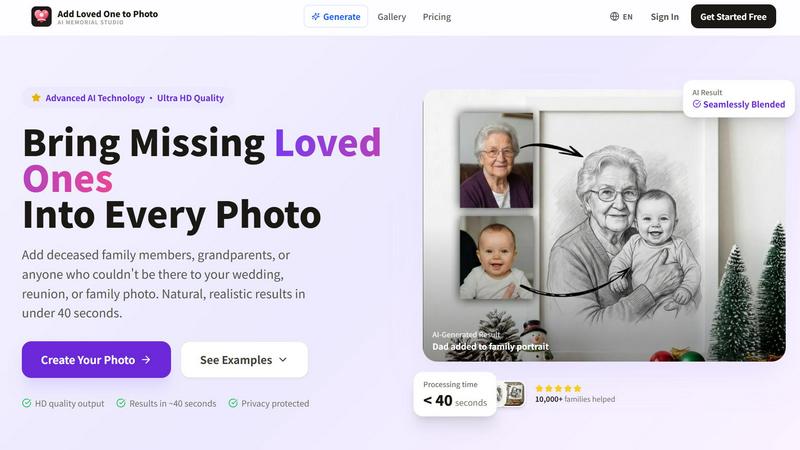
About Add Loved One to Photo
Add Loved One to Photo is an innovative AI memorial photo studio that offers families the ability to create complete and meaningful photographs by seamlessly integrating loved ones who could not be present. This tool is designed for those looking to honor their memories, allowing users to upload a group photo alongside a reference image of the deceased or absent individual. The AI technology works to blend these images together, producing a natural and emotionally resonant result in under 40 seconds. Whether it is for memorial portraits, family reunions, weddings, or holiday gatherings, this product caters to a range of sentimental restoration needs. Users can also explore creative options with a style-based generation mode, enabling them to create artistic variations like watercolor, sketch, or oil painting, ensuring that every memory can be cherished in a personalized way.
Features of Add Loved One to Photo
Advanced AI Technology
The core feature of Add Loved One to Photo is its advanced AI technology that allows for the automatic blending of images. This tech ensures that the added loved one appears naturally within the existing photo, preserving the integrity of the original image while enhancing the emotional impact.
Ultra HD Quality
Users can expect ultra HD quality output from their edited photos. The AI generates high-resolution images that are suitable for printing and framing, ensuring that the finished product meets the highest standards of visual clarity and detail.
Quick Processing Time
One of the highlights of this service is its efficiency. The AI processes images in less than 40 seconds, allowing users to create their memorial photos quickly and easily, without the need for complicated editing skills or software.
Privacy Protection
Add Loved One to Photo prioritizes user privacy, ensuring that all uploaded images are handled with the utmost care. The platform guarantees that personal photos remain confidential and secure throughout the editing process.
Use Cases of Add Loved One to Photo
Family Portraits
Families can use this service to create a complete family portrait by adding a deceased family member. This use case is especially meaningful during reunions or special occasions when every family member is missed.
Wedding Remembrance Photos
For weddings, Add Loved One to Photo provides a way to honor those who are no longer with us. Users can add a missing parent or grandparent to wedding photos, creating a touching tribute that enhances the joy of the day.
Graduation Keepsakes
Graduation is a significant milestone, and this tool allows families to include a loved one in the graduation portrait. By adding a parent or grandparent, users can create a cherished keepsake that celebrates both achievement and memory.
Holiday Memories
During the holiday season, families often want to remember those who can no longer join them. This service can help create a complete holiday family photo by integrating a loved one into the festive scene, making the memories even more special.
Frequently Asked Questions
How does Add Loved One to Photo work?
Users simply upload a group photo and a reference photo of the loved one they wish to add. The AI technology seamlessly blends the images to create a realistic and emotionally meaningful result.
What types of photos can I create?
Add Loved One to Photo is versatile and can be used for various occasions, including family portraits, weddings, graduations, birthdays, and holiday photos. The service is designed to help restore sentimental memories.
Is my privacy protected when using the service?
Yes, privacy protection is a key component of Add Loved One to Photo. All uploaded images are handled with care, ensuring that personal photos remain confidential throughout the editing process.
What quality can I expect from the final images?
The final images are generated in ultra HD quality, ensuring that they are suitable for printing and framing. Users can expect high-resolution outputs that capture every detail beautifully.
Explore more in this category:
Similar to Add Loved One to Photo

xfiles
Free PDF, image and audio tools that process your files locally in your browser. No account or added watermarks.

IconCreator
IconCreator is an AI-powered logo and app icon generator. Create professional logos, app icons, favicons, and brand assets in minutes.

Reword Image
Change the text already printed inside a photo, screenshot or poster, without the original design file.

Bulin 47 AI Videos
One photo in, a 15-second Bulin 47 street freestyle video with sound out: original dembow beat, lip-synced Spanish verse, crowd.

Ozil Goal AI
Make the Ozil goal AI video from one photo. You chip the keeper and score. 15 s, 9:16, 720p, no watermark. Ready for TikTok.

IdeaAize Free AI Tools
IdeaAize Free AI Tools is a suite of 50+ free online utilities that run 100% in your browser — no registration, no file uploads, no watermarks.

Spaceora
Turn room and outdoor photos into AI interior, virtual staging, garden and landscape design concepts.

Artcraft AI
AI image and video studio in your browser: generate and edit images, turn photos into videos, edit clips by sentence.