

AddSubtitles
AddSubtitles is a web-based AI tool that automatically generates stylish subtitles and edits videos for TikTok, Shorts, and Reels without watermarks.
About AddSubtitles
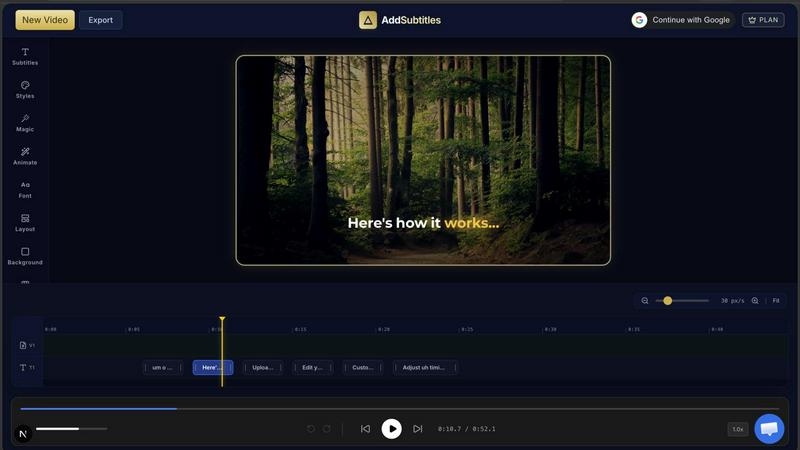
AddSubtitles is a powerful, browser-based video editing tool designed specifically for modern content creators who need to produce engaging short-form videos quickly. Whether you are making TikToks, YouTube Shorts, or Instagram Reels, AddSubtitles automates the most tedious parts of video editing so you can focus on your message. The platform automatically adds viral word-by-word subtitles, removes awkward silences, filters out filler words like "um" and "uh", and even drops context-aware emojis into your captions. It is trusted by over 1,000 daily creators and requires no credit card to start. The main value proposition is simple: stop manually chopping your timeline and wasting hours on re-exports. AddSubtitles handles silence detection, subtitle styling, and animation in one seamless workflow. You can save custom presets for your brand colors and fonts, translate subtitles into 50+ languages, and export without any watermarks, even on the free plan. It is the ultimate web-based editor for anyone who wants to add professional, thumb-stopping captions without learning complicated software.
Features of AddSubtitles
Auto Subtitle Generation with Word Animations
AddSubtitles automatically transcribes your audio and creates synchronized subtitles with stunning word-by-word animations. Choose from popular styles like Stomp, Wave, Flip, Karaoke, Pop, and Slide to make your text jump off the screen. Each animation is engineered to maximize viewer retention and dwell time, giving your videos that viral CapCut-level look directly in your browser. You can preview animations live and lock in your brand with saveable presets.
Remove Silences and Dead Air
The AI-powered editorial engine analyzes your audio waveform and instantly flags every awkward pause. With a single toggle, all dead air is removed, making your video up to 30% shorter without any manual scrubbing. This feature alone saves hours of editing time, especially for podcasters, interviewers, and vloggers who need tight, engaging content without the gaps.
Filler Word Filter
Automatically detect and visually tag filler words like "um," "uh," and "like" in your transcript. Instead of removing them entirely, AddSubtitles strikes them through so viewers see the hesitation without hearing it. This keeps your speech natural while polishing your final product. It is an instant polish for anyone who speaks off the cuff.
AI Hook Generator and Auto Emojis
Paste your transcript and get five attention-grabbing spoken hooks engineered to maximize viewer retention in the critical first three seconds. Additionally, the Auto Emojis feature reads your script and drops context-aware emojis above or below your text, eliminating manual placement. These two features work together to make your content instantly more engaging and shareable.
Use Cases of AddSubtitles
Social Media Content Creators
If you post daily on TikTok, Instagram Reels, or YouTube Shorts, AddSubtitles is your secret weapon. You can upload a raw clip, auto-generate animated subtitles, remove silences, and export a polished video in minutes. The viral word animations and auto emojis help your content stand out in crowded feeds, increasing watch time and engagement without requiring any video editing experience.
Podcasters and Interviewers
Podcasters often struggle with dead air and filler words during long recordings. AddSubtitles automatically removes silences and filters out "um" and "uh" from your transcript, tightening your episodes without losing natural flow. You can also translate subtitles into 50+ languages to reach a global audience, making your podcast accessible to non-native speakers.
Educators and Course Creators
Online educators need clear, engaging captions to help students follow along. AddSubtitles lets you add professional subtitles with custom brand colors and fonts, ensuring consistency across your course library. The one-click translation feature allows you to offer your content in multiple languages, expanding your student base without re-recording a single word.
Marketers and Brand Managers
Marketing teams can quickly produce high-quality video ads and social media posts with consistent branding. Save custom style presets that include your brand fonts, colors, and animation preferences. Every video looks identical without lifting a finger. The AI Hook Generator helps craft compelling opening lines that capture attention immediately, perfect for A/B testing ad creatives.
Frequently Asked Questions
How do I automatically remove silences from a video?
Upload your video to AddSubtitles and navigate to the silence removal toggle. Our AI analyzes your audio waveform and identifies every pause longer than a set threshold. Flip the toggle on, and all dead air is instantly removed from your timeline. You can adjust the sensitivity to keep natural pauses or remove them entirely. The process takes seconds and requires no manual editing.
Can I save my own custom subtitle fonts and brand colors?
Yes, absolutely. AddSubtitles allows you to create saveable presets that include your preferred font, text size, color, background style, and animation type. Once saved, you can apply that preset to any new video with one click. This is perfect for maintaining brand consistency across your entire content library without reconfiguring styles every time.
Is AddSubtitles free to use?
Yes, AddSubtitles offers a generous free plan that does not require a credit card. You can automatically add subtitles, remove silences, filter filler words, and export your videos without watermarks. The free version includes access to all core features. There are paid plans available for users who need higher export limits, more translation credits, or advanced team features, but you can start creating immediately at no cost.
Does it work for TikTok and Instagram Reels?
Yes, AddSubtitles is specifically optimized for short-form vertical video platforms like TikTok, Instagram Reels, and YouTube Shorts. The editor exports in 9:16 aspect ratio by default, and the subtitle animations are designed to be eye-catching on mobile screens. All features, from silence removal to auto emojis, work seamlessly with these formats.
Can I translate subtitles automatically?
Yes, AddSubtitles includes a one-click subtitle translation feature that supports over 50 languages including Spanish, French, Hindi, German, and Japanese. After generating your original subtitles, simply select your target language and the platform will auto-translate your captions. The translated subtitles remain synchronized with your video, allowing you to reach a global audience without re-recording your audio.
Explore more in this category:
Similar to AddSubtitles

Enzo Celebration AI
Create a fan-made Enzo Fernandez celebration video from one photo.

Dime Dime Baby
Turn one adult photo into a personal 9-second Dime Dime Baby dance video in native 9:16, with a silent MP4 download and one-time paid credits.


I'm Sorry I Lied
An AI costume reveal maker that pairs an imagined outfit, a confession and the original photo in three captioned images and a silent 9-second video.

Tip Toeing in My Jordans
Upload a photo and get a 12-second Tip Toeing in My Jordans video: you play the AI Rumpelstiltskin, a friend can play the woman in the hay.

Nano AI
Create and edit AI images and videos in one workbench, with multiple models, reference images and a shared credit balance.

Influence
Influence helps creators write social captions with AI & keep the next week’s posts organized.

Genjutsu AI
AI video-to-video: Motion Transfer & Object Swap. Preview the credit cost, pay once. No subscription.