

AI ImageEditor
ImageEditor.net lets you generate, edit, enhance, and upscale images with AI right in your browser, no design skills needed.
About AI ImageEditor
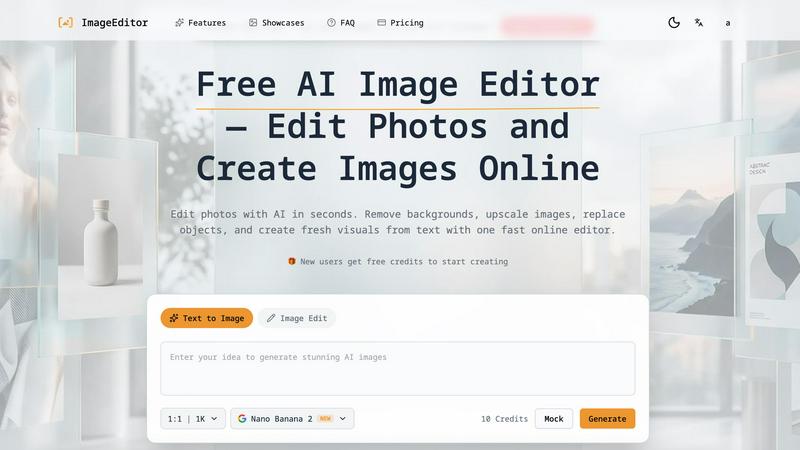
AI ImageEditor is a powerful, browser-based AI image editing tool that redefines how creators, marketers, designers, and businesses approach visual content creation. Instead of juggling multiple complex software applications, ImageEditor.net brings together a comprehensive suite of AI-powered features in one simple, intuitive platform. Whether you need to generate a photorealistic image from a text description, remove a background from a product photo, upscale a low-resolution image to 4K, or replace an object in an existing picture, this tool handles it all with remarkable speed and accuracy. The platform is built for everyone, from complete beginners who have no design experience to seasoned professionals who need quick, high-quality results. It uses state-of-the-art AI models, including the new GPT-Image-2, to understand natural language prompts and deliver stunning visuals that match your creative vision. One of its standout qualities is accessibility; you can start creating instantly without signing up, and the interface is designed to be friendly and approachable. With features like batch processing, multiple output formats, and a commercial license included, AI ImageEditor is not just a tool but a complete creative ecosystem that empowers users to produce professional-grade images for social media, marketing campaigns, presentations, and any other project, all from the comfort of their web browser.
Features of AI ImageEditor
Text to Image Generation
Transform your text prompts into stunning, photorealistic visuals with remarkable ease. Our advanced AI understands complex natural language descriptions and produces high-quality outputs with accurate details and lifelike features. You can describe anything from a cozy coffee shop to a geometric art piece, and the AI will generate a unique, professional-grade image in seconds. The tool supports detailed prompts and offers style presets to help you achieve exactly the look you want, making it perfect for brainstorming concepts, creating social media content, or generating unique artwork without any design skills.
Image to Image Enhancement
Upload any existing photo and transform it with enhanced quality and creative modifications. This feature allows you to take a base image and apply intelligent enhancements, style transfers, and creative transformations while preserving the original composition. Whether you want to change the artistic style, improve lighting and colors, or completely reimagine the subject, the AI handles the heavy lifting. It is ideal for refining product photos, giving old pictures a new look, or experimenting with different visual aesthetics without starting from scratch.
Background Removal
Remove backgrounds from images instantly with AI-powered precision. This tool is perfect for product photos, portraits, and creating transparent PNGs for professional use. The AI automatically detects the main subject and separates it from the background with clean, accurate edges, saving you hours of manual masking work. Whether you need a clean product shot for an e-commerce store, a professional headshot for a resume, or a transparent image for a graphic design project, this feature delivers flawless results in just a few clicks.
Image Upscaling
Enhance image resolution and quality without losing any detail using our advanced upscaling technology. You can upscale images to 2K or 4K resolution, making them suitable for professional projects, marketing materials, and high-quality prints. The AI intelligently adds detail and sharpness to your images, ensuring that even low-resolution photos look crisp and clear when enlarged. This is especially useful for printing banners, creating high-resolution social media graphics, or restoring old photos that need a quality boost.
Use Cases of AI ImageEditor
Social Media Content Creation
Marketers and social media managers can use AI ImageEditor to quickly generate eye-catching visuals for posts, stories, and ads. From creating unique images from text prompts to removing backgrounds for product showcases, the tool streamlines the entire content creation workflow. You can produce a week's worth of professional-looking graphics in minutes, ensuring your brand stays consistent and engaging across all platforms without needing a dedicated design team.
E-Commerce Product Photography
Online sellers can dramatically improve their product listings by using the background removal and image enhancement features. Remove distracting backgrounds to create clean, professional product shots that highlight your items. Use the upscaling tool to ensure your product images are high-resolution and look great on any device. This helps build customer trust, improves conversion rates, and gives your store a polished, credible appearance that competes with larger retailers.
Personal and Professional Portraits
Individuals and businesses can use AI ImageEditor to create high-quality ID photos, professional headshots, and personal portraits. The background removal tool makes it easy to swap out distracting backgrounds for clean, professional ones. You can also use the image enhancement features to improve lighting, skin tones, and overall image quality. This is perfect for updating LinkedIn profiles, creating company directories, or preparing passport photos without visiting a studio.
Creative Concept Art and Design
Artists, designers, and creative professionals can leverage the text-to-image generation and style transfer features to explore new ideas and create concept art. Use the AI to quickly visualize a character, a scene, or a product design based on a simple text description. The image-to-image transformation allows you to take a rough sketch and turn it into a polished visual. This accelerates the brainstorming process and provides a rich source of inspiration for any creative project.
Frequently Asked Questions
Do I need any design experience to use AI ImageEditor?
No, absolutely not. AI ImageEditor is designed for everyone, from complete beginners to professional designers. The interface is intuitive and user-friendly, and the AI handles all the complex editing tasks. Simply type a description of what you want, or upload an image, and the tool will do the rest. You can start creating professional-quality visuals instantly without any prior design skills or training.
Is there a free version of AI ImageEditor available?
Yes, you can start using AI ImageEditor for free immediately. The platform allows you to generate and edit images without signing up for your first creation. You receive a certain number of free credits to try out the features. For more advanced capabilities, higher resolution outputs, and additional credits, you can explore the paid subscription plans that offer greater flexibility and power for regular users.
What kind of images can I create with the Text to Image feature?
You can create an incredibly wide variety of images using the Text to Image feature. The AI understands complex natural language descriptions, so you can generate anything from photorealistic landscapes and portraits to abstract art and product mockups. You can specify styles, moods, colors, and even specific camera settings like "Kodak Portra 400" to achieve a particular look. The possibilities are limited only by your imagination.
Can I use the images I create for commercial purposes?
Yes, AI ImageEditor includes a commercial license with its service. This means you can use the images you create for commercial projects, including marketing materials, social media ads, product packaging, website content, and more. You do not need to worry about additional licensing fees or attribution requirements for standard commercial use, making it a safe and powerful tool for businesses and entrepreneurs.
Pricing of AI ImageEditor
While specific pricing tiers and costs are not explicitly detailed in the provided context, AI ImageEditor operates on a credit-based system. New users receive free credits to start creating immediately. For continued and advanced use, the platform offers paid subscription plans that provide more credits, access to higher resolution outputs like 4K, and priority processing. The exact pricing details for these plans are best found on the official ImageEditor.net website under the "Pricing" section, where you can compare different tiers and choose the one that best fits your creative needs and budget.
Explore more in this category:
Similar to AI ImageEditor

ImageGPT
ImageGPT is an all-in-one AI creative platform for generating, editing and transforming images and videos using AI.

ErgoAssessment
See your posture the way an ergonomist beside your desk would. Your camera, five body angles, plain fixes. Free, no signup.

ImgEnhancer
Free AI image enhancer that sharpens blurry photos, reduces noise, upscales resolution, and restores clarity online.

AI Album Cover Maker
Create release-ready album covers from a prompt or photo. Generate, refine, and export art for singles, EPs, mixtapes, and playlists.

RemoveMate
AI background removal and image cleanup tools for product photos, portraits, social posts and everyday creative projects.

Krea 3
Krea 3 is an AI image editor that relights photos, swaps backgrounds and changes one object from a text prompt with GPT Image 2 and Nano Banana Pro.

Nano Pro
AI photo editor and image generator with Nano Banana models, up to 14 references and 4K output.

Remove Background
Free background remover that runs entirely in your browser — no uploads, no watermark, no account.