

AppLaunchFlow
AppLaunchFlow helps you create store-ready assets like screenshots, videos, and ASO copy in minutes from one workspace.
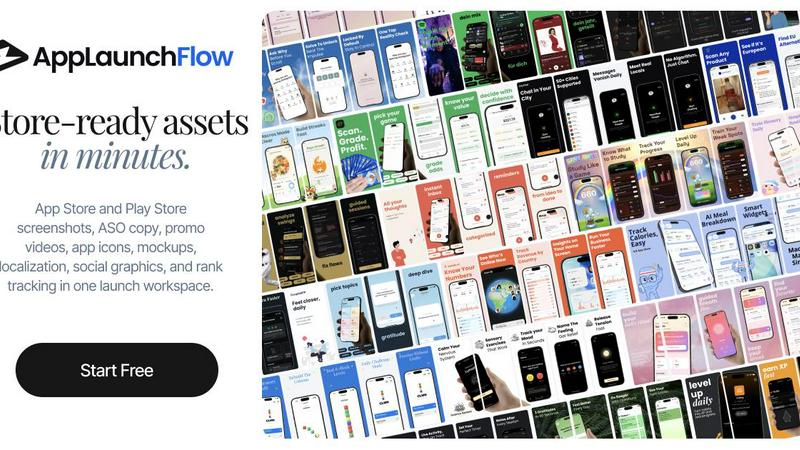
About AppLaunchFlow
AppLaunchFlow is a comprehensive launch and growth workspace designed specifically for mobile app developers and product teams. It solves the frustrating, fragmented process of preparing an app for store submission. Instead of jumping between Figma, Canva, spreadsheets, video tools, translation services, App Store Connect, and Play Console, AppLaunchFlow brings everything into one unified platform. The core idea is simple: upload your raw app screenshots once, then reuse them across every launch asset you need. This includes App Store and Play Store screenshot sets, ASO copy and metadata, app preview and promo videos, social graphics, 3D mockups, app icons, localized screenshots and copy, and even keyword tracking after launch. The product is built for indie developers, small teams, and agencies who want to move fast without sacrificing quality. AppLaunchFlow combines the speed of AI with the control of a visual editor, so you are never left with a black box. You get AI-generated layouts and copy, but you can always tweak text, spacing, colors, device frames, and export sizes. It is trusted by over 3,000 app developers and has helped export countless assets, localize apps into many countries, and launch real apps on both stores. Whether you are launching your first app or your tenth, AppLaunchFlow acts as your launch and growth assistant, letting you focus on building while it handles the repetitive, time-consuming work of store preparation.
Features of AppLaunchFlow
Screenshot Editor with AI Assistance
The screenshot editor is the core of AppLaunchFlow. It allows you to upload raw screenshots from your phone and instantly generate store-ready assets. AI drafts layouts and copy based on your app context, but you retain full editing control in a visual drag-and-drop canvas. You can adjust headlines, body text, spacing, colors, screenshot order, and apply 3D device frames, pills, badges, and AI-generated illustrations. The editor supports undo, redo, and auto-save, making the design process fast and flexible. It outputs all required sizes for both the App Store and Play Store, ready for direct upload.
Promo Video Workflow
AppLaunchFlow includes a dedicated promo video workflow that turns your static screenshots into a compelling storyboard. This feature eliminates the need for separate video editing software. You can select screenshots, arrange them in order, and the tool generates a preview video suitable for store listings and social media promotion. This helps you showcase your app in motion without learning complex video editing tools, saving significant time and effort during the launch phase.
App Icon Composer
Creating a standout app icon is simplified with the icon composer. This feature provides layered editing capabilities, allowing you to combine backgrounds, symbols, text, and effects. AI can assist in generating initial icon concepts, and you can refine them visually. This ensures your app icon is polished and consistent with your brand, without needing a graphic designer. You can export icons in all required sizes for both major app stores.
Keyword Monitor and Rank Tracking
After your app is live, AppLaunchFlow helps you monitor its performance with a built-in keyword tracker. This feature lets you see whether your ASO changes are actually moving rankings. You can track keywords over time, view your app's position in search results, and make data-driven decisions to improve your visibility. This turns AppLaunchFlow from a pre-launch tool into a continuous growth assistant, helping you iterate on your ASO strategy based on real results.
Use Cases of AppLaunchFlow
Solo Indie Developer Launching a First App
A solo developer has just finished building their app and needs to get it on the App Store quickly. They are not a designer and have no budget for freelancers. Using AppLaunchFlow, they upload raw screenshots from their phone, use the AI to generate initial screenshot layouts and ASO copy, then tweak the text and colors in the visual editor. They create a promo video, generate social graphics, and localize everything into five languages with one click. The entire launch kit is ready in a few hours instead of weeks.
Small Team Managing Multiple App Updates
A small product team manages a portfolio of health and fitness apps. Each update requires new screenshots, updated ASO copy, and fresh promo videos. They use AppLaunchFlow to quickly swap out screenshots and update headlines in their existing projects. The visual editor allows them to maintain brand consistency across all apps. The keyword monitor helps them track the impact of their ASO changes after each update, allowing them to refine their strategy based on real ranking data.
Agency Preparing Launches for Multiple Clients
A mobile app agency handles launches for several clients each month. They need a scalable workflow that ensures quality and speed. AppLaunchFlow allows them to create templates for different app categories. They upload client screenshots, apply AI-generated copy based on the app's description, and then customize the look and feel in the editor. The localization feature lets them quickly adapt assets for international clients. The centralized workspace keeps all client assets organized and accessible.
Non-Designer Founder Creating Professional Assets
A founder with a great app idea but no design skills needs to create store assets that look professional. They are intimidated by complex design tools. AppLaunchFlow provides proven design templates based on competitor analysis of top-performing apps. The founder picks a template, drops in their screenshots, and lets the AI fill in the copy. They can make simple adjustments to colors and text without learning design principles. The result is a high-converting store listing that looks like it was made by a professional.
Frequently Asked Questions
Do I need design skills to use AppLaunchFlow?
No, you do not need design skills. AppLaunchFlow is built for developers and founders who are not designers. The AI generates initial layouts and copy based on your app context and proven templates. You then have a visual editor to make simple adjustments like changing text, colors, and screenshot order. It is designed to be fast and intuitive, not a black box that requires training.
Can I edit the AI-generated content?
Yes, absolutely. AppLaunchFlow gives you full editing control over all AI-generated content. You can tweak headlines, body copy, button text, and any other element in the screenshot editor. You can also adjust spacing, colors, device frames, and the order of screenshots. The tool is designed to give you the speed of AI with the control of a manual editor.
What platforms and devices are supported?
AppLaunchFlow supports both iOS and Android app listings. The screenshot editor includes 3D device frames for the latest models, such as iPhone 17 Pro and Google Pixel 10 Pro, in various colors. You can export all required screenshot sizes for both the App Store and Play Store, ensuring your assets are store-ready.
How does localization work in AppLaunchFlow?
Localization is a one-click process. You can translate your screenshots and store copy into over 25 App Store languages. The layouts automatically adapt for longer text strings, so your design remains intact. This saves you from manually recreating assets for each market and helps you reach a global audience quickly.
Explore more in this category:
Similar to AppLaunchFlow

PageLint
AI copy audit for landing pages: 55 checks, each finding quotes your page and cites its source. Free 16-check audit, no signup.

Leadeon
AI growth tool for X and LinkedIn: write posts in your voice, schedule at your best times, find leads on X and see what works.

Assistly
An AI receptionist on your website that answers visitors 24/7 from your own content and captures every lead.


FollowX Today
Swipe to match with verified solo founders in your niche. Form 7-day mutual follow pacts, earn points, and grow a feed full of builders who engage in

ViewMax Studio
AI video generator that turns one prompt into shorts, UGC-style ads and faceless videos, with script, voiceover and captions.


Klype AI
Writes LinkedIn and social posts in your own measured voice and checks every draft for AI tells and invented claims.