

BlueHumanizer
BlueHumanizer turns stiff AI text into clear, natural writing with one click, keeping your meaning and tone intact.
About BlueHumanizer
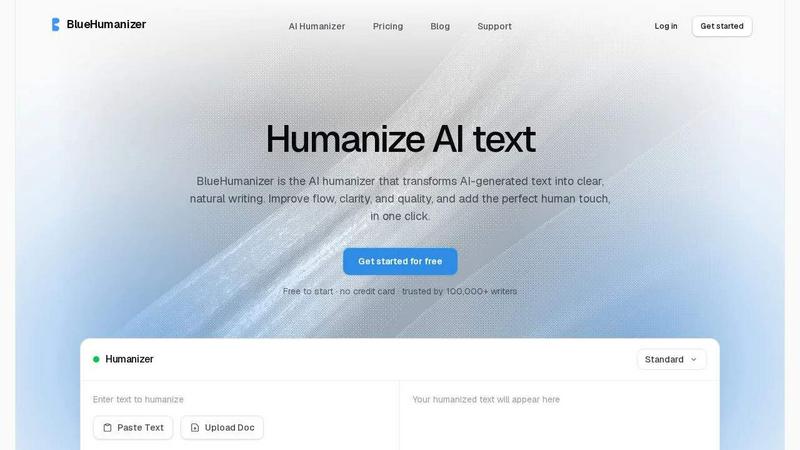
BlueHumanizer is an AI humanizer tool that transforms AI-generated text into clear, natural writing with a single click. If you have ever used ChatGPT, Claude, Gemini, or any other AI writer, you know the output can sometimes feel stiff, robotic, or repetitive. BlueHumanizer solves that problem by rewriting your text into polished, human-sounding prose with better flow and sharper phrasing, all while keeping your original meaning, tone, and key points intact. Unlike basic tools that simply swap words for synonyms, BlueHumanizer reshapes sentence structure and restores the natural rhythm that makes writing feel real and authentic. Quotes and citations stay untouched, so academic and professional work remains accurate. With support for over 50 languages, adjustable humanization levels, and tone controls, BlueHumanizer is built for students, researchers, marketers, bloggers, and anyone who writes with AI. Whether you are refining an essay, polishing a research paper, shipping on-brand marketing copy, or warming up everyday emails and reports, BlueHumanizer delivers writing that reads clean, natural, and ready to publish. It is free to start with no credit card required, and trusted by over 100,000 writers worldwide. The tool is designed to be simple and intuitive: you paste your text or upload a document, click humanize, and get polished output in seconds. No setup, no learning curve, just clear writing that flows.
Features of BlueHumanizer
Humanize AI Text in One Click
Copy, paste, and humanize. There is no setup, no learning curve, and no complicated steps. Just take your AI-generated text from ChatGPT, Gemini, Claude, or any other AI writer, drop it into BlueHumanizer, and click the humanize button. In seconds, you get clear, polished writing that flows naturally. The tool does the heavy lifting for you, reshaping sentence structure and restoring natural rhythm so your text reads like it was written by a person, not a machine. It is that simple.
Clearer, Smoother Writing
BlueHumanizer tightens phrasing, varies sentence rhythm, and improves overall flow. Your writing reads smoothly and naturally without changing what you actually said. The tool does not just swap words for synonyms. It restructures sentences to eliminate awkward phrasing and repetitive patterns. The result is text that feels more conversational and engaging, whether you are writing an essay, an email, or a blog post. Your meaning stays intact, but the delivery becomes much cleaner and easier to read.
Keeps Your Intent and Tone
The rewrite preserves your tone, your intent, and your key points, now with cleaner, smoother phrasing. You do not have to worry about BlueHumanizer changing the message you are trying to convey. The tool understands context and ensures that your voice comes through clearly. Whether you need a formal tone for academic work or a casual tone for social media, BlueHumanizer adapts to your needs. You can adjust the humanization level and tone controls to dial in exactly the style you want.
Keep Citations Untouched
Your quotes, citations, and references stay exactly as they are. Only the writing around them changes. This is a critical feature for students, researchers, and academics who need to maintain accuracy and proper attribution. BlueHumanizer recognizes citation formats and leaves them untouched, so you never have to worry about losing a reference or misquoting a source. The tool focuses on improving the flow and clarity of your writing while preserving the integrity of your sources.
Use Cases of BlueHumanizer
Students Refining Essays and Assignments
Students can use BlueHumanizer to refine AI-assisted drafts of essays and assignments into clear, well-structured writing that flows naturally. Instead of submitting text that sounds robotic or repetitive, students can polish their work to meet academic standards. The tool helps improve readability and coherence while keeping the original arguments and insights intact. This is especially useful for meeting word counts and ensuring that the writing sounds like the student's own voice.
Researchers and Academics Polishing Papers
Researchers and academics can refine AI-drafted papers and abstracts into clear, natural prose, with every citation left intact. BlueHumanizer helps improve the flow and clarity of complex academic writing without altering the technical accuracy or losing important references. This saves time during the editing process and ensures that the final submission reads professionally. The tool is ideal for preparing manuscripts for journals, conferences, or grant proposals.
Marketers and Content Teams Shipping Copy
Marketers and content teams can ship blog posts, emails, and landing page copy that reads clearly and matches the tone of their brand. BlueHumanizer helps transform AI-generated drafts into polished, on-brand content that engages readers. With adjustable tone controls, teams can ensure that the writing aligns with their brand voice, whether it is professional, casual, or persuasive. The tool speeds up the content creation process while maintaining high quality.
Non-Native Writers Improving Fluency
Non-native English writers can use BlueHumanizer to make AI-generated English flow naturally, so their writing reads as fluent and effortless. The tool corrects awkward phrasing and improves sentence structure, helping non-native speakers communicate more effectively in professional and academic settings. BlueHumanizer supports over 50 languages, making it accessible to writers around the world who want to produce clear, polished English text.
Frequently Asked Questions
How does BlueHumanizer differ from other AI humanizer tools?
BlueHumanizer does not just swap words for synonyms like many basic tools. Instead, it rewrites the way a person would, reshaping sentence structure and restoring natural rhythm. This means the output actually flows and reads clearly, rather than sounding like a thesaurus was applied. The tool also preserves your original meaning, tone, and key points, while leaving quotes and citations untouched. It offers adjustable humanization levels and tone controls for more customized results.
Is BlueHumanizer free to use?
Yes, BlueHumanizer is free to start with no credit card required. You can paste your text and humanize it immediately. The free tier allows you to experience the core functionality and see the quality of the output. For users who need higher word limits or advanced features, there may be paid plans available, but you can begin using the tool without any financial commitment.
Does BlueHumanizer work with all AI writing tools?
Yes, BlueHumanizer works with text from ChatGPT, Claude, Gemini, Mistral AI, and any other AI writing tool. You simply paste the AI-generated text into the tool, and it rewrites it into clear, natural prose. The tool is model-agnostic, so it handles output from any source. This makes it versatile for users who work with multiple AI tools or switch between them.
Will BlueHumanizer change my quotes or citations?
No, BlueHumanizer leaves your quotes, citations, and references exactly as they are. Only the writing around them changes. The tool is designed to recognize citation formats and preserve them intact. This is especially important for academic and research writing where accuracy and proper attribution are critical. You can trust that your sources will remain accurate and properly formatted.
Pricing of BlueHumanizer
BlueHumanizer is free to start with no credit card required. The free tier allows you to humanize AI-generated text and experience the core features. For users who need higher word limits, advanced tone controls, or additional capabilities, there are paid plans available. Specific pricing details for paid plans are not provided in the available content, but the tool is designed to be accessible for writers at all levels. You can begin using BlueHumanizer immediately without any financial commitment.
Similar to BlueHumanizer

TestNeo
TestNeo.ai is an AI-native engineering and release assurance platform that helps teams automate web and API testing using natural language.

VoiceVibe
Talk to your computer: dictate, rewrite, ask about your screen, launch AI agents.

Booksmaker.ai
Books Maker AI is the AI-powered platform that turns your idea into a professional book.

Toolara Music
Describe a song in plain text and get a complete track — vocals or instrumental, custom lyrics, up to 120 seconds, MP3 download

LinkIntel
MCP server giving your AI assistant your X post results and X’s ranking weights, with sources.

Ask Versa AI
AI verdicts for any two Amazon products, in seconds. Live specs plus real buyer reviews, scored 0-100, one clear winner. Free, no account.

Verla AI
AI academic assistant for writing, research, presentations, and coding

TryThatTool
Discover AI tools worth trying. Compare options, explore practical reviews, and build your own AI stack based on your goals and budget.