

Browser Notes
Browser Notes lets you write, brainstorm, and map ideas locally in your browser with no signup or cloud needed.
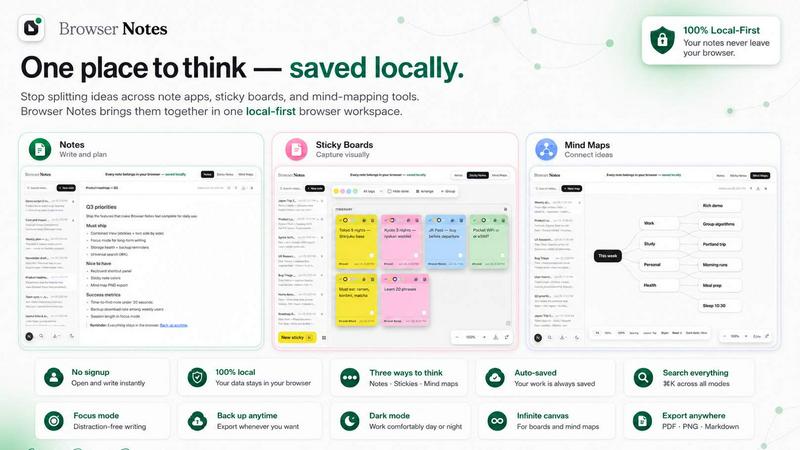
About Browser Notes
Browser Notes is a local-first workspace that brings your notes, sticky notes, and mind maps together in one place, right inside your browser. Unlike traditional note-taking apps that scatter your ideas across different tools or push your private thoughts to the cloud, Browser Notes keeps everything stored locally on your device. There is no account required, no tracking of your activity, and no forced sync to external servers. You can work offline without any interruptions, and when you want to back up your data, you can do so anytime with a simple export. This makes Browser Notes an ideal choice for writers, students, freelancers, and anyone who values privacy and simplicity. Whether you are brainstorming a new project, organizing research, or capturing quick thoughts, Browser Notes gives you three flexible ways to think: write formatted notes using markdown, create sticky notes on a free canvas, or branch ideas from a center with mind maps. Everything stays in your browser, so you are always in control of your data. It is designed to be approachable and practical, with a clean interface that helps you focus on your ideas rather than managing tools. If you already have a backup from another session or device, you can easily import it to continue your work. Browser Notes is a Chrome extension that transforms your browser into a powerful, private, and offline-ready workspace.
Features of Browser Notes
Local-First Storage
All your notes, sticky notes, and mind maps are stored directly in your browser's local storage. This means no data is ever sent to the cloud, and no third party has access to your private ideas. You can work completely offline without worrying about internet connectivity. Your data stays with you, and you can back it up manually at any time by exporting a backup file. If you switch devices or want to restore your data, simply import your backup file. This approach gives you full ownership and control over your information, making Browser Notes a trustworthy tool for sensitive or personal projects.
Three Ways to Think
Browser Notes offers three distinct tools to match your thinking style. You can write and format notes using markdown, which is perfect for structured writing, documentation, or journaling. For quick brainstorming or visual organization, you can use sticky notes on a free canvas where you can move, resize, and group ideas freely. When you need to explore relationships between concepts, mind maps let you branch ideas from a central topic, helping you see connections and expand your thinking visually. You can switch between these tools seamlessly within the same workspace, and even start from a template to save time.
No Account, No Tracking
You do not need to create an account, log in, or provide any personal information to use Browser Notes. There is no user tracking, analytics, or data collection of any kind. Your activity and content remain completely private. This makes Browser Notes an excellent choice for users who are concerned about online privacy or who simply prefer tools that respect their autonomy. You can start using it immediately after installation, with zero friction and no commitment.
Offline Functionality
Browser Notes works entirely offline, so you can capture ideas, take notes, or create mind maps even when you do not have an internet connection. This is especially useful for travelers, remote workers, or anyone in areas with unreliable connectivity. Since everything is stored locally, you never experience sync delays or conflicts. When you are back online, you can continue working without any changes. The offline capability ensures your productivity is never interrupted by network issues.
Use Cases of Browser Notes
Academic Research and Note-Taking
Students and researchers can use Browser Notes to organize their study materials and research findings. You can create detailed markdown notes for each subject or paper, use sticky notes to brainstorm essay outlines, and build mind maps to connect key concepts and theories. Because everything is stored locally, you can work from a library, coffee shop, or home without needing internet access. You can also back up your entire research project at the end of each session, ensuring you never lose your work.
Project Planning and Brainstorming
Freelancers, entrepreneurs, and project managers can use Browser Notes to plan projects from start to finish. Start with a mind map to outline the main goals and deliverables, then use sticky notes on a free canvas to organize tasks, deadlines, and resources. Finally, write detailed notes using markdown to document requirements, meeting notes, or action items. The local-first storage means your sensitive business ideas remain private, and you can easily share your backup file with collaborators if needed.
Personal Journaling and Idea Capture
For personal use, Browser Notes is a great tool for journaling, capturing random ideas, or keeping a daily log. You can write markdown notes for longer entries, use sticky notes for quick reminders or to-do lists, and create mind maps for life planning or goal setting. Since no account is required, you can start journaling immediately without signing up. The offline functionality ensures you can write down ideas even when you are on a plane, in a park, or anywhere without internet.
Content Creation and Writing
Writers, bloggers, and content creators can use Browser Notes to draft articles, outline blog posts, or organize research for a book. Use mind maps to structure your content and explore different angles, then write your draft using markdown with full formatting support. Sticky notes can hold snippets of inspiration, quotes, or links you want to include. Because everything is local, you can focus on your writing without distractions from notifications or sync prompts. Back up your work regularly to keep your drafts safe.
Frequently Asked Questions
How do I back up my data in Browser Notes?
You can back up your data anytime by using the export feature. Browser Notes allows you to download a backup file that contains all your notes, sticky notes, and mind maps. This file is stored on your device, and you can keep it on your hard drive, cloud storage, or external drive. If you need to restore your data on a different device or after clearing your browser data, simply use the import backup feature. This gives you complete control over your data without relying on any third-party servers.
Is Browser Notes really free to use?
Yes, Browser Notes is completely free to use. There are no hidden costs, subscription fees, or premium tiers. You get access to all features, including notes, sticky notes, mind maps, templates, and backup functionality, without paying anything. The product is supported by its community and remains free because there is no cloud infrastructure to maintain. You can install the Chrome extension and start using it immediately with no financial commitment.
Can I use Browser Notes on multiple devices?
Browser Notes stores data locally in your browser, so it does not sync automatically across devices. However, you can manually transfer your data by exporting a backup from one device and importing it on another. For example, you can export your workspace on your laptop, save the backup file to a cloud drive or USB stick, then import it on your desktop or another browser. This gives you flexibility while keeping your data private and under your control.
What happens to my data if I clear my browser cache?
If you clear your browser's local storage, cookies, or cache, you may lose your notes, sticky notes, and mind maps stored in Browser Notes. To prevent data loss, it is recommended to regularly export a backup of your workspace. You can then import this backup after clearing your browser data to restore everything. The extension itself will remain installed, but your content will need to be restored from the backup file. Always keep a recent backup in a safe location.
Explore more in this category:
Similar to Browser Notes

Zipic
Native image compression for Mac and Windows (Windows beta), with a local CLI and AI skill for automated image workflows.

002call
Call 190+ countries from your browser, with no SIM card, no app, and no contract. Cheap international calls start at $0.02 a minute, and your first mi

NexiaTools
NexiaTools is an all-in-one AI platform with 86+ micro-tools for writing, marketing and everyday business tasks. Free to try.

TextFromAudio
Turn any audio or video recording into editable text, free.

AlterHunt
AlterHunt is a curated directory of AI alternatives where you can find the best alternatives to popular tools like Higgsfield and Cursor.

Invoiceize
Free invoice generator with live previews, PDF export and optional AI-assisted Scan & fill.

Promptifi
Reviewed AI prompts and workflows for B2B sales, from account research to renewal. Run them in ChatGPT, Claude, Gemini or Copilot. 100 free.

Statement2QBO
Bank statement PDF to QBO, Excel and Xero. Runs in your browser; three pages a day are free.