

ChatGPT Image 2 Photo Editor
Turn your ideas into stunning images or edit and upscale existing photos with one simple AI-powered tool.
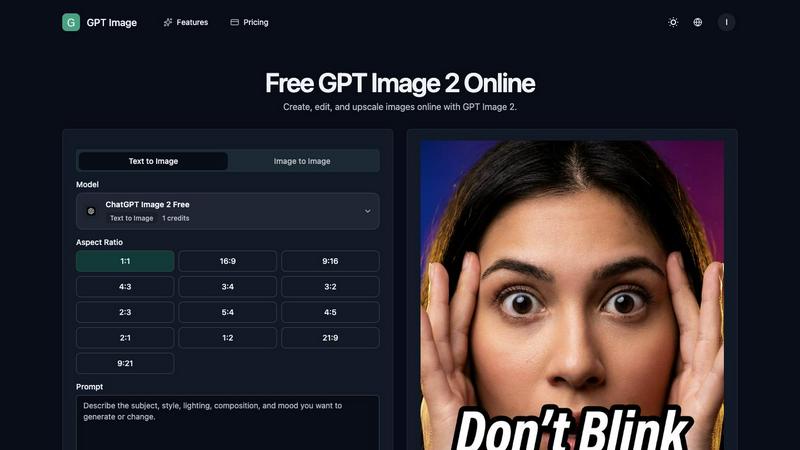
About ChatGPT Image 2 Photo Editor
ChatGPT Image 2 Photo Editor is an online AI image generator and AI photo editor designed for creators, marketers, designers, ecommerce teams, and small businesses who need fast, high-quality visuals directly in their browser. This powerful tool supports a wide range of creative workflows including text-to-image generation, image-to-image transformation, prompt-based editing, reference image workflows, upscaling, cleanup, and downloadable creative outputs. The main value proposition is that it combines the capabilities of a full AI image generator with an intuitive photo editor, allowing users to create, edit, and refine visuals without needing expensive software or advanced design skills. Whether you are producing product visuals for an ecommerce store, designing social media ads, creating YouTube thumbnails, generating professional portraits, building brand assets, or exploring fast creative variations, ChatGPT Image 2 Photo Editor streamlines the entire process. It works entirely in the browser, so there is no installation required, and it uses advanced AI models to understand natural language prompts, making it accessible to beginners while still offering the depth that professional designers need. The tool is built around the idea that creating and editing images should be as simple as describing what you want, and it delivers on that promise with a clean interface and powerful AI capabilities.
Features of ChatGPT Image 2 Photo Editor
Text-to-Image and Image-to-Image Generation
Start with a blank canvas and generate brand-new visuals from a simple text prompt, or switch to image-to-image mode when you want to keep the subject of an existing image while transforming its style, background, or mood. This dual capability gives you maximum creative flexibility, whether you are brainstorming concepts from scratch or refining an existing asset. The AI interprets your prompt accurately and produces high-quality images that match your description, saving hours of manual design work.
Prompt-Based Editing and Retouching
Instead of complex masking tools or manual brushes, you can edit images by simply typing what you want to repair, replace, restyle, or keep consistent. This prompt-first cleanup approach lets you describe blur, clutter, or unwanted details in plain language, and the AI handles the rest. It is an incredibly fast way to retouch images, remove distractions, change backgrounds, or adjust colors without needing to learn complicated software.
Reference Image Workflows for Consistency
Upload one or more reference images when you need tighter control over subject appearance, composition, materials, or art direction. You can define what must stay consistent across outputs, such as a face, product silhouette, packaging details, color palette, or framing. This feature is essential for maintaining brand identity, ensuring product accuracy, or keeping a specific character consistent across multiple visual variations.
AI Image Edit Tools for Speed and Versatility
Every AI image edit starts from a simple prompt, allowing cleanup, retouching, background changes, and style exploration to happen without switching between different tools. You can apply AI filters and artistic styles to test multiple visual directions quickly, whether you want a cleaner social look, a sharper ad style, or a more stylized portrait treatment. The ability to generate stronger versions from one source image without complex masking makes this an incredibly efficient photo editing workspace.
Use Cases of ChatGPT Image 2 Photo Editor
Ecommerce Product Visuals and Lifestyle Scenes
Turn a simple product photo into a polished lifestyle environment visual for product pages, paid social ads, and landing pages. You can generate multiple lifestyle scenes featuring your product in different settings, such as a living room, kitchen, or outdoor environment, without needing a photoshoot. This helps ecommerce teams create consistent, high-quality visuals that drive conversions and build brand trust.
Social Media Content and Ad Creatives
Generate eye-catching social media posts, ad creatives, and thumbnails quickly by describing the visual style, mood, and elements you need. You can create multiple variations of the same concept to test which performs best, then refine the winner with prompt-based editing. This is ideal for social media managers and marketers who need to produce a high volume of engaging visuals on a tight schedule.
Brand Asset Creation and Consistency
Build a library of brand assets including logos, icons, backgrounds, and promotional graphics that maintain a consistent visual identity. By using reference images and defining what must stay consistent, you can ensure that all brand materials share the same color palette, style, and overall feel. This is invaluable for small businesses and startups that need professional branding without hiring a full design team.
Portrait and Profile Image Enhancement
Create and retouch professional portraits and profile images for LinkedIn, company websites, or social media. You can start from a reference photo and ask the AI to improve the lighting, change the background, adjust the expression, or apply a more polished style. The identity retention feature ensures that the person's face remains recognizable across different edits and variations.
Frequently Asked Questions
How does ChatGPT Image 2 Photo Editor work?
It works by using advanced AI models that understand natural language prompts. You simply describe the image you want to create or the edit you want to make, and the AI generates the result. You can also upload reference images for more control, and the tool supports both text-to-image and image-to-image workflows entirely in your browser.
Can I use my own images as references?
Yes, you can upload one or more reference images when you need tighter control over the subject, composition, materials, or art direction. The AI can combine elements from your reference images with your text prompt to create a custom result that matches your vision.
Is this tool suitable for beginners?
Absolutely. The entire interface is designed around simple text prompts and intuitive workflows. You do not need any prior design experience or knowledge of complex editing software. Just describe what you want, and the AI handles the technical work for you.
What types of images can I create with this tool?
You can create a wide variety of images including product visuals, social media ads, YouTube thumbnails, professional portraits, brand assets, artistic concepts, lifestyle scenes, and much more. The tool supports multiple aspect ratios and styles, making it suitable for almost any creative project.
Pricing of ChatGPT Image 2 Photo Editor
Based on the available information, the tool uses a credit system where each image generation costs 1 credit. Users start with 0 remaining credits, which suggests that credits are either purchased or provided through a subscription plan. For specific pricing details, tiers, and plan options, users should visit the official website or sign in to their account.
Explore more in this category:
Similar to ChatGPT Image 2 Photo Editor

Reword Image
Change the text already printed inside a photo, screenshot or poster, without the original design file.

Artcraft AI
AI image and video studio in your browser: generate and edit images, turn photos into videos, edit clips by sentence.

Dola AI
Dola AI video generator online: make Seedance 2.5 videos from text or a photo in your browser. No app, no watermark, free credits.

ToonBee AI
ToonBee AI turns a script or a one-line idea into a narrated cartoon video, keeping the same character in every scene. 10+ styles, 16:9 or 9:16.

sakuttoAI
A free suite of online tools for everyday tasks like PDF compression, image conversion, text diff and CSV to Excel.

Bulin 47 AI
Turn one portrait into a vertical AI-generated freestyle performance video.

imgtxtapp.laviolab.com
imgtxtapp.laviolab.com is a Telegram-based image-to-text converter that turns photos, screenshots, scanned documents into editable text

AnyFileKit Image Translator
Translate the text in screenshots, photos and manga, with the translation drawn back over the original image.