

conceptviz
Easily transform science concepts into clear, ready-to-use diagrams in seconds for classrooms and research.
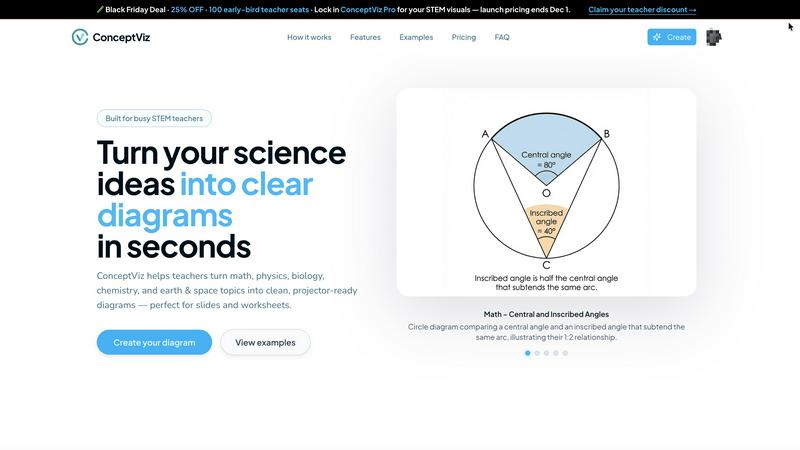
About conceptviz
ConceptViz is an innovative online tool that revolutionizes the way educational diagrams are created, making it a game-changer for teachers, students, and researchers in various scientific fields such as math, physics, biology, chemistry, and earth & space sciences. This user-friendly platform allows users to transform simple text descriptions into high-quality, projector-ready diagrams in just a few easy steps. With its focus on clarity and usability, ConceptViz addresses the needs of K-12 education and higher education by providing clear visual representations of complex concepts. Whether you are preparing a classroom presentation or working on an intricate research project, ConceptViz streamlines the process of diagram creation, ensuring that visuals are tailored specifically to your educational needs. The tool is designed for real-world usage, boasting high contrast, legible labels, and layouts that enhance the teaching and learning experience, making lessons more engaging and accessible.
Features of conceptviz
Easy-to-Use Interface
ConceptViz features a straightforward interface that enables users to create diagrams quickly and efficiently. By simply signing in and selecting a subject and grade level, users can start generating visuals without needing any design skills. This makes it an excellent tool for educators and students alike.
Text-to-Diagram Conversion
One of the standout features of ConceptViz is its ability to convert plain text descriptions into detailed diagrams. Users can describe what they need, such as "convex lens ray diagram" or "labeled plant cell cross-section," and the tool generates a precise visual representation, saving time and effort in the process.
High-Quality Visuals
The diagrams produced by ConceptViz are designed to be clear, high-resolution, and projector-ready. They feature thick, legible lines and minimal background noise, ensuring that visuals are sharp and easy to read from any distance, making them perfect for classroom presentations and educational materials.
Versatile Subject Coverage
ConceptViz caters to a wide range of subjects and grade levels, from elementary to high school and even university-level topics. Users can explore preset diagrams across various scientific disciplines, allowing them to find the right visuals quickly and easily, tailored to their specific teaching needs.
Use Cases of conceptviz
Classroom Presentations
Teachers can use ConceptViz to create engaging and informative diagrams for classroom presentations. By generating visuals that align with their lesson plans, educators can enhance student understanding of complex topics, making learning more interactive and effective.
Student Projects
Students can leverage ConceptViz to create diagrams for science projects or presentations. By inputting their project descriptions, they can generate accurate visuals that support their research and findings, helping them communicate their ideas more effectively.
Research Visualizations
Researchers in scientific fields can utilize ConceptViz for creating intricate diagrams that illustrate their findings. Whether it's a detailed biology diagram or a complex chemistry setup, the tool allows for the quick generation of visuals that are essential for academic publications or presentations.
Educational Resources Development
Curriculum developers and educational content creators can benefit from ConceptViz by generating diagrams that enhance learning materials. By producing tailored visuals for worksheets, textbooks, and online courses, they can ensure that educational resources are comprehensive and visually appealing.
Frequently Asked Questions
How does ConceptViz generate diagrams?
ConceptViz generates diagrams by converting plain text descriptions into visual representations. Users simply type in what they need, and the tool creates a diagram that matches their specifications.
Is it necessary to have design skills to use ConceptViz?
No, it is not necessary to have any design skills to use ConceptViz. The platform is designed to be user-friendly, allowing anyone to create professional-quality diagrams without prior design experience.
What subjects and grade levels does ConceptViz cover?
ConceptViz covers a wide range of subjects, including math, physics, biology, chemistry, and earth & space sciences, and is suitable for various grade levels from elementary to high school and even university topics.
Can I use the diagrams in various presentation formats?
Yes, the diagrams created with ConceptViz are high-resolution and projector-ready, making them suitable for use in various presentation formats, including PowerPoint and Google Slides, as well as printed materials.
Explore more in this category:
Similar to conceptviz

Try OC Maker
Create OCs from text or images, customize their look, and turn them into animated videos with AI.

IconCreator
IconCreator is an AI-powered logo and app icon generator. Create professional logos, app icons, favicons, and brand assets in minutes.

this+that
An AI agent that reads every email and chat message your team gets, turns requests into tasks, and does what they ask.

Reword Image
Change the text already printed inside a photo, screenshot or poster, without the original design file.

TestNeo
TestNeo.ai is an AI-native engineering and release assurance platform that helps teams automate web and API testing using natural language.

Leadeon
AI growth tool for X and LinkedIn: write posts in your voice, schedule at your best times, find leads on X and see what works.

Assistly
An AI receptionist on your website that answers visitors 24/7 from your own content and captures every lead.

IdeaAize Free AI Tools
IdeaAize Free AI Tools is a suite of 50+ free online utilities that run 100% in your browser — no registration, no file uploads, no watermarks.