

EditTextImage
Edit text in your images online and keep the original font, color, and perspective with no software needed.
About EditTextImage
EditTextImage is an innovative online AI tool that lets you edit text in any image file without needing Photoshop, design skills, or the original source file. Have you ever needed to change one word on a finished poster, screenshot, or product photo but realized you lost the original design file? This tool solves that exact problem. You simply upload your image, type the existing text and the replacement text, and the AI samples the typography straight from the pixels. This means the font, color, drop shadow, perspective, and background all stay perfectly intact, even for paid fonts you don't have installed on your computer. The entire process takes about 10 seconds and outputs at 2K resolution. Whether you are a marketer needing to update a campaign headline, a small business owner fixing a typo on a product label, a developer localizing app screenshots, or an event organizer updating a date on a flyer, EditTextImage is built for you. It works with PNG, JPEG, and WebP files up to 10 MB, and your first edit is completely free with no credit card required. There are no subscriptions, no monthly fees, and credits never expire. This tool is ideal for anyone who needs quick, pixel-perfect text edits without the hassle of complex design software.
Features of EditTextImage
AI Powered Font Sampling
The core technology behind EditTextImage is its ability to analyze the pixels of your image and sample the exact typeface being used. You don't need to identify the font name, download it, or have it installed on your system. The AI examines the shape, weight, spacing, and style of every character in your original text. It then applies these same characteristics to your replacement text. This works seamlessly with paid fonts, custom hand lettering, and unique typography that standard font finders cannot identify. The result is a text replacement that looks like it was part of the original design file all along.
Pixel Perfect Layout Preservation
When you edit text in an image using traditional tools, you often end up with smeared backgrounds, misaligned text, or warped perspectives. EditTextImage eliminates these issues entirely. Every pixel around your text stays exactly where it should be. The AI understands the spatial relationship between the text and the surrounding elements, including backgrounds, shadows, gradients, and overlays. Whether your text has a subtle drop shadow, a three dimensional perspective, or sits on a complex background pattern, the replacement text inherits these properties automatically. This level of precision means your edited image looks natural and professional.
Fast 10 Second Processing
Speed is a major advantage of EditTextImage. The entire process from upload to download takes approximately 10 seconds for most edits. There is no waiting for complex rendering, no multiple steps to adjust settings, and no trial and error. You upload your image, enter the original text and the replacement text, and click generate. The AI handles everything in the background. This makes it perfect for quick fixes, last minute changes, and high volume workflows where time is critical. You can edit multiple images in minutes rather than spending hours in traditional editing software.
High Resolution 2K Output
Unlike many online image editing tools that compress or reduce the quality of your output, EditTextImage delivers results at 2K resolution. This ensures your edited images are suitable for professional use including print materials, high resolution screenshots, social media ads, and ecommerce product photos. The output maintains the clarity and sharpness of the original image, so there is no visible degradation around the edited text area. This high quality output means you can use the edited image directly without needing additional upscaling or enhancement.
Use Cases of EditTextImage
Document Fixes and Corrections
Lost the source file for an important document? Only have a screenshot or a scan? EditTextImage allows you to edit text directly on document images. You can update invoice numbers, fix typos in contracts, correct dates on official documents, or change names and titles without needing the original Word or PDF file. This is incredibly useful for administrative staff, accountants, and legal professionals who frequently need to make small corrections to scanned documents. The AI preserves the font style and document formatting, so the correction blends in seamlessly with the rest of the text. You avoid the hassle of recreating the entire document from scratch.
Poster and Flyer Updates
Event organizers and marketers know that dates, venues, and speakers change frequently. When your designer is offline or the original design file is lost, EditTextImage saves the day. You can edit the text on a finished poster or flyer directly. Change the event date from Saturday to Sunday, update the venue name, swap out a speaker, or modify a promotion code. The AI preserves the exact font, color, and layout of the original design. This means you can reuse beautiful marketing materials season after season without paying for a complete redesign each time. It saves hundreds of dollars and hours of design time.
App Screenshot Localization
App developers and product managers often need to create screenshots for app stores in multiple languages. Traditionally, this required rebuilding every UI mockup for each language, which is time consuming and expensive. With EditTextImage, you can swap languages on existing screenshots with pixel perfect accuracy. Simply upload your English screenshot, enter the English text and its translated equivalent, and the AI handles the rest. The font, button styles, and UI elements all remain consistent. This makes localization workflows dramatically faster and allows you to launch in new markets more quickly.
Ecommerce Product Photo Updates
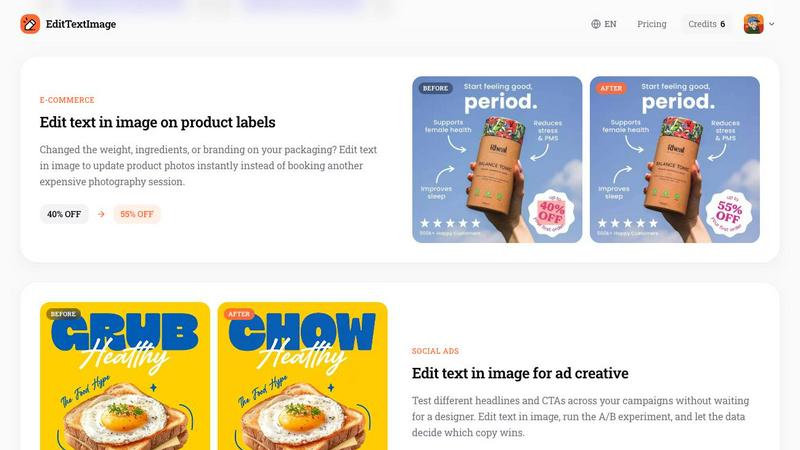
Online retailers frequently need to update product photos when packaging changes. Maybe you changed the weight of your product, updated the ingredients list, or launched a new promotional offer. Instead of booking another expensive photography session or recreating product images from scratch, you can edit the text directly on your existing product photos. Update price tags, change discount percentages, modify product names, or adjust nutritional information. The AI handles complex text on curved surfaces, labels, and packaging with perspective and lighting effects. Your product photos stay consistent and professional across all your listings.
Frequently Asked Questions
What types of images does EditTextImage support?
EditTextImage supports PNG, JPEG, and WebP file formats. Your image can be up to 10 MB in size. The tool works with a wide variety of image types including posters, screenshots, product labels, documents, signs, packaging, and social media graphics. For best results, the text you want to edit should be clearly visible and not heavily obscured by other elements. The AI performs best when the original text is readable and has sufficient resolution.
Do I need to have the original font installed on my computer?
No, you do not need to have the font installed. This is one of the biggest advantages of EditTextImage. The AI samples the typeface directly from the pixels of your image. It analyzes the shape, weight, spacing, and style of every character. This means it works with any font, including paid commercial fonts, custom hand lettering, and unique typography. You do not need to identify the font name or download it. The AI handles everything automatically.
Is my first edit really free with no credit card?
Yes, your first edit is completely free and no credit card is required to start. You simply sign in with your Google account and you receive one free credit. This credit never expires, so you can use it whenever you need it. There is no trial period or hidden subscription. You can test the tool with your own image to see the quality of the results before deciding to purchase additional credits. This makes it risk free to try the service.
What happens if I need to edit an image with complex text effects like drop shadows or perspective?
EditTextImage is specifically designed to handle complex text effects. The AI understands spatial relationships between text and surrounding elements. It preserves drop shadows, reflections, gradients, three dimensional perspectives, and background textures. When you replace the text, these effects are automatically applied to the new text. The result maintains the same visual appearance as the original image. For best results with very complex effects, ensure the original text is clear and the effect is visible in the image.
Pricing of EditTextImage
EditTextImage offers a simple and affordable pricing structure. Your first edit is free with no credit card required. After using your free credit, you can purchase a one time pack of 30 edits for $9.90. There are no subscriptions, no monthly recurring fees, and no hidden charges. Credits never expire, so you can use them whenever you need them. Commercial use is included with all credits, meaning you can use the edited images for business purposes, marketing materials, product listings, and more. This pay as you go model makes it accessible for individuals, small businesses, and large teams alike. You only pay for what you use.
Similar to EditTextImage

Hotel Lobby AI
Hotel Lobby AI turns two portraits into a duet video in an orange recording booth with motion, lip-sync, and audio.

Tiny Desk AI Video Maker
Turn three photos into a vertical Tiny Desk-style concert video with original sound.

ZombieTrend AI
ZombieTrend AI turns two photos into a cinematic zombie love story video with sound, no watermark, and a free preview.

GenX
All-in-one AI workspace to generate images, videos, and audio with multiple leading AI models.

Vikas Editor
Upload a photo, pick a style prompt, get an AI edit. Credit-based Vikas Editor.

AI Halloween Photo Generator
Halloween AI portraits—templates, no long prompts

Hotel Lobby AI Video
Create a Hotel Lobby duo video from two character photos. Choose left and right performers, review the AI result, and download your finished clip.

Design.com AI Image Generator
Turn text prompts into polished, copyright-safe visuals that plug directly into branded templates