

Fix Pixelated Photos
Enhance and restore pixelated photos effortlessly with AI for sharper, clearer images in seconds, all in your browser.
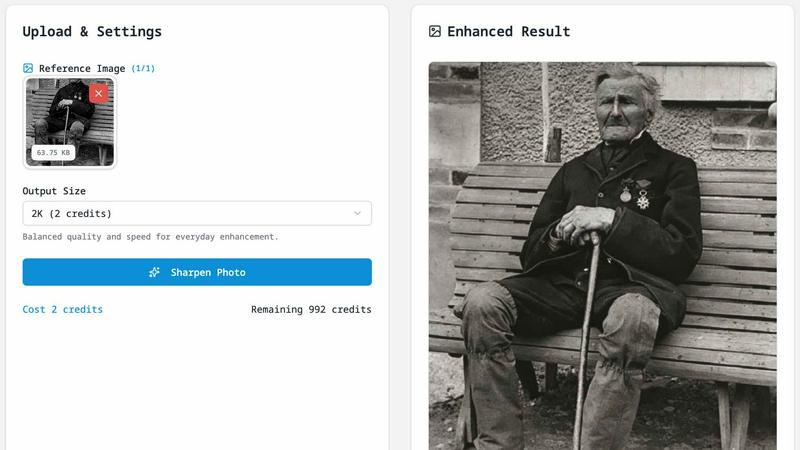
About Fix Pixelated Photos
Fix Pixelated Photos is a powerful, browser-based AI image enhancement platform designed to tackle the common issues of pixelated and low-resolution images. Whether you are a professional photographer, a content creator, or simply someone looking to improve personal photos, this tool is tailored for you. Its main value proposition lies in its ability to unpixelate, sharpen, and upscale images with just a few clicks, making it easy for anyone to enhance their visuals without the need for complex software.
The platform operates entirely online, meaning no downloads or installations are required, and it works seamlessly on both desktop and mobile devices. By leveraging advanced AI technology, Fix Pixelated Photos allows users to restore detail, clarity, and vibrancy to their images quickly and efficiently. With features like one-click unpixelation and smart sharpening, you can achieve professional-quality results in moments, enhancing everything from portraits and product shots to old photographs and screenshots.
Features of Fix Pixelated Photos
One-Click Unpixelate
This feature is designed to reduce blocky artifacts and recover smoother edges from compressed or low-resolution images. With just a single click, you can see your images transform, making it an ideal solution for anyone who needs quick fixes without diving deep into manual editing.
AI Upscaling
The AI upscaling capability increases the image resolution while preserving essential structures and details. This allows your photos to become more usable for sharing online or for print, ensuring that they maintain their quality even at larger sizes.
Smart Sharpening
Improve the clarity of key areas in your photos, such as faces, text, and product shots, without the need for extensive manual adjustments. Smart sharpening enhances detail in a way that looks natural, making it a perfect choice for high-quality image presentations.
Batch-Friendly Workflow
For users needing to enhance multiple images, the batch-friendly workflow allows you to apply the same enhancement process efficiently across several files at once. This saves time and effort, making it ideal for photographers and businesses handling large volumes of images.
Use Cases of Fix Pixelated Photos
Restoring Old Photographs
If you have old family photos that have faded or lost details over time, Fix Pixelated Photos can help restore their clarity. This is perfect for preserving memories and sharing them with loved ones in a visually appealing manner.
Enhancing Product Images for E-commerce
For e-commerce businesses, high-quality product images are essential. Use this tool to upscale and sharpen product shots, ensuring they look professional and attractive to potential buyers.
Improving Portraits for Social Media
Whether you are a professional photographer or just someone who enjoys taking pictures, enhancing portraits for social media can make a significant difference. Fix Pixelated Photos helps you improve skin details and sharpness, ensuring your images stand out.
Fixing Screenshots for Presentations
Screenshots often suffer from pixelation, especially when taken from low-quality sources. This tool can quickly enhance screenshots, making them clearer and more presentable for reports or presentations.
Frequently Asked Questions
What does this tool do?
Fix Pixelated Photos is an AI-powered platform that enhances the quality of low-resolution images by unpixelating, sharpening, and upscaling them quickly and efficiently.
What image types are supported?
The platform supports a wide range of image formats, including JPEG, PNG, and GIF, making it versatile for various types of images that users might need to enhance.
Do I need editing experience?
No editing experience is required to use Fix Pixelated Photos. Its user-friendly interface allows anyone, regardless of skill level, to enhance their images easily.
How do you handle uploaded images?
Uploaded images are processed solely for enhancement purposes and are not published or shared. Your privacy is important, and all files are deleted after processing to ensure security.
Explore more in this category:
Similar to Fix Pixelated Photos

Reword Image
Change the text already printed inside a photo, screenshot or poster, without the original design file.

Artcraft AI
AI image and video studio in your browser: generate and edit images, turn photos into videos, edit clips by sentence.

sakuttoAI
A free suite of online tools for everyday tasks like PDF compression, image conversion, text diff and CSV to Excel.

imgtxtapp.laviolab.com
imgtxtapp.laviolab.com is a Telegram-based image-to-text converter that turns photos, screenshots, scanned documents into editable text

AnyFileKit Image Translator
Translate the text in screenshots, photos and manga, with the translation drawn back over the original image.

PXDMD
Free AI image editor: remove backgrounds, erase objects and watermarks, and color-grade photos in seconds.

SightRadar
Face recognition API, a drop-in replacement for AWS Rekognition. Index, search, compare and detect faces, billed per photo with no subscription.

Restore Old Photos - Retrocap
AI photo restoration app for iPhone and Android: repair scratches and tears, colorize black-and-white photos, sharpen faces and animate old portraits.