

Gemma4All Hardware Checker
A free 10-second tool that checks if your Mac, PC, or phone can run any Gemma 4 model without signup or waiting.
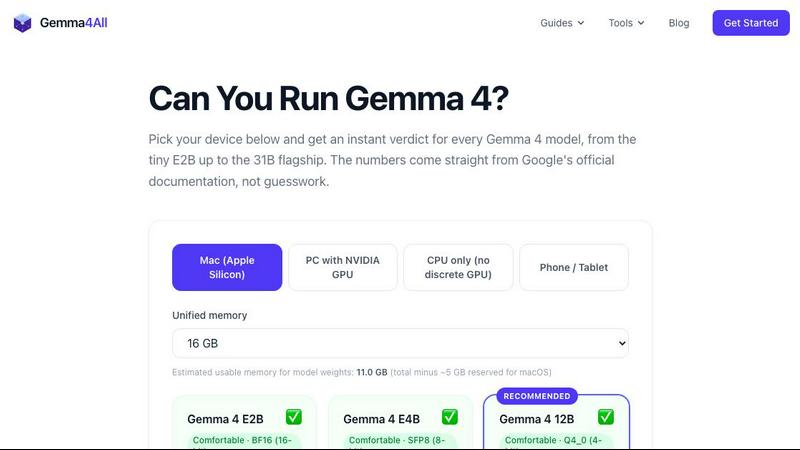
About Gemma4All Hardware Checker
Gemma4All Hardware Checker is a free, no-signup tool that takes the guesswork out of running Google's Gemma 4 models locally on your own device. In about 10 seconds, you can find out whether your Mac, NVIDIA GPU-powered PC, CPU-only computer, or even your phone has what it takes to run any of the five Gemma 4 model sizes. Instead of blindly downloading gigabytes of model weights only to discover your hardware cannot handle them, this tool gives you a clear, instant verdict: Comfortable, Tight, or Won't fit. For each model size, it also recommends the best quantization level to use, so you get the most performance out of your available memory. The results include a detailed memory breakdown and tips for using quantization-aware training (QAT) to optimize your setup. You can even generate a shareable link to your results, making it easy to compare notes with friends or colleagues before committing to a download. This tool is built on the same verified numbers used in the site's 20+ free step-by-step guides for running Gemma 4 with Ollama and LM Studio on real hardware. Whether you are a developer, a hobbyist, or just curious about running open AI models locally, the Hardware Checker saves you time, bandwidth, and frustration.
Features of Gemma4All Hardware Checker
Instant Compatibility Verdict for All Gemma 4 Sizes
Select your device type and memory size, and the tool instantly evaluates your hardware against all five Gemma 4 model sizes: E2B (2B), E4B (4B), 12B, 26B A4B, and 31B. For each model, you get a clear verdict of Comfortable, Tight, or Won't fit, along with the best quantization pick for your specific setup. This means you can immediately see which models are worth downloading and which ones you should skip, all without creating an account or providing any personal information.
Detailed Memory Breakdown and QAT Tips
Beyond a simple yes or no answer, the Hardware Checker provides a comprehensive memory usage breakdown for each model and quantization combination. You can see exactly how much RAM and VRAM each configuration will consume, helping you understand the trade-offs between model size and performance. The tool also includes practical tips for quantization-aware training (QAT), so you can further optimize your setup to squeeze the best possible performance out of your hardware.
Shareable Results Link for Easy Comparison
Once you get your results, the tool generates a unique, shareable link that captures your entire hardware configuration and all the verdicts. You can send this link to friends, colleagues, or online communities to compare notes and get second opinions before downloading large model files. This feature is especially useful for teams deciding on shared hardware purchases or for enthusiasts helping each other choose the right setup for local AI experimentation.
Dedicated Pages for 44 Popular Device Configurations
If you have a common device like a MacBook Air M2, a desktop with an RTX 3060, or a high-end workstation, the Hardware Checker includes dedicated pages for 44 popular configurations. These pages offer pre-computed results so you can jump straight to the answer without manually entering your specs. This makes the tool even faster for users with mainstream hardware, while still supporting custom configurations for those with unique setups.
Use Cases of Gemma4All Hardware Checker
Deciding Which Model to Download for Your Laptop
You have a MacBook Air M2 with 8GB of RAM and want to run a local AI assistant. Instead of downloading the 31B model and finding out it crashes, you use the Hardware Checker. It tells you the E4B model will run Comfortably with a 4-bit quantization, while the 12B model will be Tight. You confidently download the right model and start using it immediately, saving hours of wasted time and bandwidth.
Planning a Hardware Upgrade for Local AI Work
You are a developer who wants to run the full 31B Gemma 4 model on your desktop. You use the Hardware Checker with your current 16GB RAM setup and see a Won't fit verdict. Then you simulate an upgrade to 32GB of RAM and see the verdict change to Comfortable. This helps you make an informed purchasing decision, knowing exactly how much memory you need to invest to achieve your goal.
Comparing Hardware Before a Team Purchase
Your team is evaluating laptops for running AI models during travel. Each member has a different candidate machine. You each run the Hardware Checker and share your results links. In a quick meeting, you compare the verdicts side-by-side and see that only machines with at least 16GB of unified memory can run the 12B model comfortably. The team selects the right hardware without any trial-and-error downloads.
Helping a Friend Choose a Quantization Level
A friend wants to run Gemma 4 on their gaming PC with an NVIDIA RTX 3060 and 12GB of VRAM. They are unsure whether to use 8-bit or 4-bit quantization. You send them the Hardware Checker link. They input their specs and see that 4-bit quantization is recommended for the 12B model, while 8-bit would be too tight. They follow the recommendation and get smooth performance without any crashes or slowdowns.
Frequently Asked Questions
Do I need to create an account to use the Hardware Checker?
No, the Gemma4All Hardware Checker is completely free and requires no signup or account creation. You simply visit the page, select your device type and memory size, and get your results instantly. There is no email required, no login, and no data collection. Your privacy is fully respected, and you can use the tool as many times as you like without any restrictions.
Which devices and operating systems are supported?
The Hardware Checker supports a wide range of devices including Mac computers with Apple Silicon (M1, M2, M3, M4 chips), Windows and Linux PCs with NVIDIA GPUs, CPU-only PCs and laptops, and even modern smartphones. For each device type, you can select your specific memory size to get accurate results. The tool covers all common configurations and includes dedicated pages for 44 popular device setups.
How accurate are the compatibility verdicts?
The verdicts are based on the same verified memory and performance numbers used in the site's 20+ detailed guides for running Gemma 4 with Ollama and LM Studio. These numbers come from real-world testing on actual hardware configurations. While individual results can vary slightly depending on your specific system settings, background processes, and framework optimizations, the tool provides a highly reliable estimate that will save you from downloading models your hardware cannot run.
What does the shareable results link include?
The shareable link captures your selected device type, memory size, and the full set of compatibility verdicts for all five Gemma 4 model sizes, including the recommended quantization for each. It does not include any personal information or tracking data. You can share this link with anyone, and they will see exactly the same results you saw, making it easy to compare hardware configurations or ask for advice from the community.
Explore more in this category:
Similar to Gemma4All Hardware Checker


OpenDaemon
Free Windows AI agent app: describe an app in plain words and it plans and builds it phase by phase with your coding app.


Ideogram 4.5
Ideogram AI 4.5 is an image generator and editor for precise, drift-free refinement, native 2K lettering, and Pixel Lock.

Vikas Editor
Upload a photo, pick a style prompt, get an AI edit. Credit-based Vikas Editor.

PLRental
AI-powered platform for car, motorcycle, and ATV rental agencies: scan IDs, generate contracts, and manage fleet and finances.

AI Halloween Photo Generator
Halloween AI portraits—templates, no long prompts