

happy oyster
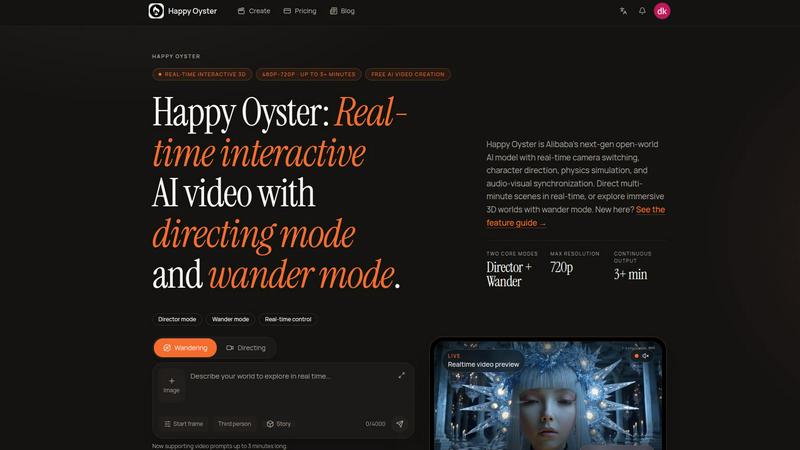
Happy Oyster lets you create interactive AI worlds you can wander through or direct in real time.
About happy oyster
Happy Oyster is an independent AI video platform built for creators who want control, not randomness. Unlike traditional AI video tools that rely on lucky prompts and hope for the best, Happy Oyster puts you in the director's seat. It is a world-model workspace where you can create entire 3D worlds, wander through them to explore their atmosphere, and then direct the camera and story as the world responds to you in real time. This platform is designed for marketers, e-commerce professionals, content creators, and artists who need production-ready video output with intentionality. With Happy Oyster, you start from a place, not a clip. You define the world's landmarks, scale, atmosphere, and characters, then test it by wandering inside. Once you are satisfied, you steer the story and camera with precision. The platform supports structured inputs, reference images, and production-ready settings like aspect ratios and export lengths. It offers two distinct modes: Director Mode for purposeful creation and Wander Mode for free exploration. Happy Oyster is independent and not affiliated with any major tech conglomerates, giving users transparent usage rights and a clean, focused experience. Whether you are prototyping a video hook, bringing a product photo to life, or scouting visual concepts for a film, Happy Oyster gives you the tools to direct AI video with intention, not chance.
Features of happy oyster
Director Mode
Director Mode is the core feature for purposeful video creation. You define every aspect of your scene: the subject, environment, lighting, camera motion, and action. Upload reference images to anchor the visual style and ensure consistency across outputs. You can export your video in 5-second, 10-second, or 15-second lengths, choose from multiple aspect ratios, and render at 720p resolution. This mode gives you real-time preview so you can iterate and refine your vision before final export. It is perfect for when you need a specific shot or scene and cannot afford the unpredictability of standard AI video generators.
Wander Mode
Wander Mode transforms your workflow by letting you explore AI-generated 3D worlds in first-person or third-person view. Instead of guessing what a scene looks like, you can navigate through it freely to test its atmosphere, scale, and mood. This is ideal for mood boarding, concept scouting, or generating ambient content for background use. You can move through the world to discover interesting angles and compositions before committing to a directed shot. Wander Mode supports roughly 1-minute world prompts, giving you ample time to explore and evaluate your creation.
World-First Creation
Happy Oyster flips the traditional AI video process on its head by putting world creation first. You start by building a complete 3D world with landmarks, scale, atmosphere, and characters. This persistent scene becomes your canvas. Once the world is established, you can wander through it to test its livability and then direct the camera and story within it. The world keeps responding to your inputs, creating a dynamic, interactive environment. This feature ensures that your video is grounded in a coherent space rather than being a random clip generated from a text prompt.
Real-Time Preview and Iteration
The platform provides a live, real-time preview of your world and directed scenes as you work. This feedback loop allows you to see changes instantly, tweak parameters, and refine your vision on the fly. You are not waiting for renders or guessing at results. The real-time preview supports both Wandering and Directing modes, so you can see how your world looks from different perspectives and how your camera movements affect the story. This feature dramatically speeds up the creative process and reduces wasted time on outputs that do not match your intent.
Use Cases of happy oyster
Marketing Video Drafts from Briefs
Marketers can turn creative briefs into video drafts in minutes. Instead of waiting for a production team or struggling with unpredictable AI tools, you use Director Mode to input the subject, environment, and camera motion that matches your campaign. Upload a reference image to lock in the brand style, then export a 10-second draft for client review. You can iterate on lighting and action in real time, making it easy to align with stakeholder feedback before committing to full production.
E-commerce Product Animation
E-commerce professionals can bring static product photos to life with intentional motion. Upload a reference image of your product, then use Director Mode to define the environment and lighting that showcase it best. Add subtle camera motion to create a compelling product video for your listing. The ability to control every aspect ensures the product looks professional and consistent with your brand identity, without needing a physical photoshoot or expensive animation software.
Creative Prototyping for Reels and Hooks
Content creators can prototype video hooks and social media reels with precision. Use Wander Mode to explore different visual atmospheres and find the perfect backdrop for your content. Then switch to Director Mode to set up the action and camera movement that will grab viewers attention in the first few seconds. Export in multiple aspect ratios to test which format performs best on different platforms, all without leaving the Happy Oyster workspace.
Pre-Production Scene Blocking for Artists
Artists and filmmakers can block out scenes and test visual tone before entering full production. Create a world that matches your script's setting, then wander through it to evaluate scale and composition. Use Director Mode to experiment with different camera angles, lighting conditions, and character placements. This pre-visualization saves time and money on set, ensuring that your creative vision is solid before you start shooting or animating.
Frequently Asked Questions
What is the difference between Director Mode and Wander Mode?
Director Mode is for purposeful, structured video creation where you define every aspect of the scene including subject, environment, lighting, camera motion, and action. You can upload reference images and export in set lengths and resolutions. Wander Mode is for free exploration of AI-generated 3D worlds in first-person or third-person view. It is ideal for mood boarding, concept scouting, and testing the atmosphere of a world before directing a specific shot.
How long can my videos and world explorations be?
Happy Oyster currently supports roughly 3-minute Directing sessions and 1-minute Wandering world prompts. The platform is continuously evolving, and longer durations may become available in future updates. These limits are designed to balance creative flexibility with real-time performance, ensuring a smooth and responsive experience.
Can I use my own images as reference for video generation?
Yes, you can upload reference images in Director Mode to anchor the visual style and ensure consistency across your outputs. This is particularly useful for maintaining brand identity, matching a specific aesthetic, or recreating a particular look from a photograph. The platform uses these images to guide the AI in generating scenes that align with your visual reference.
What commercial rights do I have to the videos I create?
Happy Oyster provides transparent credits and commercial usage rights for the content you generate, subject to the platform's Terms and your rights to any materials you upload. This means you can use your videos for commercial projects, marketing campaigns, and client work. It is always recommended to review the full Terms and Acceptable Use policy on the website for complete details on your specific rights and obligations.
Explore more in this category:
Similar to happy oyster

this+that
An AI agent that reads every email and chat message your team gets, turns requests into tasks, and does what they ask.

Dame Hombro
Make a personalized Dame Hombro freestyle video from one person or pet photo.

Popstar AI
Popstar AI is an AI video generator that puts you in Drake's POPSTAR music video from one photo, with the original song and no watermark.

TestNeo
TestNeo.ai is an AI-native engineering and release assurance platform that helps teams automate web and API testing using natural language.

Bulin 47 AI Videos
One photo in, a 15-second Bulin 47 street freestyle video with sound out: original dembow beat, lip-synced Spanish verse, crowd.

Assistly
An AI receptionist on your website that answers visitors 24/7 from your own content and captures every lead.


Vedic AstroGPT
explore your vedic birth chart, check compatibility and ask ai-assisted astrology questions with free tools and optional paid credits.