

JustPDF
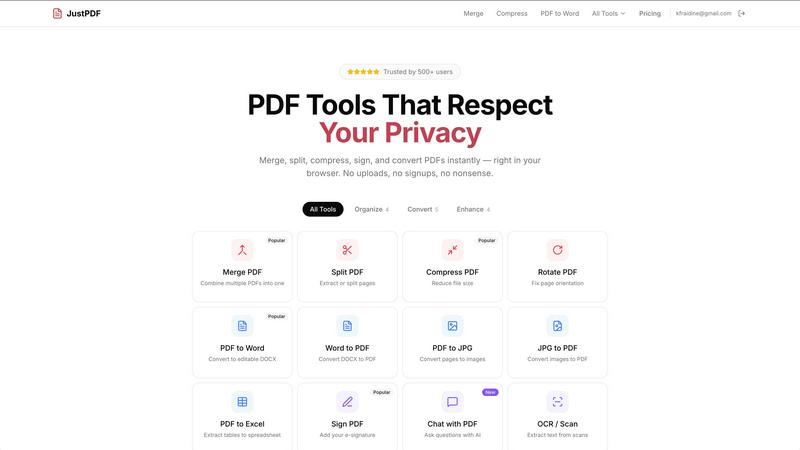
JustPDF is a privacy-first PDF toolkit with 17 free tools for merging, compressing, and converting files—all without leaving your browser.
About JustPDF
JustPDF is an innovative online tool designed to simplify your PDF-related tasks with a suite of 17 professional-grade tools, all fully operational within your web browser. This means you can manage your PDF files without worrying about uploading sensitive documents to external servers. JustPDF's unique technology leverages JavaScript and WebAssembly to handle file processing locally on your device, ensuring maximum privacy and security. Ideal for students, professionals, and anyone who frequently works with PDFs, JustPDF offers a user-friendly experience without the need for an account. With a free tier allowing three operations per day, users can easily merge, split, compress, and convert files, among other functions. For those needing extensive use, a Pro subscription starts at just $4 per month, unlocking unlimited access to all features. Whether you are looking to edit, convert, or enhance your PDF documents, JustPDF is your go-to solution designed for efficiency and convenience.
Features of JustPDF
100% Browser-Based Processing
JustPDF guarantees that your files never leave your device. All processing occurs directly in the browser, ensuring that your data remains private and secure. You can verify this by checking the Network tab in DevTools, giving you peace of mind while you work.
Comprehensive PDF Tools
With 17 powerful tools, JustPDF covers all your PDF needs. Whether you want to merge multiple documents, split pages, compress files, or convert PDFs to various formats like Word, JPG, or Excel, JustPDF has got you covered with just a few clicks.
No Signup Required
Enjoy the convenience of using JustPDF without the hassle of creating an account. The free tier allows you three operations per day, making it easy to get started without any commitments. Perfect for quick tasks or occasional users who need reliable PDF tools.
FERPA-Compliant for Educational Use
JustPDF is designed with education in mind, fully compliant with FERPA regulations. This means that educational institutions can utilize JustPDF's features confidently, ensuring student data privacy and security while performing necessary document operations.
Use Cases of JustPDF
Merging PDF Documents
If you have multiple PDF files that need to be combined into a single document, JustPDF makes this task simple. Just drag and drop your files, and within moments, you’ll have one cohesive PDF ready for sharing or printing.
Converting PDFs to Word
Need to edit a PDF? JustPDF allows you to convert any PDF file into an editable Word document effortlessly. This feature is invaluable for students and professionals who need to modify text or graphics without starting from scratch.
Compressing PDF Files
Large PDF files can be cumbersome to share or upload. With JustPDF, you can compress your PDFs in seconds, making them easier to manage while maintaining quality. This is particularly useful for emailing documents or uploading them to online platforms.
Signing PDF Documents
JustPDF includes a simple yet effective e-signature feature, allowing you to add your digital signature to important documents quickly. This is perfect for contracts, agreements, or any paperwork requiring your approval or acknowledgment without the need for printing.
Frequently Asked Questions
How does JustPDF ensure my files are secure?
JustPDF processes all files directly in your browser, meaning they never leave your device. This local processing uses advanced technologies like JavaScript and WebAssembly, ensuring your data remains private.
Can I use JustPDF offline?
While JustPDF primarily operates in your browser, the tools are designed to function seamlessly without needing an internet connection once the page is loaded. This is perfect for users who may not always have access to the web.
Is there a limit to how many times I can use JustPDF for free?
Yes, the free tier allows you to perform three operations per day. If you require more frequent access, consider the Pro subscription for unlimited use starting at just $4 per month.
What types of file conversions does JustPDF support?
JustPDF supports a variety of conversions, including PDF to Word, JPG to PDF, PDF to Excel, and more. This wide range ensures that you can handle all your document needs efficiently and effectively.
Explore more in this category:
Similar to JustPDF


RunMyWealth
Smart, private financial calculators for mortgage, FIRE, and debt. 100% free, runs locally in your browser, no signup required.

sakuttoAI
A free suite of online tools for everyday tasks like PDF compression, image conversion, text diff and CSV to Excel.

VoiceVibe
Talk to your computer: dictate, rewrite, ask about your screen, launch AI agents.

imgtxtapp.laviolab.com
imgtxtapp.laviolab.com is a Telegram-based image-to-text converter that turns photos, screenshots, scanned documents into editable text

AFFLIGO
AFFLIGO is a free online toolkit for everyday file tasks. Easily edit PDFs, compress images, convert file formats, and get things done.

SafePDF
Free online PDF tools to merge, split, compress, convert, sign, and edit PDFs privately in your browser. No signup required.

ColdCrow
AI cold email writer: turn one line about a prospect into personalized outreach with a deliverability score in seconds. Free trials, no credit card.