

Kreotar
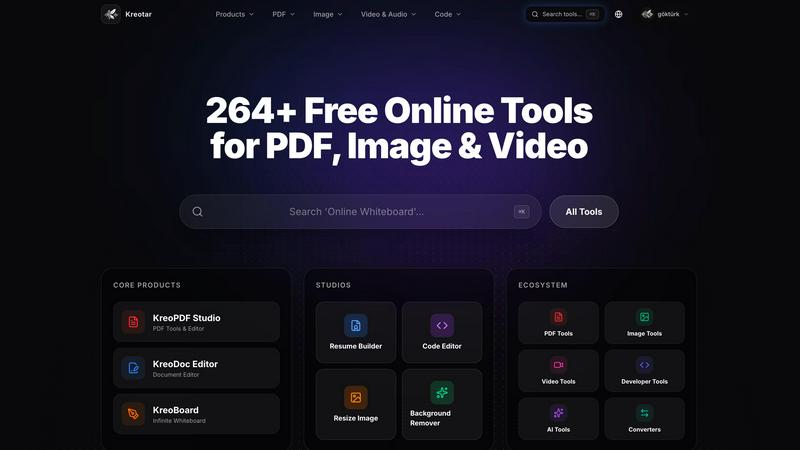
Kreotar is your free browser workspace for editing PDFs, images, code, and handling everyday digital tasks with over 200 tools.
About Kreotar
Kreotar is a free, browser-native productivity workspace designed to help you complete everyday digital tasks faster and with less friction. Instead of jumping between multiple websites, heavy software, or expensive subscriptions, you get one clean, accessible ecosystem for your most common online work. Whether you need to edit a PDF, prepare a document, resize an image, convert a file, format code, or create a resume, Kreotar brings these workflows together in a single searchable hub with over 200 tools.
The platform is built for students, freelancers, developers, creators, job seekers, small business owners, and teams who need fast, practical digital tools without complexity. Kreotar offers three ways to work: quick online tools for one-off tasks, professional studios like KreoPDF, KreoDoc, and KreoBoard for deeper editing and planning, and KreoCloud, a signed-in workspace where you can save files, boards, signatures, and favorite tools for continuity. The long-term vision is to make everyday online work less fragmented. Instead of juggling many different websites, you can access useful browser-based tools from one place and move from problem to result faster. Kreotar is completely free, requires no heavy desktop install, and supports multiple languages to serve a global audience.
Features of Kreotar
Quick Online Tools Hub
Access over 200 browser-based tools for PDF tasks, image editing, video processing, text analysis, developer utilities, file conversion, generators, and more. You can search for specific tools like JSON Formatter, Word Counter, or Image Resizer using the command palette (Ctrl+K) and complete tasks instantly without leaving your browser.
Professional Browser Studios
Kreotar includes dedicated studios for larger workflows. KreoPDF lets you edit, sign, and export PDFs. KreoDoc provides a clean interface for drafting and editing DOCX-style files. KreoBoard offers a visual canvas for planning, brainstorming, and diagramming. These studios give you focused editing surfaces without requiring any software installation.
KreoCloud Workspace
Your signed-in command center for organizing work and maintaining continuity. KreoCloud saves supported files, recent PDF edits, boards, signatures, and favorite tools across sessions. You can return to previous work, reopen files in the correct studio, and keep your digital projects organized in one private workspace.
Multilingual and Global Accessibility
Kreotar supports over 20 languages including English, Spanish, German, French, Japanese, Korean, Chinese, Arabic, Hindi, and many more. This makes the platform accessible to users worldwide, enabling seamless workflows regardless of your preferred language or region.
Use Cases of Kreotar
Student Document and PDF Workflows
A student needs to merge several PDF lecture notes, compress a large file for email submission, and convert a PDF to Word for editing. With Kreotar, they open KreoPDF, merge and compress the files in seconds, then use the PDF to Word converter. All tasks happen in one browser tab without downloading any software.
Freelancer Image and File Preparation
A freelance designer receives client images that need resizing, cropping, and format conversion for a social media campaign. They use the image resizer, crop tool, and PNG to JPG converter in Kreotar. They can also batch edit brightness, contrast, and saturation using the image tools, all from a single workspace.
Developer Code Formatting and Testing
A developer needs to format messy JSON, decode a JWT token, generate a UUID, and test a regular expression. Instead of opening multiple online utilities, they use Kreotar's developer tools hub. They search for JSON Formatter, JWT Decoder, UUID Generator, and Regex Tester, complete each task quickly, and move on to their main project.
Small Business Owner Document and Finance Tools
A small business owner needs to create a professional resume, calculate a loan payment, and convert a color code for their branding materials. They use KreoDoc to draft their resume, the finance loan calculator for payment estimates, and the color converter tool to match brand colors across formats. All work can be saved in KreoCloud for future access.
Frequently Asked Questions
Is Kreotar really free to use?
Yes, Kreotar is completely free. You can use all 200+ browser tools, professional studios like KreoPDF and KreoDoc, and save supported work in your private KreoCloud workspace without any cost. There are no subscription fees, hidden charges, or premium tiers. You only need an internet connection and a modern browser.
Do I need to create an account to use Kreotar?
No, you can use all quick online tools and professional studios without signing in. However, creating a free KreoCloud account allows you to save supported files, boards, signatures, recent work, and favorite tools across sessions. This is useful if you want to return to previous projects and maintain continuity in your workflows.
What types of tools are available on Kreotar?
Kreotar offers over 200 tools across multiple categories including PDF tools (merge, split, compress, convert), image tools (resize, crop, background remover, color adjustment), video and audio tools (convert, trim, mute, thumbnail), text tools (word counter, fancy text, text to speech), developer tools (JSON formatter, base64 encoder, regex tester, JWT decoder), converter tools (color, aspect ratio, cooking), finance tools (compound interest, loan calculator), generator tools, and AI tools.
Can I edit and sign PDFs in Kreotar?
Yes, Kreotar includes KreoPDF, a professional browser studio for editing, signing, and exporting PDFs. You can add text, images, and signatures, fill out forms, rearrange pages, and export your final document. All PDF editing happens in your browser without uploading files to a server, keeping your documents secure.
Explore more in this category:
Similar to Kreotar


Reword Image
Change the text already printed inside a photo, screenshot or poster, without the original design file.

TestNeo
TestNeo.ai is an AI-native engineering and release assurance platform that helps teams automate web and API testing using natural language.

RunMyWealth
Smart, private financial calculators for mortgage, FIRE, and debt. 100% free, runs locally in your browser, no signup required.

Riff
Free Chrome extension. Chrome's built-in AI turns your rough point into a fresh reply for posts on X, LinkedIn, Facebook or Instagram.

Artcraft AI
AI image and video studio in your browser: generate and edit images, turn photos into videos, edit clips by sentence.

sakuttoAI
A free suite of online tools for everyday tasks like PDF compression, image conversion, text diff and CSV to Excel.

Klype AI
Writes LinkedIn and social posts in your own measured voice and checks every draft for AI tells and invented claims.