

Makeshots
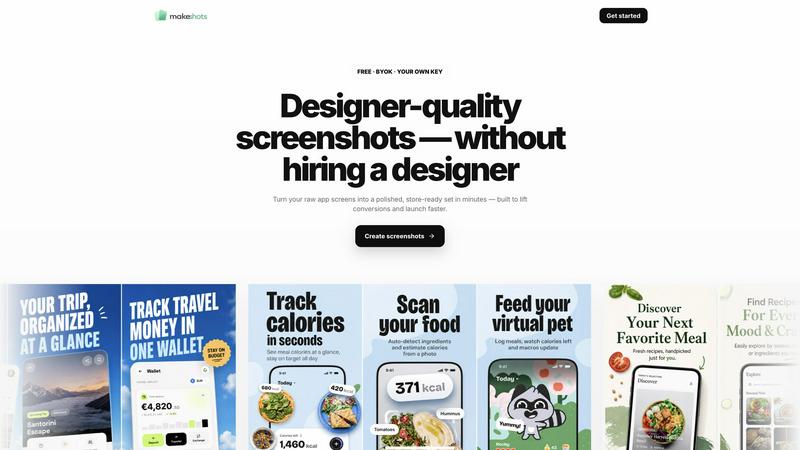
Makeshots turns your raw app screens into store-ready screenshots with AI-designed layouts and benefit-led headlines in minutes.
About Makeshots
Makeshots is a purpose-built AI tool that helps app developers create professional, designer-quality screenshots for the Apple App Store and Google Play Store in minutes, without any design experience. The core value proposition is simple: turn your raw app screens into a polished, store-ready set that lifts conversions and helps you launch faster. Unlike traditional methods that require hiring a designer, struggling with complex design tools like Figma or Photoshop, or wrestling with template after template, Makeshots streamlines the entire process into three straightforward steps. You simply upload your app screens, pick a reference style or bring your own, and then download every store size you need at the exact pixel dimensions required. The AI handles the heavy lifting by designing the full set with benefit-led headlines that speak directly to potential users. This tool is built for indie developers who ship apps solo, agencies and freelancers managing multiple clients, ASO and marketing teams running experiments, and studios with a portfolio of apps. With over 500 app founders and more than 1000 screenshots generated, Makeshots has proven to be a reliable, time-saving solution that eliminates the bottleneck of screenshot creation, allowing you to focus on what matters most: building and improving your app.
Features of Makeshots
Designed from your real screens
Upload the app screens you already have, whether they are raw UI captures or existing assets, and Makeshots immediately transforms them into a polished, on-brand set. The AI analyzes your screens to maintain visual consistency and then writes benefit-led headlines that highlight the core value of your app. This means you don't need to create mockups or redesign anything from scratch. Your actual app screens become the foundation for professional, store-ready visuals that look like a designer crafted them specifically for your brand.
Every store size, one pass
Stop worrying about resizing your screenshots for different devices and platforms. Makeshots automatically generates all the required sizes in a single pass, including iPhone, iPad, and Android dimensions, plus a Play Store feature graphic. Every export is delivered at the exact pixel dimensions each store requires, so you never have to manually crop, resize, or adjust your images. This feature alone saves hours of tedious, repetitive work and eliminates the risk of uploading screenshots that get rejected due to incorrect sizing.
Localize in 20 languages
Expanding your app to international markets becomes effortless with Makeshots. You can translate the marketing copy on every screenshot panel into 20 different languages while your in-app UI stays completely untouched. The tool exports everything in upload-ready locale folders, making it simple to submit localized listings to each App Store or Google Play Store region. This feature is invaluable for ASO teams and developers targeting global audiences, as it ensures your screenshots resonate with users in their native language without requiring a separate design process for each market.
App Store preview, built in
Before you publish anything, Makeshots lets you see exactly how your listing will look to shoppers in the App Store and Google Play Store. You can switch between different device sizes and languages live, previewing the full visual experience exactly as potential users will encounter it. This built-in preview helps you catch any issues, test different headline combinations, and ensure your screenshots are optimized for conversion before you ever hit submit. It is a powerful quality assurance step that saves you from publishing suboptimal visuals and having to redo the entire process.
Use Cases of Makeshots
Indie developers shipping their first app
For solo founders and indie developers who are bootstrapping their app, hiring a designer for screenshots is often too expensive and time-consuming. Makeshots allows you to go from raw app screens to a complete, store-ready set in about five minutes. You can generate all required sizes for iPhone, iPad, and Android in one pass, ensuring your app looks professional and trustworthy from day one. This use case is all about removing the design barrier so you can focus on product development and launch with confidence.
Agencies delivering polished client work
Agencies and freelancers managing multiple app clients need to deliver high-quality, consistent results quickly. Makeshots enables you to spin up A/B versions of screenshots for different clients without the design overhead. You can import screens from a client's App Store URL, apply a consistent style across their portfolio, and export everything in the required sizes. This dramatically reduces the time spent on each project and allows you to serve more clients without scaling your design team.
ASO teams running store experiments
Marketing and ASO professionals rely on testing different screenshot variations to improve conversion rates. Makeshots supports this workflow by allowing you to generate up to four different versions of your screenshots for store experiments. You can test different benefit-led headlines, visual styles, and layouts to see which combination drives the most downloads. Combined with localization into 20 languages, this use case empowers ASO teams to run sophisticated, data-driven experiments across multiple markets simultaneously.
Studios managing multiple apps
Companies with a portfolio of apps face the challenge of keeping store presence consistent across all their products. Makeshots simplifies this by letting you paste an App Store URL to import existing screens, then regenerate the full set whenever the UI changes. This ensures every app in your portfolio maintains a polished, on-brand look without requiring individual design work each time you update. It is an efficient way to manage brand consistency at scale while saving your team countless hours.
Frequently Asked Questions
What do I need to get started with Makeshots?
To start creating screenshots, you only need your raw app screens. Ideally, upload three clear UI screenshots from your app, and Makeshots will handle the rest. You do not need any design experience, design tools, or templates. Simply upload your screens, choose a style, and download the complete set of store-ready images in about five minutes.
Does Makeshots support both Apple App Store and Google Play Store sizes?
Yes, absolutely. Makeshots generates all the required sizes for both platforms in a single pass. This includes iPhone, iPad, and Android device dimensions, as well as the Play Store feature graphic. Every image is exported at the exact pixel dimensions each store requires, so you never have to manually resize or adjust anything.
Can I localize my screenshots into different languages?
Yes, you can localize the marketing copy on every screenshot panel into 20 different languages. The in-app UI on your screenshots stays untouched, only the promotional text and headlines are translated. The tool exports everything in upload-ready locale folders, making it simple to submit localized listings to each regional App Store or Google Play Store.
What if I need to update my screenshots after an app update?
If your app's UI changes, you can easily regenerate your entire screenshot set. Simply upload your new raw app screens or paste your App Store URL to import the latest screens, and Makeshots will recreate the full set with your chosen style and headlines. This makes it simple to keep your store presence up to date without starting from scratch.
Explore more in this category:
Similar to Makeshots


OpenDaemon
Free Windows AI agent app: describe an app in plain words and it plans and builds it phase by phase with your coding app.

Enhance My Photo
Online AI photo enhancer that sharpens portraits, products, scenery, pets and text images and exports JPEG/PNG/WebP without watermarks.


Kamero
AI event photo sharing for photographers. Guests take a selfie and face recognition instantly finds every photo they appear in from weddings & events.

Hotel Lobby AI
Hotel Lobby AI turns two portraits into a duet video in an orange recording booth with motion, lip-sync, and audio.

Tiny Desk AI Video Maker
Turn three photos into a vertical Tiny Desk-style concert video with original sound.

ZombieTrend AI
ZombieTrend AI turns two photos into a cinematic zombie love story video with sound, no watermark, and a free preview.