

Omni Voice
Free AI voice generator for natural text to speech, consent-based voice cloning, and voice design in one browser workspace.
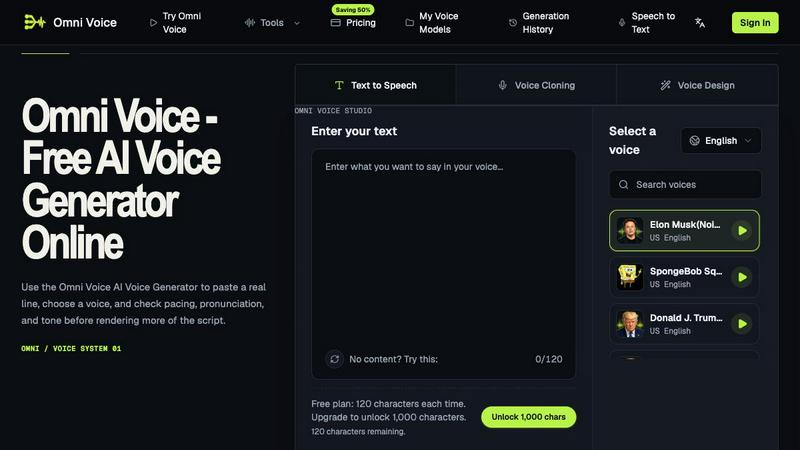
About Omni Voice
Omni Voice is a browser-based AI voice generator that turns written scripts into natural text to speech, with consent-based voice cloning and voice design in the same workspace.
Omni Voice treats punctuation, line breaks, and sentence length as practical controls for rhythm, emphasis, and pauses in every generated take, so rewriting a line changes the delivery and not only the words. Creators audition public library voices on a real sentence from the project, then render the full script once a voice handles the hardest name or hook.
Key features:
- Text to speech that responds to the way a script is written
- Public voice library with audition playback before a full render
- Consent-based voice cloning into account-only private voice models
- Voice Design for new voice profiles from the same credit balance
- Generation history with comparison and download of earlier takes
- English, Chinese, Japanese, and Korean output in one workspace
Omni Voice fits video voiceover, audiobook and course narration, game dialogue, app prompt prototyping, and accessibility audio. It is freemium: the free plan renders 120 characters per conversion, while paid plans start at $9.9 per month and raise a single conversion to 1,000 characters.
Explore more in this category:
Similar to Omni Voice

xfiles
Free PDF, image and audio tools that process your files locally in your browser. No account or added watermarks.


Leadeon
AI growth tool for X and LinkedIn: write posts in your voice, schedule at your best times, find leads on X and see what works.

Bulin 47 AI
Turn one photo into the viral 19-second Bulin 47 freestyle, with original sound and a watermark-free vertical MP4.

ViewMax Studio
AI video generator that turns one prompt into shorts, UGC-style ads and faceless videos, with script, voiceover and captions.

BoogiePaw
AI dog dancing videos from your dog's photo: upload one shot, pick a dance, get a 9:16 clip in minutes. No prompts, no editing.

Dola AI
Dola AI video generator online: make Seedance 2.5 videos from text or a photo in your browser. No app, no watermark, free credits.

Gas Station Dance AI
Turn your photos into a viral gas station dance video with AI