

Ozigi app
Ozigi automates content creation for social media and blogs using your unique voice instead of ChatGPT's generic tone.
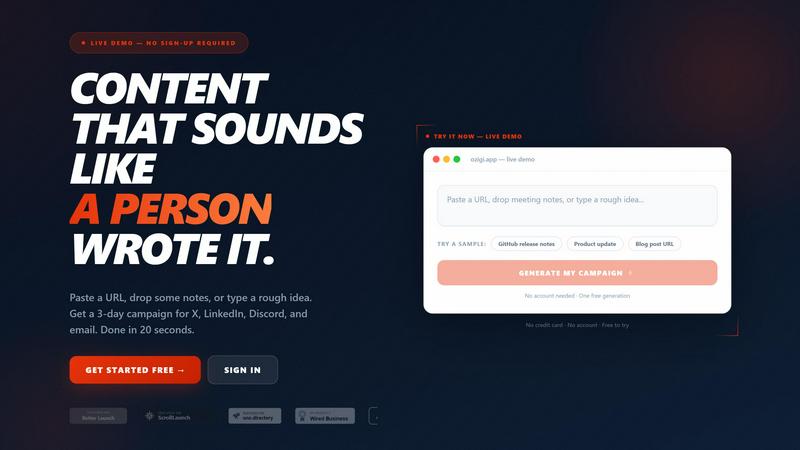
About Ozigi app
Ozigi is an AI content creation tool that solves a very specific problem: most AI writing tools make your content sound generic, robotic, and lifeless. If you have ever read something generated by ChatGPT and thought "this sounds like everyone else," you know exactly what Ozigi aims to fix. The product is built for technical creators, founders, and builders who have real things to say but find that every AI writing tool strips out the specificity, voice, and credibility that makes content worth reading.
Here is how it works. You drop in raw context, like a URL, a block of notes, a PDF, or even an image. Ozigi takes that input and returns polished, platform-specific drafts for X (Twitter), LinkedIn, Discord, Slack, and email. You only need to edit the 10 percent that only you know. Then you publish. The output does not sound like it came from ChatGPT. It does not open with "In today's fast-paced landscape." It never uses words like "delve," "robust," or "seamlessly." Instead, it sounds like a person who actually built the thing and knows how to explain it clearly.
There is no prompt engineering required. You do not need to reformat your content for each platform. And there is no AI slop to clean up. Ozigi also includes a hard-coded blocklist that strips generic AI buzzwords like "tapestry," "vibrant," and "unlock" before they ever reach your feed. This feature alone helps your posts stand out and avoid the dreaded "AI smell" that causes content to flop on social media. Whether you are writing blog posts, newsletters, LinkedIn updates, or X threads, Ozigi keeps your unique voice intact while saving you hours of editing time.
Features of Ozigi app
Raw Input Processing
Ozigi accepts multiple types of raw input including URLs, PDFs, voice notes, and meeting notes. You do not need to clean up or reformat your material before feeding it into the system. The AI automatically strips out the noise, extracts what matters, and uses that context to generate your content. This means you can paste a messy block of notes from a brainstorming session and get back a polished draft ready for publication.
Platform-Specific Draft Generation
Instead of generating one generic piece of content that you then have to manually reformat for each platform, Ozigi creates separate drafts for X (Twitter), LinkedIn, Discord, Slack, and email newsletters. Each draft is tailored to the specific audience and format of that platform. For example, your LinkedIn post will sound professional and thoughtful, while your X thread will be concise and punchy. This saves you the tedious work of rewriting the same idea five different ways.
Anti-Buzzword Blocklist
Ozigi has a hard-coded blocklist that automatically removes overused AI buzzwords like "delve," "tapestry," "vibrant," "unlock," and "seamlessly" from every draft. This is a structural constraint built into the engine, not just a suggestion. The result is content that sounds human, specific, and credible. Generic AI smell is the number one reason posts flop on platforms like X and LinkedIn, and this feature directly addresses that problem.
Direct Publishing and Distribution
You can post directly to X and LinkedIn from within the Ozigi dashboard. You can also send email newsletters to your subscriber list or export content for your CMS. The distribution grid shows you all your generated campaigns across platforms in one view, making it easy to schedule, edit, or copy drafts. This turns your content creation workflow into a single, streamlined process from input to publication.
Use Cases of Ozigi app
Technical Founders Sharing Product Updates
If you are a technical founder building in public, you need to share product updates, release notes, and architecture decisions regularly. Ozigi takes your GitHub release notes or raw engineering updates and transforms them into polished X threads, LinkedIn posts, and Discord messages. Your audience gets clear, specific updates that sound like they came from a person who actually built the software, not from a marketing department using ChatGPT.
Content Creators Managing Multiple Platforms
If you publish on multiple platforms like X, LinkedIn, and a newsletter, you know how time-consuming it is to reformat the same idea for each audience. Ozigi generates platform-specific drafts from a single input. You write your raw notes once, and the AI produces a short tweet, a longer LinkedIn post, a Discord announcement, and an email newsletter subject line. You only need to edit the small details that require your personal touch.
Engineering Teams Sharing Internal Updates
Engineering teams often need to share updates across Slack channels, Discord servers, and email lists. Ozigi can take raw technical notes, meeting summaries, or changelog entries and generate appropriate messages for each channel. For example, a Slack message for your engineering team can be brief and technical, while an email newsletter for external stakeholders can be more polished and explanatory. This keeps everyone informed without extra work.
Bloggers and Newsletter Writers
If you write a blog or newsletter, you know how hard it is to maintain a consistent voice while publishing frequently. Ozigi helps by turning your raw ideas, research links, or PDF notes into long-form drafts that match your personal writing style. You get a solid first draft that you can then refine with the 10 percent of details that only you know. This cuts your writing time significantly while ensuring your content still feels authentic and specific.
Frequently Asked Questions
Do I need to learn prompt engineering to use Ozigi?
No, you do not need any prompt engineering skills. Ozigi is designed to work with raw input like URLs, PDFs, notes, or images. You simply paste or upload your material, choose your output format, and the AI generates drafts for you. There are no complex prompts to write or parameters to tune. The system is built for people who want to save time, not learn a new skill.
How does Ozigi make my content sound like me?
Ozigi uses your raw input as context and applies a set of structural constraints that prevent generic AI language. It has a hard-coded blocklist that removes common AI buzzwords like "delve," "tapestry," and "unlock." It also avoids generic openings like "In today's fast-paced landscape." The AI focuses on the specific details you provide, so the output sounds like someone who actually knows the topic, not like a language model generating average text.
Can I publish directly from Ozigi to my social media accounts?
Yes, you can post directly to X and LinkedIn from within the Ozigi dashboard. You can also send email newsletters to your subscriber list and export content for your CMS. The distribution grid shows all your generated campaigns in one place, making it easy to schedule, edit, or copy drafts for each platform.
What types of input does Ozigi accept?
Ozigi accepts URLs, PDFs, voice notes, and blocks of text like meeting notes or raw ideas. You do not need to clean up or reformat your material before uploading it. The AI automatically processes the input, strips out irrelevant noise, and extracts the key information needed to generate your content. This flexibility means you can work with whatever raw material you have on hand.
Pricing of Ozigi app
No pricing information was provided in the context. Please visit the Ozigi website or contact their sales team for current pricing details.
Similar to Ozigi app

Bulin 47 AI
Turn one portrait into a vertical AI-generated freestyle performance video.

Klype AI
Writes LinkedIn and social posts in your own measured voice and checks every draft for AI tells and invented claims.

VoiceVibe
Talk to your computer: dictate, rewrite, ask about your screen, launch AI agents.

BlazePhoenix
On-chain DEX aggregator: the swap route is computed inside the transaction that executes it. No API key, no signup.

imgtxtapp.laviolab.com
imgtxtapp.laviolab.com is a Telegram-based image-to-text converter that turns photos, screenshots, scanned documents into editable text

AFFLIGO
AFFLIGO is a free online toolkit for everyday file tasks. Easily edit PDFs, compress images, convert file formats, and get things done.


SightRadar
Face recognition API, a drop-in replacement for AWS Rekognition. Index, search, compare and detect faces, billed per photo with no subscription.