

QuickTextTools
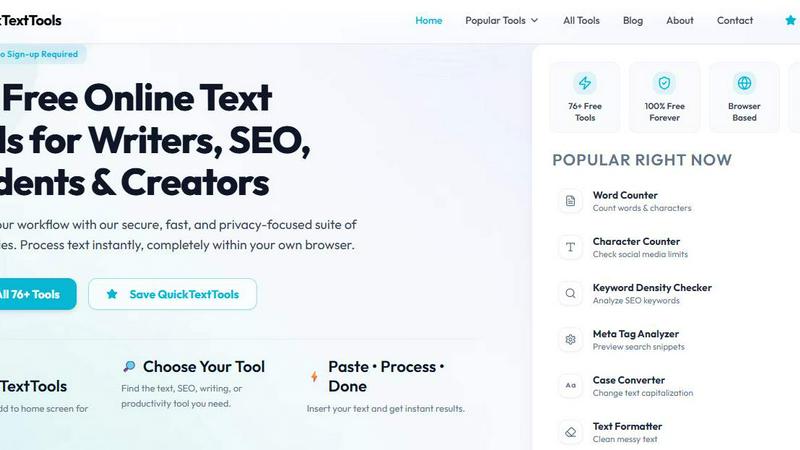
QuickTextTools offers 76+ free online utilities for writers and creators to enhance productivity and optimize text effortlessly.
About QuickTextTools
QuickTextTools is a free, user-friendly online platform that features over 76 browser-based tools designed to enhance productivity for writers, marketers, developers, students, SEO professionals, and content creators. This comprehensive toolkit offers a variety of utilities such as text formatting tools, SEO analysis utilities, writing assistants, keyword management tools, and developer utilities, all aimed at simplifying workflows and saving time. QuickTextTools stands out by providing fast, easy-to-use, and privacy-focused tools that operate directly in your browser, eliminating the need for complicated setups or software downloads. Whether you're looking to clean up a messy keyword list, analyze SEO meta tags, convert text case formatting, or improve your writing process, QuickTextTools delivers practical solutions that help users work smarter and more efficiently, all while ensuring a secure and hassle-free experience.
Features of QuickTextTools
Word Counter
The Word Counter tool allows users to easily count the number of words, characters, sentences, and paragraphs in their text. This feature is particularly useful for writers who need to adhere to specific length requirements for articles, essays, or social media posts, making it an essential tool in any content creator's arsenal.
Keyword Density Checker
This feature enables users to analyze the frequency and density of keywords within their text. By understanding how often certain keywords appear, writers and SEO professionals can optimize their content for search engines, enhancing visibility and improving SEO performance for better rankings.
Text Cleaner
The Text Cleaner tool helps users remove unwanted characters, extra spaces, and hidden HTML tags from their text. This feature is perfect for ensuring that content is polished and free of clutter before publishing, making it easier to read and more visually appealing.
URL Encoder
With the URL Encoder tool, users can convert special characters in URLs into a format that is safe for web use. This feature is essential for developers and marketers who need to create clean and functional links for their websites, ensuring that their audience can easily access their content.
Use Cases of QuickTextTools
Content Creation
Writers can utilize QuickTextTools to streamline their content creation process. By using tools like the Word Counter and Text Cleaner, they can ensure their work is concise, well-formatted, and free from errors, leading to higher quality output.
SEO Optimization
SEO professionals can take advantage of the Keyword Density Checker and Meta Tag Analyzer to enhance their website content. By analyzing keyword placements and optimizing meta tags, users can improve search engine rankings and attract more organic traffic.
Social Media Management
Marketers can leverage various tools such as the Hashtag Generator and Instagram Caption Generator to create engaging posts tailored for their audience. These tools help in crafting catchy captions and hashtags that boost engagement on social platforms.
Academic Use
Students can benefit from QuickTextTools by using the Word Counter and Reading Time Calculator to manage their essays and research papers more effectively. These tools assist in meeting assignment requirements and improving overall writing efficiency.
Frequently Asked Questions
Is QuickTextTools really free to use?
Yes, QuickTextTools is completely free to use with no sign-up required. Users can access all features and tools without any hidden costs or subscriptions.
Do I need to download any software to use QuickTextTools?
No, QuickTextTools is a browser-based platform, which means you can access all tools directly through your web browser without the need for downloads or installations.
Is my data safe when using QuickTextTools?
Absolutely. QuickTextTools prioritizes user privacy and security. All processing is done client-side, meaning your data is not stored or shared with any third parties.
Can I access QuickTextTools on my mobile device?
Yes, QuickTextTools is designed to be accessible on any device with a web browser, making it easy to use on both desktop and mobile platforms for users on the go.
Explore more in this category:
Similar to QuickTextTools

VoiceVibe
Talk to your computer: dictate, rewrite, ask about your screen, launch AI agents.

imgtxtapp.laviolab.com
imgtxtapp.laviolab.com is a Telegram-based image-to-text converter that turns photos, screenshots, scanned documents into editable text

AFFLIGO
AFFLIGO is a free online toolkit for everyday file tasks. Easily edit PDFs, compress images, convert file formats, and get things done.

SafePDF
Free online PDF tools to merge, split, compress, convert, sign, and edit PDFs privately in your browser. No signup required.

ColdCrow
AI cold email writer: turn one line about a prospect into personalized outreach with a deliverability score in seconds. Free trials, no credit card.

Ask Versa AI
AI verdicts for any two Amazon products, in seconds. Live specs plus real buyer reviews, scored 0-100, one clear winner. Free, no account.

Panzoe
Panzoe is an all-in-one AI platform for personal productivity, business automation, AI assistants, content creation, and custom AI solutions.

TryThatTool
Discover AI tools worth trying. Compare options, explore practical reviews, and build your own AI stack based on your goals and budget.