

QUVIAI
QUVIAI lets you turn ideas into architectural renders, 3D scenes, videos, and music using simple text prompts or images.
About QUVIAI
QUVIAI is an all-in-one AI-powered creative platform built specifically for architects, designers, and creators who want to bring their visions to life without juggling multiple tools. Imagine uploading a simple sketch, a reference image, or a 3D model and instantly transforming it into photorealistic renders, cinematic videos, multi-angle views, floor plan renders, 3D objects, and even original music—all within a single, unified workspace. The platform is designed to streamline your entire creative workflow, from initial concept to polished presentation. QUVIAI features a built-in 3D workspace that lets you model, render, and iterate seamlessly without ever switching between different software applications. You can edit scenes using simple text prompts, generate custom furniture and decorative objects, stage them precisely where you want, and produce cinematic walkthroughs from start and end frames. Whether you are an architect refining a building design, an interior designer staging a room, or a creative professional exploring new visual concepts, QUVIAI provides the innovative tools you need to turn your vision into reality. The platform is available on web, iOS, and Android, making it accessible wherever you work. You can try it for free at quvi.ai and start creating immediately with free credits included. QUVIAI is built to inspire, blending cutting-edge artificial intelligence with enduring usability to help you produce stunning, production-ready outputs quickly and efficiently.
Features of QUVIAI
AI Image Generation
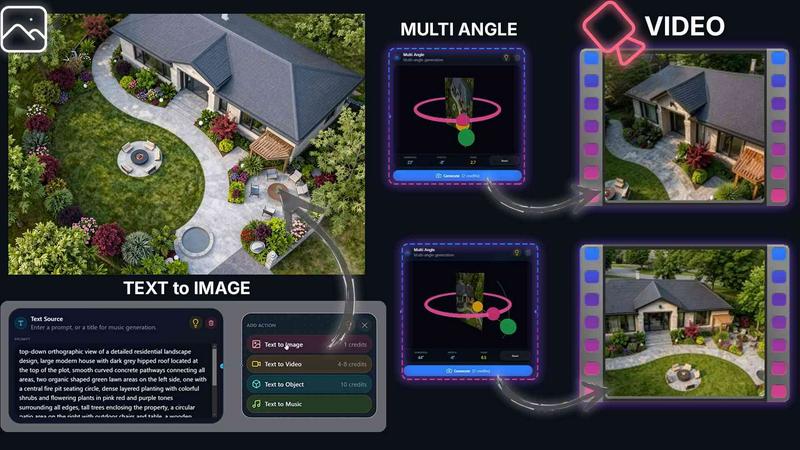
Turn any text prompt or reference image into stunning photorealistic architectural renders in seconds. This feature allows you to describe your vision in words or provide a visual starting point, and QUVIAI will generate high-quality, detailed images that capture the essence of your design. It is perfect for rapid concept exploration and client presentations.
AI Video Creation
Animate still images, generate immersive walkthroughs, or create cinematic sequences from a single text prompt. This feature brings your static renders to life, allowing you to produce engaging video content that showcases the flow and experience of a space. You can define start and end frames to create smooth, camera-guided tours through your designs.
Multi Angle Generation
Generate multiple architectural viewpoints from one source image to create richer, presentation-ready perspective sets. Instead of manually setting up different camera angles, QUVIAI automatically produces a variety of views, giving you a comprehensive visual package that highlights your design from every important angle.
3D Object Staging
Stage generated 3D objects into scene backgrounds and produce polished compositions with consistent lighting. This feature lets you generate furniture, decorative items, and other objects directly within your scene, then position them exactly where you want. The result is a fully composed, realistic environment that feels complete and thoughtfully designed.
Use Cases of QUVIAI
Architectural Concept Visualization
Architects can use QUVIAI to quickly transform rough sketches or basic 3D models into photorealistic renders and cinematic videos. This allows for rapid iteration on design ideas, easy client communication, and the ability to explore multiple design directions without spending days on manual rendering. The text-to-image and text-to-video features make it simple to experiment with different materials, lighting, and styles.
Interior Design and Staging
Interior designers can generate and stage custom furniture and decorative objects within a room scene. By using the object staging and editing tools, designers can experiment with different layouts, color schemes, and furnishings. They can produce polished compositions that show clients exactly how a space will look and feel, making it easier to finalize design decisions and approvals.
Real Estate Marketing and Walkthroughs
Real estate professionals can create compelling marketing materials by generating cinematic walkthroughs from still images or 3D models. QUVIAI can produce multi-angle views and animated sequences that highlight the best features of a property. These polished visuals can be used in listings, virtual tours, and promotional videos to attract potential buyers or tenants.
Creative and Conceptual Art Projects
Artists and creative professionals can use QUVIAI to explore new visual ideas and generate original content. The platform supports generating images, videos, and even music, making it a versatile tool for concept art, storyboarding, and experimental projects. The ability to edit scenes with text prompts allows for quick exploration of different artistic directions and styles.
Frequently Asked Questions
What is QUVIAI and who is it for?
QUVIAI is an all-in-one AI-powered creative platform designed for architects, designers, and creators. It allows you to upload sketches, images, or 3D models and transform them into photorealistic renders, videos, multi-angle views, floor plan renders, 3D objects, and music. It is ideal for anyone involved in architectural design, interior design, real estate marketing, or creative visual projects who wants to streamline their workflow and produce high-quality outputs quickly.
What types of files can I upload to QUVIAI?
You can upload sketches, images, and 3D models into QUVIAI. These inputs serve as the foundation for generating your desired outputs, such as photorealistic renders, videos, or multi-angle views. The platform is designed to work with a variety of common file formats to ensure flexibility and ease of use.
Can I edit my scenes and objects within QUVIAI?
Yes, QUVIAI features a built-in 3D workspace and editing tools that let you model, render, and iterate without switching between different software. You can edit scenes using text prompts, generate and stage furniture and decorative objects, and refine visuals with masking, inpainting, cleanup, and detail adjustments. This integrated workflow saves time and keeps your creative process fluid.
Is QUVIAI available on mobile devices and what does it cost to start?
QUVIAI is available on web, iOS, and Android, so you can use it on your computer, tablet, or smartphone. You can try it for free at quvi.ai, and free credits are included when you sign up, allowing you to generate your first render without any upfront payment. For detailed information on paid plans and features, you can visit the pricing page on the QUVIAI website.
Pricing of QUVIAI
QUVIAI offers a free tier that includes credits to get started. For detailed information on paid plans, features, and pricing tiers, please visit the official QUVIAI website at quvi.ai and navigate to the Pricing section. Specific plan costs and feature comparisons are available there to help you choose the best option for your needs.
Similar to QUVIAI

Artcraft AI
AI image and video studio in your browser: generate and edit images, turn photos into videos, edit clips by sentence.

Dola AI
Dola AI video generator online: make Seedance 2.5 videos from text or a photo in your browser. No app, no watermark, free credits.

ToonBee AI
ToonBee AI turns a script or a one-line idea into a narrated cartoon video, keeping the same character in every scene. 10+ styles, 16:9 or 9:16.

Bulin 47 AI
Turn one portrait into a vertical AI-generated freestyle performance video.

PXDMD
Free AI image editor: remove backgrounds, erase objects and watermarks, and color-grade photos in seconds.

Restore Old Photos - Retrocap
AI photo restoration app for iPhone and Android: repair scratches and tears, colorize black-and-white photos, sharpen faces and animate old portraits.

Bulin47
One photo → viral freestyle AI video. Join the Bulin 47 / Kevin Wai trend in seconds.

AI Image Tools
Text to image, photo edits, background removal and restoration. Pick Nano Banana, FLUX, Seedream or GPT Image and see the price first.