

RedLinz
RedLinz turns screenshots into AI prompts by letting you circle and annotate exactly what you want an LLM to change.
About RedLinz
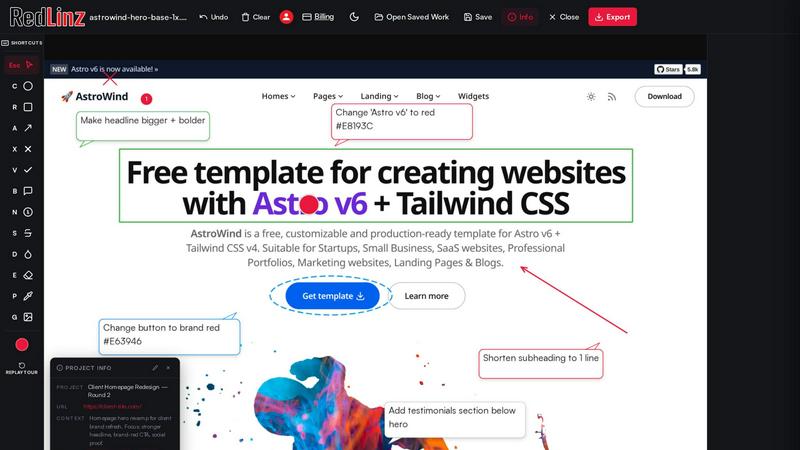
RedLinz is a browser-based visual markup tool designed to solve the frustrating problem of human-to-AI communication. Instead of writing lengthy descriptions of UI changes or handing an AI a raw screenshot and hoping it interprets your intentions correctly, RedLinz lets you mark up images directly with professional annotation tools. Circle the element you want changed, draw an arrow to show where something should move, or use a callout bubble to add a specific note. Each of the twelve standardized markup symbols carries semantic meaning that AI assistants can parse and act on, turning your visual feedback into a structured prompt with exact coordinates and labels. This product is built for developers using Cursor or Claude Code, designers collaborating with ChatGPT or Perplexity, founders shipping product updates, and marketers refining creative assets. The key value proposition is clarity: instead of typing "no, the OTHER red box," you simply circle the correct element and export a prompt that leaves no room for misinterpretation. RedLinz works with any AI tool that reads text and images, and all annotation happens entirely client-side, meaning your images never leave your browser. With a free forever tier offering five markups per month and no credit card required, RedLinz makes precise AI communication accessible to everyone.
Features of RedLinz
Twelve Semantic Markup Symbols
RedLinz provides twelve standardized annotation symbols that carry machine-readable meaning, not just visual decoration. Circle an element to signal CHANGE_ELEMENT, use an arrow for MOVE_TO, apply a rectangle for APPLY_TO_REGION, or stamp an X to DELETE_ELEMENT. Additional symbols include checkmark for KEEP_AS_IS, number stamps for ORDERED_CHANGE, color drop for CHANGE_COLOR, and an eyedropper for PICK_COLOR. Each symbol maps to a specific instruction that AI assistants understand, eliminating guesswork and ensuring your feedback is interpreted correctly every time.
Structured Prompt Export
When you finish annotating, RedLinz captures the marked-up screenshot and generates a structured AI prompt containing coordinate data, annotation types, and precise instructions. This is far more powerful than sending a flat image because the AI receives explicit directions about what to change, where to change it, and in what order. The prompt is formatted for immediate use with ChatGPT, Claude, Perplexity, Cursor, Grok, or any other AI tool that accepts text and image inputs, saving you the time of manually translating visual feedback into written instructions.
Client-Side Privacy Protection
All annotation processing happens entirely within your browser, meaning your images and screenshots never leave your device. This client-side architecture ensures complete privacy for sensitive design mockups, staging environments, or proprietary product screenshots. You maintain full control over your data while still getting the benefit of AI-powered communication. No image uploads to external servers, no data storage concerns, and no privacy tradeoffs for using the tool.
Cross-Platform AI Compatibility
RedLinx works seamlessly with every major AI tool on the market, including Perplexity Computer, Claude, ChatGPT, Cursor, and Grok. The exported prompt format is universal, so you can annotate once and use the output with any AI assistant that reads text and images. This flexibility makes RedLinz a single, consistent workflow tool whether you are fixing code with Cursor, revising copy with ChatGPT, or generating design iterations with Claude.
Use Cases of RedLinz
Bug Reports That Cursor Never Misreads
Instead of writing three paragraphs describing which button is broken on your application, circle the problematic element directly on a screenshot, add a brief note, and export a structured prompt. When you paste this into Cursor or Claude, the AI immediately understands the exact location and nature of the bug. This eliminates the back-and-forth clarification that typically accompanies written bug reports and ensures the fix is applied correctly on the first attempt.
Polishing the Last Ten Percent AI Got Wrong
When Cursor or Claude Code builds you something that is ninety percent correct, marking up the remaining ten percent visually is far more efficient than describing it in words. Circle the element that needs adjustment, add a callout with the specific change required, and export the prompt. The AI receives precise coordinates and instructions, so it applies the fix correctly the first time without requiring multiple iterations of vague corrections.
Specifying Changes in Sequential Order
Number-stamp a screenshot of your current application in the exact order changes should be applied, add notes to each stamp, and export a spec that an AI or human engineer can follow step by step. This is particularly useful for complex feature updates where the order of operations matters. The AI understands the sequence of changes and applies them in the correct order, preventing dependency issues and reducing the need for follow-up clarification.
Providing Precise Feedback on AI-Generated Images
AI image generation tools are easy to use but notoriously difficult to revise accurately. When Midjourney or similar tools produce an image with a wrong hand, off-brand color, or extra letter, circle the specific issue on the image, use the color drop symbol to specify the correct color, and export a revision prompt. The AI understands exactly which element to change and how, eliminating the vague "fix the hand" requests that typically lead to completely different images.
Frequently Asked Questions
How does RedLinz ensure my images stay private?
All annotation processing happens entirely client-side within your browser. Images and screenshots never leave your device or get uploaded to any external server. This means your proprietary designs, staging environments, and sensitive product screenshots remain completely under your control. The only data that leaves your browser is the structured prompt you choose to copy and paste into an AI tool.
Can I use RedLinz with any AI tool?
Yes, RedLinz works with any AI tool that accepts text and image inputs, including Perplexity Computer, Claude, ChatGPT, Cursor, and Grok. The exported prompt is formatted as a universal structured instruction that includes both the annotated screenshot and the coordinate-based markup data. This compatibility means you can use a single annotation workflow regardless of which AI assistant you prefer for a given task.
What happens when I reach my free markup limit?
The free tier includes five markups per month, and your usage resets at the beginning of each month. If you need more markups, you can upgrade to Pro for eight dollars per month or eighty-two dollars per year. Pro provides unlimited markups and watermark-free exports. There is no credit card required to start with the free tier, and you can upgrade at any time.
Is RedLinz suitable for team collaboration?
RedLinz is designed primarily for individual use with AI tools, but the structured prompt export format makes it excellent for team collaboration as well. You can annotate a Figma export or staging site once, and the same export works as a precise brief for an AI assistant or a human teammate. This eliminates the "wait, which section?" follow-ups that plague traditional feedback workflows.
Pricing of RedLinz
RedLinz offers a free forever tier that includes five markups per month with no credit card required. For users who need more capacity, the Pro plan is available at eight dollars per month or eighty-two dollars per year. Pro provides unlimited markups and clean, unwatermarked exports. All features and annotation tools are available on both tiers, so free users get full access to the twelve markup symbols and structured prompt generation. Upgrade at any time from within the application.
Similar to RedLinz

Agent Pets
Your Claude Code & Codex sessions as pets in Chrome. Approve, deny and reply to your coding agents from any tab.

UX Critic
AI design critic: scored UX reviews with every issue pinned to the exact region of your screenshot.


GeminiLaunch
Publish AI-generated HTML or React code from ChatGPT, Claude or Gemini as a live website in seconds. No GitHub needed.

TokenSave
Free AI token counter and cost calculator for ChatGPT, Claude and Gemini, plus a private Claude Code usage analyzer.

APIKO AI API
One OpenAI-compatible endpoint for text, image and video models from OpenAI, Anthropic, Google, DeepSeek and more.

BlazePhoenix
On-chain DEX aggregator: the swap route is computed inside the transaction that executes it. No API key, no signup.