

RoomCreator
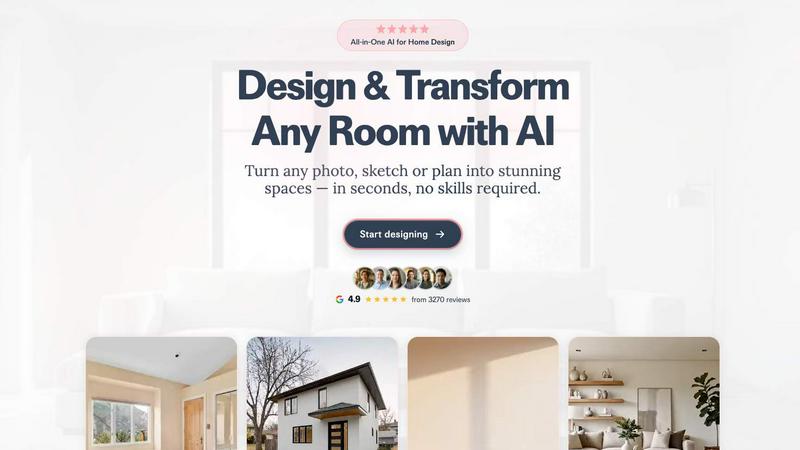
Upload any photo and instantly get stunning AI interior designs, no skills required.
About RoomCreator
RoomCreator is your friendly, AI-powered design companion that takes the guesswork and stress out of home transformation. It's built on a simple, powerful idea: you should be able to see your design dreams come to life before you lift a paintbrush or buy a single piece of furniture. Whether you're a homeowner dreaming of a kitchen refresh, a real estate agent staging a listing, or a DIY enthusiast with a vision, RoomCreator makes professional-grade visualization accessible to everyone. Just upload a photo of any space—your living room, bedroom, kitchen, or even your home's exterior—and in about 10 seconds, you'll receive stunningly realistic redesigns. The platform intelligently suggests smart layout changes, new color palettes, furniture arrangements, and complete style makeovers, all while preserving the realistic lighting and dimensions of your actual room. With no design skills required and a free trial to start, RoomCreator empowers you to experiment confidently, make decisions faster, and finally turn that "what if" idea into a clear, visual plan for your perfect space.
Features of RoomCreator
Instant AI Interior Redesign
This is the core magic of RoomCreator. Simply upload a photo of your existing room, choose from a wide range of styles like Modern, Scandinavian, or Bohemian, and watch as the AI generates a completely new, hyper-realistic version of your space. It doesn't just swap colors; it reimagines furniture layouts, suggests new decor, adjusts lighting, and applies different flooring—all tailored to your room's specific shape and size. It's like having an interior designer on speed dial, ready to show you multiple professional concepts in seconds.
Exterior Design & Paint Visualizer
Test your curb appeal ideas without any risk. Using a photo of your home's exterior, you can experiment with different paint colors, siding materials, roofing styles, and even landscaping elements. This tool is perfect for homeowners planning a repaint or a renovation, and for real estate agents who want to showcase a property's potential. See exactly how a new color scheme will look with your home's unique architecture and natural lighting before making a costly commitment.
Precision Brush Editor (Inpaint Tool)
Get detailed control over your redesigns without starting from scratch. If you love the new sofa but want to change the artwork, or if you want to remove an unwanted object, simply use the brush tool to select that specific area. The AI will then edit only that section, seamlessly blending new elements into the existing design. This feature gives you the flexibility to fine-tune your vision with pixel-perfect precision.
Empty Room Generator & Sketch to Render
See the true potential of any space by instantly removing all furniture and clutter with one click, giving you a clean canvas. Furthermore, bring your roughest ideas to life by uploading a hand-drawn sketch or a basic floor plan. RoomCreator's AI will transform your simple lines and shapes into a fully realized, photorealistic interior image, making it an invaluable tool for early-stage planning and concept development.
Use Cases of RoomCreator
Homeowner Renovation Planning
Stop debating over paint swatches and furniture arrangements. Homeowners can use RoomCreator to visualize a complete room makeover before spending any money. Upload a photo of your dated kitchen or bland bedroom, try out various styles and layouts, and make confident, informed decisions about your renovation project. It turns abstract ideas into concrete visuals you can share with contractors, family, or friends.
Real Estate Listing Enhancement
Real estate agents can dramatically improve their listings by transforming empty, cluttered, or outdated rooms. Stage a vacant living room with stylish furniture, modernize an old bathroom, or boost a home's curb appeal with a fresh exterior look. These AI-generated visuals help properties stand out online, attract more potential buyers, and can help justify a higher asking price by showcasing the home's full potential.
DIY Project Visualization
For the DIY and home decor enthusiast, RoomCreator is the ultimate sandbox. Test bold new wall colors, try out that statement piece of furniture you saw online, or experiment with different layout flows for a small space. It allows you to play with endless design combinations risk-free, ensuring your next weekend project turns out exactly as you imagined—or even better.
Interior Design Concept Presentation
Freelance designers, architects, or individual property investors can use RoomCreator to quickly generate multiple visual concepts for clients or stakeholders. Instead of spending hours on manual renders, upload a space and produce several high-quality, realistic "after" images in different styles. This speeds up the feedback loop, helps clients visualize the end result clearly, and makes presentations more compelling and professional.
Frequently Asked Questions
How accurate and realistic are the AI redesigns?
RoomCreator's AI is trained to generate highly realistic images that respect the original room's architecture, lighting, and perspective. While the results are photorealistic and provide an excellent visualization of style, color, and layout, they are AI-generated interpretations. We always recommend using the results as a powerful inspiration and planning tool, and checking specific paint colors or furniture dimensions in real life before purchasing.
What kind of photos work best?
You can upload almost any photo! Clear, well-lit pictures taken from a corner of the room (showing two walls) yield the best results. However, the AI is quite robust and can work with messier rooms, pixelated images, or even basic sketches. Just ensure the main space you want to redesign is clearly visible in the photo for the most accurate transformation.
Is RoomCreator really free to try?
Absolutely! You can start using RoomCreator immediately with 10 free credits, and no credit card is required to sign up. This allows you to test several redesigns and explore the core features. If you find it invaluable and need more credits, there are affordable subscription plans available for unlimited creativity.
Can I use RoomCreator for commercial purposes, like my real estate business?
Yes, many professionals use RoomCreator for commercial purposes. Real estate agents, interior designers, and property investors regularly use the tool to create visuals for listings, client presentations, and investment proposals. Be sure to check the specific terms of service for the plan you choose regarding the usage rights of the generated images.
Similar to RoomCreator

TestNeo
TestNeo.ai is an AI-native engineering and release assurance platform that helps teams automate web and API testing using natural language.

sakuttoAI
A free suite of online tools for everyday tasks like PDF compression, image conversion, text diff and CSV to Excel.

SightRadar
Face recognition API, a drop-in replacement for AWS Rekognition. Index, search, compare and detect faces, billed per photo with no subscription.


JustTools
JustTools offers a growing collection of free online tools that run directly in your browser, with no sign-up and no uploads.


Dravyaa
Dravyaa is an AI-powered ERP platform that helps manufacturers, traders, and distributors manage sales, purchases, inventory, production, accounting,

CyberScore Labs
Enter your website address. In 60 seconds, get a free private report showing what hackers can see from the outside, and exactly how to fix it.