

Screen Dub
Screen Dub turns your screen recording into a polished demo with AI scripts and voiceovers, no mic needed.
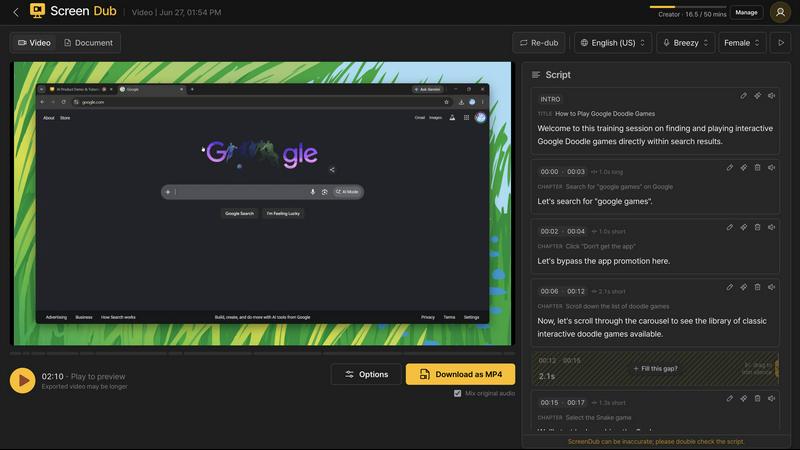
About Screen Dub
Screen Dub is an innovative AI-powered tool that transforms screen recordings or slide decks into polished, narrated videos and written step-by-step guides in minutes. The product eliminates the traditional pain points of video creation: no script to write, no microphone to record, and no video editor to learn. Simply hit record in your browser or upload an existing file like MP4, WebM, MOV, PDF, or PowerPoint, and Screen Dub handles everything else automatically. The tool detects every on-screen action, pins it to a precise timestamp, and writes a clean, editable narration script. It then voices that script using natural, studio-grade AI voices that sync perfectly with each action as it happens. One of its standout capabilities is the ability to publish in over 70 languages with a single click, removing the need for reshoots, hand subtitling, or hiring voice talent per market. Every project exports as both a polished MP4 video and a step-by-step PDF, meaning one recording becomes a demo, tutorial, and documentation all at once. Screen Dub is built for teams and creators who produce repetitive content like product onboarding, support answers, internal training, feature launches, sales demos, and standard operating procedures. It requires no download, no browser extension, and no IT ticket. Recordings can run up to 10 minutes at up to 2K resolution, and a Free plan offers 10 minutes of export per month with no credit card required. For those who prefer their own voice, the tool also supports recording with a microphone or mixing human and AI narration across projects. Screen Dub fundamentally changes the workflow from spending a full day on a five-minute video to completing the entire process in about five minutes.
Features of Screen Dub
Automatic Script and Narration Generation
Screen Dub automatically analyzes your screen recording or uploaded file to detect every on-screen action, click, and transition. It then generates a complete, clean narration script that describes each step in natural language. You can edit this script line by line before it is voiced, giving you full control over the final message. The AI then voices the script using studio-grade AI voices that are timed to land precisely on each action as it happens, creating a seamless viewing experience without any manual syncing.
Multi-Language Publishing with One Click
From a single recording, you can publish your video in over 70 languages with just one click. This feature eliminates the need for reshooting, hand subtitling, or hiring voice talent for each market. The AI handles both the translation of the script and the generation of natural-sounding voiceovers in the selected language. This is particularly valuable for global teams, SaaS companies, and creators who need to reach international audiences without multiplying their production time and costs.
PowerPoint and PDF to Video Conversion
Screen Dub can turn any PowerPoint presentation or PDF document into a fully narrated video. Upload your existing deck, and the tool reads every slide, writes the narration, and voices it in your choice of 70+ languages. The output includes both a polished video and a written handout, all derived from the presentation your team already uses. This feature is ideal for sales and pitch decks, investor updates, training materials, webinars, and feature launches, allowing you to repurpose existing content without starting from scratch.
Step-by-Step Written Guide Generation
Alongside the video export, Screen Dub automatically produces a written step-by-step guide in PDF format. This guide mirrors the narrated video, documenting each action, timestamp, and instruction in a clean, readable format. One capture thus becomes both a demo video and documentation, saving teams the effort of writing separate manuals or knowledge base articles. This feature is especially useful for customer support teams, training departments, and anyone who needs to provide both visual and written instructions.
Use Cases of Screen Dub
Product Demos and SaaS Onboarding
Sales and customer success teams can record a single product walkthrough and instantly generate a narrated demo video with a written guide. The AI handles the script and voiceover, so team members do not need to memorize or rehearse their pitch. The same recording can be published in multiple languages for international customers, and the step-by-step PDF serves as onboarding documentation. This reduces the time spent on repetitive demos from hours to minutes and ensures every prospect receives a consistent, professional experience.
Internal Training and SOPs
Training departments and team leads can record standard operating procedures or training sessions once, then use Screen Dub to produce narrated videos and written guides that new hires can access anytime. The ability to update the script line by line means training materials stay current without reshooting. Multi-language support is valuable for global teams, and the automatic documentation ensures every employee has a reference they can follow at their own pace. This eliminates the need for live training sessions and reduces the burden on senior staff.
YouTube Tutorials and How-To Content
Content creators and educators can produce high-quality tutorial videos without spending hours scripting, recording voiceovers, or editing. Record your screen as you perform the task, and Screen Dub automatically writes and voices the narration. You can edit the script to match your personal style or brand voice before export. The one-click language translation allows you to reach a global audience with minimal extra effort, and the written guide can be offered as a downloadable resource for viewers.
Customer Support and Knowledge Base Videos
Support teams can quickly create video answers to common questions by recording their screen while solving the issue. Screen Dub generates a narrated video and a written step-by-step guide that can be added to the knowledge base or sent directly to customers. The ability to publish in 70+ languages means international customers receive support in their native language without requiring multilingual support staff. This reduces ticket volume, improves customer satisfaction, and ensures consistent, accurate answers every time.
Frequently Asked Questions
Do I need to download any software to use Screen Dub?
No, Screen Dub is entirely browser-based. You do not need to download any software, install a browser extension, or submit an IT ticket. Simply open the Screen Dub website in your browser, and you can start recording or uploading files immediately. This makes it easy for teams to adopt the tool without waiting for IT approval or dealing with installation issues.
Can I use my own voice instead of the AI voiceover?
Yes, you have the option to record with a microphone instead of using the AI-generated voice. Screen Dub supports mixing human and AI narration across different projects, so you can choose the approach that works best for each video. This flexibility is useful for creators who want a personal touch in some videos while leveraging AI efficiency for others.
What file formats can I upload to Screen Dub?
Screen Dub supports a variety of input formats. You can upload MP4, WebM, and MOV video files, as well as PDF documents and PowerPoint presentations. If you prefer to record directly, you can capture your screen or a specific browser tab from within the tool. Recordings can be up to 10 minutes long at resolutions up to 2K, ensuring high-quality output for professional use.
Is there a free plan available and what does it include?
Yes, Screen Dub offers a Free plan that gives you 10 minutes of export per month with no credit card required. This allows you to test the tool and create a few videos before committing to a paid plan. The Free plan includes the core features like automatic script generation, AI voiceover, and multi-language support, though exported videos will include a watermark. Paid plans start at $14.99 per month and remove the watermark, with minutes-based pricing so you pay for output rather than per user or per seat.
Pricing of Screen Dub
Screen Dub offers a Free plan that provides 10 minutes of export per month with no credit card required. This plan includes automatic script generation, AI voiceover, and multi-language support, but exported videos will have a watermark. Paid plans start at $14.99 per month and remove the watermark. The pricing is minutes-based, meaning you pay for the amount of video you export rather than for each user or seat. This makes it cost-effective for teams of any size, as you only pay for the content you actually produce. There are no hidden fees or long-term contracts, and you can upgrade or downgrade your plan at any time.
Explore more in this category:
Similar to Screen Dub

Globwall
A wall of 300 animated globs founders claim to show off their product


Hotel Lobby AI
Hotel Lobby AI turns two portraits into a duet video in an orange recording booth with motion, lip-sync, and audio.

Tiny Desk AI Video Maker
Turn three photos into a vertical Tiny Desk-style concert video with original sound.

ZombieTrend AI
ZombieTrend AI turns two photos into a cinematic zombie love story video with sound, no watermark, and a free preview.

GenX
All-in-one AI workspace to generate images, videos, and audio with multiple leading AI models.
