

Screenshot to Code
Easily convert any screenshot or design into clean, production-ready code with Screenshot to Code's AI-powered technology.
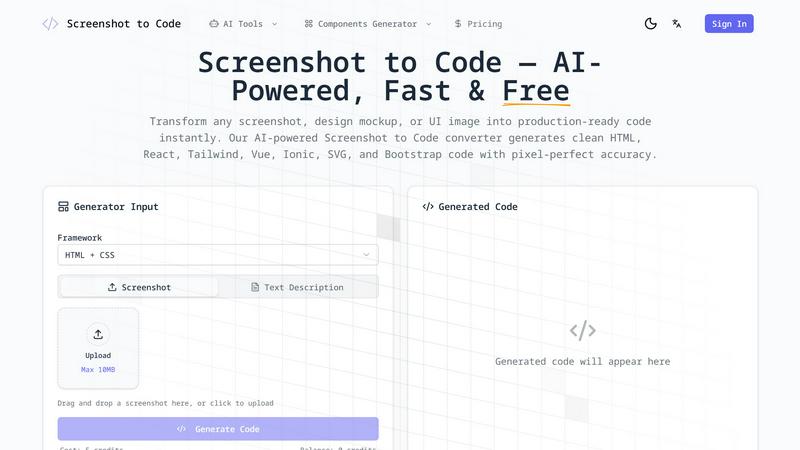
About Screenshot to Code
Screenshot to Code is an innovative AI-powered tool designed to transform visual designs into functional code effortlessly and instantly. Targeted at web developers, designers, and anyone needing to convert design mockups into code, this tool simplifies the coding process. By utilizing advanced computer vision and machine learning algorithms, Screenshot to Code can analyze screenshots, Figma designs, or even hand-drawn wireframes, generating clean, semantic code in seconds. With support for a range of frameworks including HTML, React, Vue, Tailwind, Ionic, and Bootstrap, users can expect pixel-perfect accuracy and maintain the original design's layouts, typography, and colors. This means you can focus on building your application without getting bogged down by the tedious task of manual coding, ultimately saving time and enhancing productivity.
Features of Screenshot to Code
AI-Powered Visual Recognition
Screenshot to Code employs state-of-the-art AI models to identify and analyze UI elements such as buttons, forms, and navigation menus. This visual recognition ensures that every component in your design is captured accurately in the generated code.
Multi-Framework Code Generation
The tool offers seamless code generation for various frameworks, allowing users to select their preferred format. Whether you need HTML, React components, Vue single-file components, or Tailwind CSS, Screenshot to Code has you covered with its versatile outputs.
Pixel-Perfect Accuracy
Maintaining visual fidelity is crucial in design. Screenshot to Code guarantees pixel-perfect accuracy, ensuring that generated code preserves layouts, spacing, typography, colors, and responsive breakpoints as shown in the original design.
Instant Code Export
Users can download their generated code instantly or copy it directly to their clipboard. The tool outputs well-structured, commented code that can be easily integrated into existing projects, streamlining the workflow for developers.
Use Cases of Screenshot to Code
Rapid Prototyping
Developers can use Screenshot to Code to quickly prototype their ideas. By converting screenshots of designs into functional code, they can test and iterate on their projects without the time-consuming manual coding process.
Design Handoff
When designers hand off their work to developers, Screenshot to Code simplifies the transition. It allows designers to submit their mockups, which can be converted into usable code, facilitating a smoother and faster workflow between teams.
Learning Tool for Beginners
Screenshot to Code serves as an excellent educational resource for novice developers. By observing how designs translate into code, beginners can learn about HTML, CSS, and various frameworks more effectively, gaining practical coding experience.
UI Debugging
Developers can take screenshots of existing UIs and use Screenshot to Code to analyze and debug. The tool can help identify layout issues and generate clean code that adheres to modern coding standards, improving overall project quality.
Frequently Asked Questions
How does Screenshot to Code work?
Screenshot to Code utilizes advanced AI algorithms to analyze uploaded screenshots and generate corresponding code. Users upload images, select their desired output format, and the AI processes the design into clean, functional code.
What file formats does Screenshot to Code support?
The tool supports several image formats, including PNG, JPG, and WebP. Users can upload screenshots from various sources, including websites and design tools like Figma and Sketch.
Is there a limit on the size of the screenshots I can upload?
Yes, there is a maximum upload size limit of 10MB for screenshots. This ensures that the processing remains efficient while generating the code.
Can I edit the generated code before downloading?
Absolutely! Screenshot to Code features a live preview editor where users can review and make adjustments to the generated code before exporting it. This allows for customization and ensures the final output meets project requirements.
Similar to Screenshot to Code

BlazePhoenix
On-chain DEX aggregator: the swap route is computed inside the transaction that executes it. No API key, no signup.

AFFLIGO
AFFLIGO is a free online toolkit for everyday file tasks. Easily edit PDFs, compress images, convert file formats, and get things done.

SightRadar
Face recognition API, a drop-in replacement for AWS Rekognition. Index, search, compare and detect faces, billed per photo with no subscription.


LinkIntel
MCP server giving your AI assistant your X post results and X’s ranking weights, with sources.


SafePDF
Free online PDF tools to merge, split, compress, convert, sign, and edit PDFs privately in your browser. No signup required.
